Unlock Precision with Aircraft CAD/Ordinate Data

Unlock Precision with Aircraft CAD/Ordinate Data:

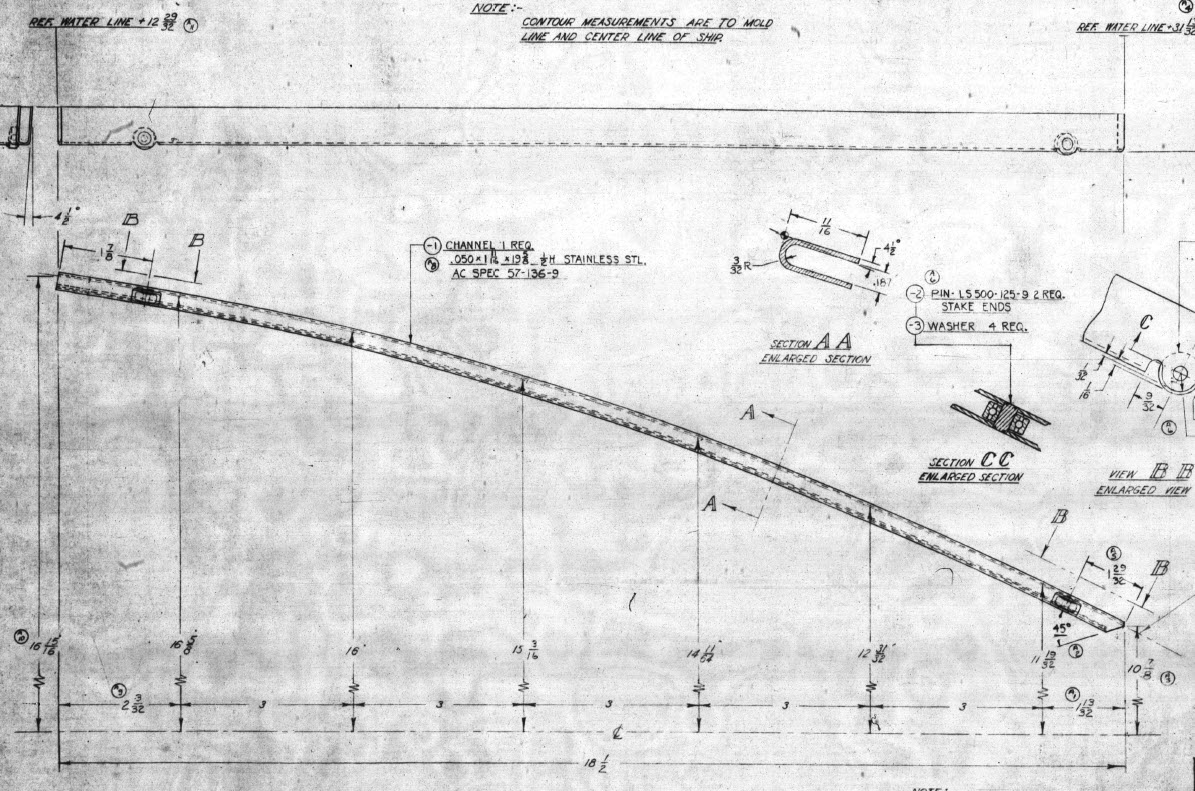
The CAD/Ordinate datasets are designed to offer detailed documentation of the dimensional information pertaining to the core profiles of various aircraft components. This includes elements such as fuselage bulkheads, cowls, vertical stabilizers, horizontal stabilizers, wings, rudders, flaps, ailerons, and elevators. Essentially, these datasets provide all the dimensional information needed to develop the main profiles for aircraft construction.

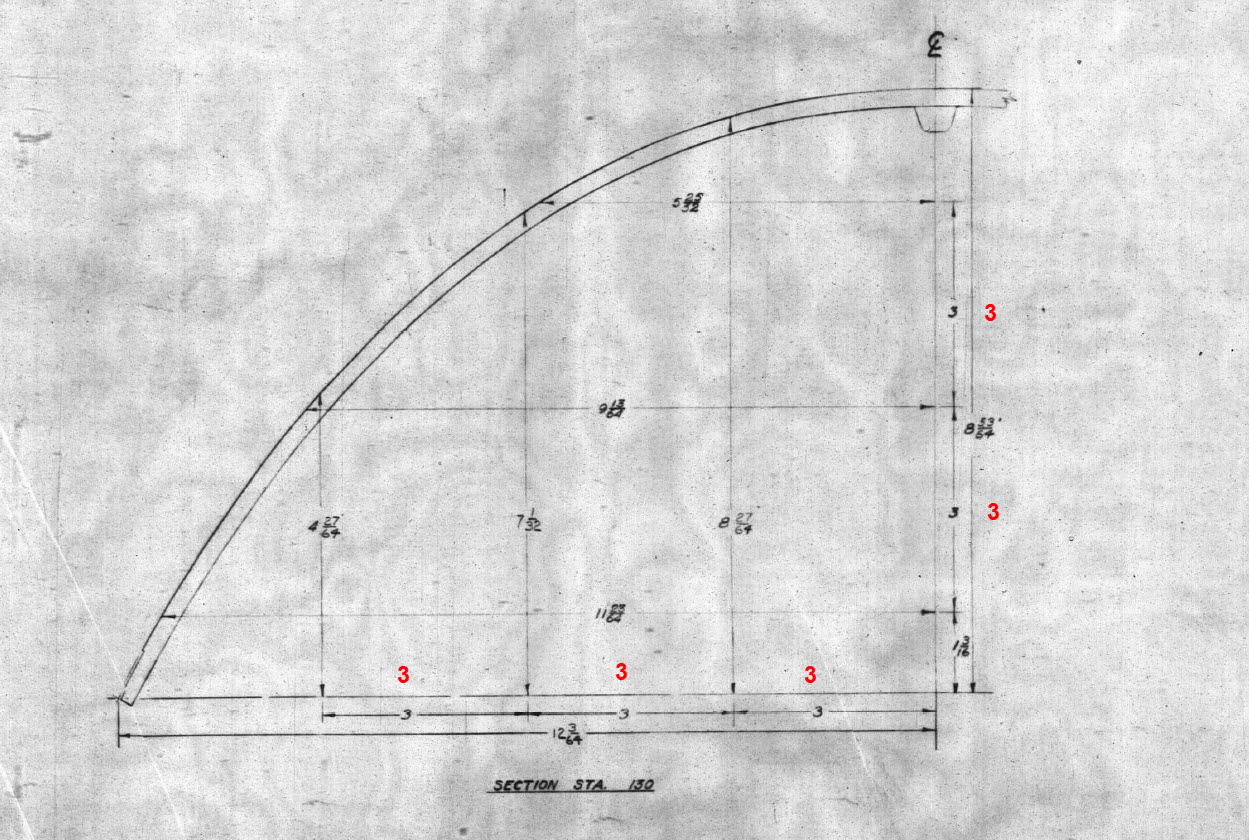
The research studies were conducted to fill in important gaps in information and to clarify unclear details. Often, data on blueprints can be difficult to read, making it necessary to record and analyze the bulkhead or rib profiles in CAD. This process helps accurately determine the correct dimensions.

The examples of ordinate dimensions above are not necessarily the worst; in fact, there are truly poor examples that exist. To tackle these issues, we should start by recording the known dimensions in Excel and making educated guesses about the worst examples. Next, we can create each profile in CAD. This CAD profile will give us a clear visual representation of any anomalies in the curvature, which can be further analyzed through curvature analysis to identify low and high spots. This process is done for every rib and bulkhead profile where we have ordinate dimensions.

The spreadsheets above are typical examples of CAD/Ordinate datasets. The first spreadsheet contains the Ordinate record for the P-38, while the second one features the Aileron sheet for the FM2. You may notice a Linear Regression analysis table included in the FM2 sheet. Initially, determining the individual profiles of the ribs or bulkheads is just the first step; we now need to assess the assembly of all these components and check for proper alignment.

Each drawn sketch profile in CAD will serve as the border for containing a surface patch.
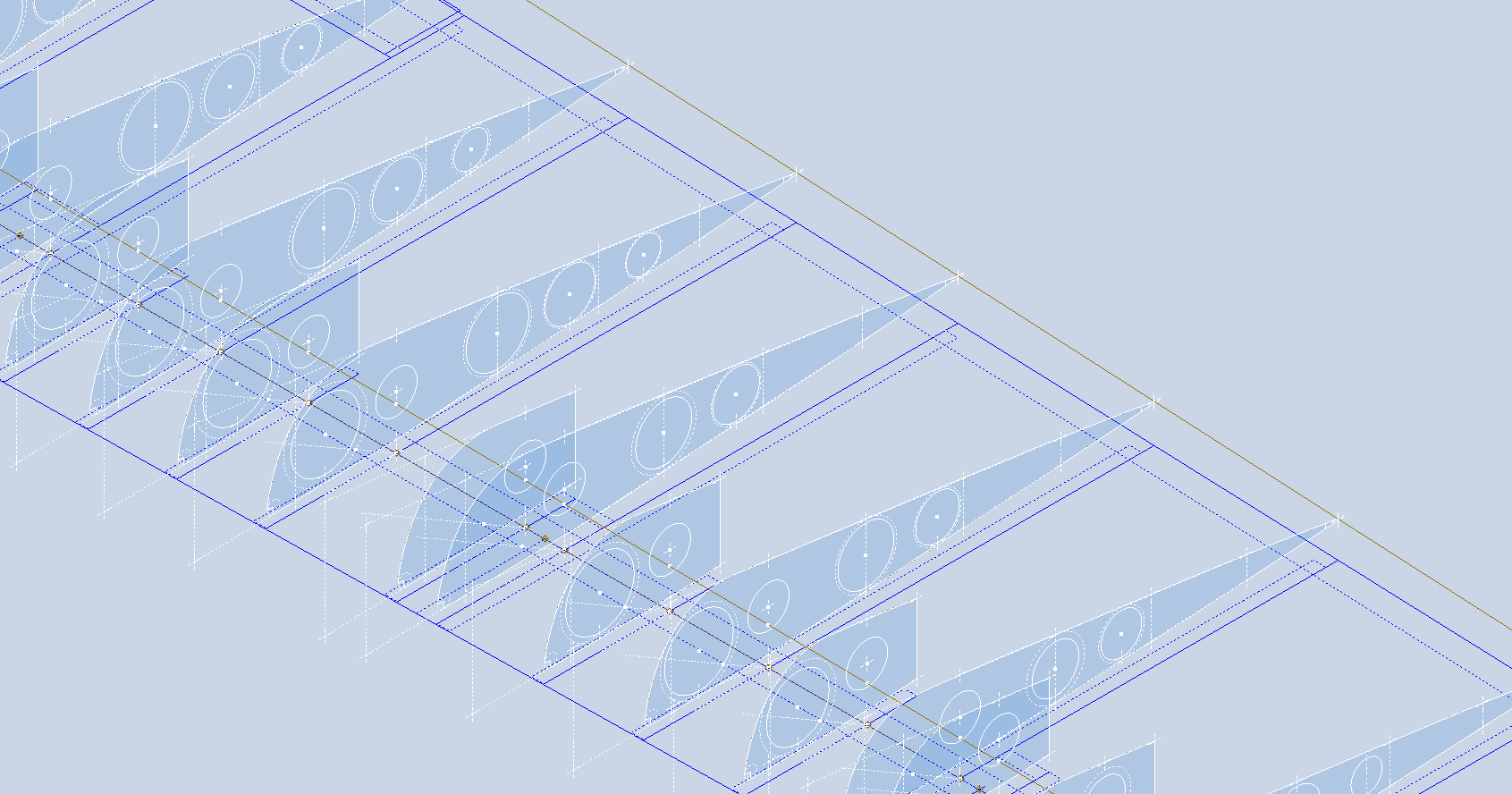
There are two primary reasons for doing this. First, it provides us with a plane that can be converted into a working surface, which can be utilized in any CAD product. Secondly, it provides us with a tangible element that we use to check assembly cross sections at key locations for alignment checks.

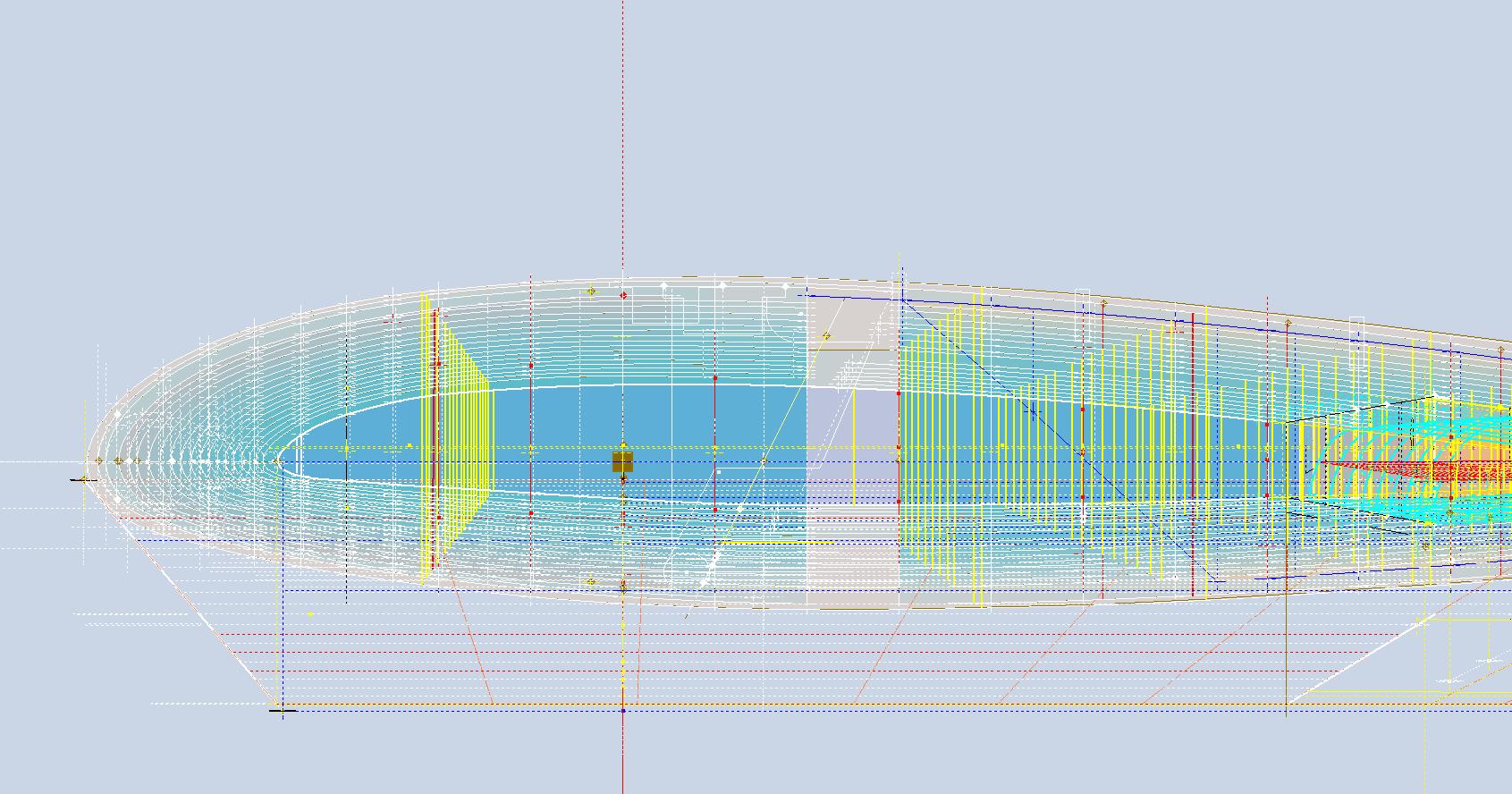
For example, consider the wing of the FM2. The wing assembly has been converted into a part file, and cross-section sketches were created at various chord locations: 30%, 60%, 70%, and 80%. Each sketch utilized the “Project Cut Edges” function to generate a cross-section of each rib. As shown in the second image, the array of lines representing the rib cross-sections provides a visual aid to identify high and low spots on the wing assembly. By creating a surface plane for each rib, we were able to generate these cross sections effectively. There were a few high and low points, which were double-checked and rectified.

If we require additional verification and strive for precision, we could use Excel’s Linear Regression to generate the coordinates for a Best Fit Line and make adjustments as needed. However, this approach may be excessive since our primary goal is to clarify the original blueprint data and apply it to identify appropriate rib and bulkhead profiles within acceptable parameters.

We can also use Linear Regression to give us an overview of how the ordinate profiles align with one another and to identify any discrepancies. Typically, acceptable parameters are within +/- 0.01 inches (or 0.254 mm), as specified by the dimensions on the blueprints, which usually only provide accuracy to two decimal places. Sometimes, as was the case with the P-51 and P-38, we had key design parameters that allowed us to calculate the exact profiles for each wing.

Validating dimensional data is crucial because the actual wing construction may not always match the accepted specifications. The design specifications for the FM2 call for a NACA 23015 airfoil at the root and a NACA 23009 airfoil at the tip. You might be surprised to learn that the NACA 23009 is a modified version of the standard 23009. Nothing is therefore assumed or taken for granted.

The CAD/Ordinate datasets are the result of extensive and thorough research and analysis, often taking many months of work, sometimes around the clock. These spreadsheets include every known ordinate dimension for various aircraft, gathered not only from blueprints but also from manuals, reports, and even correspondence. The CAD/Ordinate packages also include various 3D CAD models in various formats, including 3D DWG and fully dimensioned 2D DWG. All documents provided are fully editable so you can adapt the information to your work processes.

For more details on using the Ordinate spreadsheet data for your own CAD systems, see my earlier post here: Ordinate Overview

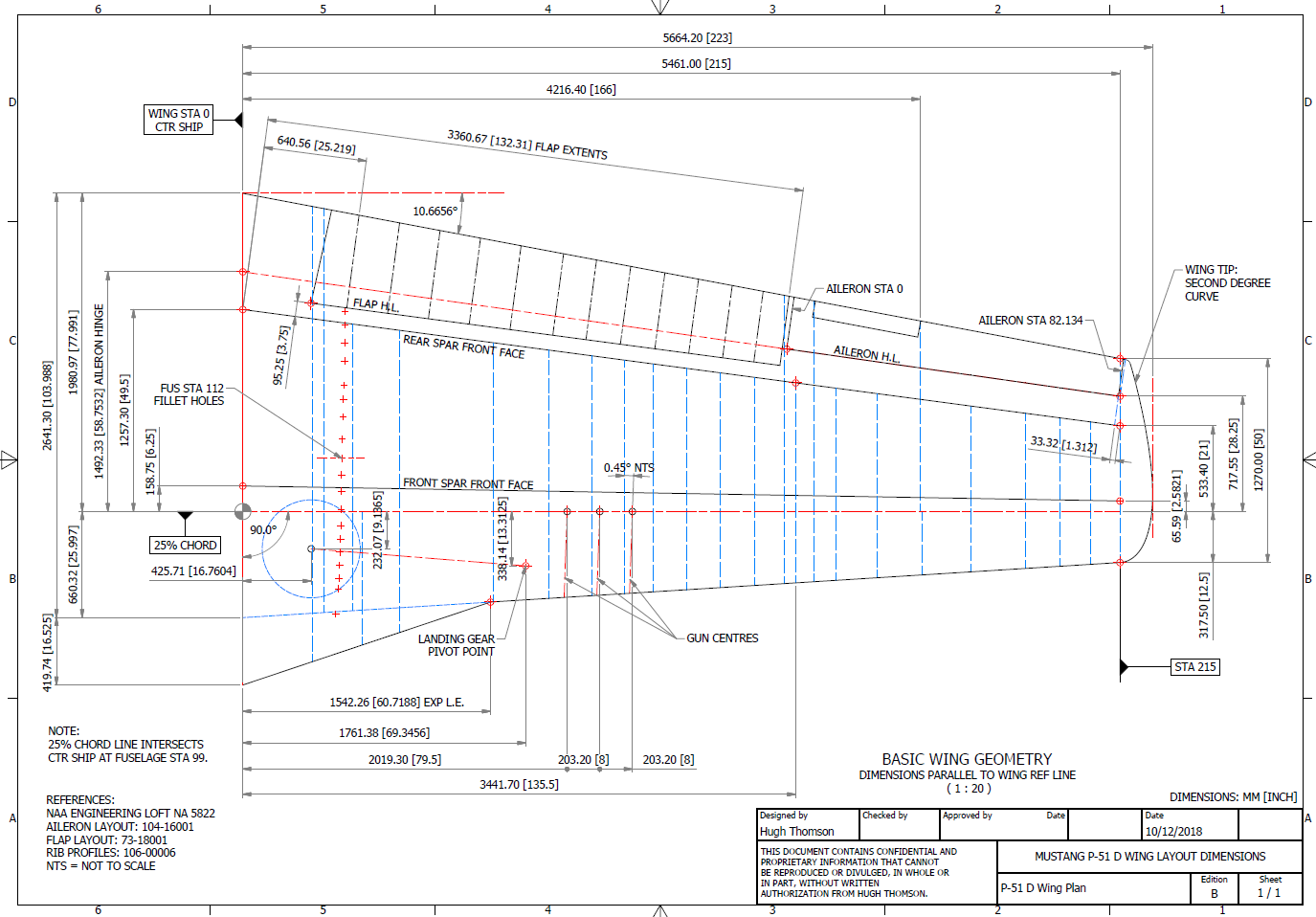
With over 45 years of experience in structural and mechanical engineering, my expertise influences everything I do.

In summary, the purpose of the CAD/ordinate datasets is the result of intensive work and research to provide the user with correct usable data that can be utilized in any CAD system.

When you buy CAD/Ordinate datasets and Blueprint collections from me, you support my ongoing research to provide the most comprehensive and probably the most accurate dimensional information about various aircraft. This blog and my research work would not be possible without your support.
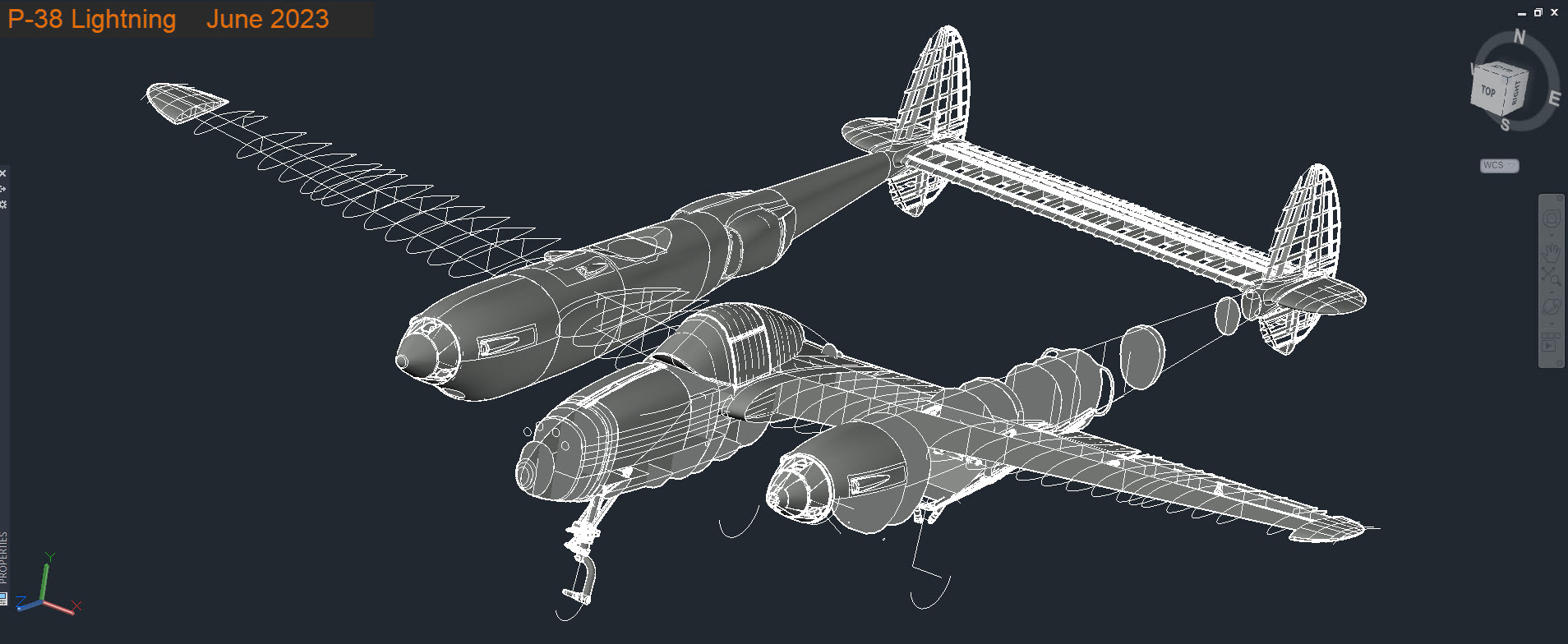
P-38 Lightning: Ord/Dimensions Study Complete

P-38 Lightning: Ord/Dimensions Study Complete:

The P-38 Lightning Ordinate/Dimension study is now finished after 7 long months. Initially, I had planned on doing this study in 3 months; working night and day; but alas due to the complexity of this aircraft this drifted into 7 months.

All areas of the aircraft have been studied, and modeled with all known, and henceforth many previously unknown dimensions collected and recorded in a comprehensive spreadsheet.

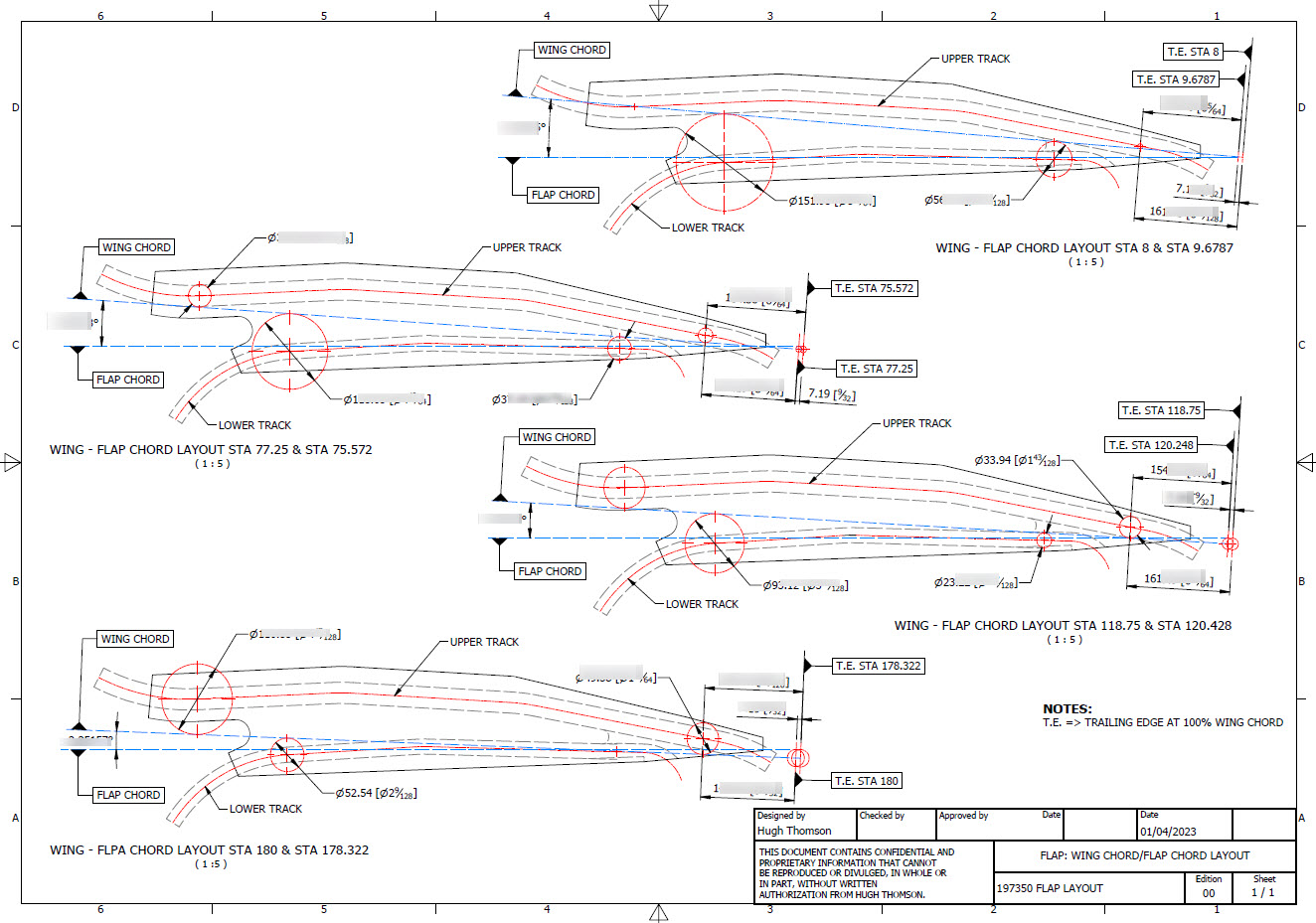
All bulkhead and rib profiles are generated for the wings, ailerons, elevators, horizontal and vertical stabilizers, rudder, fore and aft booms, fuselage, cockpit, and flaps. The latter was a challenge as the Lockheed drawings were unclear about the relationship of the flaps to the wings…however, after some research, I was able to resolve this issue to determine the exact positions of the Wing and Center Section flaps. The flap details are fully dimensioned now on 2d Acad drawings…that was the last hurdle.

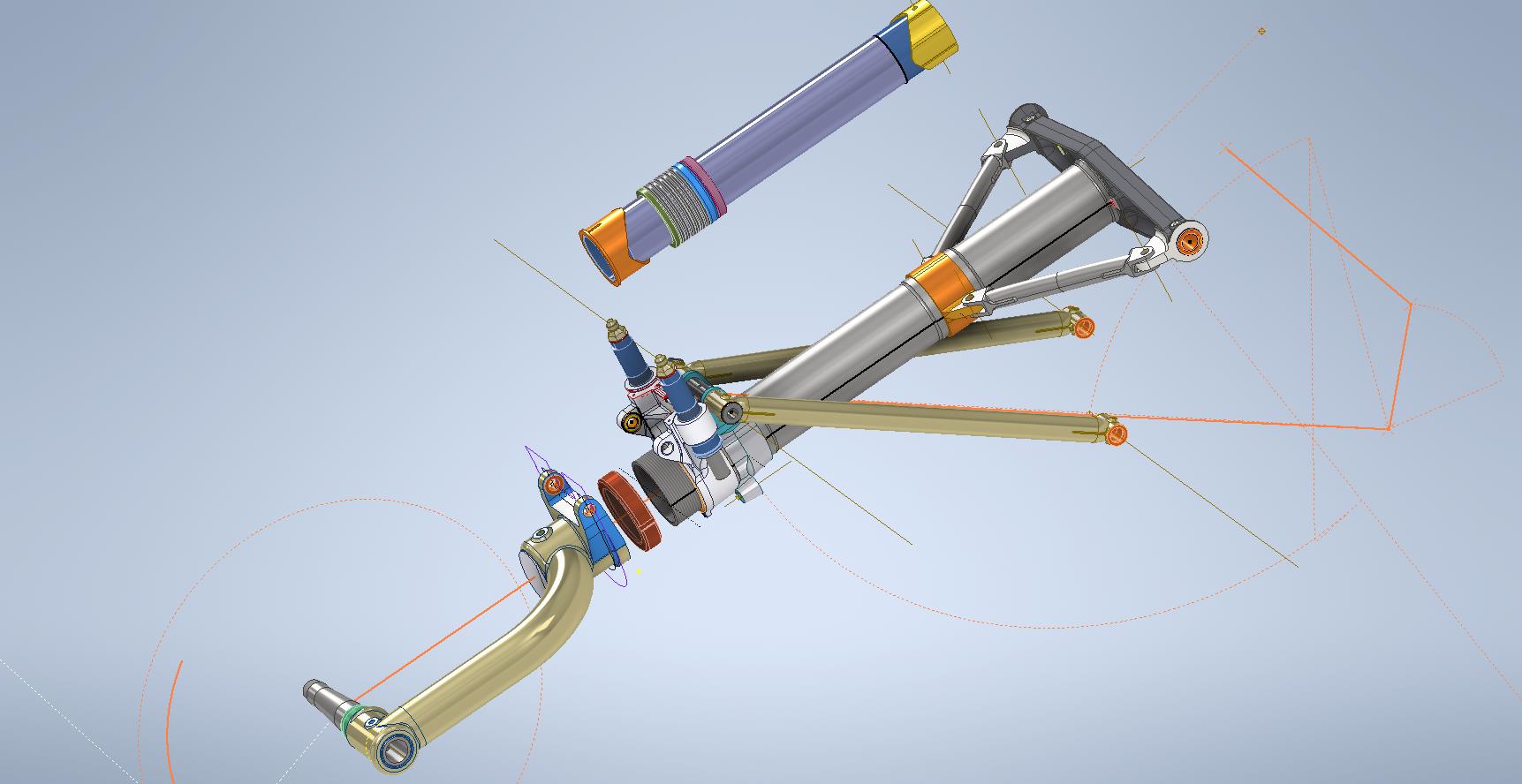
Further to the Ordinate study I also have full 3d Cad models for the Nose and main Landing Gear Assemblies.

For further details get in touch: hughtechnotes@gmail.com

P-38 Lightning: Fuselage Update

P-38 Lightning: Fuselage Update

The P-38 Fuselage development has been a real challenge. When I first started this project it seemed to me that the fuselage was well documented with stacks of ordinate information and therefore should be a fairly straightforward model. The front section and the Cockpit enclosure are actually quite well documented but the Aft section and the mid-fuselage section; forward of the cockpit; most definitely are not. After more than 6 weeks this part of the project is still very much a work in progress.

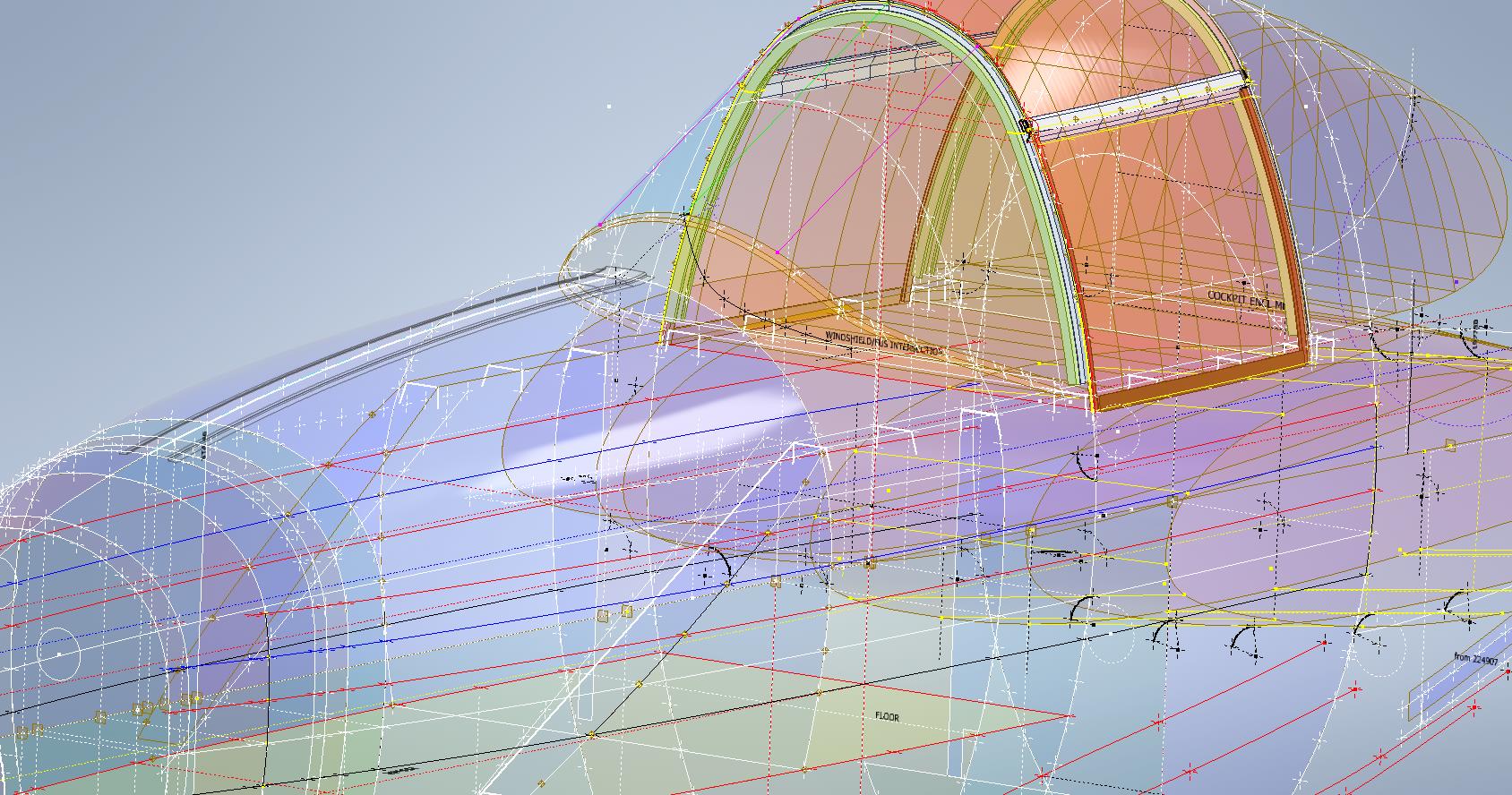
The Cockpit enclosure: There are glass profiles for the cockpit enclosure but they are from the XP-38 early model; which on inspection; in comparison to the little-known information for the later production models suggest they are very close but do vary by 1.2mm but only on the side profiles. I suspect the glass was thickened slightly when they started production. I have to work with what I have and in the absence of sufficient information on the production models’ glass dimensions I have opted for a compromise. As only the side dimensions change with the top profile and interface with the fuselage remaining the same I think working with these profiles in conjunction with the structural elements of the production P-38s will work out quite well.

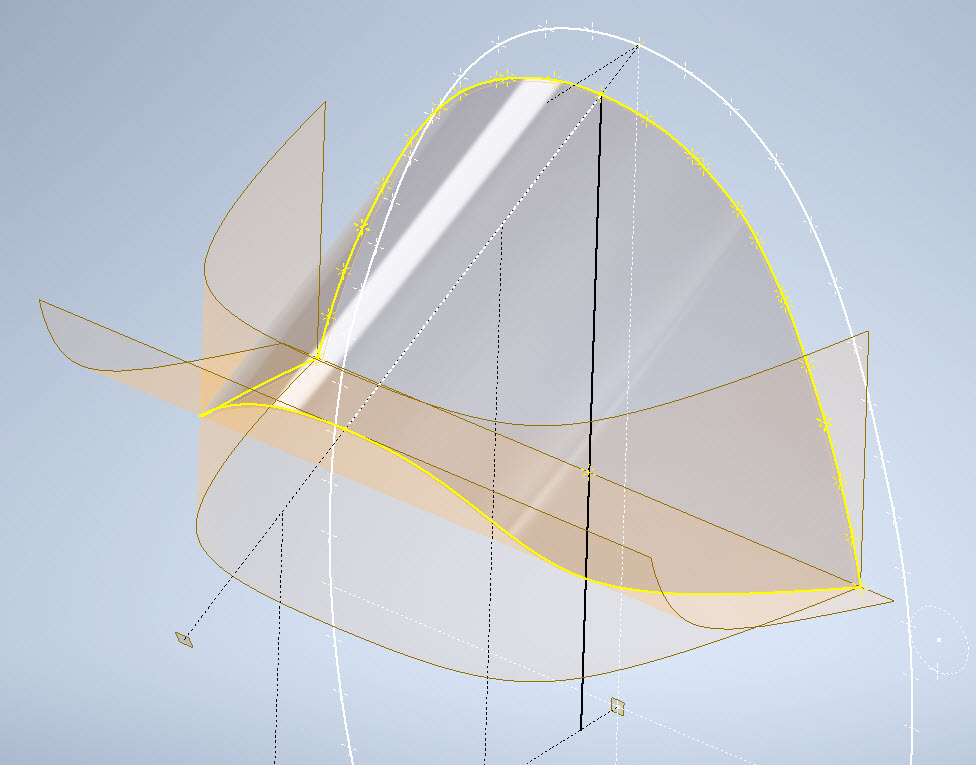
Ref 3rd image: In the 3rd image I have highlighted the location of the profiles at Station 123, 126, and 154. Sta 126 and Sta 154 are absolutely critical in setting out the cockpit enclosure and yet they are not documented nor do we have the drawings listing those dimensions. However, we do have the dimensions at Sta 123. On the windshield drawings, there is a note that states the profile at Sta 126 is the typical profile for the windshield moving forward…logically you would think therefore Sta 126 will match the profile at Sta123. I checked this and it is close but because we also have the glass profile at Sta 126.093 any minuscule deviation will have a profound impact on the curvature when eventually this is lofted. To be sure of maintaining good curvature continuity I lofted all the center section glass profiles and extended the edges by 12mm and then trimmed this resulting profile at Sta 126 and Sta 154. This gave a good result and to check I then swept the Sta 126 profile along the line of the Windshield center line and examined the profile with the known profiles at Sat 123 and of course at the interface with the fuselage. The variance was something close to 0.03mm…that is good enough for me which now ensures good curvature continuity throughout.

Aft Section; As mentioned we don’t have very much ordinate information for the Aft Fuselage Section which will require extensive research of all parts drawings from which we can extrapolate individual points that hopefully will be sufficient to fill in the blanks. The image on the left is a good example where I have drawn the various profiles for the fillet tangent to the fuselage and the wing.

Most of the drawings for the Fillets include the Tangent Points for the Fuselage and the Wings which I included in the model that now collectively gives us a reference line for the side of the Aft Fuselage at the top and bottom of the wing. Each fillet curve was checked against the ordinate surface for the wing and adjusted accordingly taking into account the skin thickness; these were also checked against known bulkhead profiles in this area.

The second image; on the right; shows how we can also use the main longitudinal members in a similar fashion to help ascertain key dimensional information to assist with the development of the aft sections. The red lines are the longitudinal members where the part drawings contain relative dimensions to the Fuselage reference line and the Centre of the Ship. Again each of the dimensions was checked against known bulkhead profiles where the average variation was in the order of 0.012mm. It may seem too small a variance to be of any consequence but when I later have a need to use these lines when creating the surfaces they have to be exact…so in each case the point was adjusted to be an exact intersection with the bulkheads. Inventor is very fussy when lofting with a guideline with no room for error…so this has to be exact.

Ultimately the goal is to find as many part drawings as possible with dimensional information that I can use to eventually have enough data to build the relevant missing Aft Section profiles. Typically this will be the main longitudinals, the skin parts, and of course the fillet drawings. This is painstakingly slow work as virtually every part drawing in this area is being reviewed for potential data that will help me achieve this goal and there are a lot of drawings!

Similarly, the process will be the same for the fuselage area forward of the cockpit which again sadly lacks a lot of key profiles. The research is where the time is expended in developing these ordinate sets…so far for the fuselage alone, I have spent in excess of 6 weeks of continuous work to get to his point, and still a lot to do.

Finally, both the P-39 and the P-38 ordinate dataset models are updated with a new approach to how these datasets are being built. I still have the extensive Excel spreadsheets listing all known dimensions but for the model, each ordinate profile is now inclusive of a surface patch. What this means is that conversions of the model for use in other cad systems will now provide a surface plane as well as a sketch profile which helps the model builder very quickly create the bulkheads for these scale models.

The P-38 is almost complete with the Boom, Wings, Horizontal and Vertical stabilizers, Flaps, and Ailerons all modeled and recorded. The Landing gear is almost fully 3d modeled as well…which is great for those that are keen on super detailing their RC models. These models have also proven to be enormously useful for the Restoration groups one of which I already work with on a P-39 Airacobra restoration.

Update 14th June 2023:

I have been developing the key Aft center profiles at the top and lower part of the fuselage. This is actually quite exciting stuff as there are not a lot of pertinent ordinate dimensions for the Aft Fuselage so I resorted to building profiles from individual part drawings.

For each part sketch profile, I have extrapolated various curves to determine the center work points. What is exciting about this is the eventual lower fuselage curve (in magenta) is absolutely perfect…normally when you derive work points from half a dozen different parts in inches there is an expectation that the eventual curve would show the odd deviation…but it didn’t. The curvature analysis shows this to be absolutely spot on.

Update 23rd June 2023:

Fuselage Aft Assembly: Almost finished with the ordinate study for the fuselage Aft assembly. This work involved generating cross-section profiles from stringers, longitudinals, bulkheads and fillets to derive series of points from which to build the curved profiles. Each profile built is checked against the existing ones by lofting a new surface profile, then a sketch cross section generated to check the curvature maintains alignment with the existing profiles. This is done for every newly generated profile. Ultimately I will end up with the best-fit surface for the Aft Fuselage Assembly. All new points will be recorded in the Main Spreadsheet and fully dimensioned on individual drawings.

Technote: P-38 Forged Parts

Technote: P-38 Forged Parts

I had promised an article on the P-38 Flap CAD development as a follow-up to my earlier article on this topic…but I deviated slightly to address a question from a reader about Forged Parts.

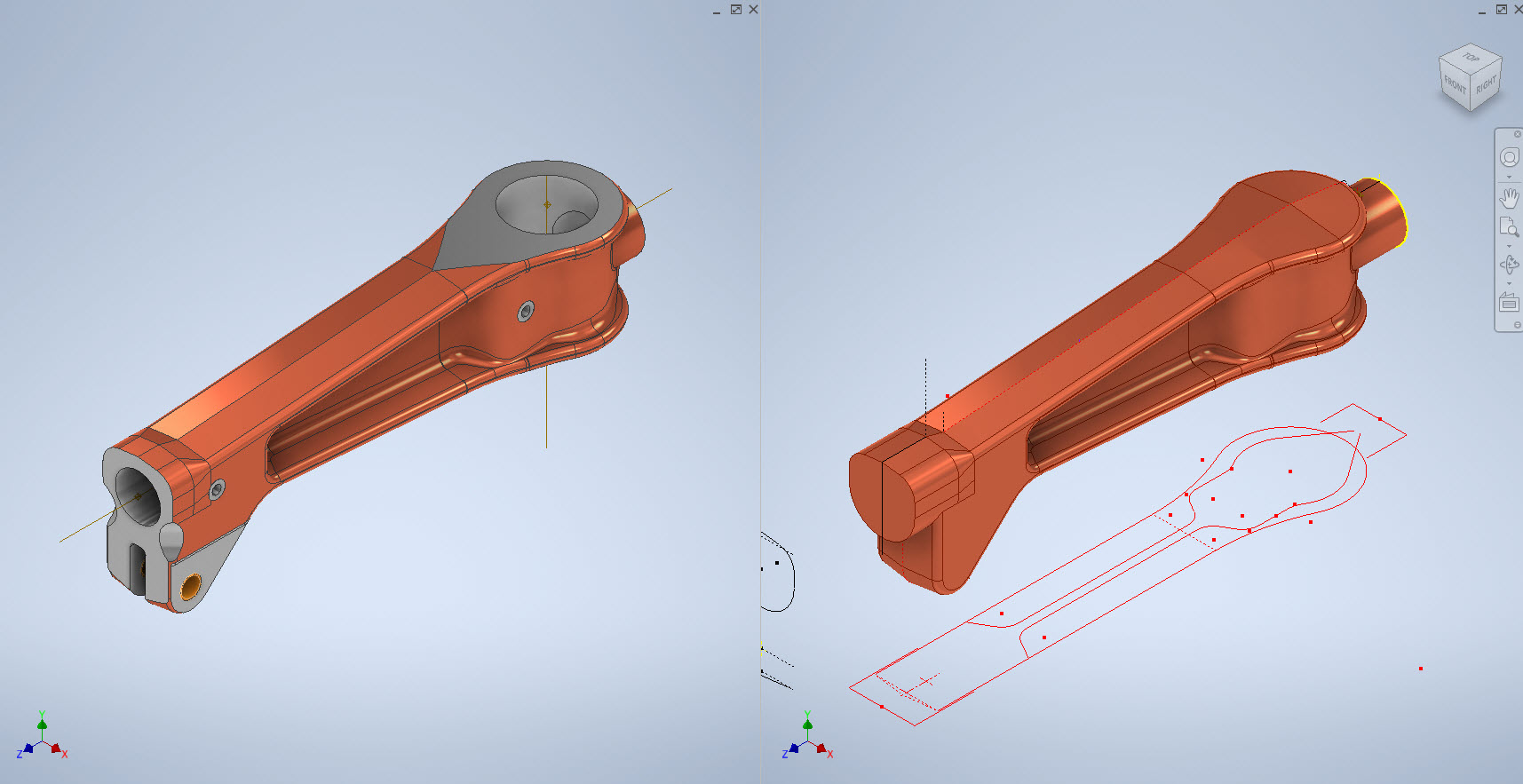
Typically for all these aircraft Forged parts are the main element in the process of manufacturing complex parts that may be used in such applications as Landing Gear. Such is the case with the P-38 Lightning where we have the main support members that are machined forged parts.

I have touched on this briefly in previous posts: Technote P-39 Inventor Face draft and P-51d Mustang Tailwheel Down Position support. Those articles tend to focus on using the Face draft feature in Inventor and using Derived model parts to differentiate between model states i.e. Forged and machined. I should note that with the later versions of Inventor, it is possible to contain the various Model states in one part file but I prefer to use separate derived Part files. The reason is that they are in fact 2 very different manufacturing processes and the drawings for each model may be sent to different departments or indeed different companies. So it makes sense to keep them separate.

In the example above we have 2 components for the Main Landing Gear and the Nose Landing Gear. Both examples use the derived parts process as you can see. In this article, I wanted to cover some of the frustrating differences that you will likely encounter when building these models.

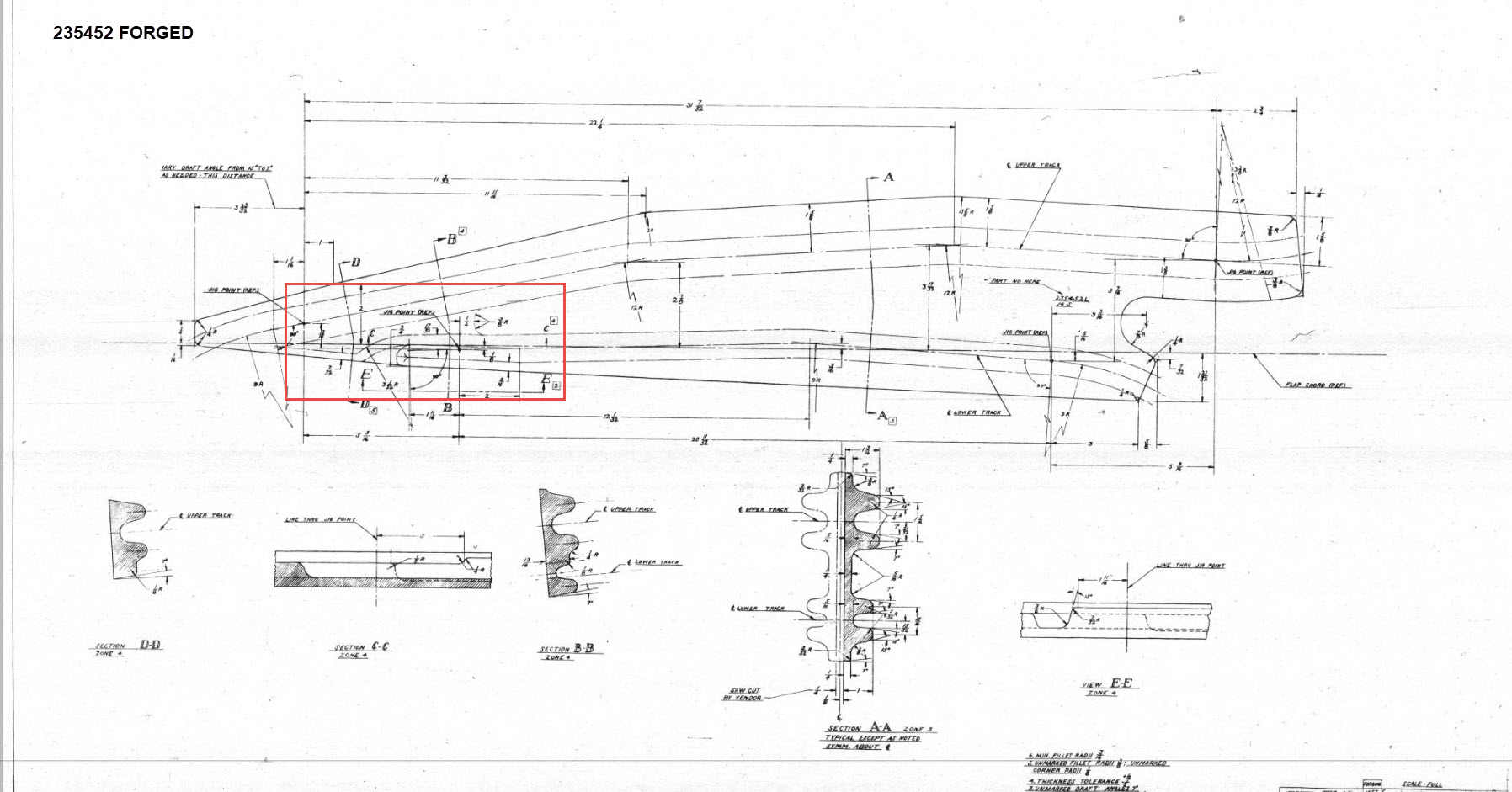
Forged Parts are notoriously complex and the Lockheed drawings tend to only provide the main dimensions and key elements often omitting small details that are likely to have been decided by the mold maker. To determine missing details I often build the models as a surface and then turn that into a final solid.

In the above images, this part had an elevated top and bottom section interspersed with a waveform for the main body. The 2d sketches were drawn outside the main part body to make it easier to visualize and manipulate the part data. This part used 3d intersection curves to generate a sweep path for the top and bottom profiles and the surface trim command to profile the main body.

Incidentally, although the sketches do not share the same space as the main model you can still select a single line from any of the sketches in order to trim parts and surfaces in the model…they do not need to be connected. I have often seen folks extrude surfaces from external sketches and then trimmings to that surface but you don’t have to do that…just select the line.

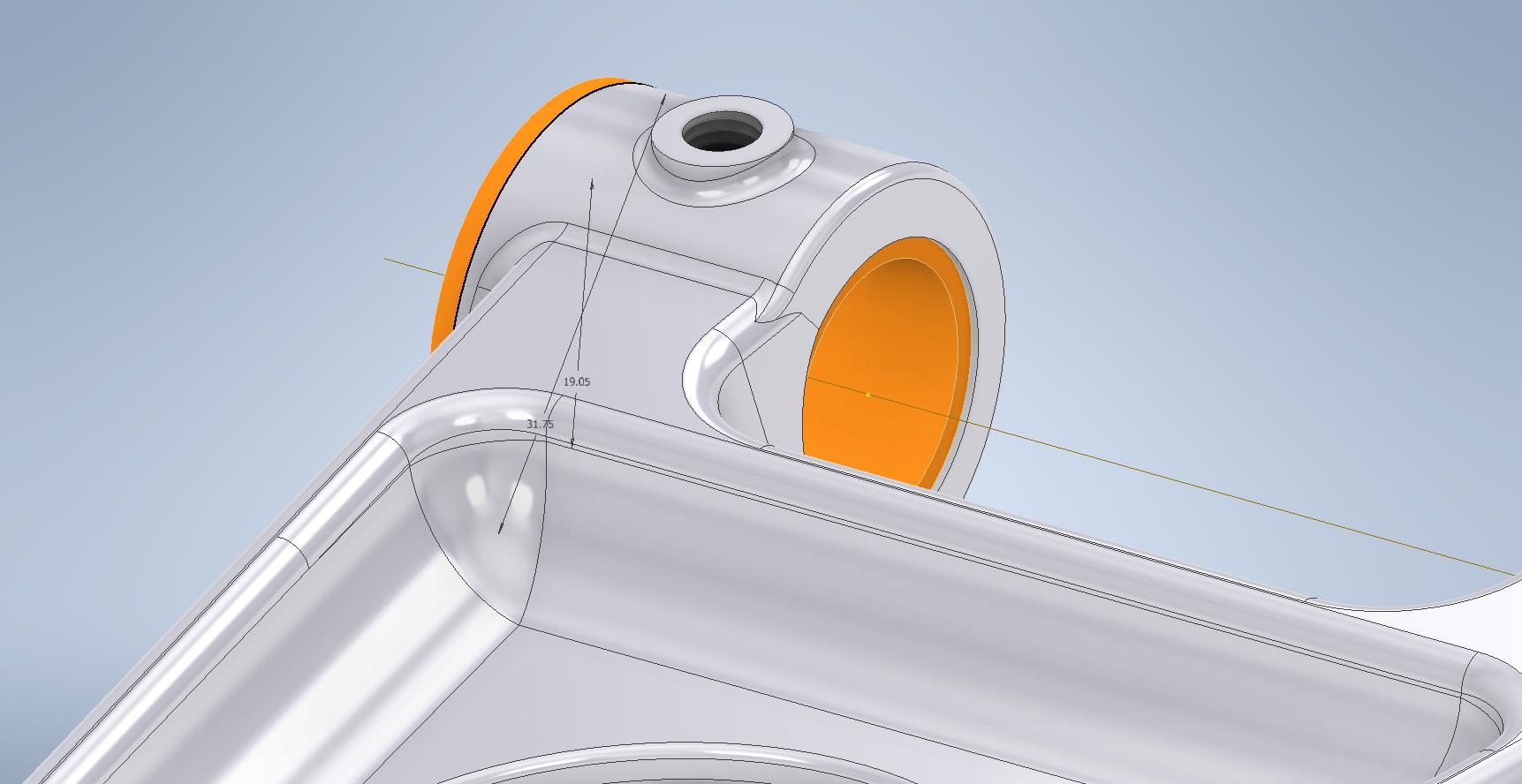
One of the key details that is not clear in this particular example was the protrusion just above the cylinder at the front of the model. All you have on the drawings is a line on elevation and 2 lines on the plan sketches..the specific details of how this small detail interfaces with the main body is down to interpretation. I modeled it with the flat upper surfaces tangent to the curved edge and applied a fillet to the intersecting sides. I did look at a number of variations but I think the end product is close to how it will actually be. This is the frustrating bit when trying to decipher designer intent with limited information.

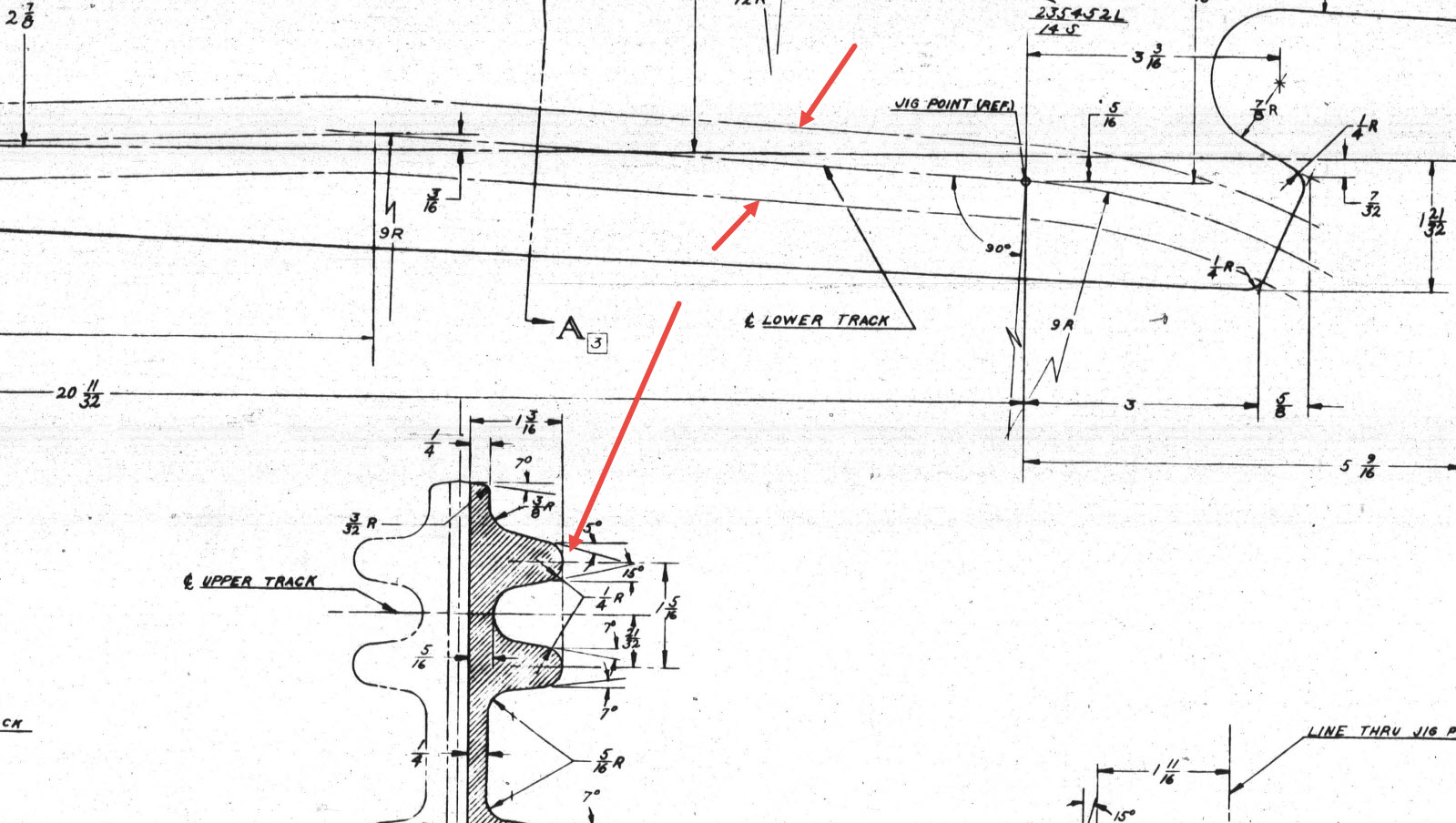
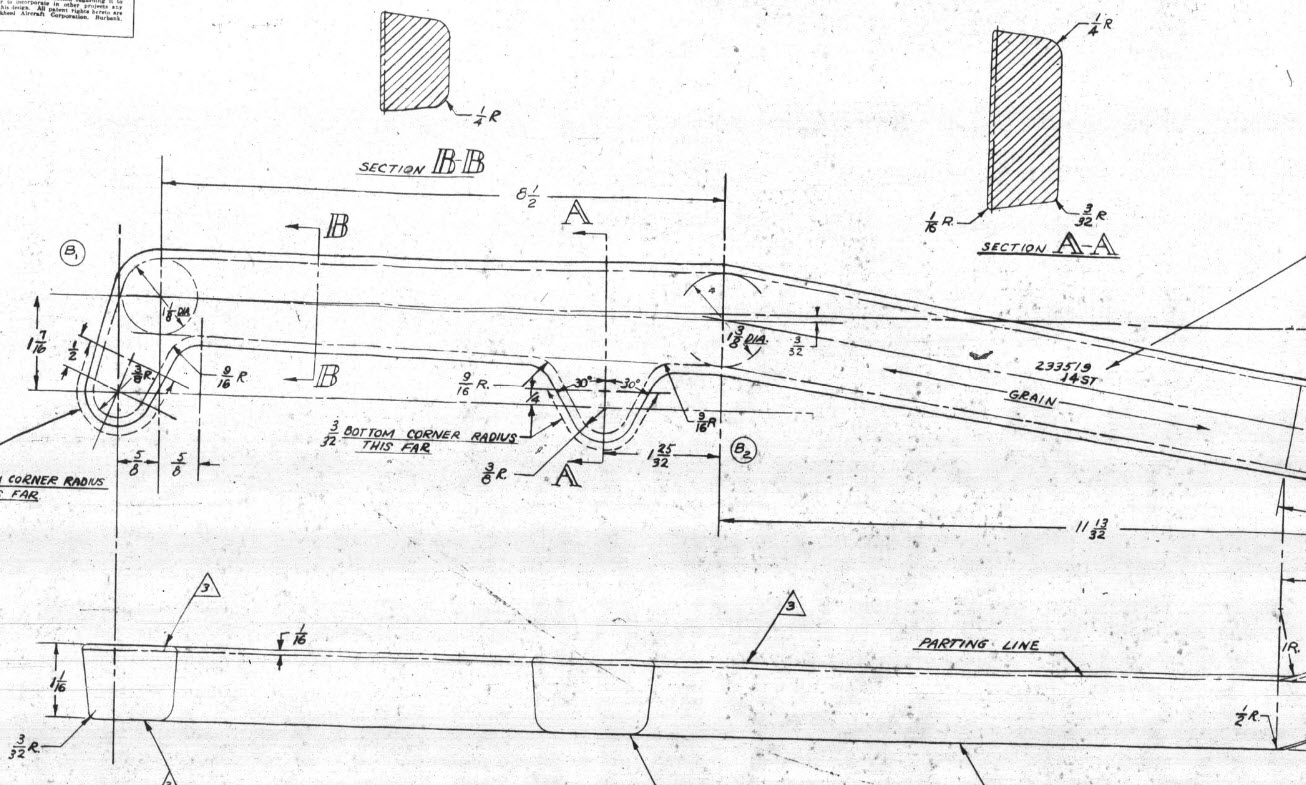
Some of the complexity comes from how the drawings themselves depict the dimensions of the profiled sections. In the first image above we have the criteria shown as the center line of the section’s curved profile. The second image shows a different part however this time the dimensions are to the projected edge intersection of the curved profile. The third image is also similar where the dimensions shown are to the projected intersections. The final image is the Flap carriage arm with the dimensions shown to a dotted line which is not clearly defined on either the sections or the main views to determine what this actually is. After much deliberation, I deiced to interpolate this line as the projected intersection of the drafted sides with the top and bottom faces. I had initially suspected this was to the corner tangent but that would entail a very complex development process due to the varying corner radius.

As you look through the dozens of forged part drawing there are all sorts of variations on the theme with few consistencies. This is where you can spend a lot of time determining how these dimensions relate to the model and how best to incorporate this information in such a manner to keep the model as simple as possible. Consequently, it is not unusual to spend upwards of between 3 and 4 hours modeling the forged parts. I think for the most part where doubt exists to work to a projected intersection as the point of dimension…it will be a lot easier to model and saves a whole lot of frustration.

To give you some idea of progress on the Nose Landing Gear models:

In the latter 2 images, you may notice small differences which relate to the various model variances. I am modeling the P-38H and the comparison photo is the P-38J.

TechTip: Variable Fillets:

When modeling these complex parts often applying fillets can yield unexpected and undesirable results.

In the images above you can see how applying just standard fillets of different radii can result in quite an undesirable intersection between the flat plane and the circular node. What we need is continuity to achieve a smooth transition from one edge to the next as shown in the second image above. This can be achieved by using the Variable fillet feature.

Variable Fillets give us the option to vary the radius of the applied fillet. When you first apply the Variable Fillet you have a radius specified for the beginning and the end of the selection…you can apply additional points anywhere along the length of the selection to which we can adjust the radius at those points.
You can also add selection sets of edges to the original selection which have their own capacity for separate adjustment. To achieve our goal here for fillet continuity I have 4 selections: the top planar edge (1), the node circumference (2), the lower planar edge (4), and the remaining node circumference (3). It is important for each selection set fillet to have the same radius at each intersection to ensure continuity.

Each selection set is listed separately in the dialogue box and the way to adjust them is to simply select the edge selection as I have highlighted with the first one…this shows the applied points and values in the area below under the heading “Variable Fillet Behaviour”. I have added additional points to the planar fillets at 1 and 4 where the value is set to 2mm which then defines the radius between those 2 points. A small point worth noting is the diagonal draft parting line on the face of the round node that prevents selection continuity which is why we have 4 selections and not just one continuous.

It does not take long to do this and the end result is much more agreeable.

Technote: P-38 Lightning Flap Guide Tracks

Technote: P-38 Lightning Flap Guide Tracks:

The P-38 project is a study I have been working on for a while. In previous posts, I have covered the development of the Boom, Empennage, and Dive Flaps…even did a video on Youtube for the latter. Many of these studies are designed to research the operational characteristics of the component parts and this new study of the wing Flaps is no exception.

Essentially the flaps are split on either side of the Main Boom, with one being fitted at the Centre Section and the other at the main wing. These are activated by hydraulically controlled push and pull tubes with preformed carbon steel cables.

The extent of the operation of the flaps is controlled by guide tracks at each end, which incidentally is where this part of the project starts.

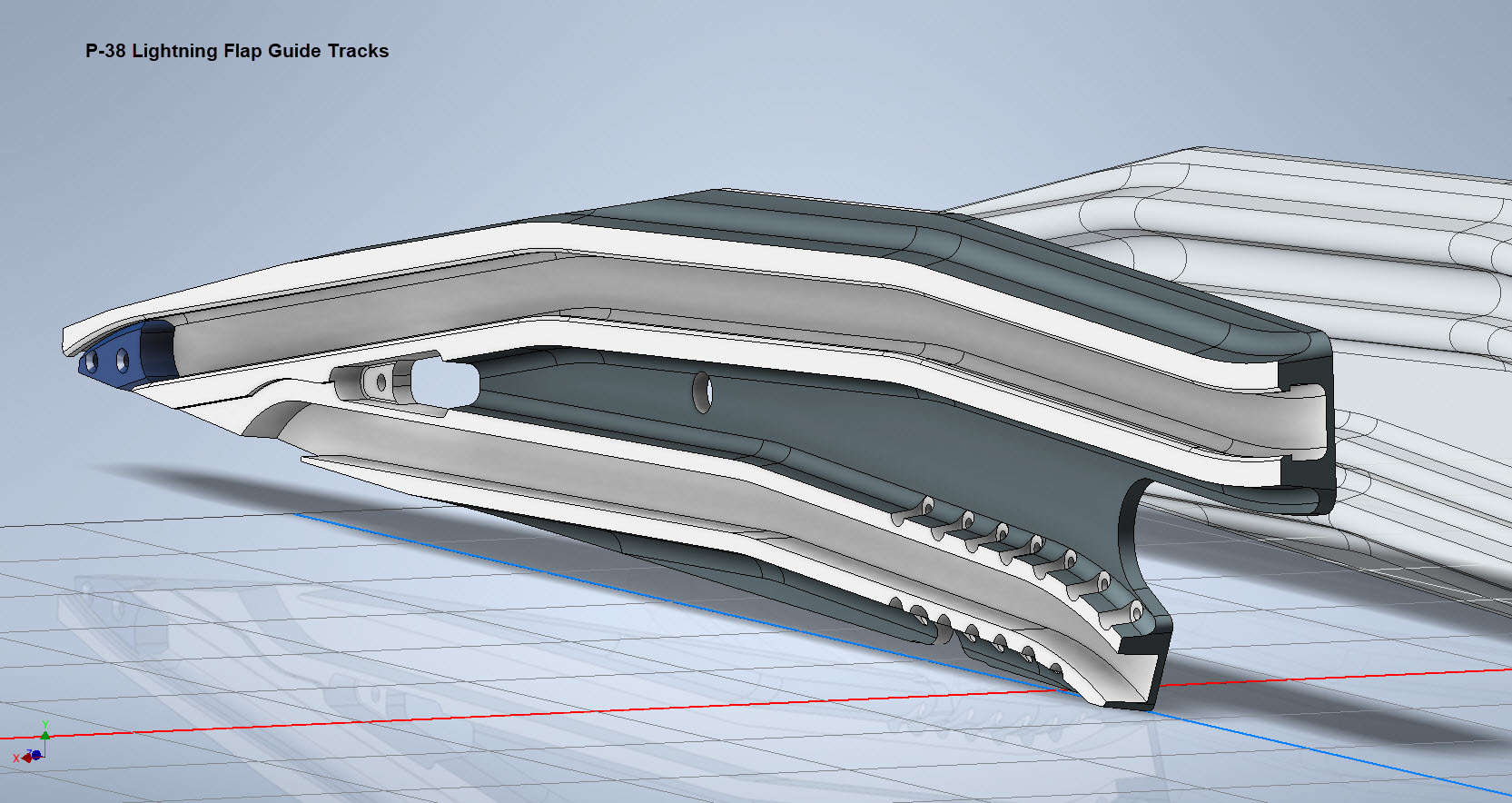
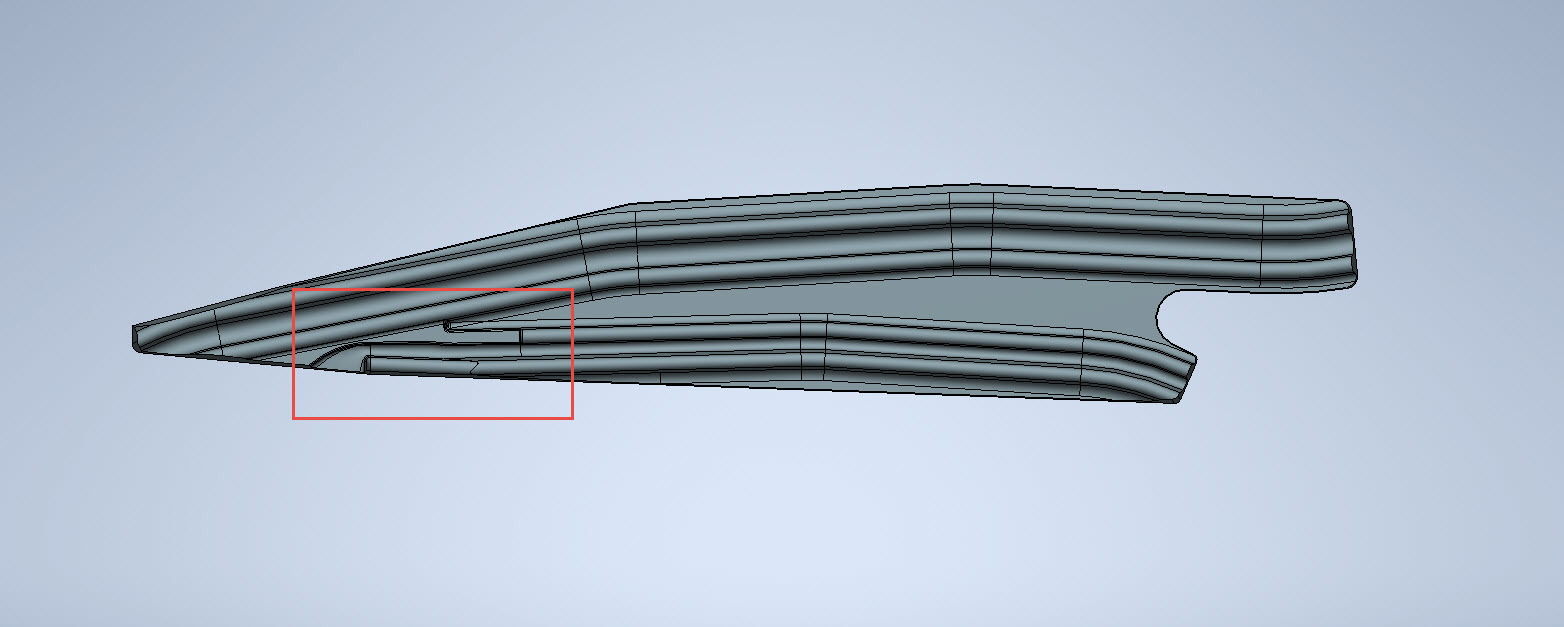
These guides are machined solid from forged Alumimiun blocks. In the image above the machined part is shown with the original forging in the background. It comprises 2 tracks with the upper track just over an inch wide and the lower track slightly smaller at 0.835″ wide. The blue part at the extreme end is a separate stop block.

I am currently working through the variations of these tracks for each location and although some minor differences they are all based on one type of forging, part #235452.

The forging drawing is not too clear about the definition of the track at the left-hand side which appears to drift slightly from the main track center. Understandably the lower part of the track walls deviate to align with the edge of the forging and therefore the main upper wall portion will adjust accordingly. I have improvised in developing this area and now that the project has further progressed there are a few minor changes I would make should this part ever be required for actual production. At this stage, my primary objective is the operational characteristics that are unaffected by this as the end product is the machined component that is derived from this forging.

Update: 26th March 2023:

Making good progress on the Wing Flap mechanism with the Carriage Assembly now complete except for a few standard AN nuts and Washers. The Carriage Assembly also shows the track surfaces to demonstrate the correct relationships between the rollers and the track.

The second image above shows the adjustable roller at the front end of the carriage. This is achieved by the use of an eccentric bushing item #221832 which fits into the retaining locking ring item #221741 at increments of 30 degrees.

Update 30th March 2023:

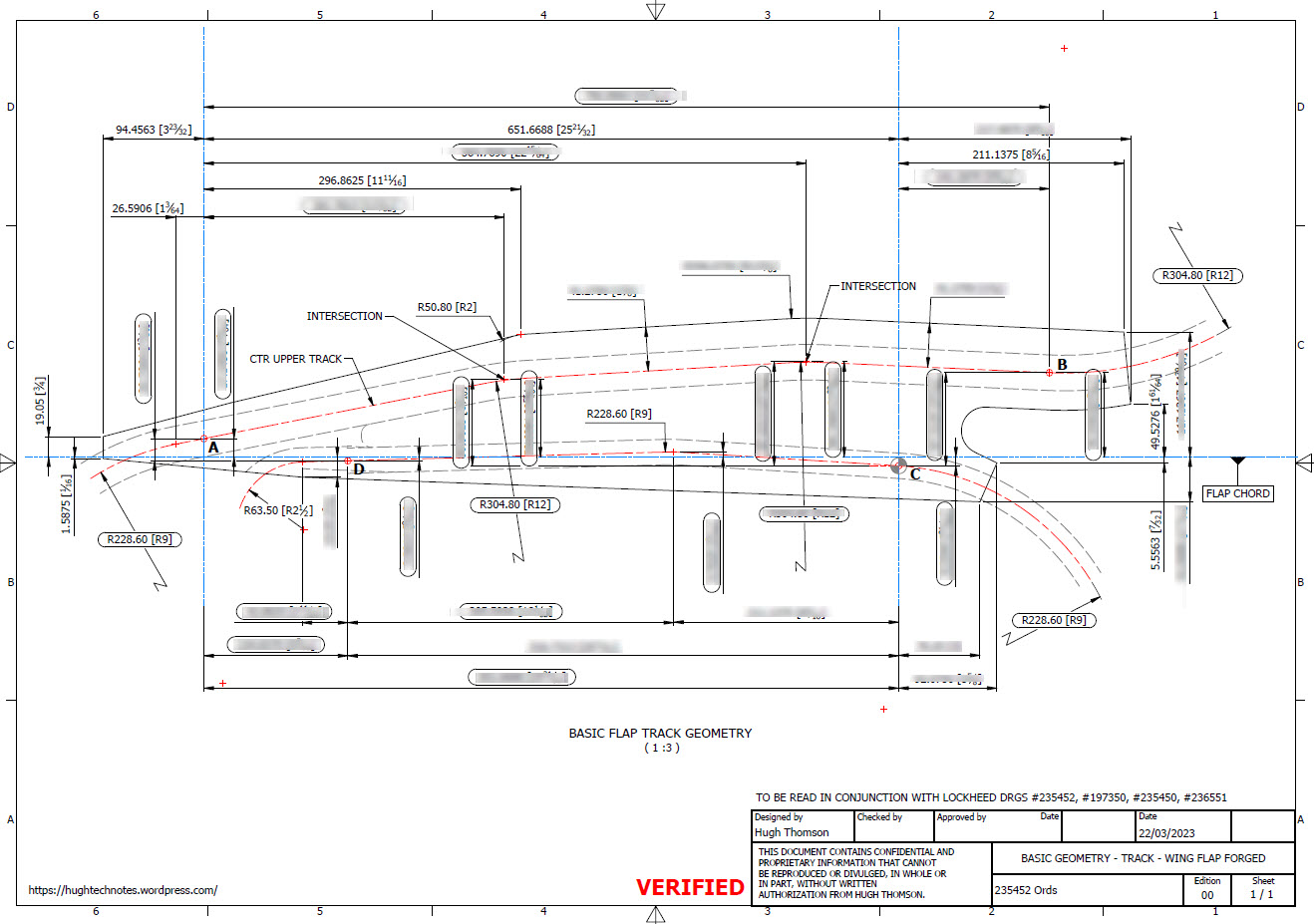
Have spent a considerable amount of time researching and resolving macro dimensional variation for the Flap Track guides. When I talk about macro I am looking at close to 1/128″ or 0.2mm…but it is essential to get this correct. The dimensions are blanked out for obvious reasons as this stuff takes a lot of time to research and develop.

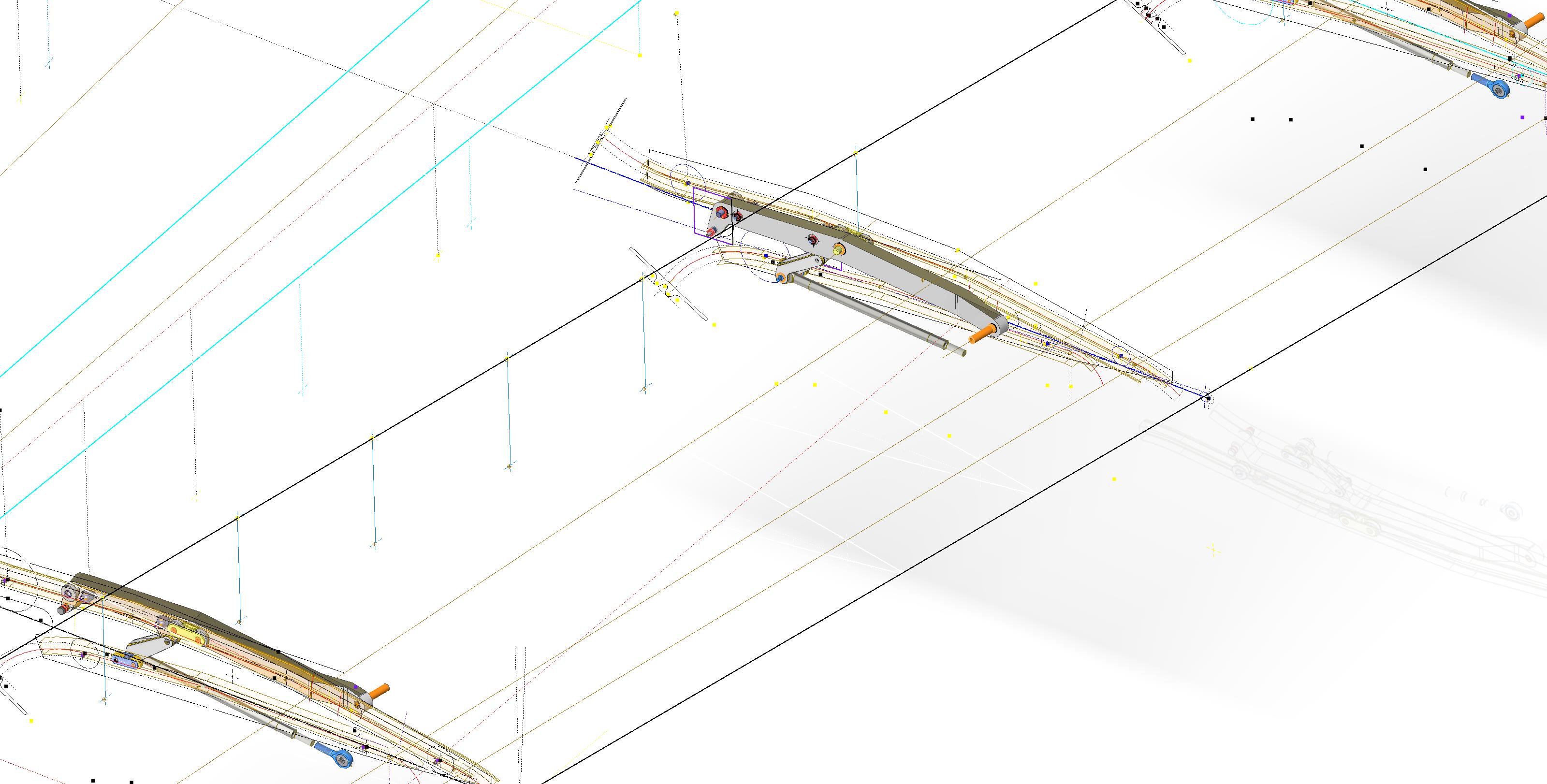
Finally located the Flap Track assemblies in their exact position on the wings. I will actually build the final assemblies as 2 separate items; one being the Inboard Flap and the other the Outboard Flap. For now, the initial plan was to get to a point where the tracks are accurately positioned and ready for the next phase which will be the Flaps themselves. The final stage will be a working simulation to determine operational parameters but we are a long way from that goal at this time.

The tracks are currently shown in the assembly as surface models which keep it simple, however, when I get to the stage of finalizing the assemblies this will be fully modeled. This part of the project was surprisingly complex to achieve and every dimension has been cross-referenced and checked against known data…at one stage I had over 21 drawings one at the same time.

To help establish the starting point for the Flap Crriage I have an outline sketch of the key runner positions to which I later constrain the carriage parts in an assembly. It is actually quite a useful technique to use sketches to help establish relationships when building an assembly.

In summary, it is often beneficial to use surfaces in lieu of solid models for clarity when building these types of models as it is so much easier to see the key relationships between the main elements. Also using sketches to help align component parts in an assembly is a good work method and can also be used later when creating 2d drawings.

This more or less covers the basic setup for the Flap Tracks and carriages…the next article will focus on the Flaps and the eventual final wing Flap assembly.

.

.

.

Technote: P-38 Lightning Dive Flaps

Technote: P-38 Lightning Dive Flaps

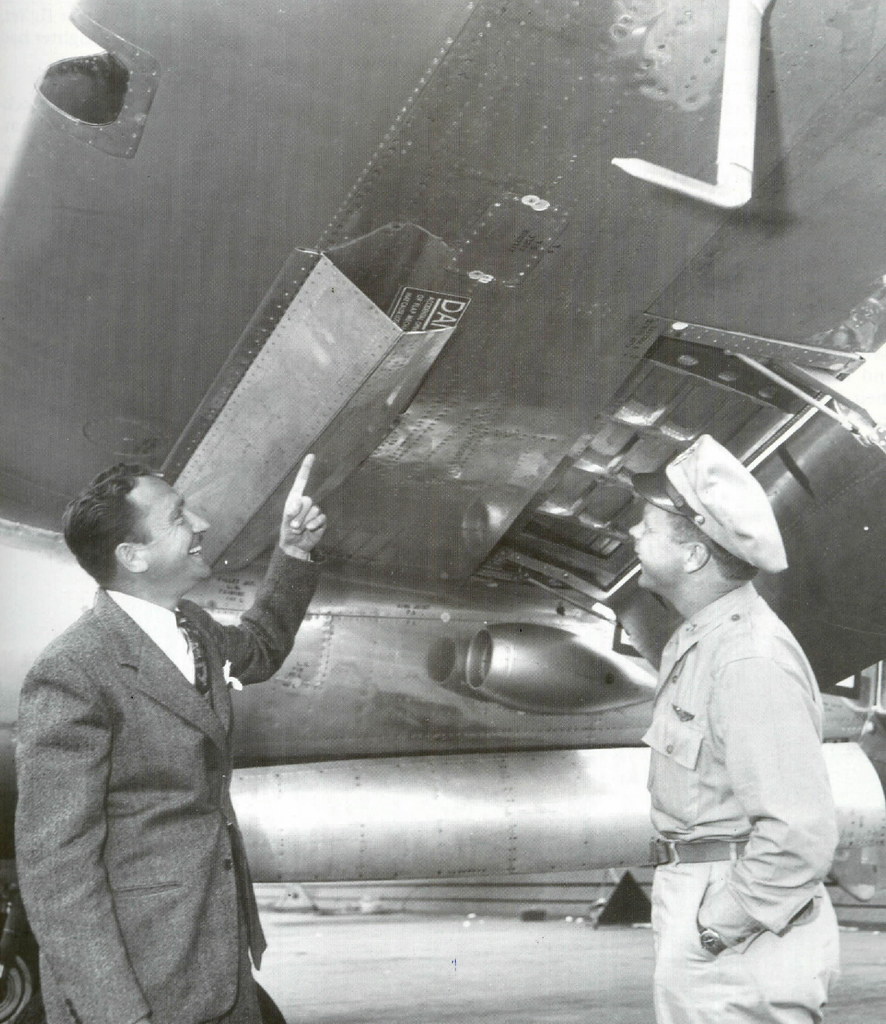
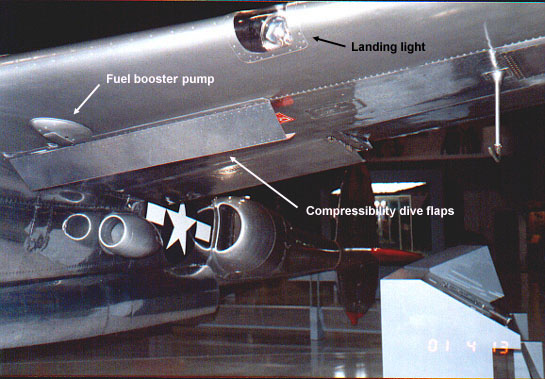
This is what I am working on now: the P-38 Lightning Dive Flaps. At the moment this is a multi-body part file which I will then extract as separate parts and then assemble. The plan is to also include all the mechanical components to analyze operational criteria.

I shall add to this post as this part of the project progresses and perhaps add some notes on Simulation within Inventor. I should note that the external panels are actually transparent to show the internal lightening holes depicted in these images.

Update Dec 7th 2022:

The mechanical components are now modeled and temporarily located in the Dive Flap assembly. It is actually quite a substantial mechanism that is currently missing the main hydraulic operating cylinder. That component is a contracted supply unit for which I do not have any details so the simulation will use a proxy component for purposes of evaluation.

Before I get around to doing that I must first locate it on the underside of the wing…that will need to be partially modeled with local ribs and struts in order to define the fixing bolt locations.

Update Dec 8th 2022:

Another day, another update. I now have the rib at Station 146 and 158 modeled primarily to assist with positioning. The Lockheed layout drawing for this assembly is not included in the archive so I had a lot of research to do to get this thing in the correct position. What I noticed is an access hatch on the underside of the wing which this assembly effectively replaces so that was useful in this task, though I had a lot of rivet holes to position to get it right!

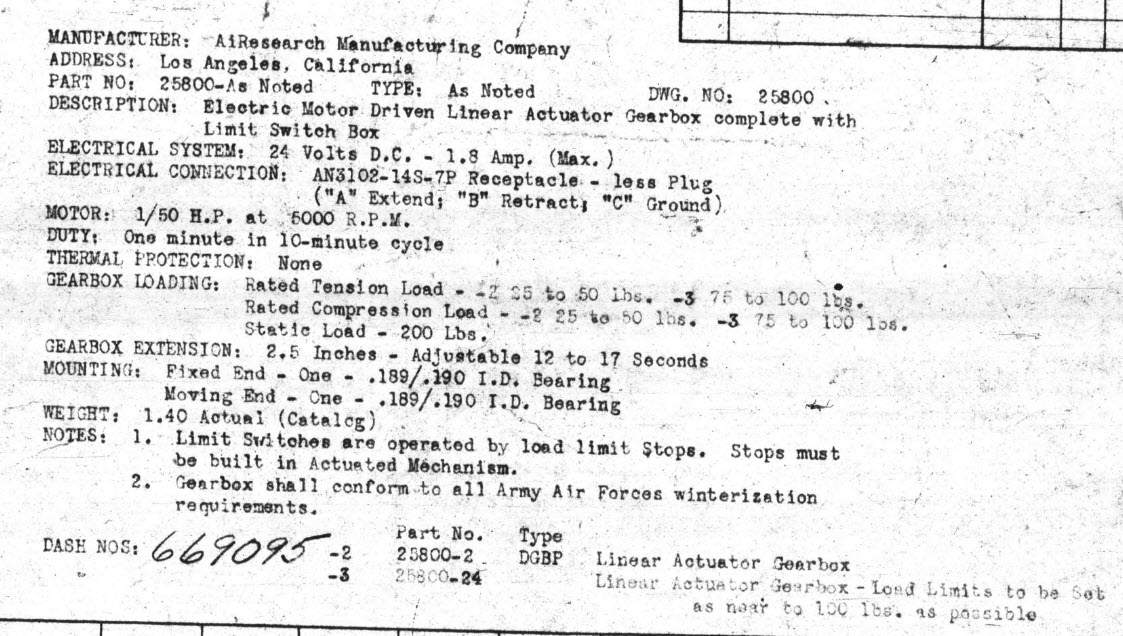
You will notice that the assembly now has the operating cylinder…I was lucky to find a drawing for this that provides much-needed data for maximum and minimum travel. Actually, I call it an operating cylinder but technically it is a linear actuator gearbox.

When I inserted this item into the assembly it provided a positional check on the main assembly.. which incidentally was perfect.

A few bits to tidy up and then move on to a simulation…I shall upload a short video to Youtube when that is done.

Update 9th Dec 2022:

I have cobbled together a quick video showing the operational aspects of the P-38 Dive Flaps. I am working on a more detailed video which won’t be ready for a few days…so check out this short version for now and let me know what you think.

https://youtu.be/95d8tc3wd14

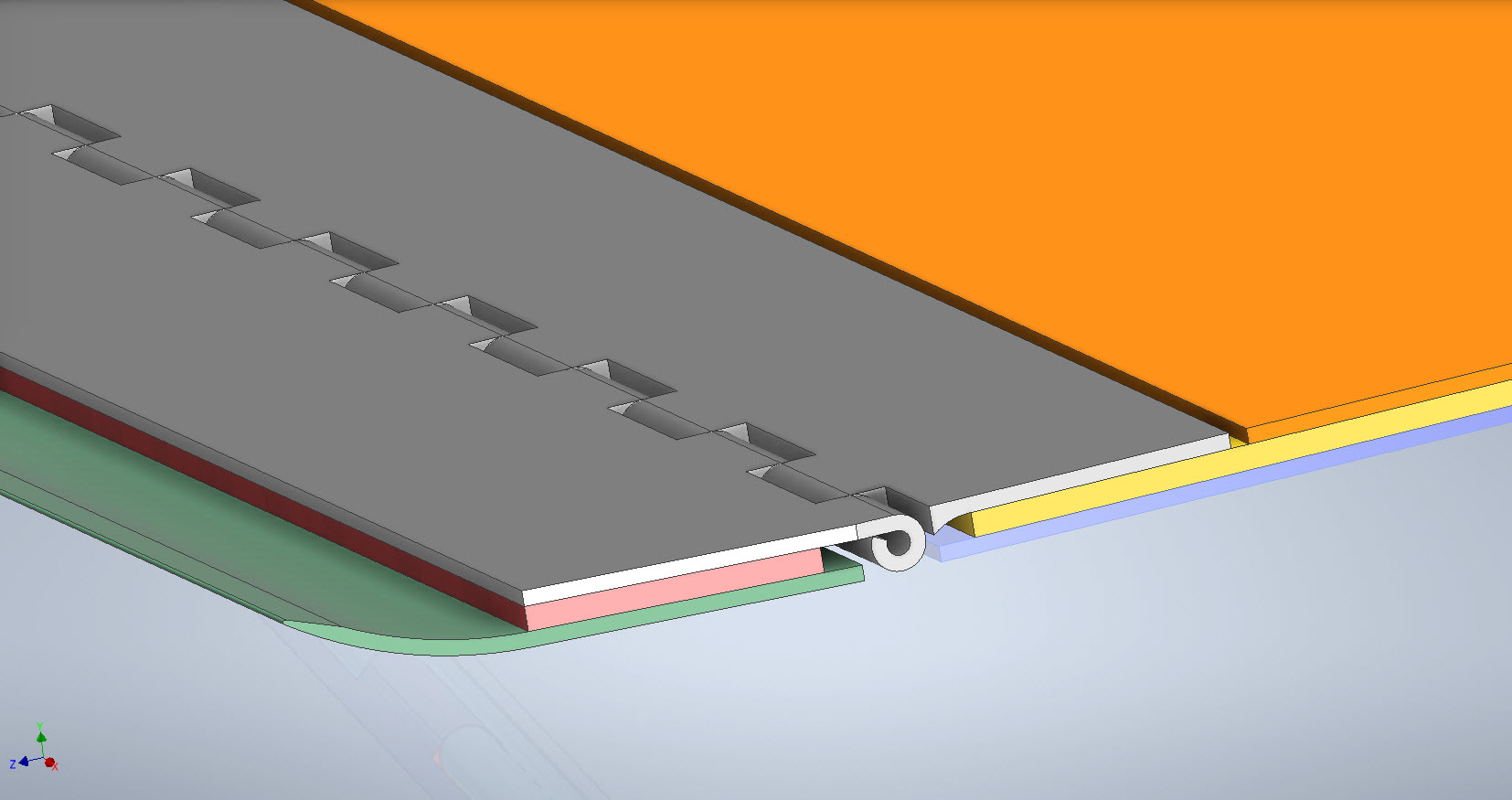
The technical bit: Each of the 3 flap panels comprises 3 layers of sheet metal with a total thickness of 0.18 inches or 4.572mm. The mechanical assembly is fitted between Ribs at Station 146 and Station 158 and driven by a Linear Actuator. The Dive Flaps were designed to be retrofitted to P-38 Lightning prior to P-38J which explains the location of the main support frame which aligns with the hole centers for a wing access panel and the forward panel fitted forward of the main beam. For reference, I have included a selection of design operational data and some close-ups of the mechanism. that you may find interesting below.

.

.

Technote: P-38 Lightning Wing Tip

Technote: P-38 Lightning Wing Tip Development:

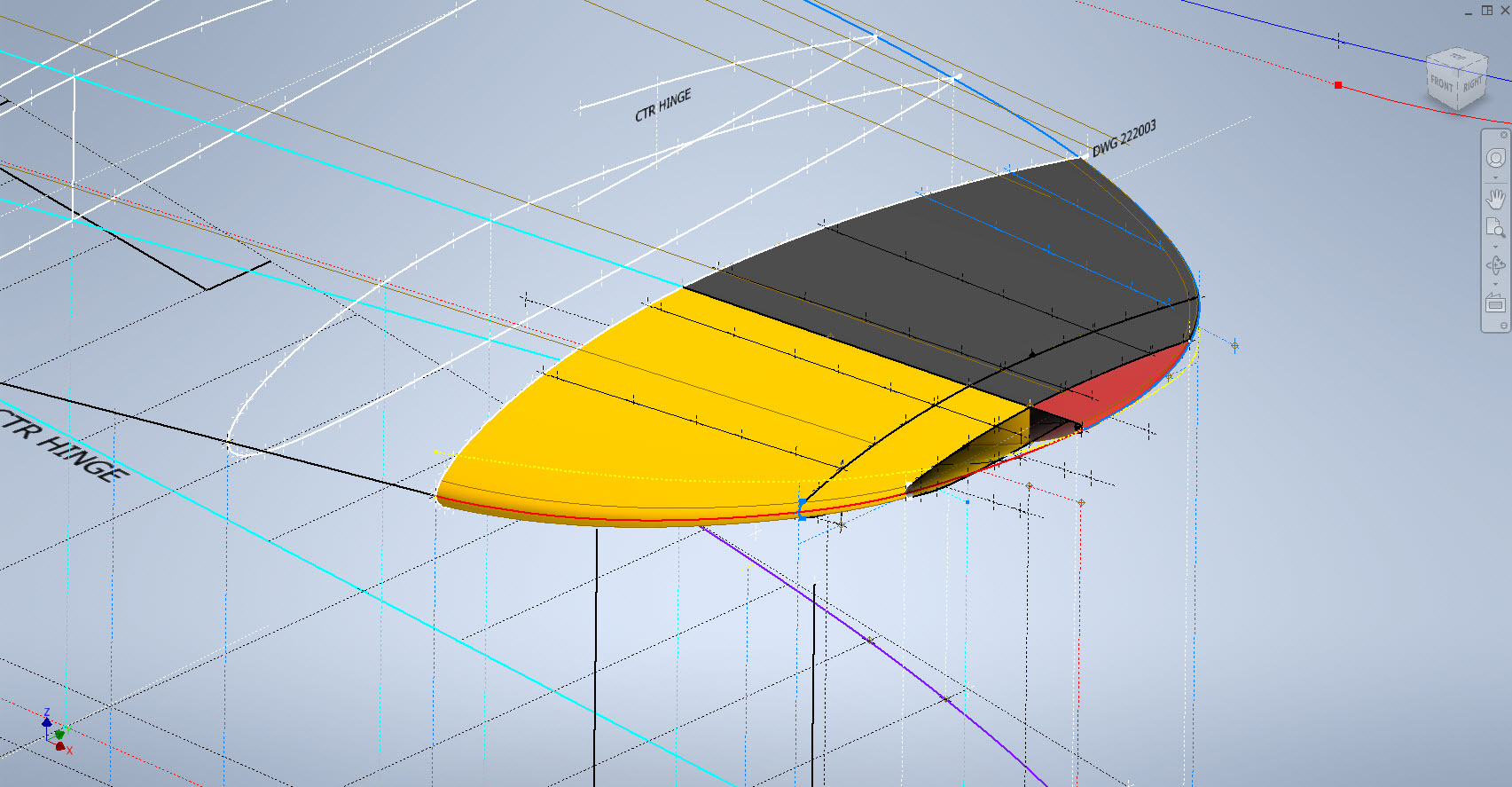
Developing this wing tip turned out to be more complex than I originally thought it would be. Because the model required a few interesting techniques I figured it is worthy of a quick technote that hopefully will assist others.

First, off the bat, you will probably have noticed the center partition which came about as a consequence of the development process. I will try to explain how this transpired…read on for more details.

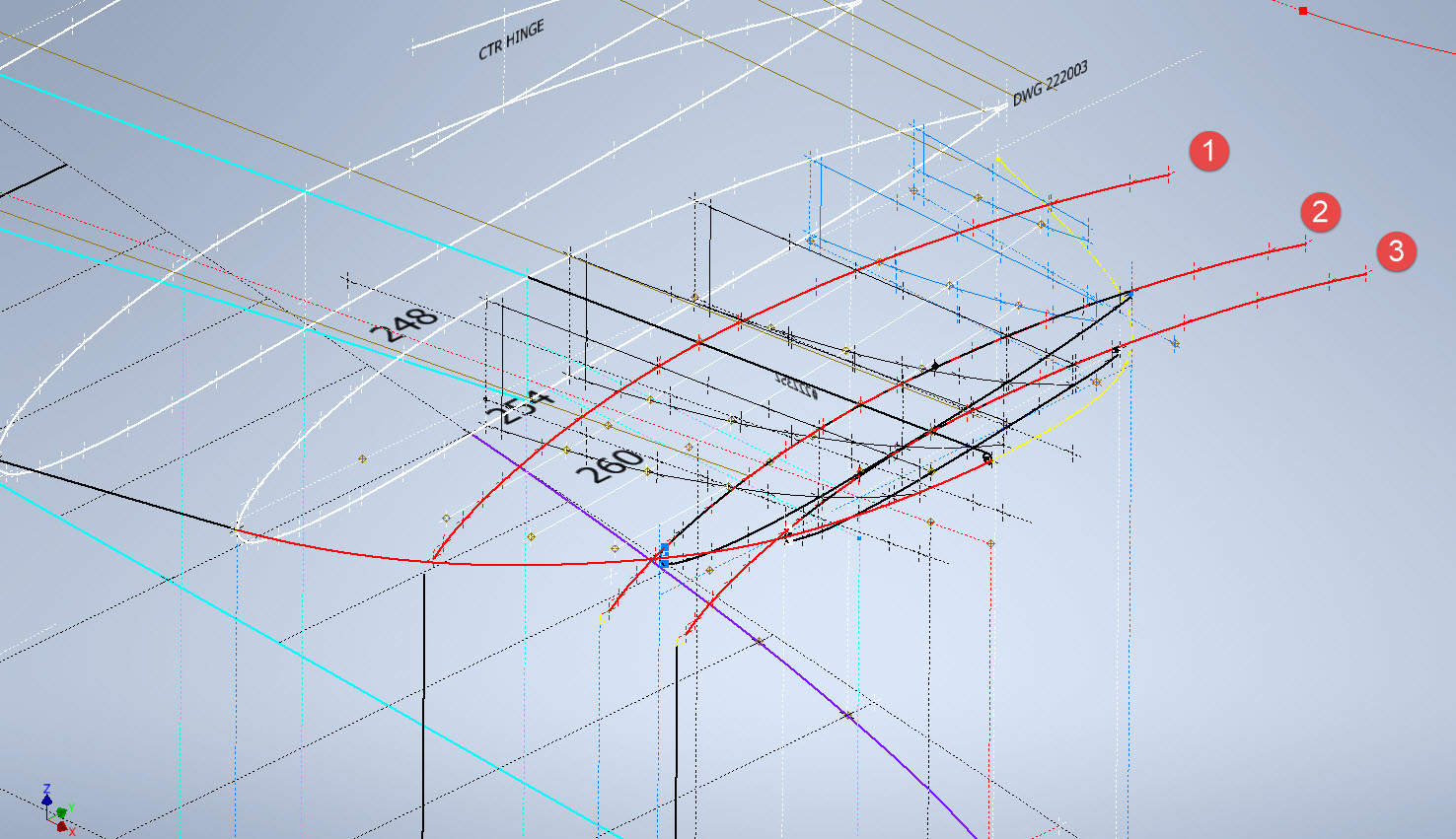
What we have is essentially one main rib profile at Station 289 and 2 others towards the tip which you would normally just loft to achieve the finished surface assuming that the required outline guide rails were included in the initial data set. Actually in this case we didn’t have those curved outlines as a 3d profile only a 2d outline on the plan view. Even with the guide rails in place just lofting the full rib profiles did not work due to the continuity of the rails in a circular manner that prevented a successful loft.

By the way, the circular guide rails at “A” and “B” were generated as intersection curves using a side profile (top right in the background) and the plan profile to derive the resulting intersection lines. I initially wanted to extrude the 2d plan profile and build a 3d curve on the face of the surface but I was unable to apply a tangent constraint to align with the Leading and Trailing edges…so my only option was a 3d intersection curve.

Realizing that a full rib profile loft was not achievable I decided to fill each rib profile with a patch surface and then split the surface at the main beam intersection, which incidentally is perpendicular to the ribs. So this gave me a patchwork of surfaces fore and aft that I used as surface profiles and lofted each section as shown using the guide rails at “A” and “B” and the center rail at “C”…this created the partition I mentioned in the beginning.

Once the main fore and aft sections were modeled I then proceeded with the extreme tip which was simply a case of again adding a surface patch to the small projecting profile in the center and lofting the surfaces separately as before. Occasionally when you have problems with lofting it often helps to break it down into more manageable chunks.

Accuracy is extremely important to ensure a good surface finish with no small deviations or folds. So I checked the coordinates of each profile mathematically and adjusted the dimensions accordingly for the top surface.

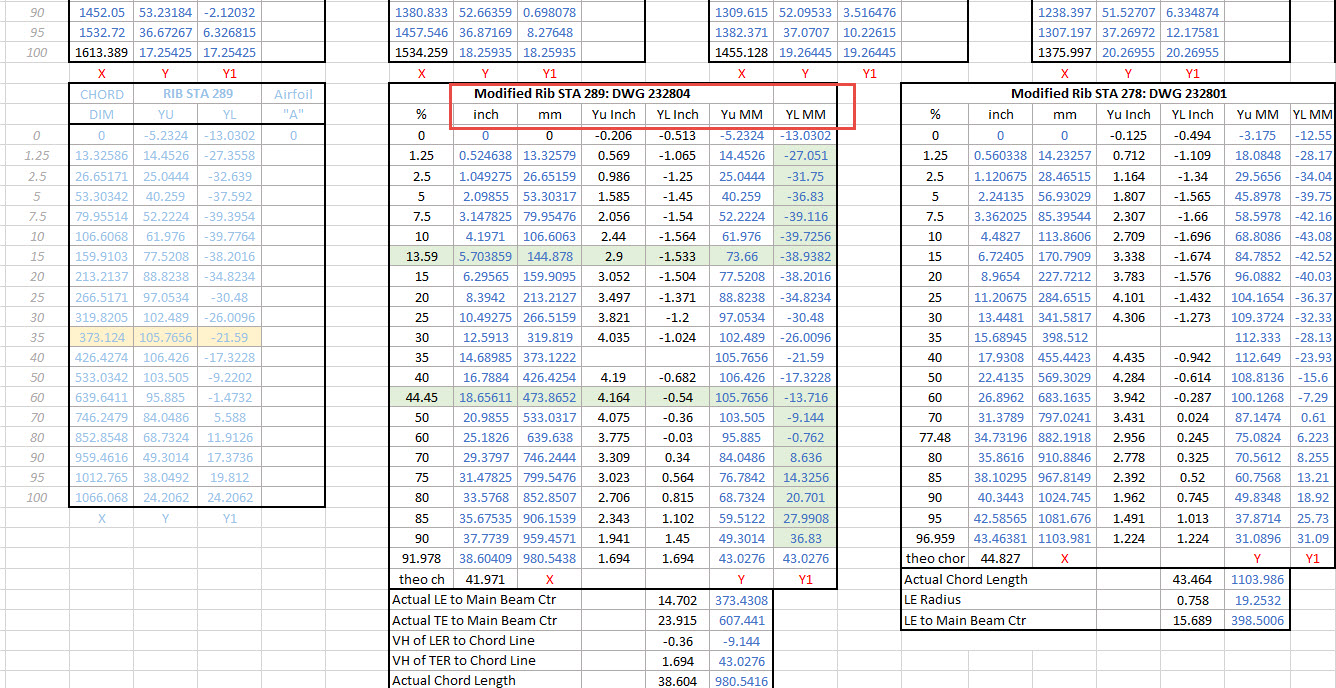
The rib profile at 1,2 and 3 was adjusted to the new coordinates for the top line only but making sure that the LE and TE were tangential to the mathematically generated curves shown in red. These end ribs are actually modified profiles according to the tabulated information on the Lockheed drawings…apparently, the profile at the wing tips is based on a NACA 4412 airfoil but when I generated a 4412 it did not match…I am not sure why but it is something that warrants further research. As I did not have the mathematical formulas or guidance on hand to check the lower profiles I accepted what information was contained in the tables…mind you I could have generated a line equation from this information in Excel. Incidentally, all the wing ribs were checked mathematically with the resulting dimensions used to generate the profiles throughout.

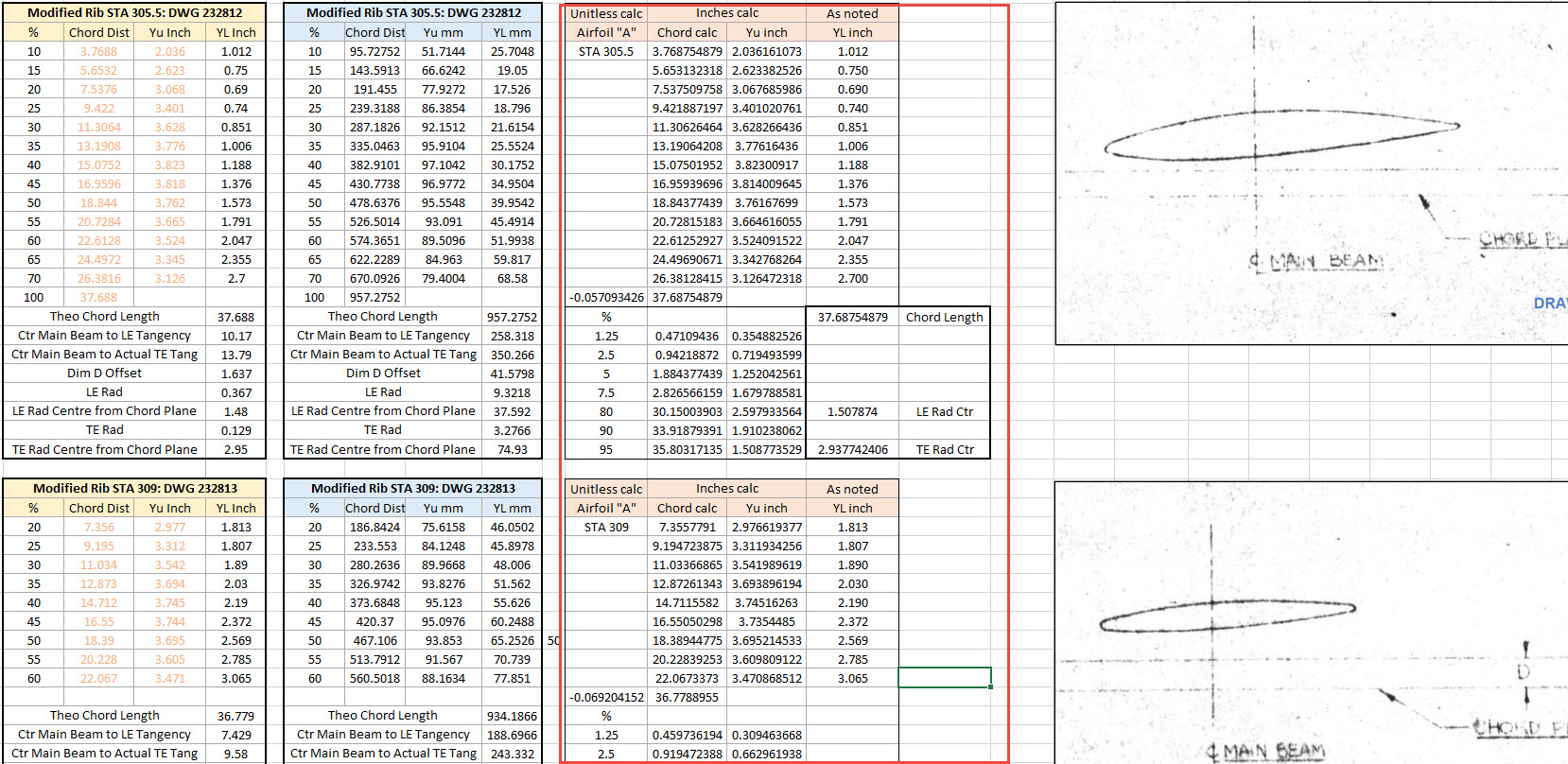
The first image shows a sample of the modified values at Rib station 289, highlighted in green alongside the normal profile on the left. The second image shows the explanation of how the main wing rib profiles were generated. All this information is included in the CAD/ordinate dataset. Also on the second image, you can see a typical rib profile extracted from the Lockheed drawings which shows the 0% chord is actually set back from the Leading Edge, which is most unusual. This created a few problems because now I had to determine from the CAD model the Actual Leading Edge before I could define the curved guide rails for generating the wing tip lofts.

This all may seem overkill and a lot more work than one would expect just to build a wing tip but the Inventor Loft command requires absolute precision when lofting with guide rails so it pays dividends to mathematically check everything where possible to ensure successful lofting. I shall update the CAD/Ordinate dataset over the next few days to include this new data.

.

.

.

Technote: P-39 and P-38 Updates

Technote: P-39 and P-38 Updates

An update on some recent work I have done for the P-38 Lightning and P-39 Airacobra. For the P38 Lightning, I now have the Boom Tailend interface with the Empennage and for the P-39 Airacobra, the new work includes the Auxiliary Fuel tank, Wing and underside panels at the Centre Section.

P-39 Airacobra Wing Layout and Aux Tank:

I was doing some research into the various closed penetrations on the underside panel as shown in the photograph on the right. So I modeled this panel to get a clearer idea of what was happening in this area as marked “A” in the underside view and front view images above. The 2 oblong holes are actually openings that normally would have a curved reinforcement which I understand would be used for the Auxiliary Fuel tank pipes and hoses. The Teardrops are for domed covers, which you can see more clearly in the first image view.

The Square cutout towards the rear of the panel is for the exhaust Flap and the slot to the front is for a removable panel that houses the Auxiliary Fuel tank mounting. The Aux fuel tank itself was well documented and was an interesting model to develop…I still have the fuel cap and vent pipe to add along with a few bracing struts to complete.

Following this exercise, I decided to further develop the wing layout. Although the CAD work for the wing was well-dimensioned with outlines for the Wing plan, Front Beam, Rear Beam, and Aux Rear Beam there was not much information on the actual rib profiles. We know that at STA 1 (22″) from the center of the ship the rib profile is a NACA 0015 and at the wing tip this is a NACA 23009 profile (204″ outboard). Other than that we have virtually no ordinate information for the ribs except for a partial profile at STA 7 +7.

The arrangement for the wing has been a subject of debate on several forums mainly regarding the construction of the Wing Tip. Usually, when there is a change in the rib profile the change occurs at the intersection of the wing tip and main wing however in this instance it is located at the extreme point of the wing tip. So the surface model is based on a loft between the 0015 profile at the root and the proxy 23009 profile at the extremities. This loft reveals an interesting caveat related to the evident wing twist and alignment of the Leading Edge.

Clarification on the location of the different NACA profiles was actually found in the NACA Report L-602 on the Flying Quality of the P-39 which defines the relative positions of the profiles. The caveat I was talking about relates to the wing twist…normally when we think of Wing twist or Washout we visualize the rib rotated about the 30% or 35% chord with the leading edge dropping and the trailing edge lifting slightly…but that is not what is happening here. The entire 23009 rib drops from a static position at the trailing edge towards the leading edge…the rotation is roughly 1.257 degrees. This results in a continuous leading edge downward alignment all along the length of the wing from the root to the tip.

As this is most unusual I was able to check the resulting surface model against known dimensional information for the beams and the partial profile at STA 7 +7 which matches. I still have to model the wing tip which has an interesting upward curvature.

P-38 Lightning Boom Tail End:

Another challenging aspect of the P-38 Lightning was determining the geometry for the Boom Tailend…essentially the intersection of the Boom and Empennage. We do have the lines of intersection for the Vertical Stabiliser, Horizontal Stabiliser, and the end of the boom but we don’t have any dimensional information for the curved profiles though we do have drawings that give us some idea of the profiles.

This was surprisingly difficult to get right and to be honest this final version is the result of 3 different attempts to achieve a viable solution. At first, I attempted to draw the Boom section, and stabilizers then fill the void with a surface patch to naturally define the curved fillets…with a few guidelines I managed to get a reasonable result but I incurred a few anomalies with the finished surface which I couldn’t correct. The second effort was more structured with a number of contours traced from the available drawings as a reference to gauge the curvature and then try again with surface patches but this time is broken down into quadrants, top 2 sections, and bottom sections…this was better and very close but again I had a few surface deviations at the leading edges.

Finally, I decided to have a look at using variable radius fillets…although I had already tried this unsuccessfully I changed my approach slightly which gave me good results. The fillets I used initially were tangential which caused a few problems where they met particularly on the top surface…what was happening was a sharp edge developing where the fillets intersected…so that was no good. It also mattered in which order the fillets were generated.

Eventually, I figured why not try G2 fillets and see if that worked…I am always wary of using G2 fillets due to some bad experiences using them before but I was running out of ideas and I was keen to find a workable solution. I started with variable G2 fillets at “1” and “2” with several control points to control the curvature and avoid folding the surface at the leading edges. After some fine-tuning, this worked out well for the first 3 locations. The remaining fillet for the Vertical Stabiliser did not go quite so well as it was impossible for the CAD software to give me a G2 variable fillet…so this one ended up being tangential. Perhaps with a bit more tweaking, it may have achieved a G2 fillet but I had spent many hours on this and I needed to make a decision.

There is a very very slight edging but it is almost unnoticeable on the final product. The final curvature of this model matches well with the guidelines extrapolated from the drawings and I am satisfied it is a very good representation of the Boom Tail End.

I hope you find this article useful and as usual any inquiries please get in touch at hughtechnotes@gmail.com

.

.

.

Technote: P-38 Lightning Cockpit Canopy

Technote: P-38 Lightning Cockpit Canopy

These are the basic profiles for the P-38 Cockpit Canopy glass panels derived from the XP-38 drawings. Knowing that there were differences between the prototype XP-38 and the production models I was initially reluctant to accept the XP-38 dimensions for developing the cockpit canopy. The production drawings do not contain any useful information to develop these profiles nor indeed was there any drawing stating the inclination angle of the windshield. There was also not enough information from the Lockheed ordinate drawings for the fuselage frames which left me with the only option to use the XP-38 information.

It transpires the dimensions on the XP-38 drawings are indeed pertinent to the production models. There are exceptions which relate to the side windows.

The drawing on the left is the P-38H side glass frame and you can see this is dimensioned as a radius value which differs from the XP-38, which is defined by ordinate dimensions. There is also a slight variation in the overall length, so I naturally presumed that there may be other variables that conflicted with the prototype model. The only way to know for sure was to build the model based on the XP-38 and cross-check against known information with the production models.

So after 3 days of frustrating intensive work, I now have the base model for the XP-38 glass profiles and I have concluded that the profiles for the front, top and rear panels dimensionally are compatible with production variants. The only area that has marginally changed is the side panels, although changing from ordinate to radial dimensions still retains alignment with the known fuselage frames.

Also worth noting is that Lockheed uses a 3-inch grid system for aligning all the fuselage components which are useful when you are trying to locate these panels where no location is noted…you just have to align the 3-inch offsets to the grid. Each of the 3-inch offsets on this drawing section for example can be matched with the full-size grid to locate the correct elevation for the top glass panel and so on.

It is actually a really clever idea and helps obviate any doubt about where an item should be located.

One further tip when working with these Lockheed drawings is that for plan views and elevation views there may not be enough dimensions to fully locate a 3d point for determining a complex curved line.

For the windshield, there was sufficient information in the vertical plane and the horizontal plane but as they were not related I could not derive specific 3d points from this data alone.

So I resolved to replicate this on 2 sketches and extrude a surface profile for each sketch. The intersection of the surfaces gave me the requisite 3d glass mold line.

The final check; that ensures this is correct; is to view the final glass panel along its axis to check that the curvature matches exactly with the top of the ordinate fuselage profile at STA 126…which it does.

For some reason, the ordinate dimensions are on STA 123 instead of STA 126 which means the end result will need to be projected to get the full glass panel model…I haven’t done that here. These are primarily dimensional studies and I tend to only include 3d models where this benefits the purpose of confirming data integrity. Oh by the way the inclination angle for the windshield is 27 degrees…don’t be sidetracked by the frame connectors that show 26.5 degrees…the reason for the 0.5-degree variance relates to the interface with the rubber sealing. Hopefully, you will find this useful.

P-38 Lightning: New Project

P-38 Lightning: New Project

New Ordinate/CAD Project: The Lockheed P-38 Lightning is an American single-seated, twin piston-engined fighter aircraft that was used during World War II. Developed for the United States Army Air Corps by the Lockheed Corporation, the P-38 incorporated a distinctive twin-boom design with a central nacelle containing the cockpit and armament.

This project will dissect the complexity of the aircraft dimensions with fully developed spreadsheets, CAD models and drawings. I have drifted back and forth on this project over the last few months, studying the blueprints in detail to determine the best way of presenting the data in a usable format.

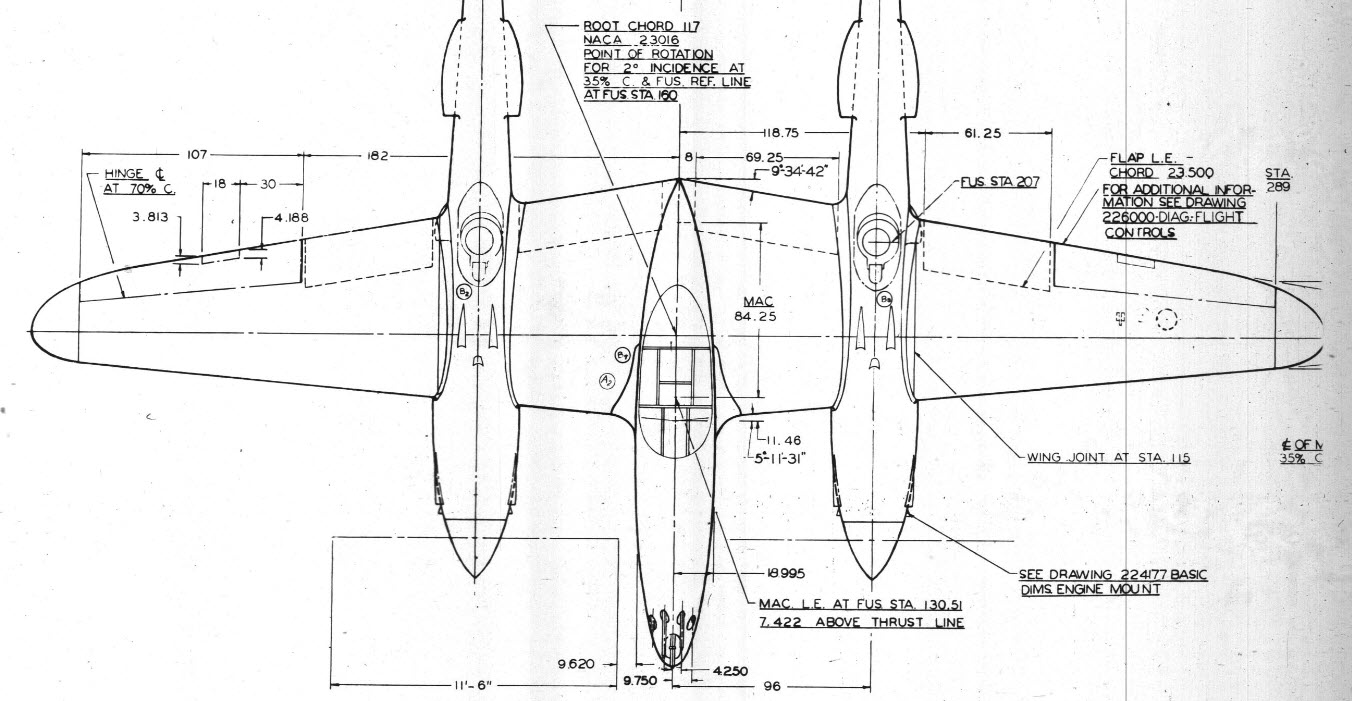
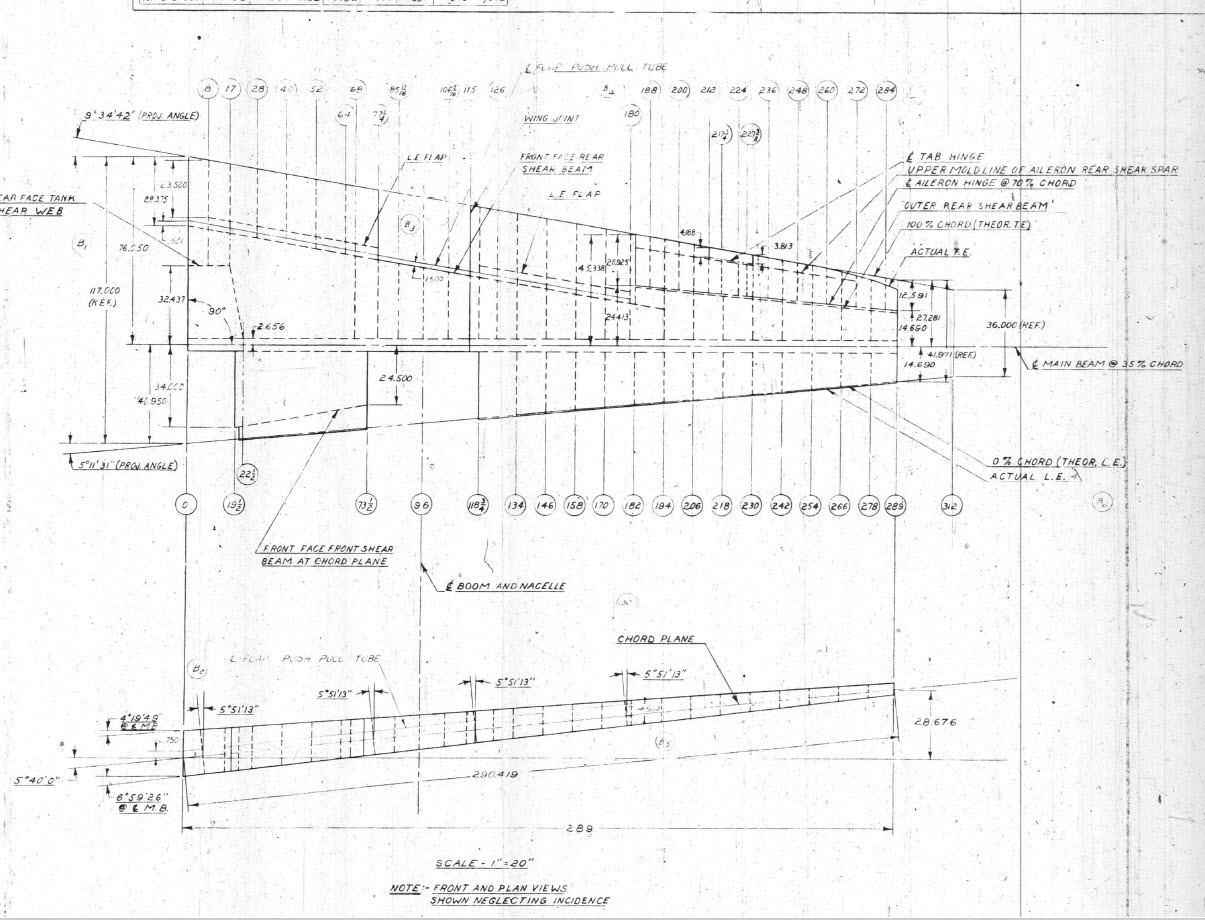
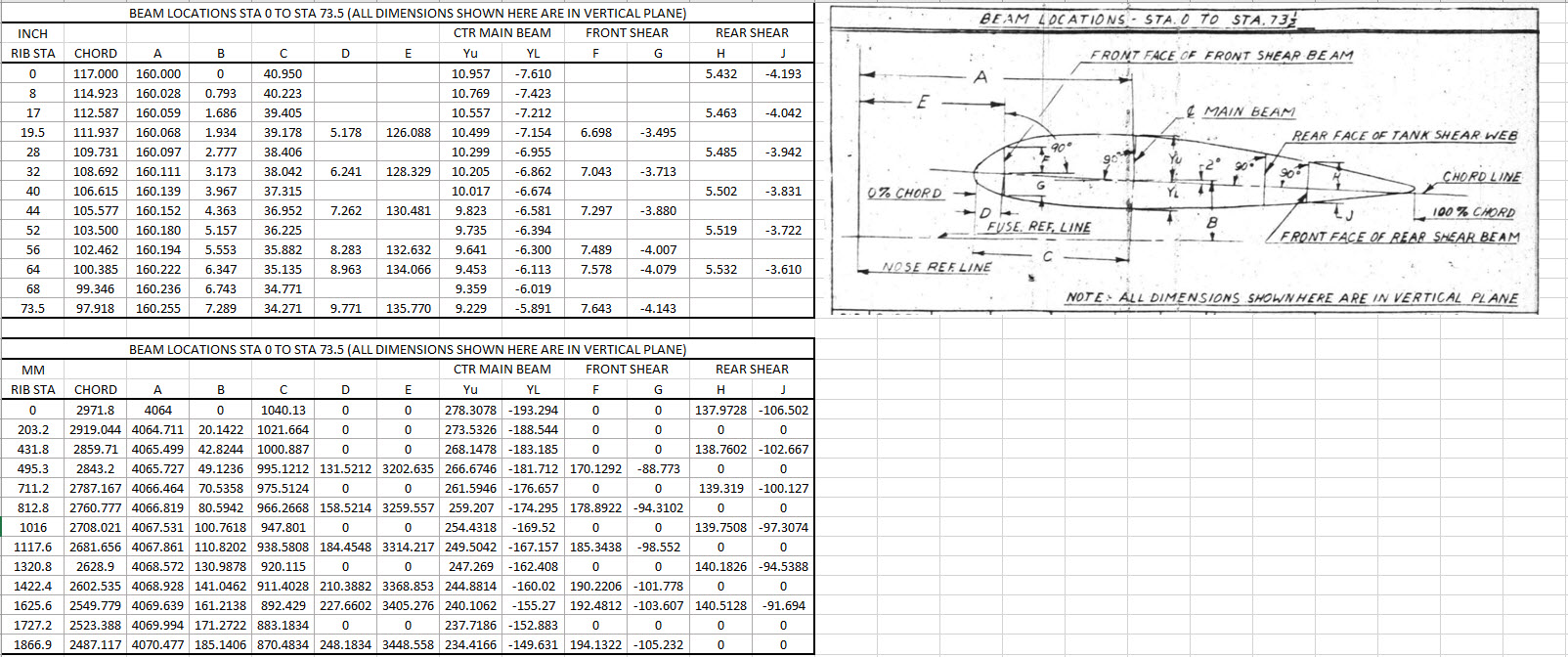
Surprisingly the wings are probably one the most complex parts of this study. The complexity comes about as a consequence of how the dimensional data has been recorded. For example, the wing chord is at a dihedral angle of over 5 degrees with the wing ribs actually perpendicular to the ground plane.

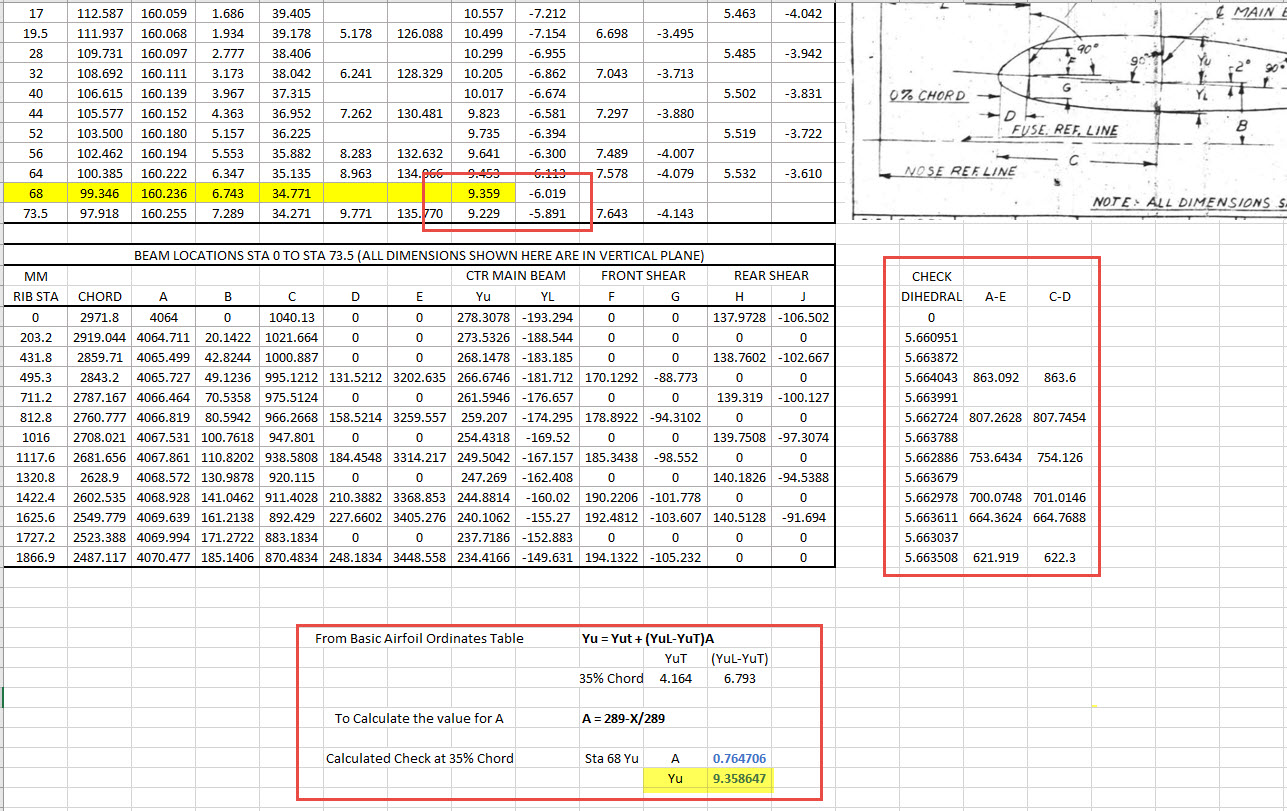
When we define the wing ribs we are actually working on a vertical plane angled to the wing chord line with the main beam and rear shear beams perpendicular to the chord on section. We also have the dimensions for the basic wing airfoil profile. Initially, I will record the rib dimensional information and generate the correct array of points at each Station. Then I shall calculate the airfoil profile at each station based on the given formulae Yu = YuT+(YuL-YuT)A. This should give us a means of verifying the tabulated data, for example; the table values for the Main Beam on 35% chord should match with the calculated airfoil values.

The plan is to record the dimensions as noted, vertical, horizontal and chord aligned in inches and millimetres exactly as defined on the original blueprints. Then I will extrapolate the X, Y, Z, coordinates for each point taking into account the chord angle of 2 degrees so that we can simply transpose these points directly into CAD at the correct positions relative to the origin point where the Nose Ref Line intersects with the Fuselage Ref Line.

The other caveat to all this is the 0% chord line is actually set back from the leading edge. There is yet another table of dimensions that relates the curvature of the leading edge to the 0% chord line. Ultimately to define the wing ordinates will involve a lot of work and then checking to ensure accuracy and correct alignment with the airfoil claculated profiles. At the end of the day, it is about making sense of all this fragmented information into a workable solution that makes it easier to interpret and use in any CAD system.

This is essentially how I work with all these Ordinate/CAD datasets. It is not just about recording information but also to check that the information works and that the end-user can transpose this into whatever system they are using. It is quite common for the information on the blueprints to be obscured, missing or simply illegible which usually requires a fair amount of time searching for answers. To complete this project I estimate something in the region of 300 manhours.

Update: 26th April 2022:

I have not yet decided on how best to present the Wing Ordinate dataset. I am looking at establishing check tables that will effectively compare the noted tabulated dimensions on the Blueprints with the calculated values. Also, we need to derive locational information directly from the wing plan CAD drawing for the Rear Shear beam and do a calculated check. Just to give you some idea of where I am going with this see screenshot below. As I mentioned above, the information on the drawings is fragmented so it is important that the excel spreadsheet data is presented in a clear and legible manner. Just now it is a bit of a muddle.

A quick update: Have rearranged the spreadsheet now with calculated values in lieu of listed values so the CAD model will be considerably more accurate. Calculated values are in blue text.

The rest of the Rib station tables will be added with similar calculated values and then I shall create a second worksheet with the airfoils for each corresponding station. The final sequence will be the extrapolation of 3D Ordinate points from a single datum so it will be possible to build an entire wing just from one collection of X, Y, and Z coordinates in one step. At least up to STA 254…still need to figure out the intricacies of the wingtip geometry.

Ordinates for each wing STA profile are calculated and recorded as shown. The highlighted rows at the 35% chord, are checked with those corresponding values listed in the tables above from the Lockheed original drawings. By the way, the drawing on the right is the Basic Layout Engine Mounts…there are 2 variations on this; both of which will be developed.

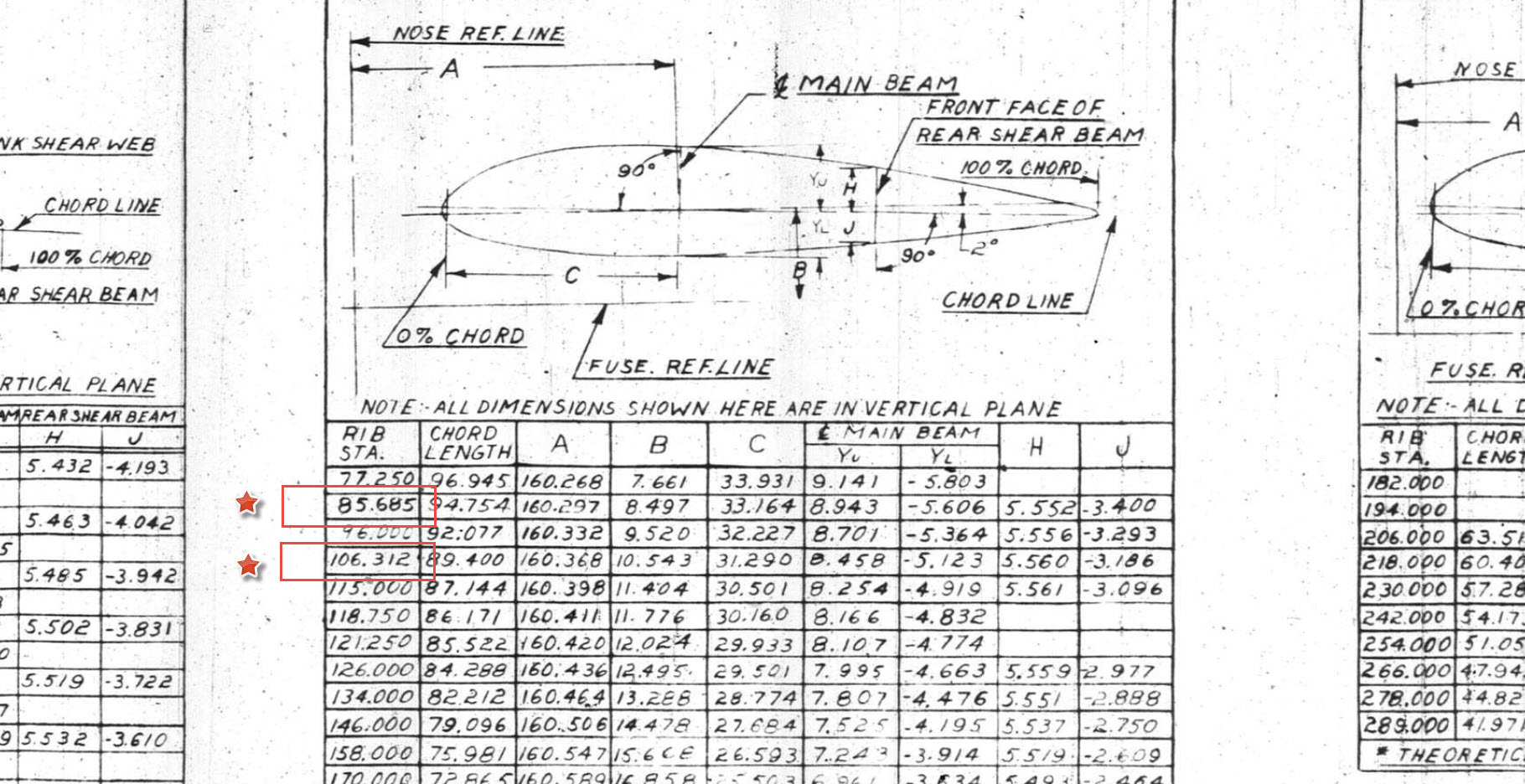
In the above screenshot, I have highlighted 2 minor corrections to the wing rib locations. They should be the decimal value for 85 11/16″ and 106 5/16″.

Update 3rd May 2022:

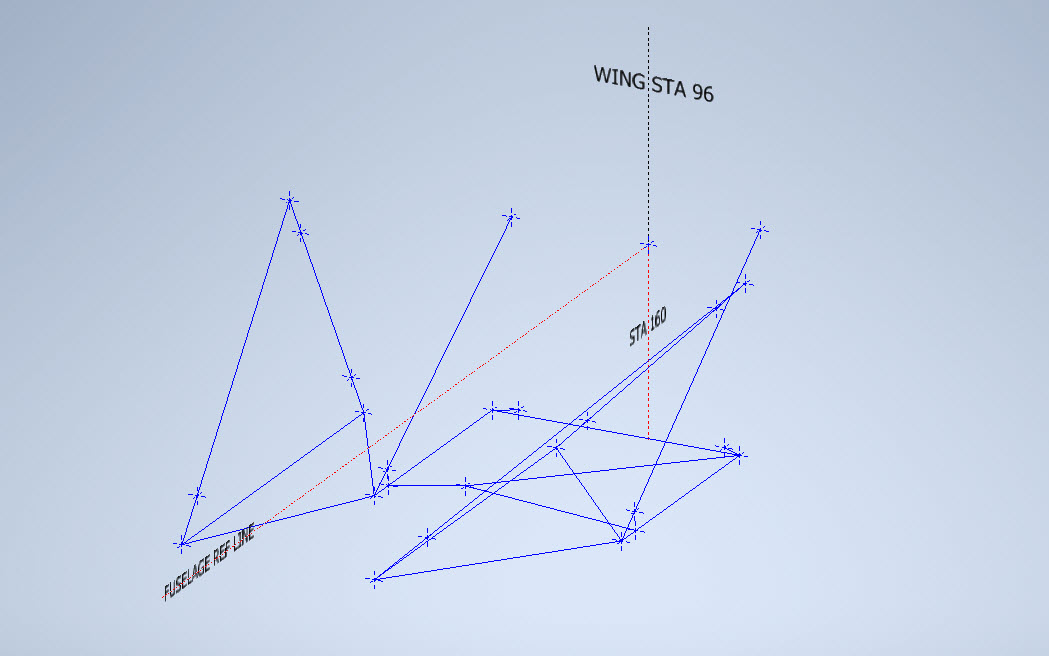
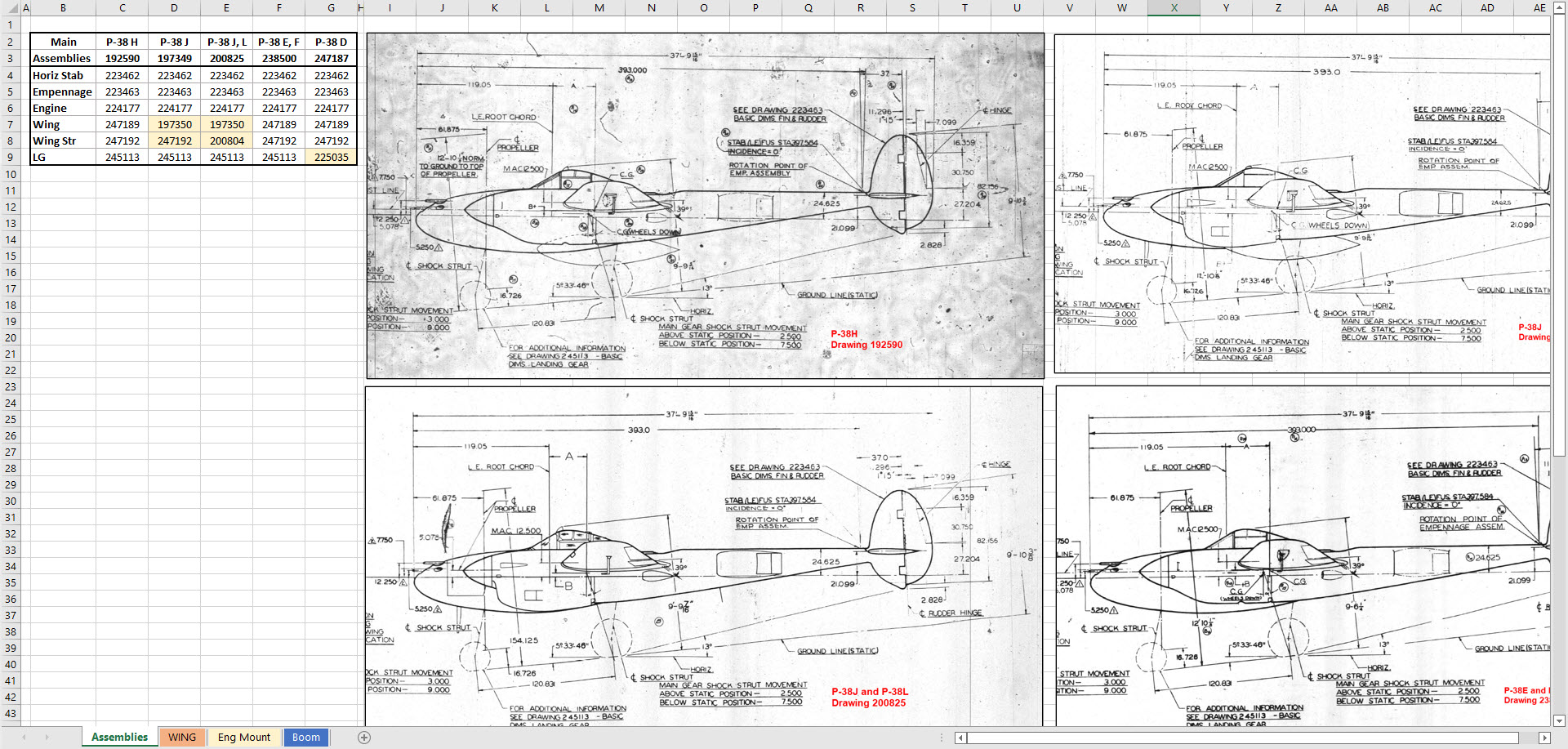
Have made good progress on the datasets for the Wing, Boom and Engine Mounts. Whilst working on this project I thought it may be prudent to compile an assembly list for each aircraft type for the basic dimension layouts as shown below. I plan to do a Technote shortly updating work methods using the ordinate dataset from Excel spreadsheets and include information on Sketch coordinate systems; manipulating the X, Y, Z-axis locally…so look out for that.