F4F/FM2 Wildcat Wing Layout Study

F4F/FM2 Wildcat Wing Layout Study

Since my last post, I have further developed the Wing layout which has revealed a number of key considerations that you may be interested in.

Wing Trailing Edge:

Other than a noted offset on the rib drawings there is no definitive alignment specified for the Wing Trailing Edge. What I found was the Wing Trailing Edge rib profiles were reasonably accurate from which I could determine this alignment.
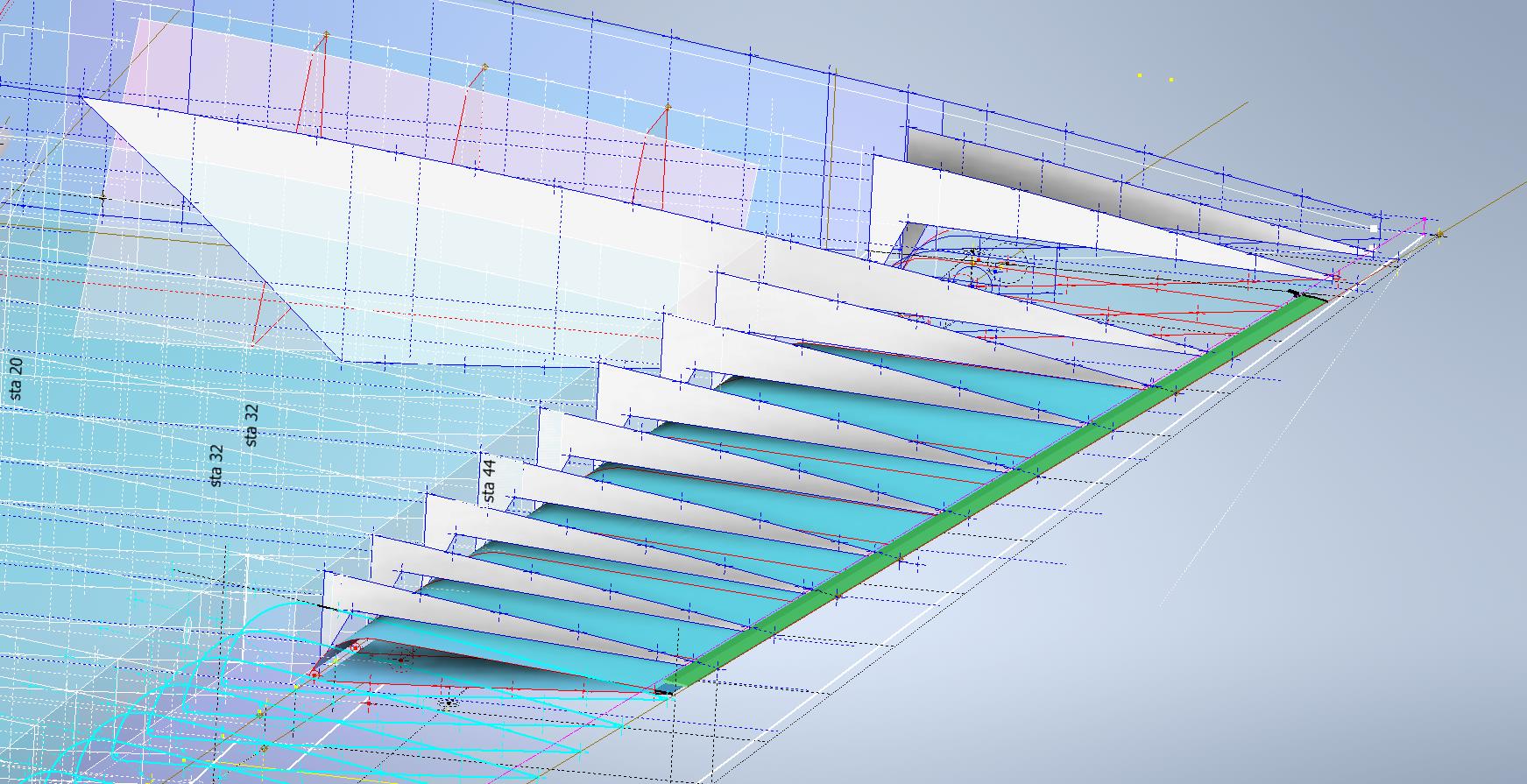
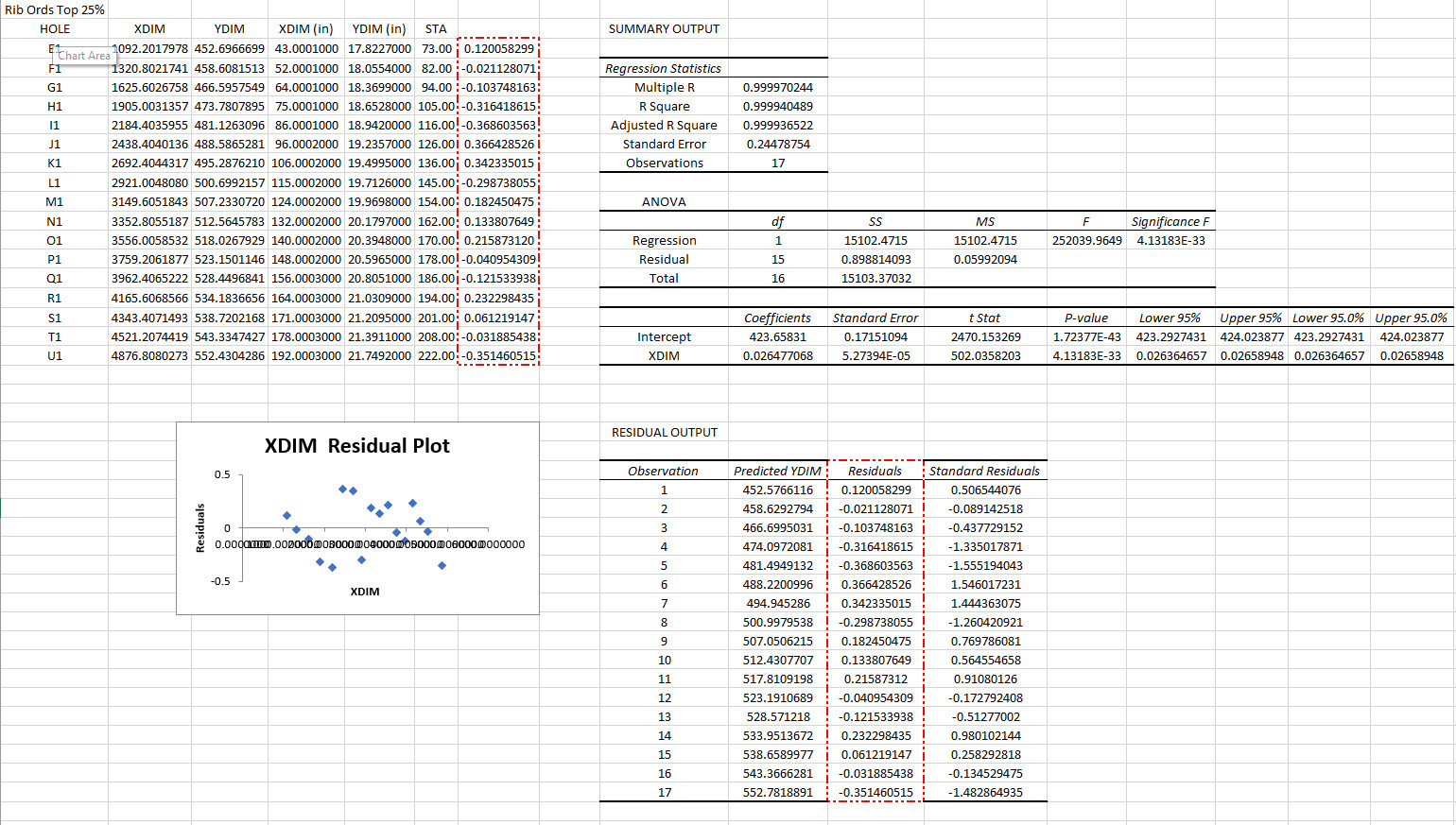
The component shown in green is the Alcoa K14403 standard Grumman profile for the trailing edge. When I developed each of the wing TE profiles (white) there was a minuscule variation in the alignment, so I needed to determine the best-fit line through those points using Linear Regression Analysis. I could just have easily selected 2 random points from the wing TE profiles which would have been okay but I like to get this stuff right.

By using Linear Regression there is no guesswork or random selection it simply analyses the point coordinates and calculates a line that best fits all these known points. As we have 11 coordinate points to analyze the end result will be an accurate placement of a Trailing Edge line that represents the collection of known coordinate points. The column named Residuals is the offset from the known coordinates to this line. As you can see the max offsets are in the region of 0.3mm…well within normal fabrication tolerances.

Having now established a correct Trailing Edge I checked this against the flaps (cyan) to see how well the assembly aligns with this newly defined trailing edge. I noted a deviation of 2.2mm on the outboard edge towards the wing tip.

Flaps:
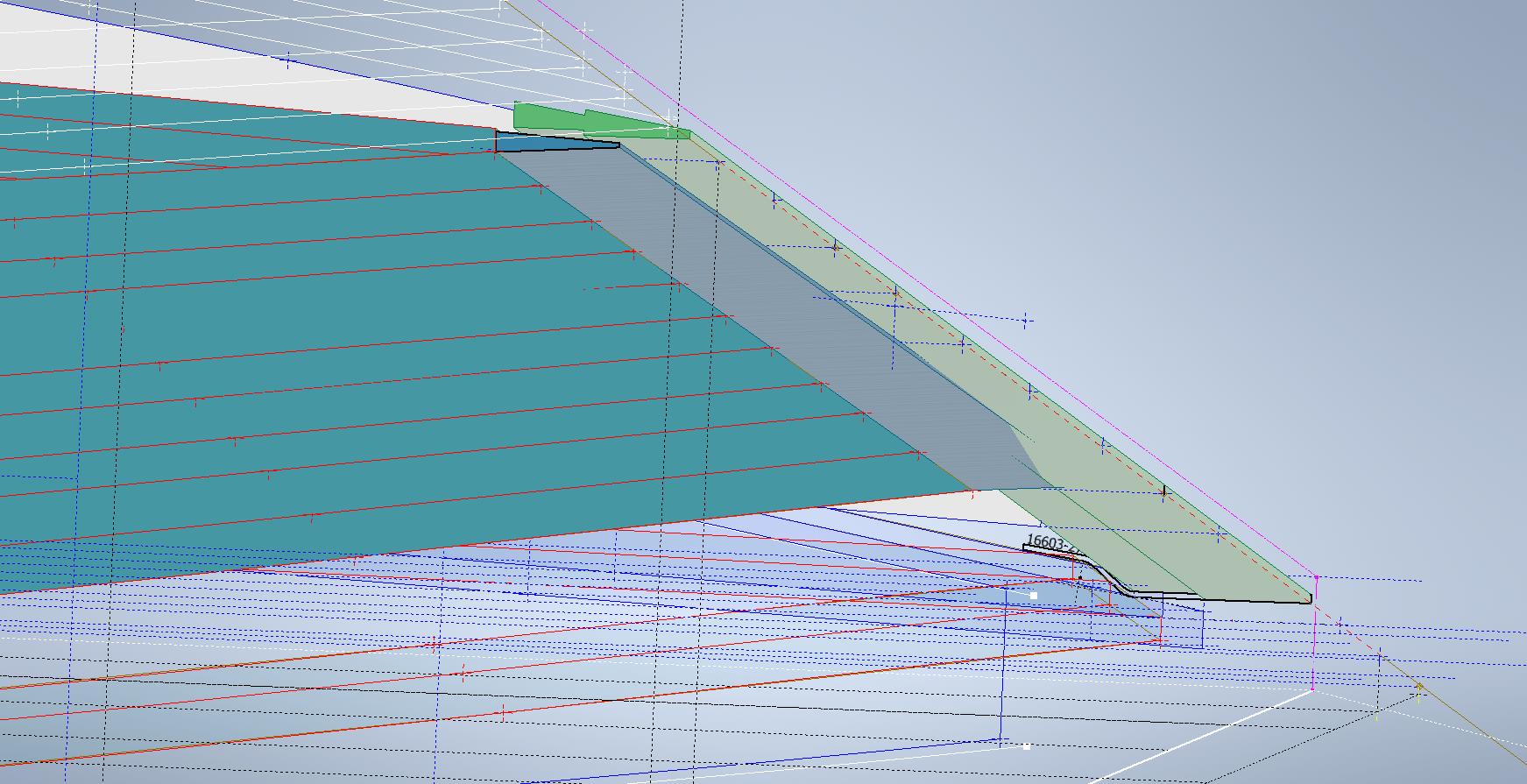
In the image above you can see how the flap assembly does not align exactly with the wing trailing edge. My first impression was that I had made a mistake with the model, so I rebuilt it resulting in the same deviation. So I checked the location of the hinges…they are dimensioned to 4 decimal places of an inch so for all intents and purposes they are exactly located. Further research reveals that there is a return spring on these flaps and I think what is happening is the flap layout is deliberately set out this way so the flap first engages with the wing at the control cylinder end and then the return spring engages closure with the outboard end…hope that makes sense. Grumman has used this type of spring mechanism to engage the closure of wing surfaces elsewhere at the wing folding mechanism.

I believe the geometry for the flaps is correct however my dilemma is whether or not to adjust the alignment to align perfectly for the future purpose of design analysis…and of course should there be any interest in the development of an RC model. One to ponder.

Wing Folding Web:

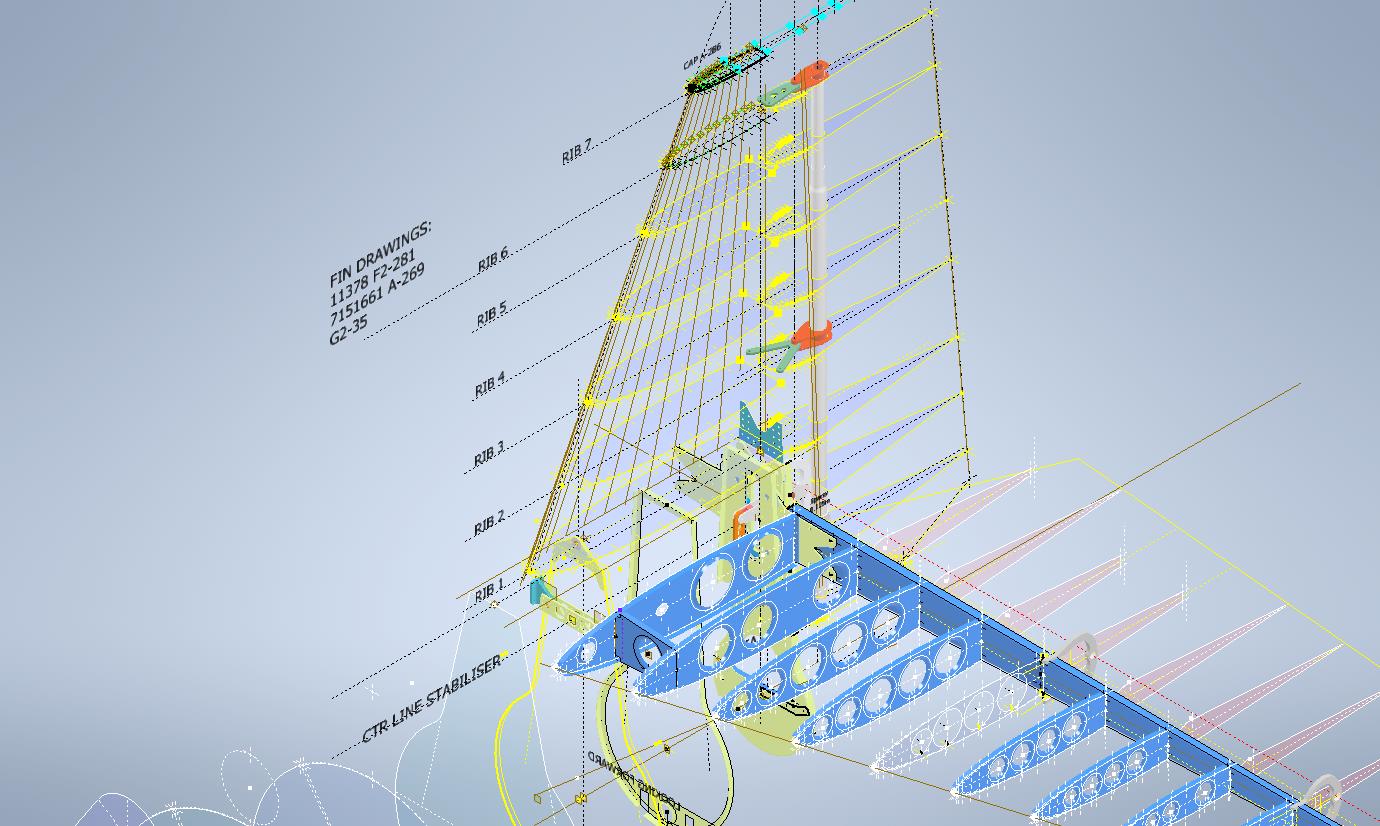
On the inner wing stub section, there is a sloped web plate attached to 3 triangular gussets. This is basically the mating plane for the wing stub and the main wing assemblies at the wing folding joint. This is one area that is not so accurately dimensioned…when you develop the triangular gussets there is a slight variation in the edge slope that this web plate is fitted to and similarly, the profile of the web plate is also marginally out. We are talking about fractions of millimeters but it does matter. I developed this area in a separate assembly where the wing ribs were lofted and then the triangular ribs and web plate were sectioned. Incidentally, the second image above is the only drawing (#7150645) that indicates the slope of this web plate at 50 degrees. You can also see the numerous datum lines that we have for setting out this wing that I mentioned in previous articles.

The mating portion of the outboard wing that engages with this web plate is the spring-loaded assembly I mentioned above…I have yet to do that part…will probably feature in a future article.

Wing Folding Hinge:

Just a quick update on the Wing Folding Hinge. I have this fully dimensioned now as an ISO View, Front and Side elevations which enables alignment checks with associated ribs and web plates. It is important that the rear face of the main spar aligns with the center of the hinge so these dimensions help establish this correct relationship.

Wing Tip:
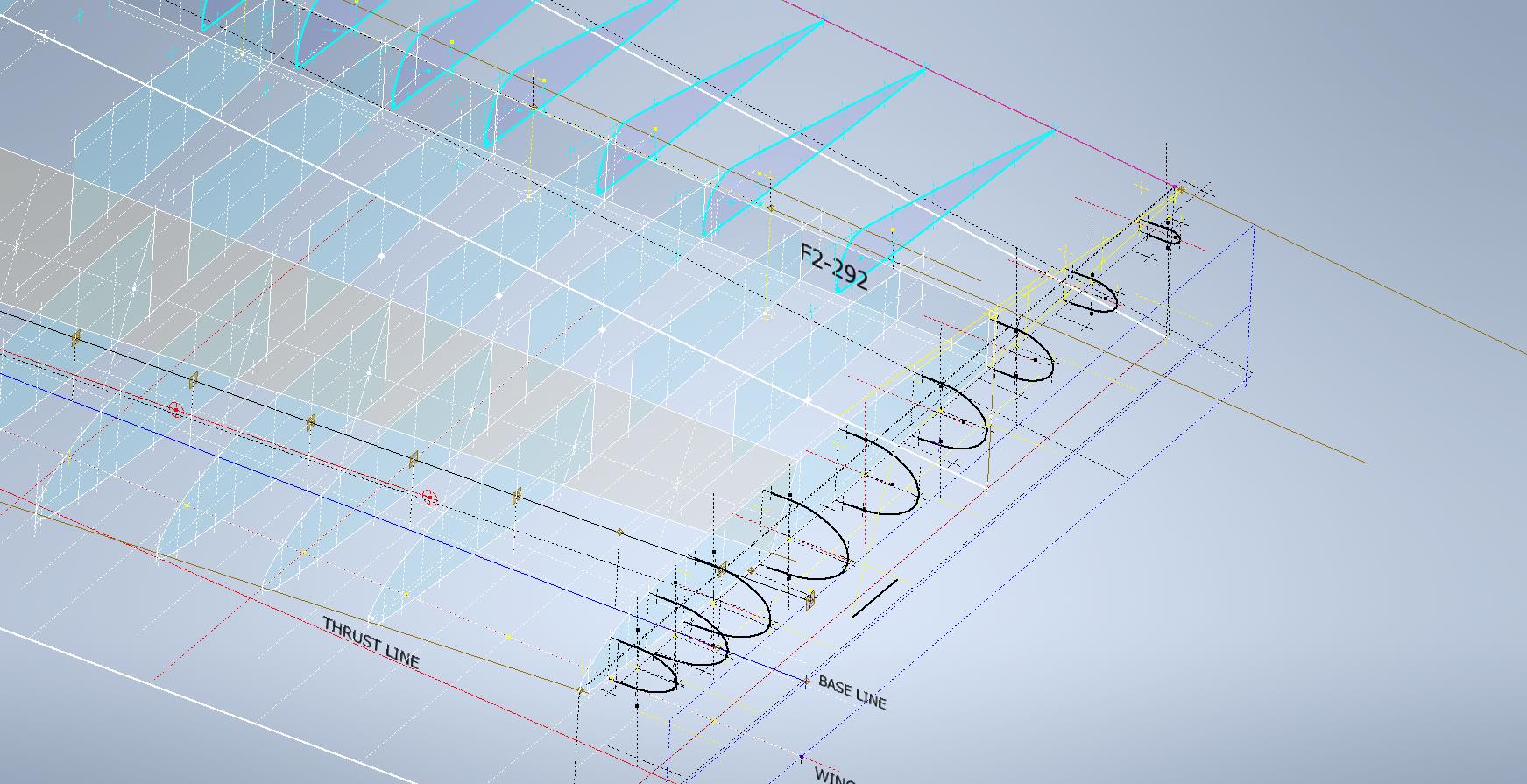
The wing tip sketch profiles are now drawn but there appears to be a slight mismatch with the wing tip rib profile at Sta 222. The Trailing Edge at 55/64″ below the Chord LIne was also puzzling as it did not align with the Trailing Edge line mentioned above. Again my first impression was that I made a mistake with the rib profile…drawn again…same result. I then checked the alignment with the Aileron assembly and whilst the wing rib TE aligns with the Aileron TE the Aileron does not align with the Wing Trailing Edge line.

This one is a bit more difficult to comprehend as there is no logical reason for the Aileron to essentially drop toward the Wing tip…yet the wing tip rib and aileron align well. Again I checked the hinge locations and they are exactly where they should be. I have been in touch with a number of museums and restoration companies to see if they have an explanation and also requested photographs along the edge of the aileron to visually examine the aileron alignment. I will get back to you on this one. By the way, I also carried out a linear regression analysis to determine the exact reference line locations for each aileron rib as a check.

This aircraft is surprisingly complex and whilst there may be perceived anomalies that at first cannot be explained there is usually a good reason for being the way they are. For example, the leading edge of the horizontal stabilizer has a negative camber towards the tip, essentially the leading drops….this is most unusual.

Finally, to make things even more puzzling the wing tip rib profile is not actually a NACA 23009…it is close in profile but it does match exactly…I believe this is a modified NACA 23009. Once I have all the ribs modeled according to the Grumman drawings I will calculate the wing rib ordinates to double-check the profiles…that will be a real pain and time-consuming thing to do as the ordinates are at 4-inch and 2-inch intervals along the chord and not by chord percentage as one would expect…so I need to transpose that data from the cad models to develop the equations for checking.

I have spent an incredible amount of time developing this wing, perhaps more than any other aircraft study I have done. This design is very complex and keeps throwing up small anomalies that at first are difficult to comprehend…it does require a lot of research to figure out the reasons why.

Update 17th Sept 2023:

Wing Rib Ordinate Check: As mentioned above I have now carried out a check on the wing rib profile ordinates. Normally I would do this the same way as I calculated the wing rib ordinates for the P-38 Lighting but that is only applicable when you know for certain the root and wing tip rib profiles. The main point of this exercise was to determine the accuracy of the FM2 wing tip profile which is apparently different from the stated NACA 23009 profile.

I resolved to do this using Linear Regression Analysis from plotted points on the 15%, 25%, 50%, and 60% chord planes. These percent chord planes actually have to be determined separately because the wing rib ordinates on the Grumman drawings are incrementally spaced at 2″ and 4″ intervals which of course does give us the straight-line projections we need.

Typically I did this for the top and lower ordinates recorded from each rib at each chord plane and compiled the resulting data into a table in Inventor which was then exported to MS Excel for analysis. The analysis confirms that the wing tip profile is accurately drawn and the ordinates on the drawing profile are correct. I shall also do a similar exercise to check the dimensions of the main beam at the flap and ailerons.

Drop me a line for further information at hughtechnotes@gmail.com

Please consider making a small donation, every contribution makes a real difference.

Grumman F4F/FM2 Wildcat Update

Grumman F4F/FM2 Wildcat Update:

Following on from my previous posting regarding the Excel Transpose function; wherein I mentioned the updates to the Grumman F4F/FM2 Cad/ordinate dataset; I thought I would share a few screenshots of progress so far.

As you can see the aircraft is partially 3D modeled…there is actually a good reason for this other than the fact I enjoy the 3D modeling! I have found that on the main assembly layout drawings, the dimensions are often shown to one side of the spar whereas the actual connecting part is defined to the other side. To ensure I get this stuff right I would model the main spar to correct material thickness and check alignments. Admittedly I did get a bit carried away with modelling some of the ribs.

The wing is probably the most complex assembly to do due to the main ribs being in 3 parts…the leading edge, mid-section, and the trailing edge. Each profile will be recorded separately; as per the Grumman drawings and then compiled to provide full rib profiles at each station. The wing also has 5 datum lines that are occasionally misidentified in the part drawings which can be really frustrating alongside incorrectly placed dimensions…generally wrong vertical dimensions are associated with the wrong rib station, more common than I would like.

Still some work to do to finish these main areas as well as the cockpit canopy, fuselage, and front cowl. I haven’t looked at the undercarriage as yet… development of that will be dependent on available information…we will see!

It is not my intention to fully 3D model this aircraft but where it helps check associativity between parts then I will. The project will fully develop all key profiles for ribs and frames which will be fully documented on Excel spreadsheets as a permanent dimensional record. I plan to have this update completed by the end of September.

The aim of these cad/ordinate datasets is to produce the most accurate dimensional records available anywhere for the various aircraft…nothing is assumed or taken for granted.

If you can help me with the spiraling costs of these projects please consider making a small donation. As usual for all enquires please get in touch at hughtechnotes@gmail.com

Technote: Excel Transpose Row to Col.

Technote: Excel Transpose Rows to Columns:

I am currently updating the F4F (FM-2) Wildcat Ordinate dataset which required transposing Excel Rows to Columns so I figured I should write a quick Technote on the process involved.

Before I get into the detail it is necessary to appreciate that I could have saved myself a bunch of work if I simply created the table in the first place with the columns and rows reoriented to better suit the required end goal. When I develop these tables it is important that the layout is the same as the original data so that ongoing cross-referencing and updating are much easier to achieve. As you can see in the screenshot of the original drawing the tabulated information is not very clear, in fact, some of it is completely illegible… which incidentally is the primary reason why I do this in the first place…initially, I develop the coordinates as best I can and then create the profiles whereupon any variations can be visualized and therefore corrected…essentially working from what we know to determine what we don’t know.

Getting back on track. What I need to do is to create a live link to the rows (highlighted) but in a columnar format to list the required X, Y coordinates for each profile. You could of course just simply copy the rows and use the Paste Special function to transpose the values to a column…however, the copied data is not linked so any changes will not be apparent in the column values. The best way I found is to use the INDEX function.

With the INDEX function, you first need to establish a range of values to be indexed…in this case, it is the values from the table shown in the red border… which give us the range from L64 to P90 (press F4 to lock that in).

The value A1 after the Column and Row values is related to the first entry in the range…it does not relate in any manner or form to the actual cell A1. I have shown alphabetically in the first image above how this A1 would change according to the values selected. So you would write this formula at the top of the column where you want the values transposed, select this cell, and use the + sign at the bottom right to pull the values down. For each column you would have a different starting point…for example, in the very first column (X-Coord) the Formula would be written as follows:

It is alphabetically the 3rd row from the first selected cell in the specified range and numerically in the first column. For each group of values you need you would adjust the starting point of the selection to the first value in the row required. When you get the CAD/Ordinate dataset for the F4F Wildcat the spreadsheet is fully editable and you will see for yourself how this was done.

As usual for further details get in touch hughtechnotes@gmail.com

Fastener Library Update: AN/MS Standards

Fastener Library Update: AN/MS Standards (Updated Jan 2024)

Over the years I have been further developing my AN (Army/Navy) or MS (Military Standard) parts library and only this morning did I eventually get around to uploading all the new files.

This is the list of Standard Fastener Parts now currently in the library…over 300 parts.

I have decided to make these files available as the original Inventor iParts. I was getting requests for different conversions to STP, Parasolid etc, and also at different scales…doing all that on request takes a lot of time. Don’t be put off by the fact that they are Inventor files as Inventor is readily available as a 30-day trial product which gives you several options for working with these parts. You can even install a Read Only version of Inventor

It is really simple to work with these files…let me show you. For a start, an iPart is actually a normal IPT part file inclusive of a table of parameters so you can generate multiple variations of the part in one file.

Part Conversion: I would assume that many people who don’t use Inventor will wish to convert to a file format more suited to their application.

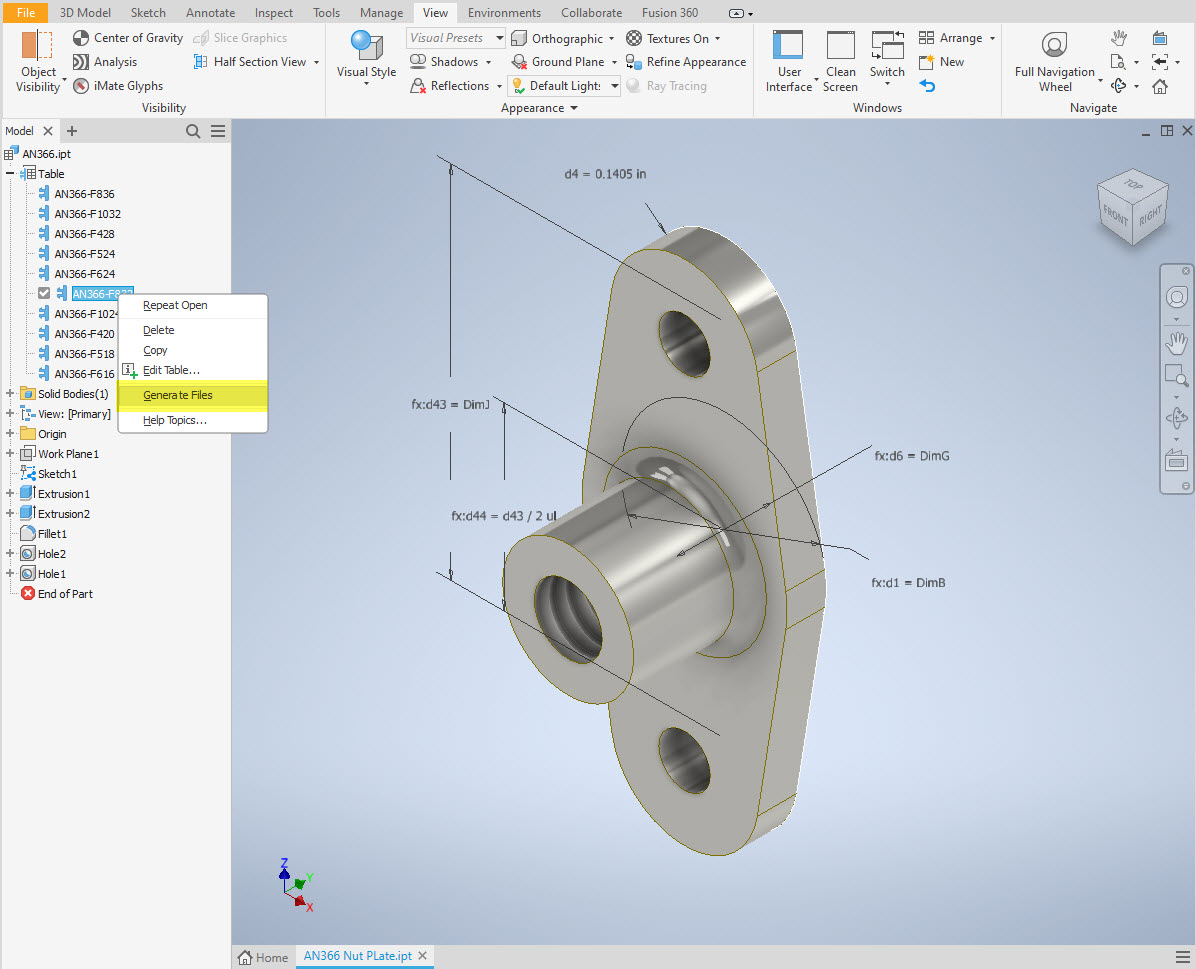
You can tell you have an iPart when the icon next to the part name in the model browser is shown as a table. To convert the file you simply expand the table folder; select the part or multiple parts and select generate files which will create a single IPT part file for each variant. This is placed in a subfolder named the same as the iPart filename. From there you can open this part file and Export whatever model format you want. Alternatively, if you would like to build your own version in a different CAD system it is useful to use the underlying sketch which can be Exported from this model; as shown in the second image which you can link separately to the Excel spreadsheet.

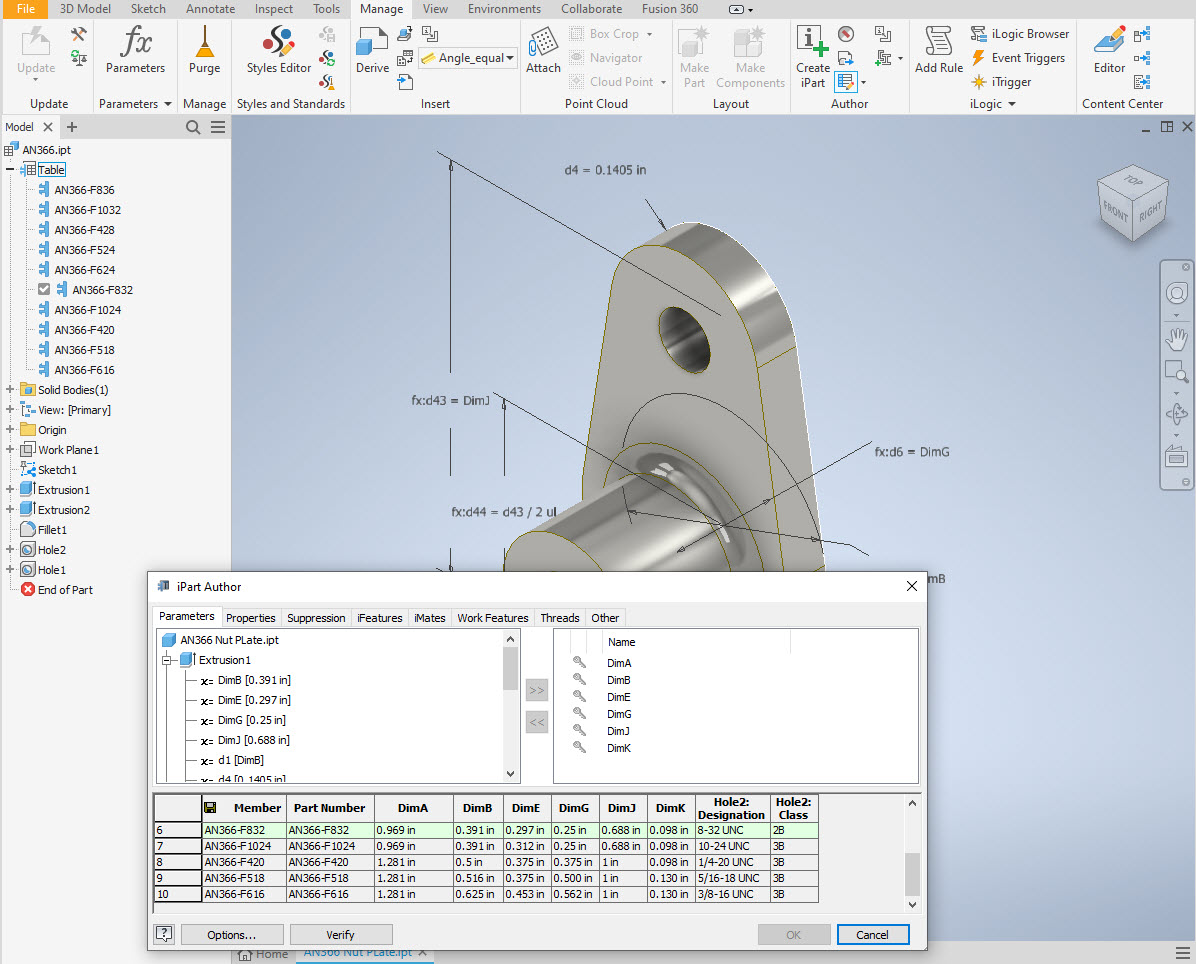
Table Editing: As I mentioned the part has an internal parameters table a bit like the format used by Excel which is fully editable. For the majority of the Library Parts, I also include the Excel table as a separate file.

Accessing the Table is as simple as right-clicking on the “Table” text and selecting what editing option you want…either “Edit Table” (which opens the part table itself) or “Edit via Spreadsheet” which will open this same table in Excel. When you save the table in Excel it will revert to the Cad Part file and update the model with any changes. Making changes is much easier in Excel where you can add new variants of the part or amend existing ones. The dimensions are all in inches but if you bring this part into an mm metric part it will automatically adapt the inch dimensions to mm…so you can be assured that the part will be correct regardless of which units you use.

These part libraries include the most commonly used sizes so you can add to this as you desire. A copy of the original specifications is also included for reference. If you are looking for Aviation-related specifications then check out this free site: http://everyspec.com/library.php.
This library is included in all the CAD/Ordinate datasets and is now also available as a separate package. See this page for more details: https://hughtechnotes.com/resources/

Manufacturers Standard Drawings:

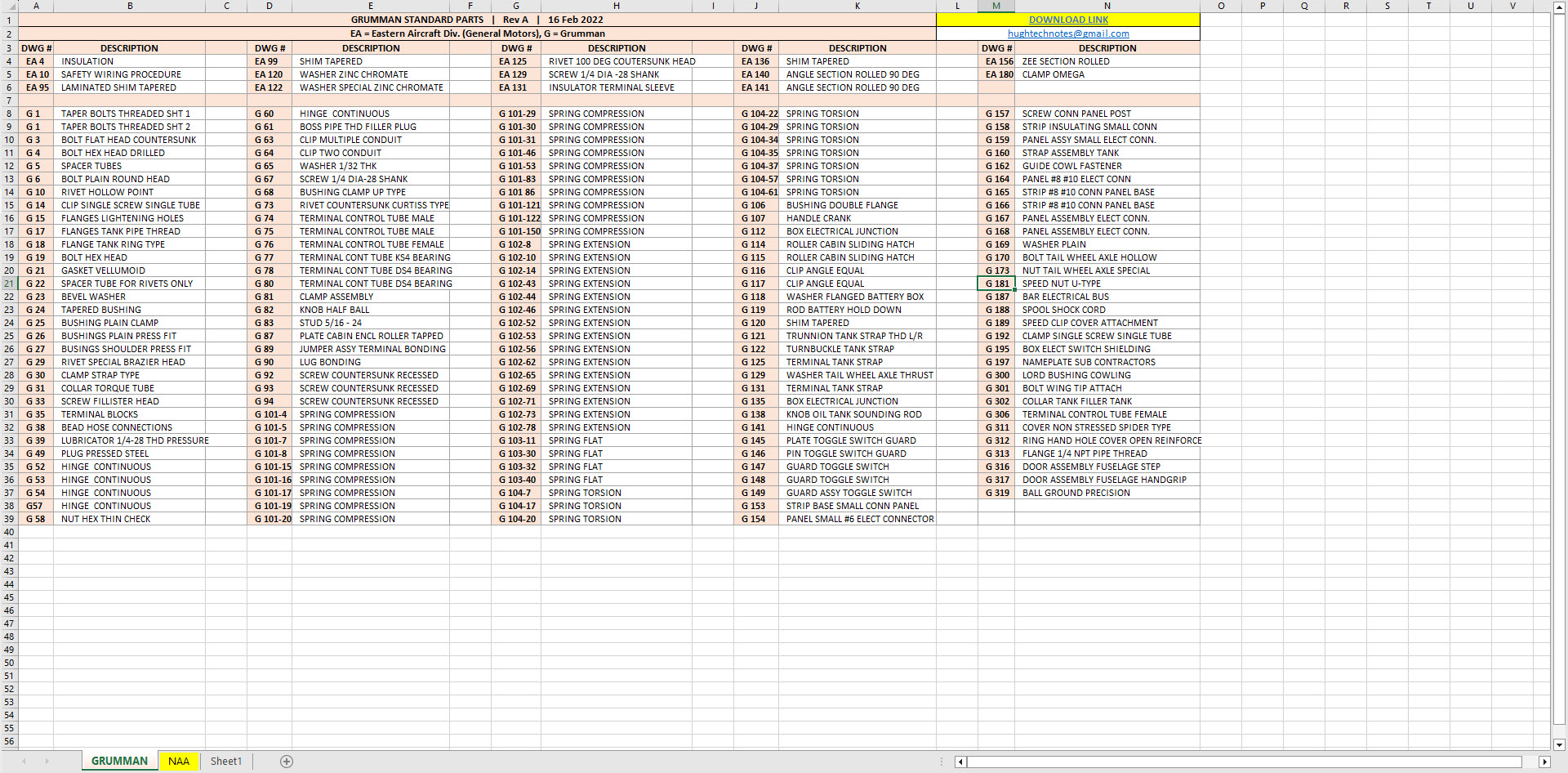
Included in the many blueprint archives are manufacturers’ Standard drawings, some of which are commonly shared specifications between various aircraft by the same manufacturer. I have a spreadsheet listing those standards for both Grumman and North American Aviation. This is available free at this link:

Manufacturers Standards (NAA and Grumman)

In the top right-hand corner of each worksheet is a link to a separate download area where all those standard drawing files are stored. As usual, the spreadsheet is fully editable so you can add to the data record as you find more information. I am sure you will find this is a beneficial resource by having all these important standards in one location. If you find these useful please consider a small donation to help support my work.

Technote: 3d Modeling to Clarify Assemblies

Technote: 3d Modeling to Clarify Assemblies

Interspersed throughout this blog are many examples of Technotes describing techniques and problem-solving primarily for 3d CAD modeling. Many of the part examples shown are actually created to address another major issue with Assemblies.

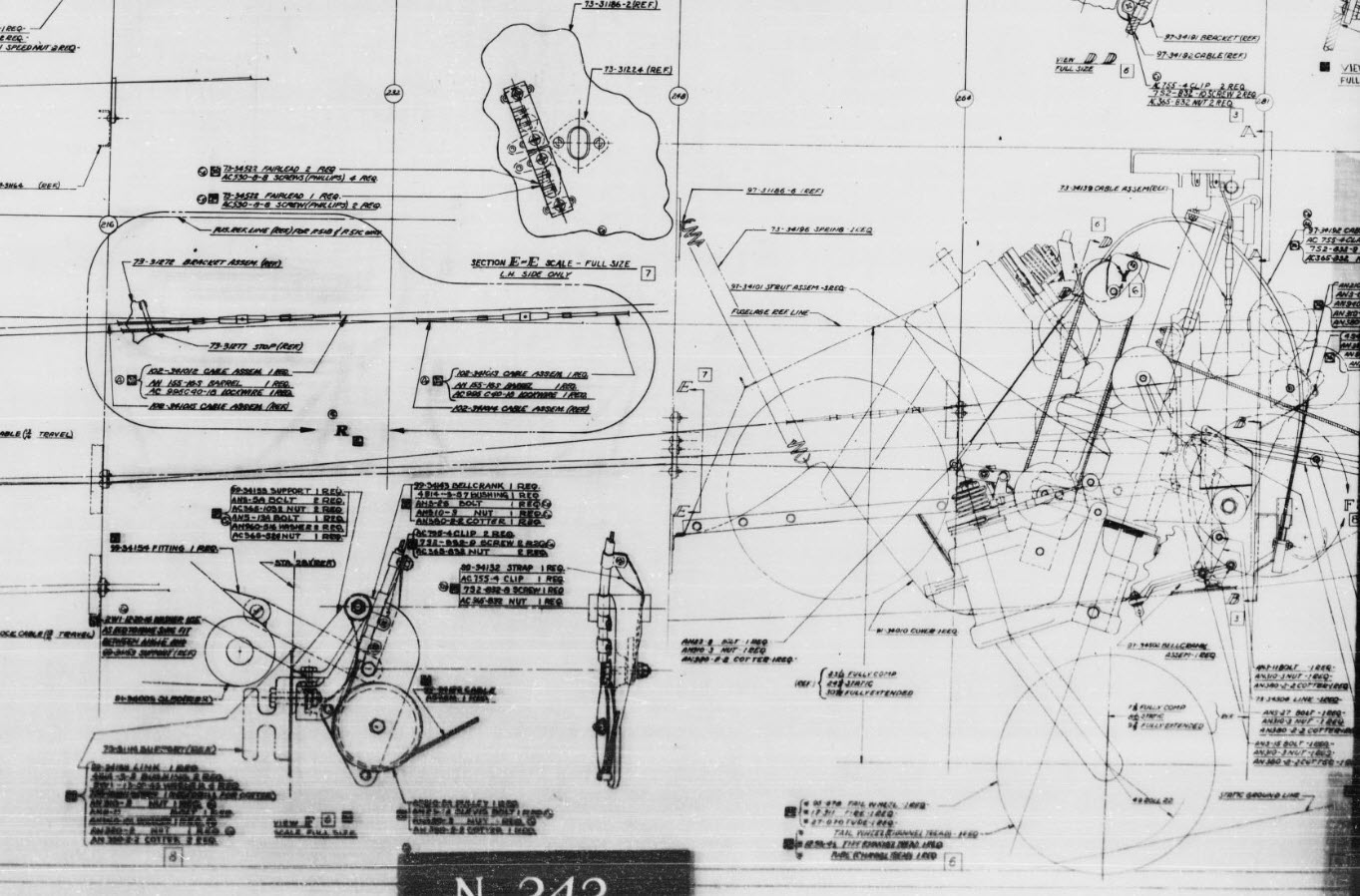
It is not uncommon for the assembly drawings to be either unclear or simply void of key information that would help establish relationships between sub-assemblies or parts. In many examples, it is simply that the reproduction of the microfilm prints is not sufficiently clear to comprehend what is going on, otherwise the omission of basic dimensional relationships.

For the P-51 Mustang, I fully developed the rear Landing Gear mechanisms to clarify what the heck was going on as the NAA Assembly drawings details were obscured.

It is too often the case that general assembly drawings tend to be nothing more than an illustrated parts list with few key dimensions that define locations or relationships between the individual parts. This is also true for many of the sub-assemblies. For the P-51 Tailwheel sub-assemblies, I also developed 2D detail drawings showing key dimensions and parts lists. Ideally, I would have developed presentation drawings showing the exploded views of each of these assemblies to provide further clarification…perhaps a project for the future.

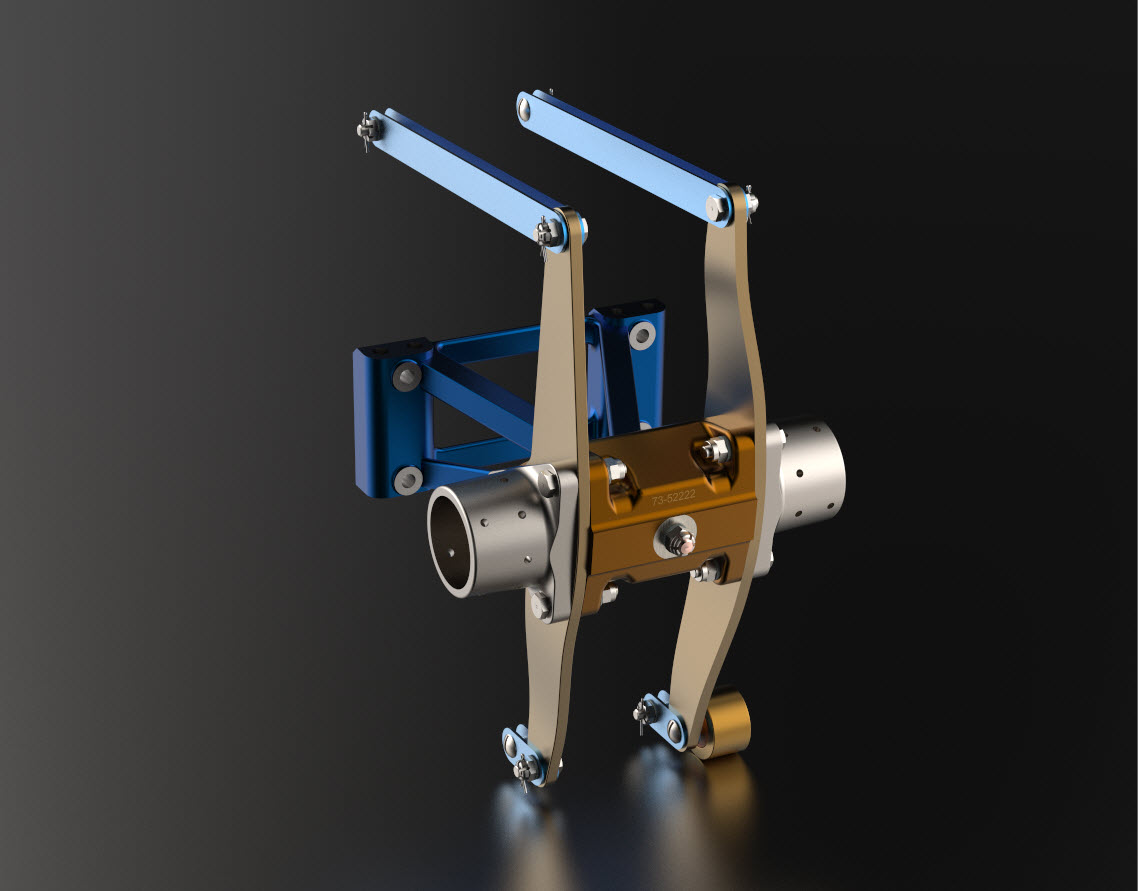
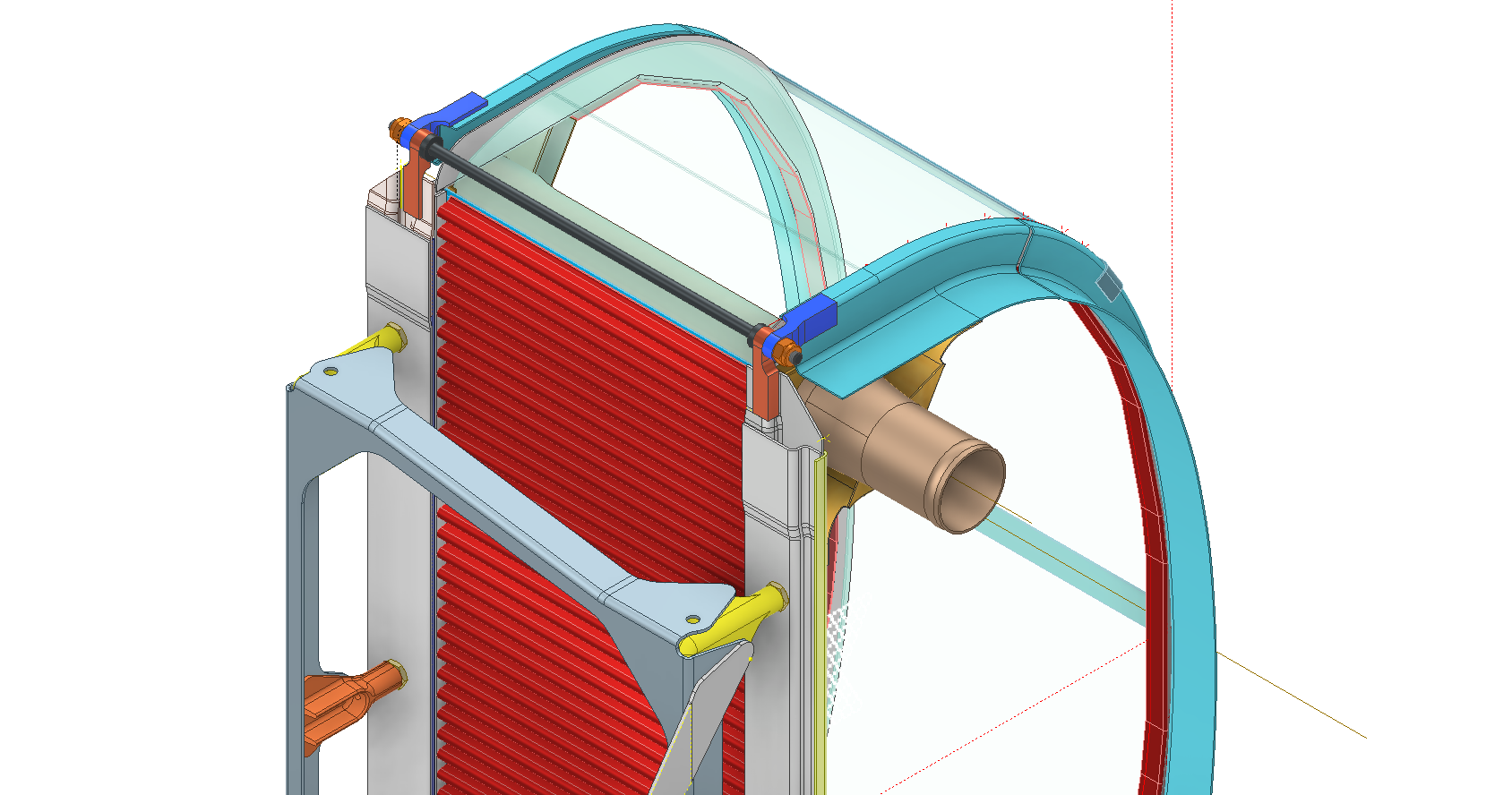
In the case of the P-38 Lightning, I have developed the Landing Gear assemblies to check the ordinate dimensions… which by the way are good. I now have the Coolant Radiator assembly which was again developed to check ordinate data but also for the same reasons as I did the models for the P-51 Tailwheel.

Typically the general assembly pictorially shows the sub-assemblies without any key dimensional information to define the location or part relationships and similarly, the sub-assembly for the clamp is not that much better. This is important stuff as occasionally they are the only reference material we have to help define ordinate data that is missing from the archive blueprints.

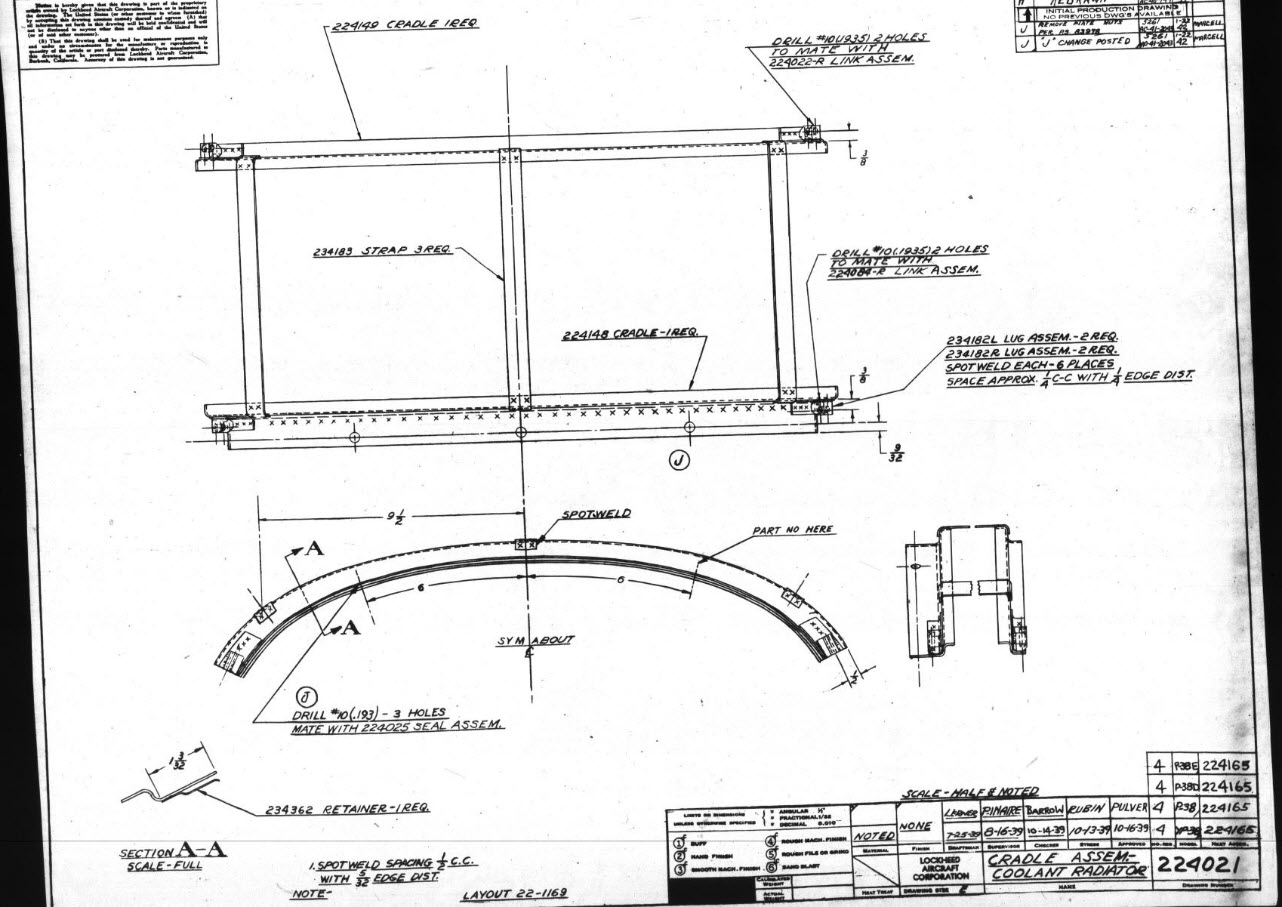
The Coolant Radiator is compromised by wrong dimensions as well…the top clamp cover, for example, had dimensions for the connection to the rod with the part drawing showing conflicting locations for different views of the same part.

The problem here is the connecting bracket item 224045 cannot possibly be 1″ from the edge of the cover plate whilst the overall dimension of 6 7/16″ prevails. I initially had located that bracket at 1 inch which seemed to be correct at the time because it fitted the part profile but when I introduced this into the assembly drawing it would not correctly align with the radiator. However, when I revised this using the 6 7/16 inch dimension it worked. That connecting part also caused more problems because the face of the part is machined 1/64″ which is not taken into account when positioning the part in the assembly.

Accumulatively this resulted in the overall width of the clamp assembly being smaller than it should be. This only came to light when I modeled the 234183 almost inconspicuous part as the stated dimension of 9.25″ did not fit with my initial layout..my first thought was this may just be an oversight but when I tried to align the main support frame (in gray) it did not align correctly. I went through everything and realized that the machined face of the corner parts connecting to the rod as shown may not have been taken into account and when removed the alignment was better and the 9.25-inch dimension on the strap was now correct. I am convinced that there should be spacers/washers between those connecting parts but this is not apparent on the assembly drawings. There remains a small discrepancy of 0.8mm which I am unable to account for….as this mainly relates to a clamp mechanism that will be compressed on assembly it was probably not deemed important but when you are trying to establish baseline dimensions it is actually very important.

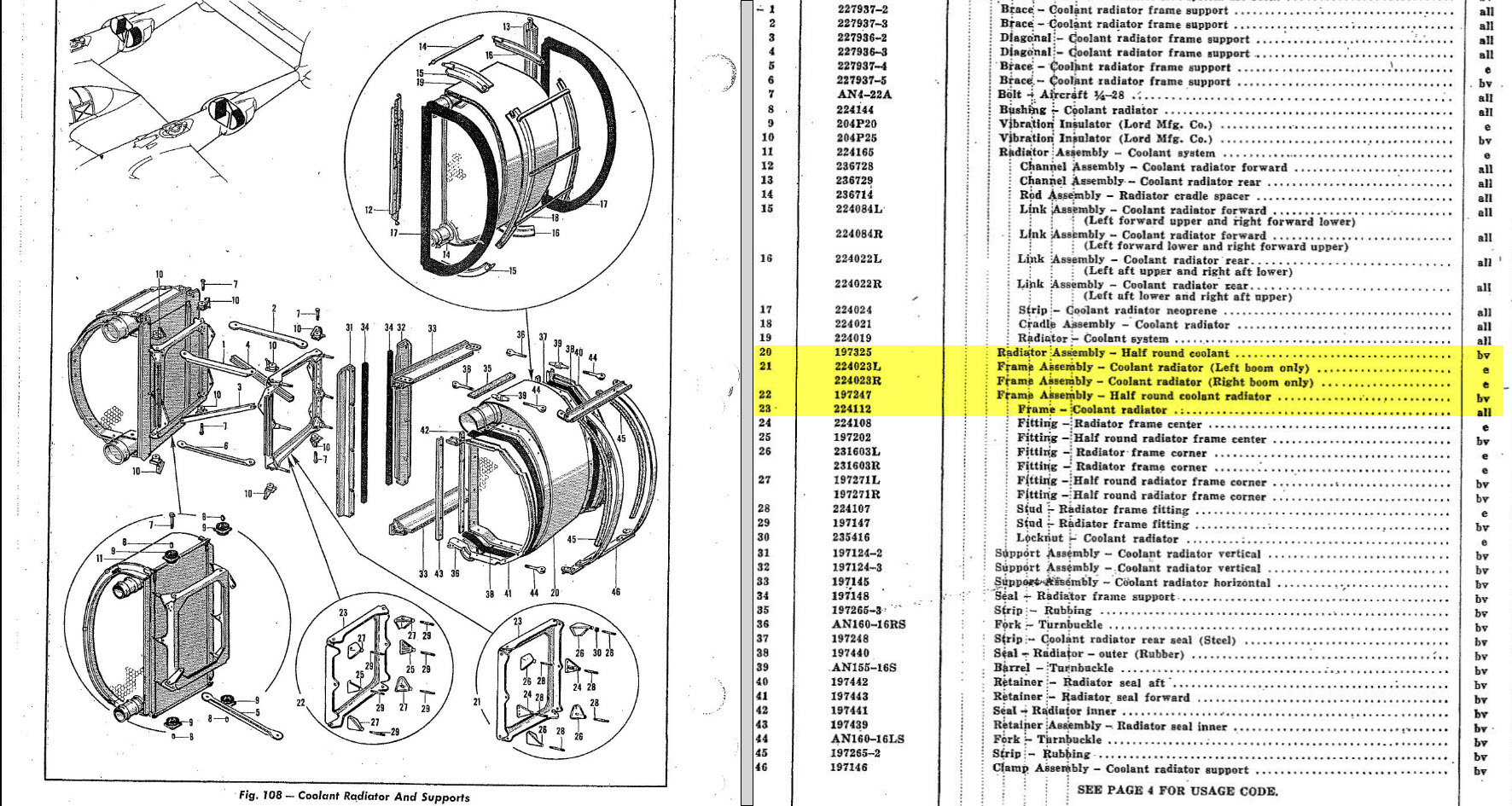
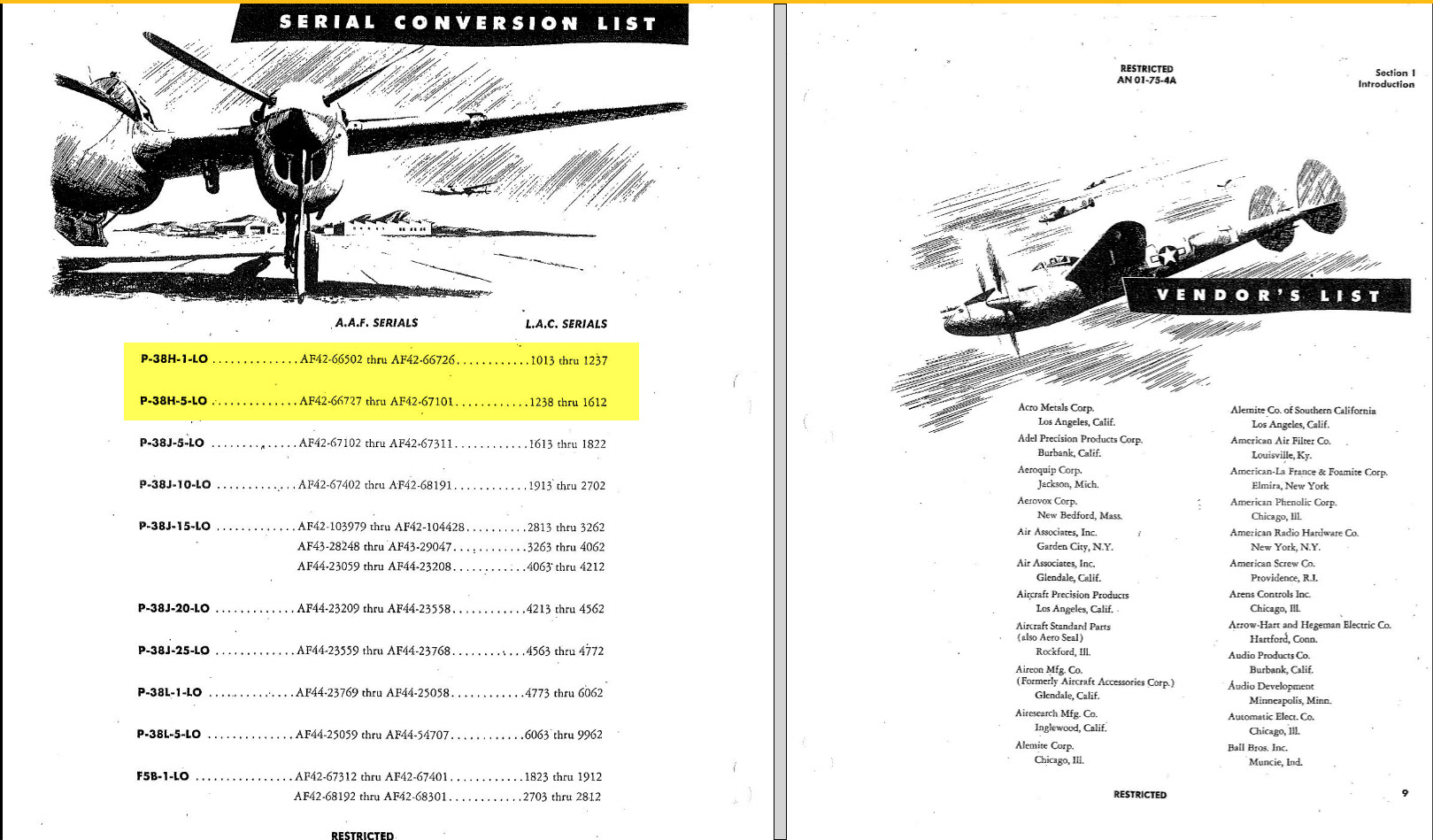
The Part catalogs generally are your first port of call when developing these assemblies but they do not contain the key dimensions you need so these 3d CAD models are essential to achieve clarity. Incidentally, while we are talking about part catalogs it is important to understand what parts belong to which version of the aircraft. For the P-38 Lightning, the first few pages list the version and serial numbers which in turn are listed elsewhere where a Usage code is assigned. In this case the “e” is essentially the P-38H and the “bv” is the P-38J. The P-38 Part catalogs tend to show the version variations on one page; which can be really daunting; whereas others may show the version differences on separate pages…so you have to be attentive.

As I mentioned at the beginning of this article the main purpose of these assembly models is to achieve clarity and to check dimensional relationships. I think this is very important stuff that would certainly benefit from exploded views in conjunction with clear assembly 2d drawings.

As usual, get in touch if you can help support my work. hughtechnotes@gmail.com

P-38 Lightning: Ord/Dimensions Study Complete

P-38 Lightning: Ord/Dimensions Study Complete:

The P-38 Lightning Ordinate/Dimension study is now finished after 7 long months. Initially, I had planned on doing this study in 3 months; working night and day; but alas due to the complexity of this aircraft this drifted into 7 months.

All areas of the aircraft have been studied, and modeled with all known, and henceforth many previously unknown dimensions collected and recorded in a comprehensive spreadsheet.

All bulkhead and rib profiles are generated for the wings, ailerons, elevators, horizontal and vertical stabilizers, rudder, fore and aft booms, fuselage, cockpit, and flaps. The latter was a challenge as the Lockheed drawings were unclear about the relationship of the flaps to the wings…however, after some research, I was able to resolve this issue to determine the exact positions of the Wing and Center Section flaps. The flap details are fully dimensioned now on 2d Acad drawings…that was the last hurdle.

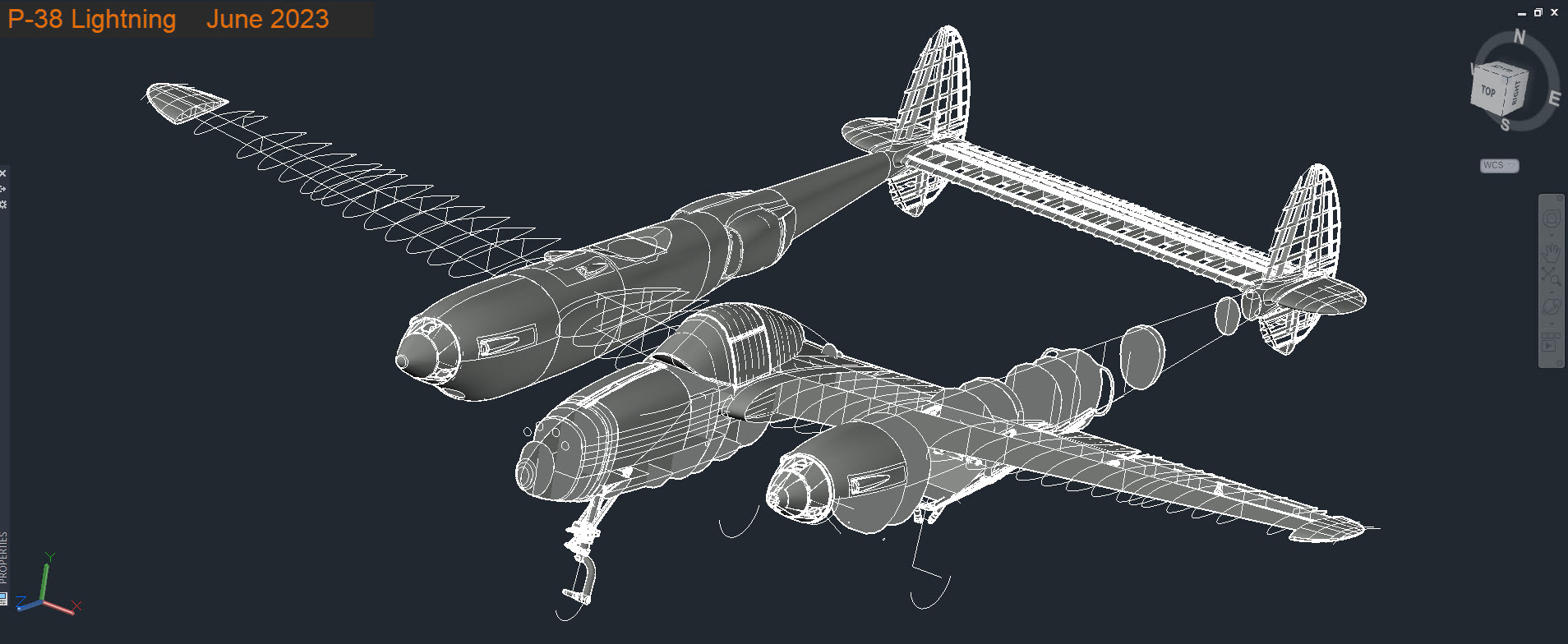
Further to the Ordinate study I also have full 3d Cad models for the Nose and main Landing Gear Assemblies.

For further details get in touch: hughtechnotes@gmail.com

P-38 Lightning: Fuselage Update

P-38 Lightning: Fuselage Update

The P-38 Fuselage development has been a real challenge. When I first started this project it seemed to me that the fuselage was well documented with stacks of ordinate information and therefore should be a fairly straightforward model. The front section and the Cockpit enclosure are actually quite well documented but the Aft section and the mid-fuselage section; forward of the cockpit; most definitely are not. After more than 6 weeks this part of the project is still very much a work in progress.

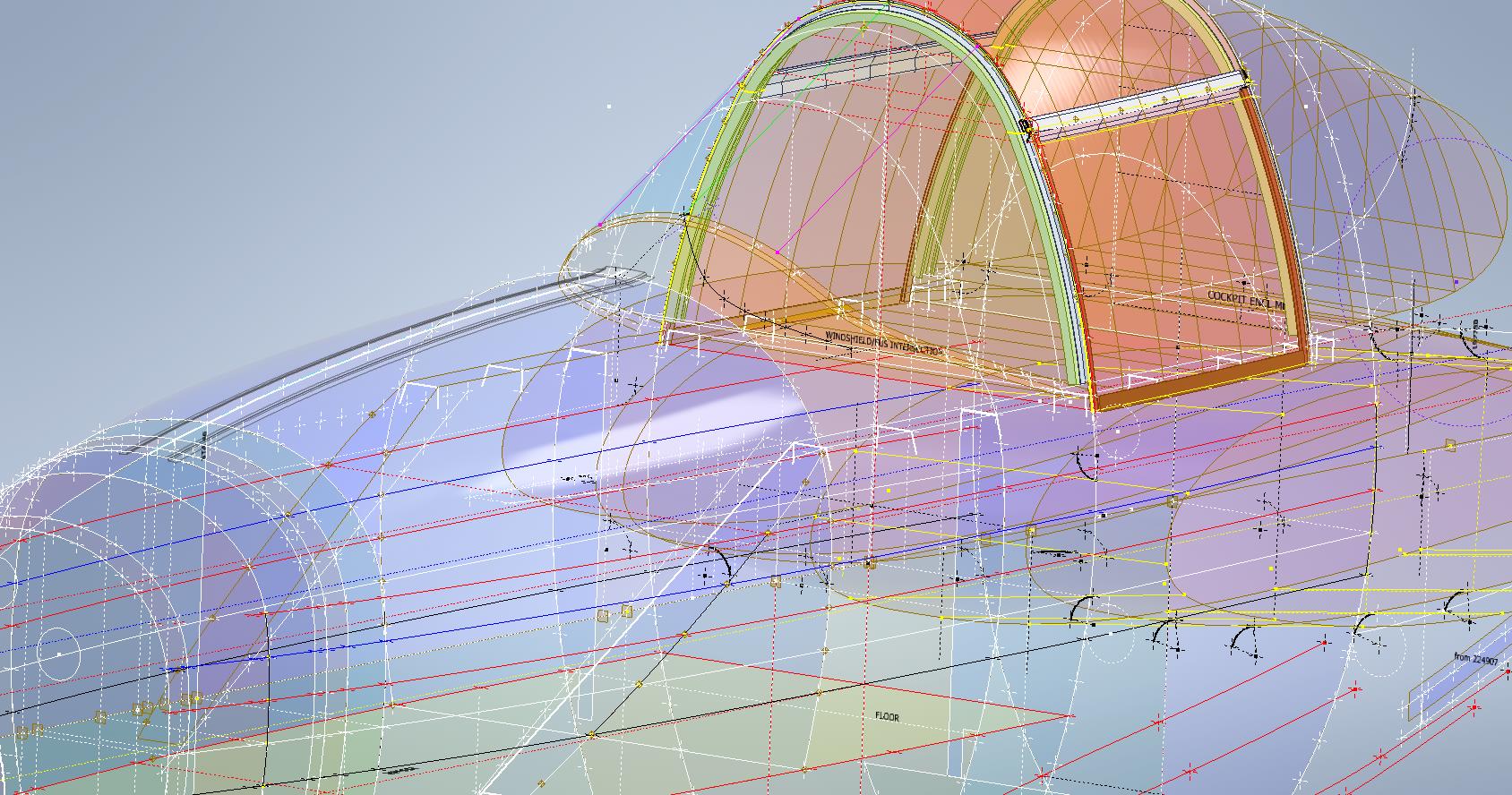
The Cockpit enclosure: There are glass profiles for the cockpit enclosure but they are from the XP-38 early model; which on inspection; in comparison to the little-known information for the later production models suggest they are very close but do vary by 1.2mm but only on the side profiles. I suspect the glass was thickened slightly when they started production. I have to work with what I have and in the absence of sufficient information on the production models’ glass dimensions I have opted for a compromise. As only the side dimensions change with the top profile and interface with the fuselage remaining the same I think working with these profiles in conjunction with the structural elements of the production P-38s will work out quite well.

Ref 3rd image: In the 3rd image I have highlighted the location of the profiles at Station 123, 126, and 154. Sta 126 and Sta 154 are absolutely critical in setting out the cockpit enclosure and yet they are not documented nor do we have the drawings listing those dimensions. However, we do have the dimensions at Sta 123. On the windshield drawings, there is a note that states the profile at Sta 126 is the typical profile for the windshield moving forward…logically you would think therefore Sta 126 will match the profile at Sta123. I checked this and it is close but because we also have the glass profile at Sta 126.093 any minuscule deviation will have a profound impact on the curvature when eventually this is lofted. To be sure of maintaining good curvature continuity I lofted all the center section glass profiles and extended the edges by 12mm and then trimmed this resulting profile at Sta 126 and Sta 154. This gave a good result and to check I then swept the Sta 126 profile along the line of the Windshield center line and examined the profile with the known profiles at Sat 123 and of course at the interface with the fuselage. The variance was something close to 0.03mm…that is good enough for me which now ensures good curvature continuity throughout.

Aft Section; As mentioned we don’t have very much ordinate information for the Aft Fuselage Section which will require extensive research of all parts drawings from which we can extrapolate individual points that hopefully will be sufficient to fill in the blanks. The image on the left is a good example where I have drawn the various profiles for the fillet tangent to the fuselage and the wing.

Most of the drawings for the Fillets include the Tangent Points for the Fuselage and the Wings which I included in the model that now collectively gives us a reference line for the side of the Aft Fuselage at the top and bottom of the wing. Each fillet curve was checked against the ordinate surface for the wing and adjusted accordingly taking into account the skin thickness; these were also checked against known bulkhead profiles in this area.

The second image; on the right; shows how we can also use the main longitudinal members in a similar fashion to help ascertain key dimensional information to assist with the development of the aft sections. The red lines are the longitudinal members where the part drawings contain relative dimensions to the Fuselage reference line and the Centre of the Ship. Again each of the dimensions was checked against known bulkhead profiles where the average variation was in the order of 0.012mm. It may seem too small a variance to be of any consequence but when I later have a need to use these lines when creating the surfaces they have to be exact…so in each case the point was adjusted to be an exact intersection with the bulkheads. Inventor is very fussy when lofting with a guideline with no room for error…so this has to be exact.

Ultimately the goal is to find as many part drawings as possible with dimensional information that I can use to eventually have enough data to build the relevant missing Aft Section profiles. Typically this will be the main longitudinals, the skin parts, and of course the fillet drawings. This is painstakingly slow work as virtually every part drawing in this area is being reviewed for potential data that will help me achieve this goal and there are a lot of drawings!

Similarly, the process will be the same for the fuselage area forward of the cockpit which again sadly lacks a lot of key profiles. The research is where the time is expended in developing these ordinate sets…so far for the fuselage alone, I have spent in excess of 6 weeks of continuous work to get to his point, and still a lot to do.

Finally, both the P-39 and the P-38 ordinate dataset models are updated with a new approach to how these datasets are being built. I still have the extensive Excel spreadsheets listing all known dimensions but for the model, each ordinate profile is now inclusive of a surface patch. What this means is that conversions of the model for use in other cad systems will now provide a surface plane as well as a sketch profile which helps the model builder very quickly create the bulkheads for these scale models.

The P-38 is almost complete with the Boom, Wings, Horizontal and Vertical stabilizers, Flaps, and Ailerons all modeled and recorded. The Landing gear is almost fully 3d modeled as well…which is great for those that are keen on super detailing their RC models. These models have also proven to be enormously useful for the Restoration groups one of which I already work with on a P-39 Airacobra restoration.

Update 14th June 2023:

I have been developing the key Aft center profiles at the top and lower part of the fuselage. This is actually quite exciting stuff as there are not a lot of pertinent ordinate dimensions for the Aft Fuselage so I resorted to building profiles from individual part drawings.

For each part sketch profile, I have extrapolated various curves to determine the center work points. What is exciting about this is the eventual lower fuselage curve (in magenta) is absolutely perfect…normally when you derive work points from half a dozen different parts in inches there is an expectation that the eventual curve would show the odd deviation…but it didn’t. The curvature analysis shows this to be absolutely spot on.

Update 23rd June 2023:

Fuselage Aft Assembly: Almost finished with the ordinate study for the fuselage Aft assembly. This work involved generating cross-section profiles from stringers, longitudinals, bulkheads and fillets to derive series of points from which to build the curved profiles. Each profile built is checked against the existing ones by lofting a new surface profile, then a sketch cross section generated to check the curvature maintains alignment with the existing profiles. This is done for every newly generated profile. Ultimately I will end up with the best-fit surface for the Aft Fuselage Assembly. All new points will be recorded in the Main Spreadsheet and fully dimensioned on individual drawings.

New Website Address

New Website Address

This blog web address has been changed to Hughtechnotes.com (was previously Hughtechnotes.wordpress.com). The new address is domain mapped so even using the old address you should still arrive here. If you have any problems then please drop me a line at hughtechnotes@gmail.com or general feedback or comments.

By the way to make your experience more enjoyable and distraction free this blog is now Advert free… which means I pay extra for that…so please consider a small donation to help with these overheads. Thank you.

Technote: P-38 Forged Parts

Technote: P-38 Forged Parts

I had promised an article on the P-38 Flap CAD development as a follow-up to my earlier article on this topic…but I deviated slightly to address a question from a reader about Forged Parts.

Typically for all these aircraft Forged parts are the main element in the process of manufacturing complex parts that may be used in such applications as Landing Gear. Such is the case with the P-38 Lightning where we have the main support members that are machined forged parts.

I have touched on this briefly in previous posts: Technote P-39 Inventor Face draft and P-51d Mustang Tailwheel Down Position support. Those articles tend to focus on using the Face draft feature in Inventor and using Derived model parts to differentiate between model states i.e. Forged and machined. I should note that with the later versions of Inventor, it is possible to contain the various Model states in one part file but I prefer to use separate derived Part files. The reason is that they are in fact 2 very different manufacturing processes and the drawings for each model may be sent to different departments or indeed different companies. So it makes sense to keep them separate.

In the example above we have 2 components for the Main Landing Gear and the Nose Landing Gear. Both examples use the derived parts process as you can see. In this article, I wanted to cover some of the frustrating differences that you will likely encounter when building these models.

Forged Parts are notoriously complex and the Lockheed drawings tend to only provide the main dimensions and key elements often omitting small details that are likely to have been decided by the mold maker. To determine missing details I often build the models as a surface and then turn that into a final solid.

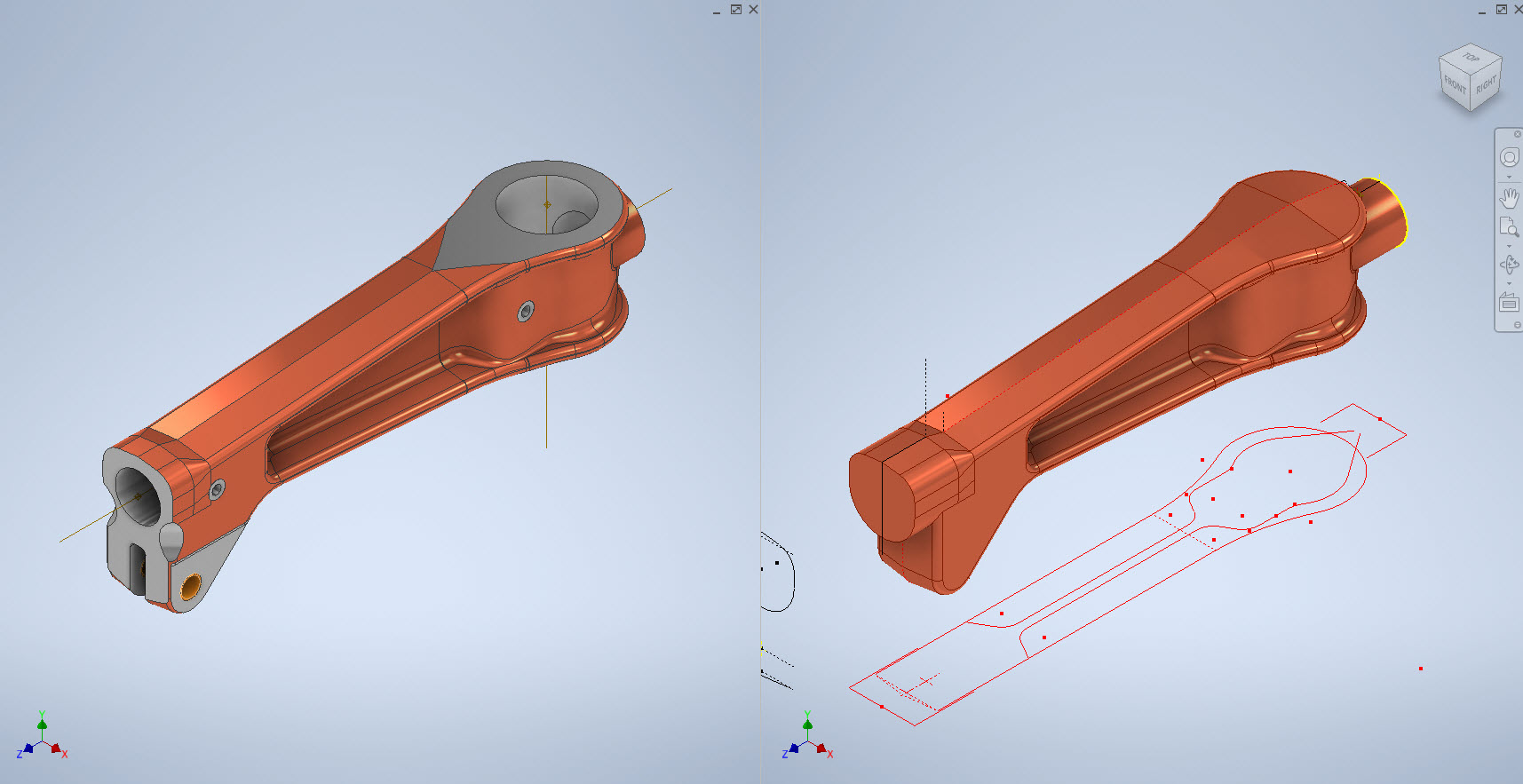
In the above images, this part had an elevated top and bottom section interspersed with a waveform for the main body. The 2d sketches were drawn outside the main part body to make it easier to visualize and manipulate the part data. This part used 3d intersection curves to generate a sweep path for the top and bottom profiles and the surface trim command to profile the main body.

Incidentally, although the sketches do not share the same space as the main model you can still select a single line from any of the sketches in order to trim parts and surfaces in the model…they do not need to be connected. I have often seen folks extrude surfaces from external sketches and then trimmings to that surface but you don’t have to do that…just select the line.

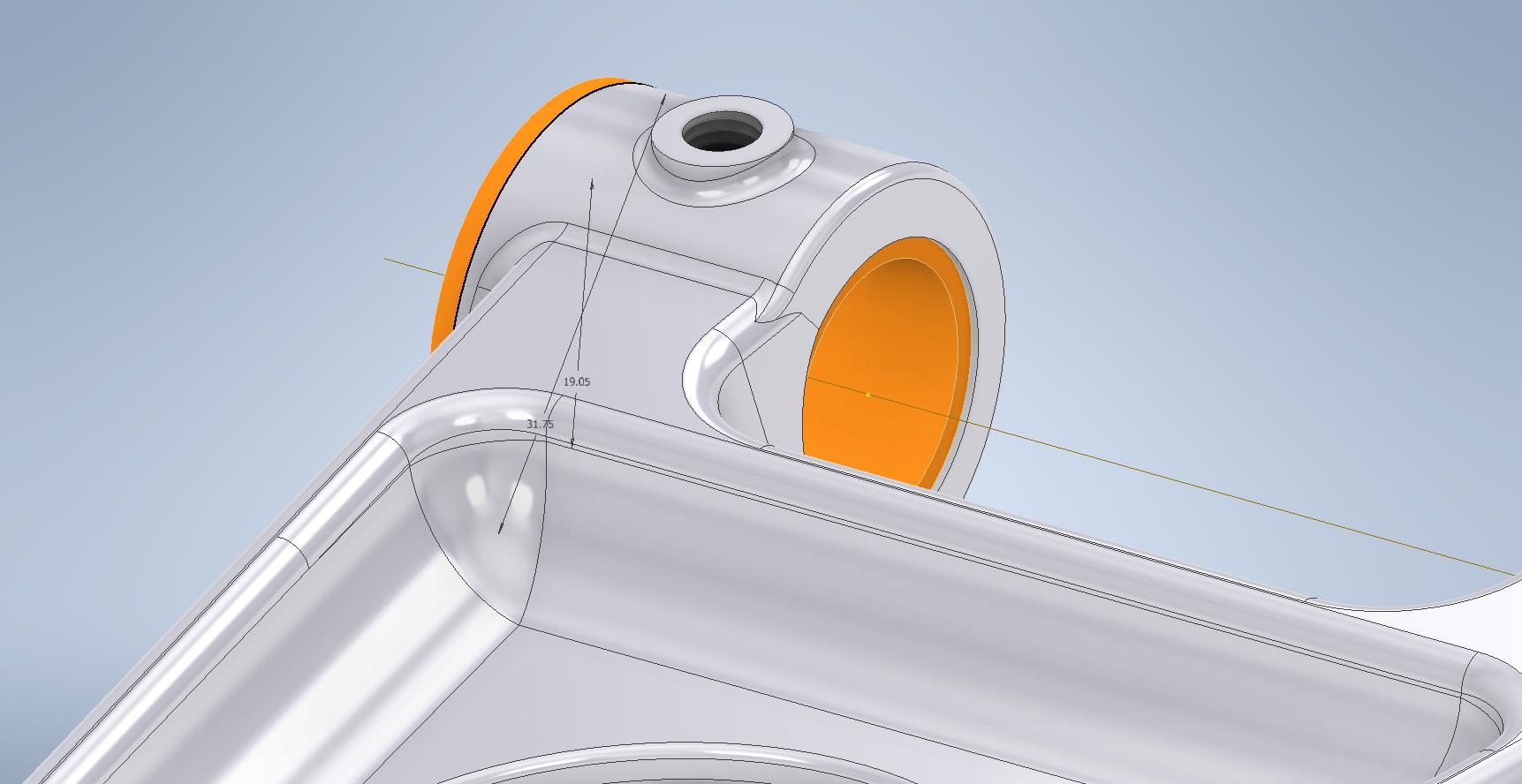
One of the key details that is not clear in this particular example was the protrusion just above the cylinder at the front of the model. All you have on the drawings is a line on elevation and 2 lines on the plan sketches..the specific details of how this small detail interfaces with the main body is down to interpretation. I modeled it with the flat upper surfaces tangent to the curved edge and applied a fillet to the intersecting sides. I did look at a number of variations but I think the end product is close to how it will actually be. This is the frustrating bit when trying to decipher designer intent with limited information.

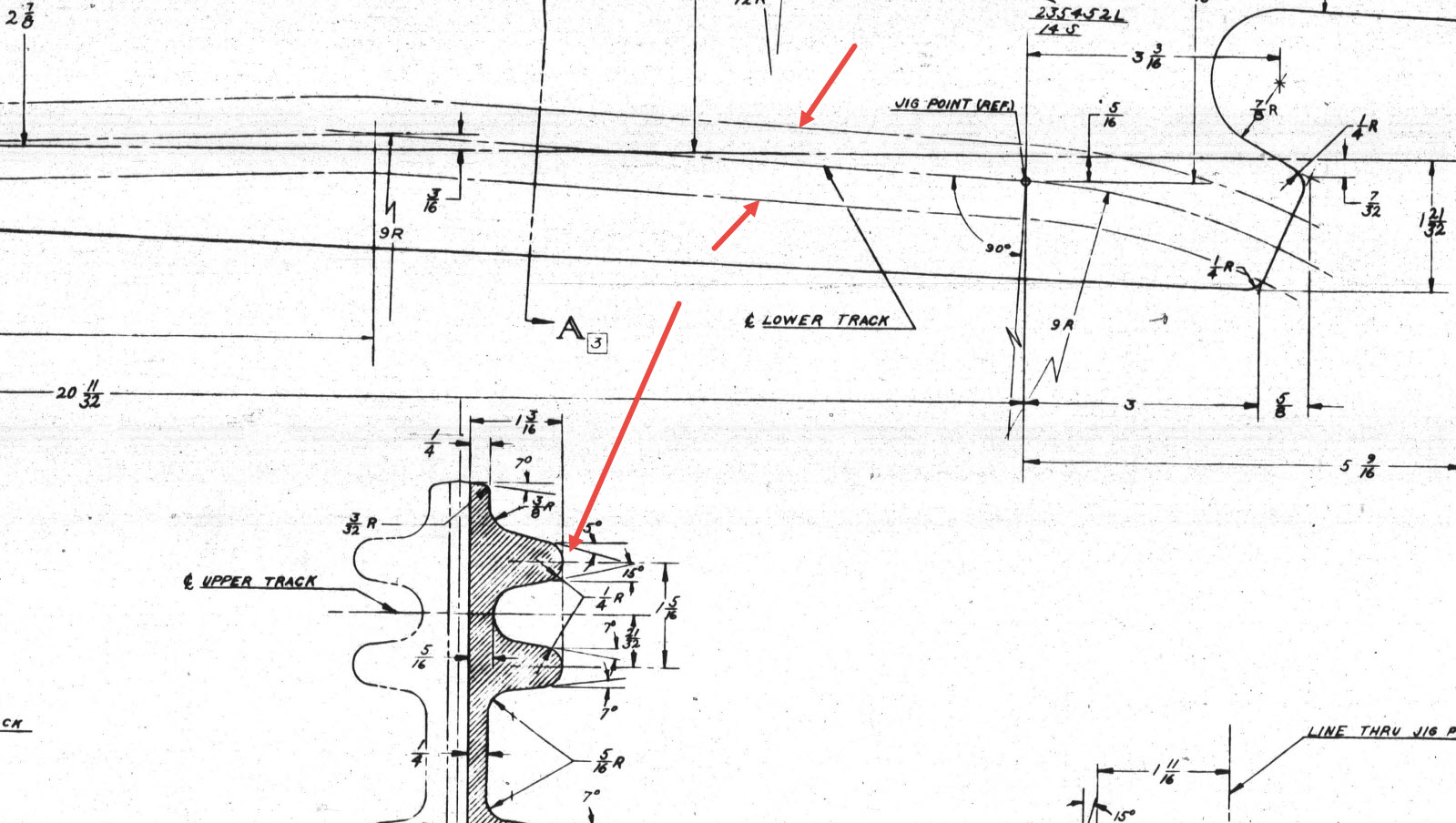
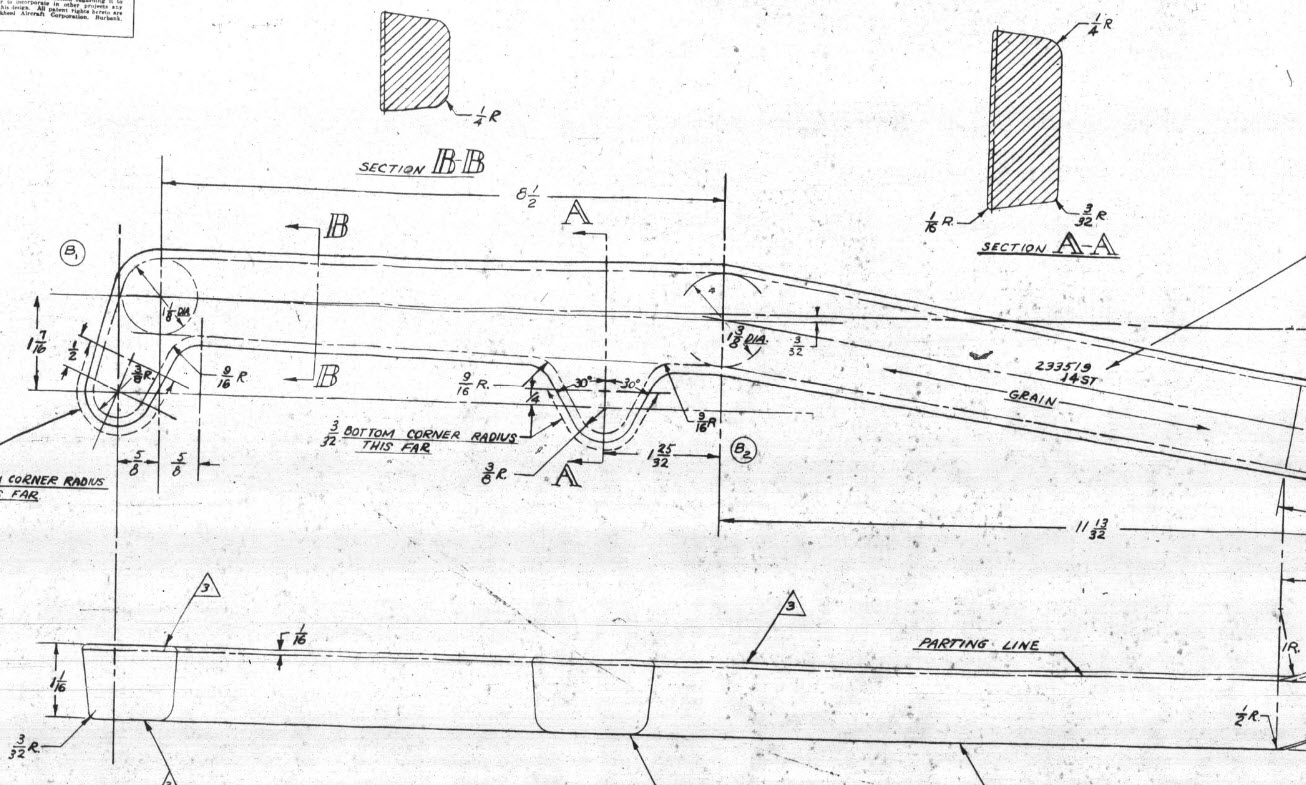
Some of the complexity comes from how the drawings themselves depict the dimensions of the profiled sections. In the first image above we have the criteria shown as the center line of the section’s curved profile. The second image shows a different part however this time the dimensions are to the projected edge intersection of the curved profile. The third image is also similar where the dimensions shown are to the projected intersections. The final image is the Flap carriage arm with the dimensions shown to a dotted line which is not clearly defined on either the sections or the main views to determine what this actually is. After much deliberation, I deiced to interpolate this line as the projected intersection of the drafted sides with the top and bottom faces. I had initially suspected this was to the corner tangent but that would entail a very complex development process due to the varying corner radius.

As you look through the dozens of forged part drawing there are all sorts of variations on the theme with few consistencies. This is where you can spend a lot of time determining how these dimensions relate to the model and how best to incorporate this information in such a manner to keep the model as simple as possible. Consequently, it is not unusual to spend upwards of between 3 and 4 hours modeling the forged parts. I think for the most part where doubt exists to work to a projected intersection as the point of dimension…it will be a lot easier to model and saves a whole lot of frustration.

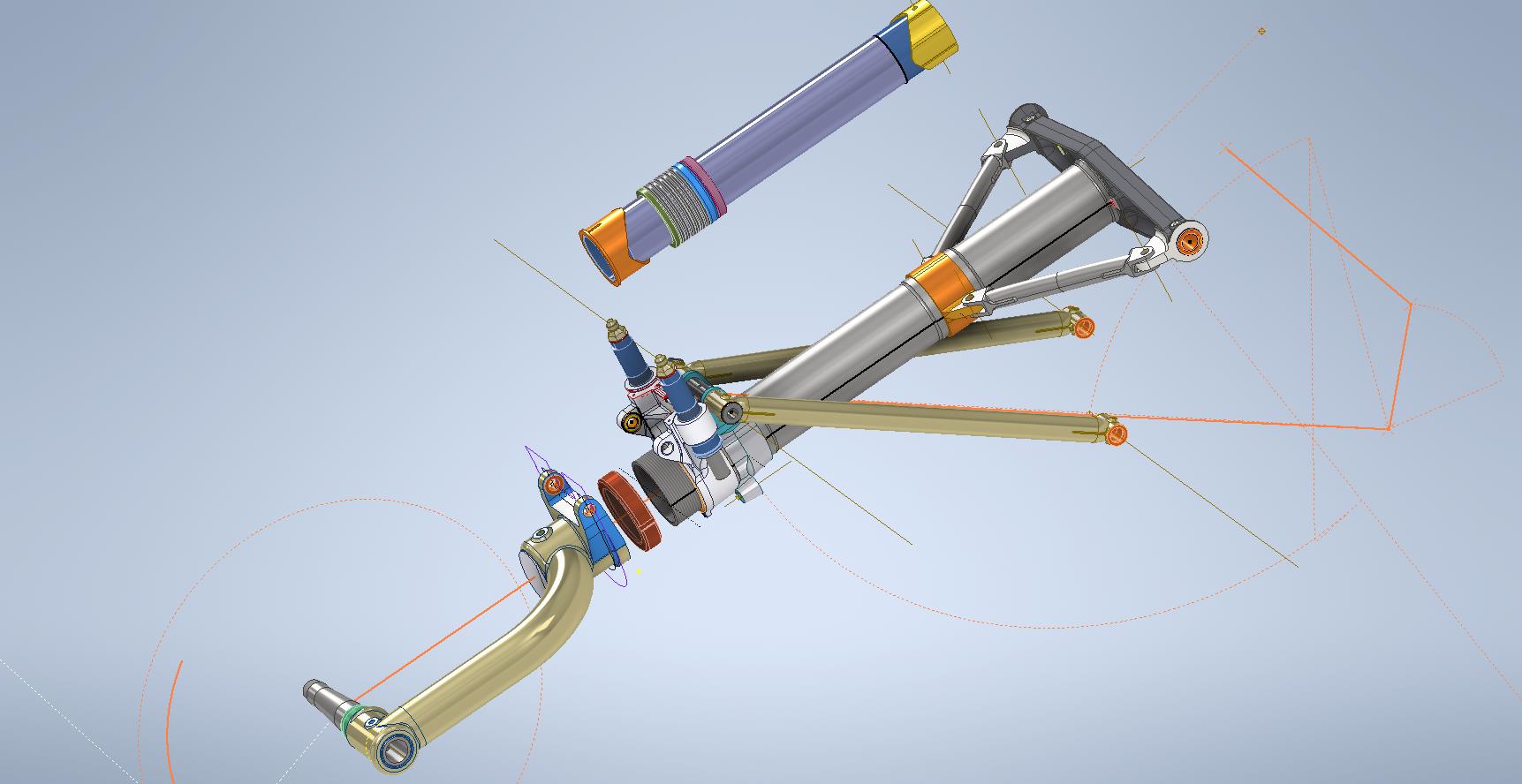
To give you some idea of progress on the Nose Landing Gear models:

In the latter 2 images, you may notice small differences which relate to the various model variances. I am modeling the P-38H and the comparison photo is the P-38J.

TechTip: Variable Fillets:

When modeling these complex parts often applying fillets can yield unexpected and undesirable results.

In the images above you can see how applying just standard fillets of different radii can result in quite an undesirable intersection between the flat plane and the circular node. What we need is continuity to achieve a smooth transition from one edge to the next as shown in the second image above. This can be achieved by using the Variable fillet feature.

Variable Fillets give us the option to vary the radius of the applied fillet. When you first apply the Variable Fillet you have a radius specified for the beginning and the end of the selection…you can apply additional points anywhere along the length of the selection to which we can adjust the radius at those points.

You can also add selection sets of edges to the original selection which have their own capacity for separate adjustment. To achieve our goal here for fillet continuity I have 4 selections: the top planar edge (1), the node circumference (2), the lower planar edge (4), and the remaining node circumference (3). It is important for each selection set fillet to have the same radius at each intersection to ensure continuity.

Each selection set is listed separately in the dialogue box and the way to adjust them is to simply select the edge selection as I have highlighted with the first one…this shows the applied points and values in the area below under the heading “Variable Fillet Behaviour”. I have added additional points to the planar fillets at 1 and 4 where the value is set to 2mm which then defines the radius between those 2 points. A small point worth noting is the diagonal draft parting line on the face of the round node that prevents selection continuity which is why we have 4 selections and not just one continuous.

It does not take long to do this and the end result is much more agreeable.

P-38 General Updates

P-38 General Updates

Just a quick update to share new and updated assemblies for the Wing Flaps, Centre Section Flaps, and the Horizontal Stabiliser.

This post was intended to be a detailed overview of the Wing and CS Flaps but I was keen to share progress on these main assemblies. I will revert back to the flap discussion in my next post.

An interesting point worth noting is the color coding for the Horizontal Stabiliser and Elevator. The Red ribs are exclusive to the forward Horizontal Stab area, and the Yellow Ribs are where the internal Horizontal Stab ribs and Elevator ribs share the same alignment.

For the flaps, the main surfaces shown represent the cutout in the wing ribs…the information for this is rather sketchy but more on that in my next post.

Each of these new assemblies also includes new Basic Geometry fully dimensioned drawings in DWG and PDF formats. Soon to be added to the P-38 CAD/Ordinate dataset, drop me a line for details or check out the CAD Resources tab at the top of the page.

.

.