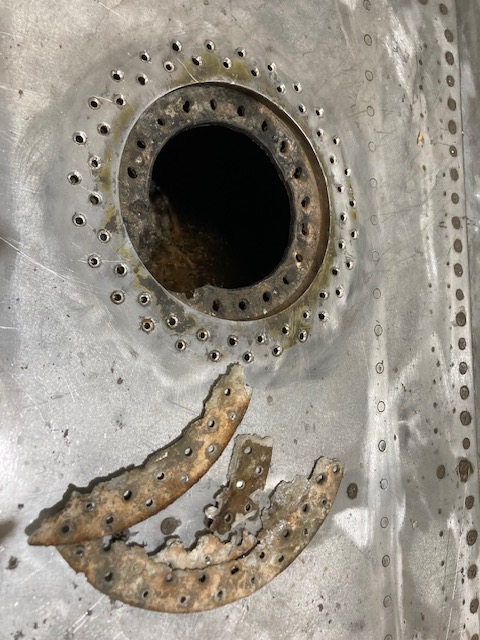
The P-39 restoration project is still very much a work-in-progress. The latest addition to the project is the Fuel Tank Covers and Filler Cap. When the existing components were removed there were visible signs of corrosion so it was decided to replace the inner mounting rings as well as the covers/caps.
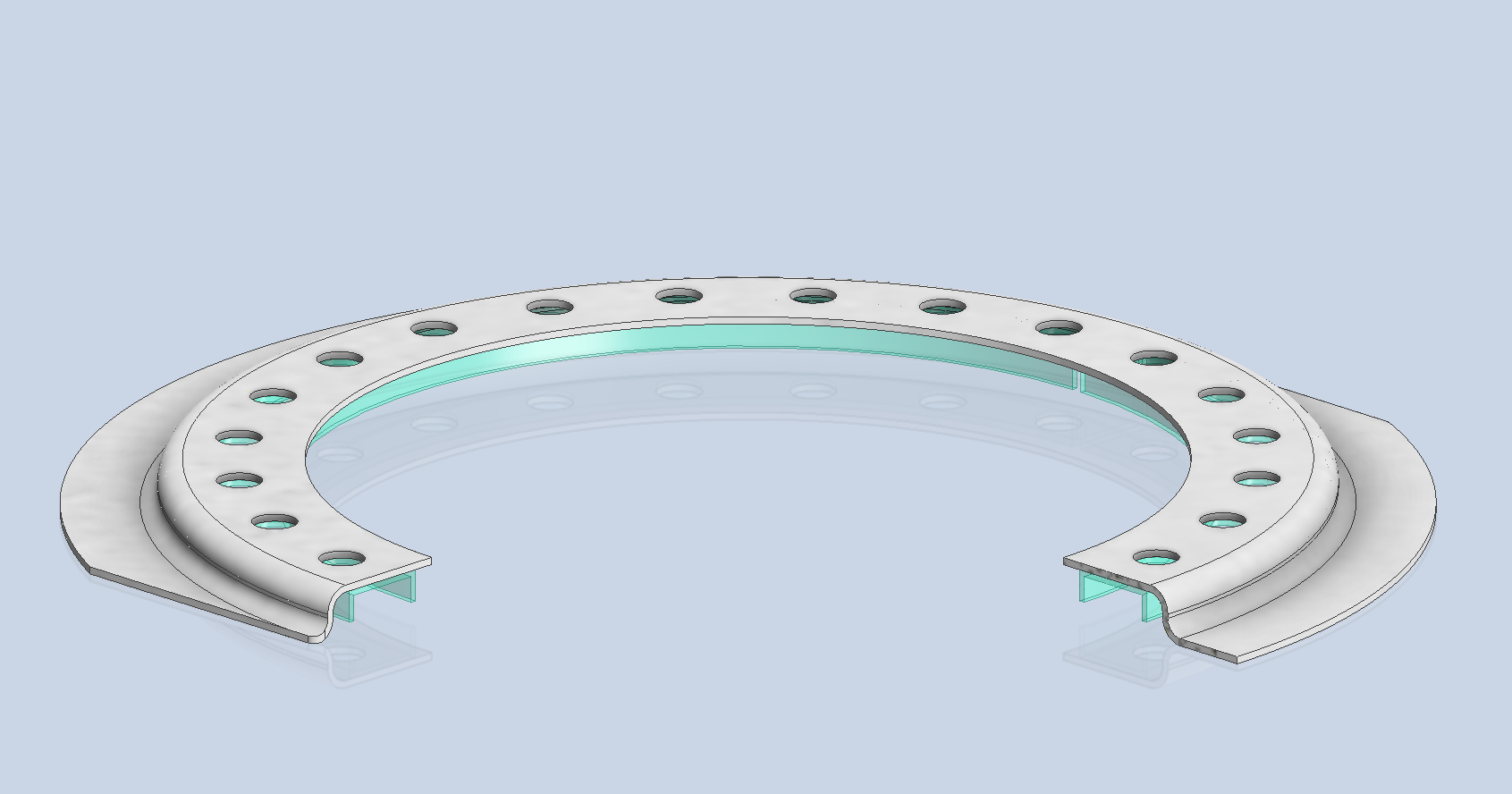
Each cap assembly consists of an inner mounting ring, a Goodyear-type sealing ring, and cover plates. It is important to consider the varying thicknesses of the sheet metal at each location, as this can lead to slight differences in the profiles of the mounting rings. Typically, when we develop these types of parts, we mark the holes in situ based on existing hole patterns to ensure a proper fit. This is usually done because the holes are evenly spaced between two known locations, which can vary during manufacturing. However, for these covers and caps, we have precise knowledge of the hole locations, allowing us to ensure an accurate match.
The flush rivets used throughout are the 35R1 Bell standard, featuring a 120-degree countersink designed for thin sheet materials. An equivalent Boeing standard for this type of rivet is also available. In the assembly drawings, I have spaced the components apart to enhance clarity. I should note that the drawings shown are still a work in progress.
Update: Ready for issue:
This is the final assembly, typical for the fuel tank covers and caps.
The lower ring features an Elastic Stop Nut Gang Channel. It is presumed that this channel was designed according to Bell standards when it was constructed. I have examined various companies that supply similar Gang Channels; however, the hole centers in their standard components differ slightly from our specifications. I suspect that we will need to have a bespoke fabricated item to meet our requirements.
It may be possible to purchase Elastic Stop Nuts and retaining springs from companies like Howmet Aerospace and create a channel to match the design in the second image below. I will provide an update later on how we will proceed.
I will also soon be able to provide you with more information about the P-39 restoration and a gallery of images showcasing the latest work.
This little part at first glance seems fairly straightforward, but there are a few caveats.
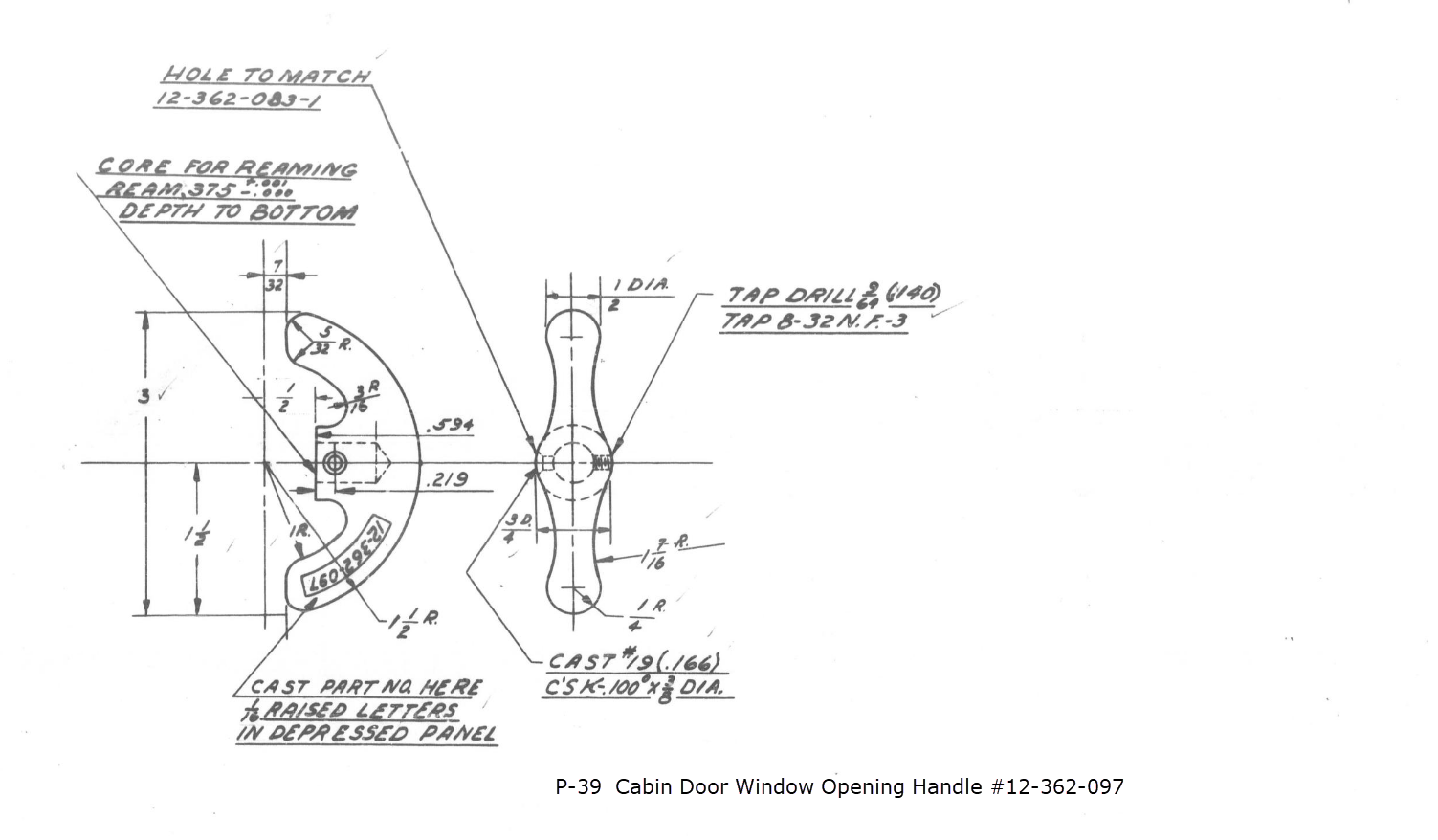
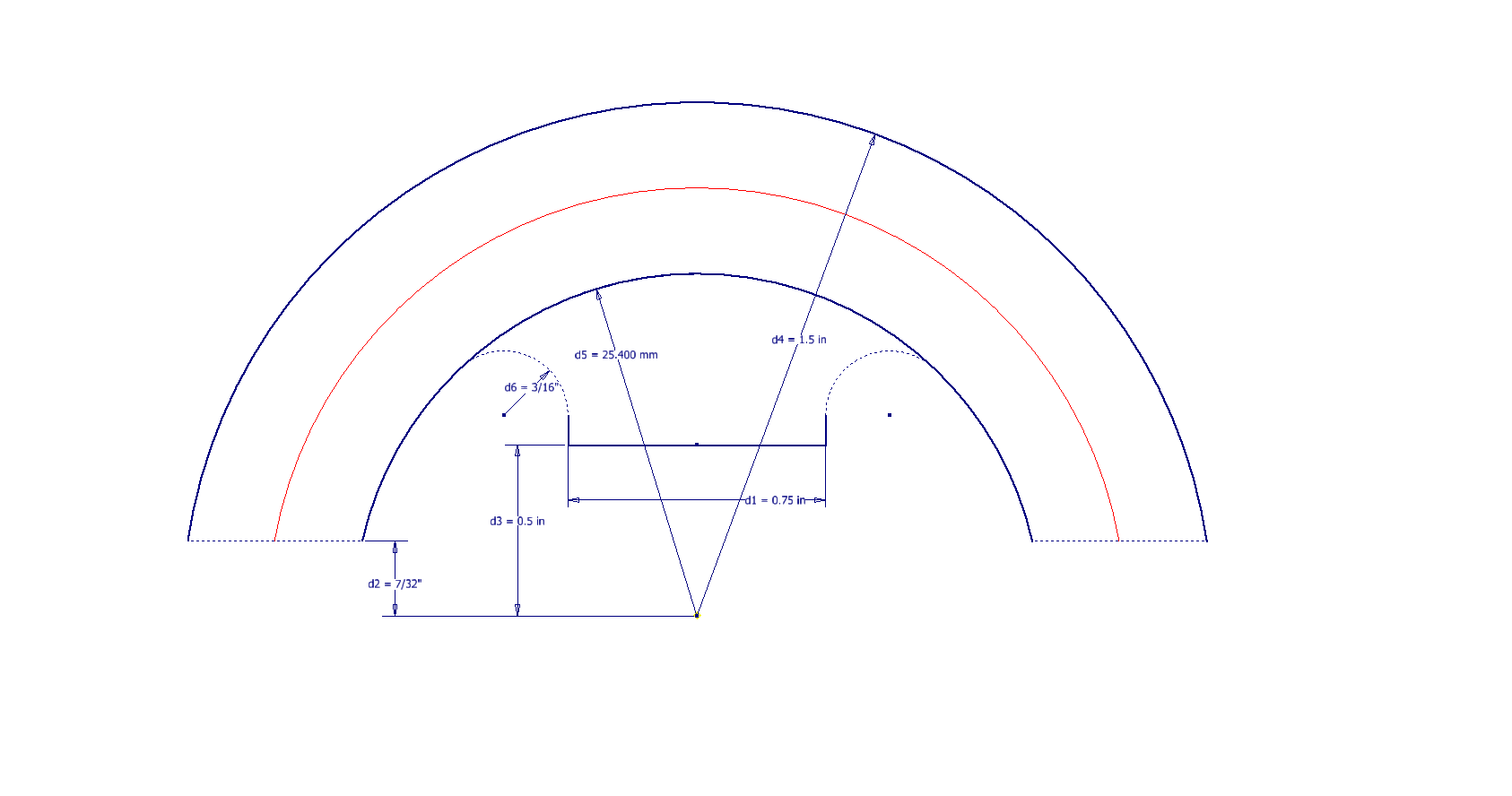
It has been a while since I specifically wrote a CAD solution Technote, and this seemed to be an ideal subject for surface modeling and 3D sketching. The dimensions define the outline for the front view, which is fine, and the plan view, which details a thinning of the handle cross section.
The thinning of the handle occurs in a specific plane as indicated in the plan view, while the front view maintains a consistent full depth diameter. Before diving into the modeling process, it’s important to pause and consider how to approach this design. Typically, my first step involves sketching out what is already known, which helps clarify the information we still need to gather. This initial sketching phase is crucial for laying the groundwork for an effective modeling strategy.
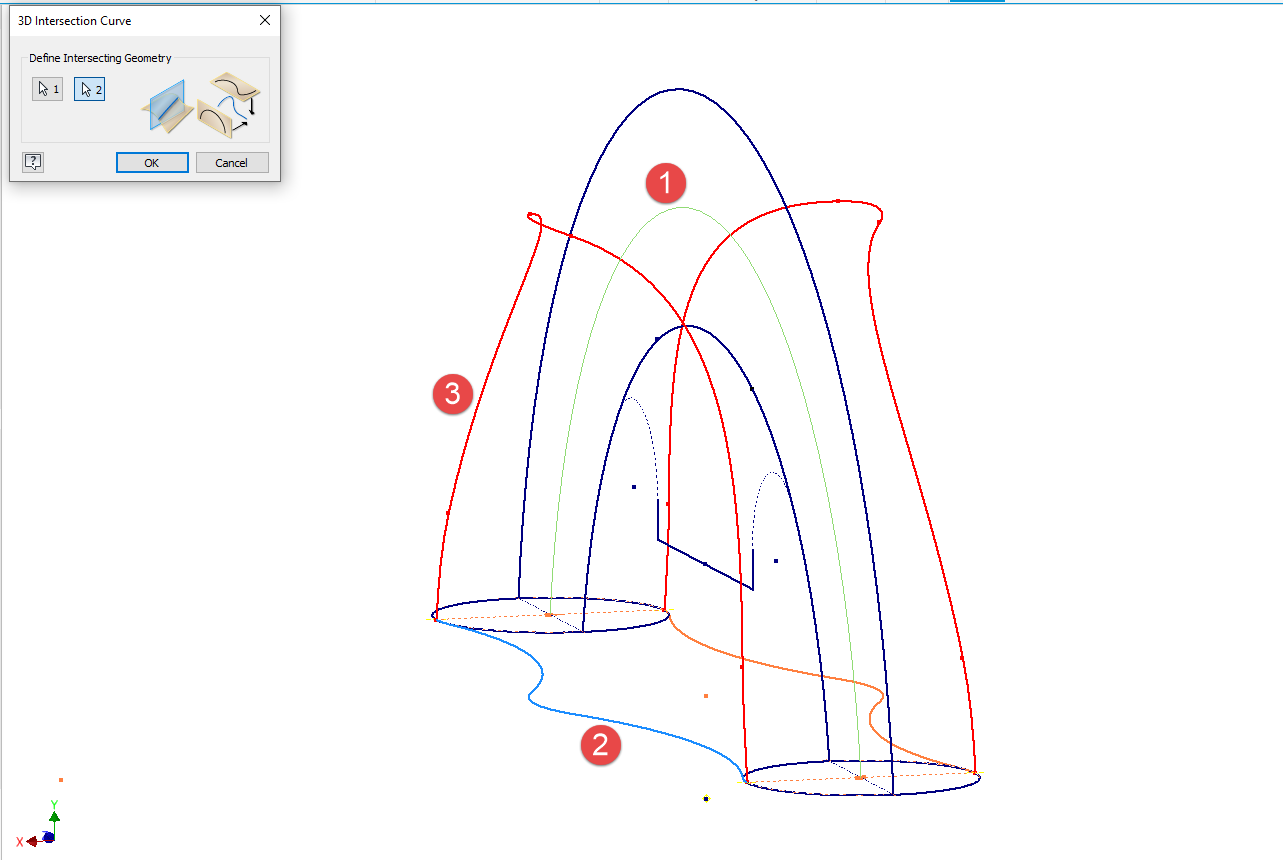
In each case, you’ll notice that these profiles are not closed. The base lines shown in the front view are defined as construction lines, and the end curves in the plan view are also intentional. This design choice allows the main profile lines to be used later for creating a Loft and for selecting a 3D Sketch Intersection. The center line of the arc in the front view will serve as the second selection for this 3D sketch. Additionally, note that the curves in the plan view are elliptical.
The purpose of the 3D Intersection sketch is to define guidelines for the eventual loft. Using the 3D sketch feature, we first select the center line from the front view and one curved edge from the plan view sketch. The resulting intersection will serve as the 3D path for the loft. This process needs to be repeated for both sides of the handle. The ellipses that will form the ends of the loft are created in a separate sketch from the previously mentioned plan view. This keeps them as distinct entities.
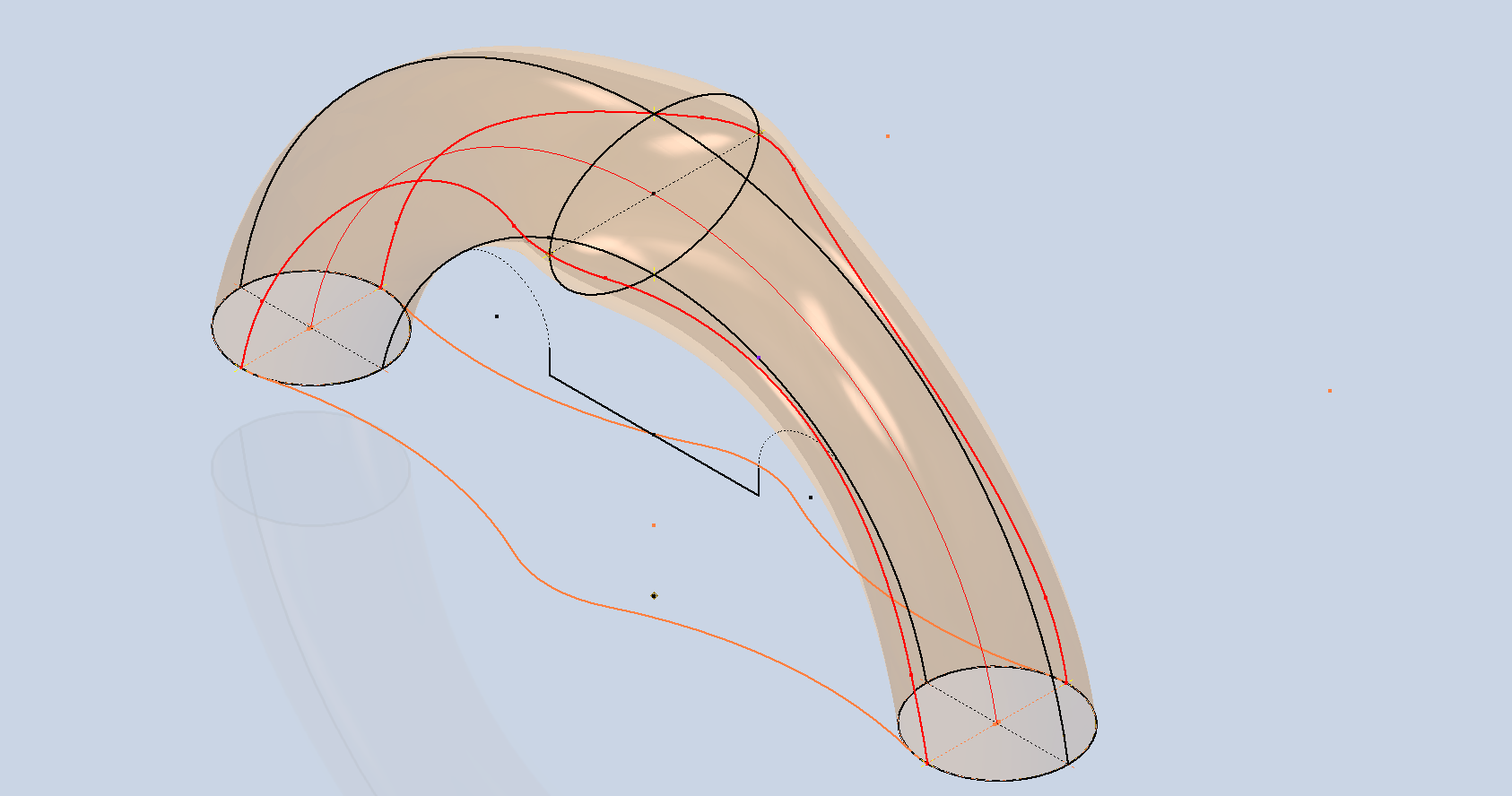
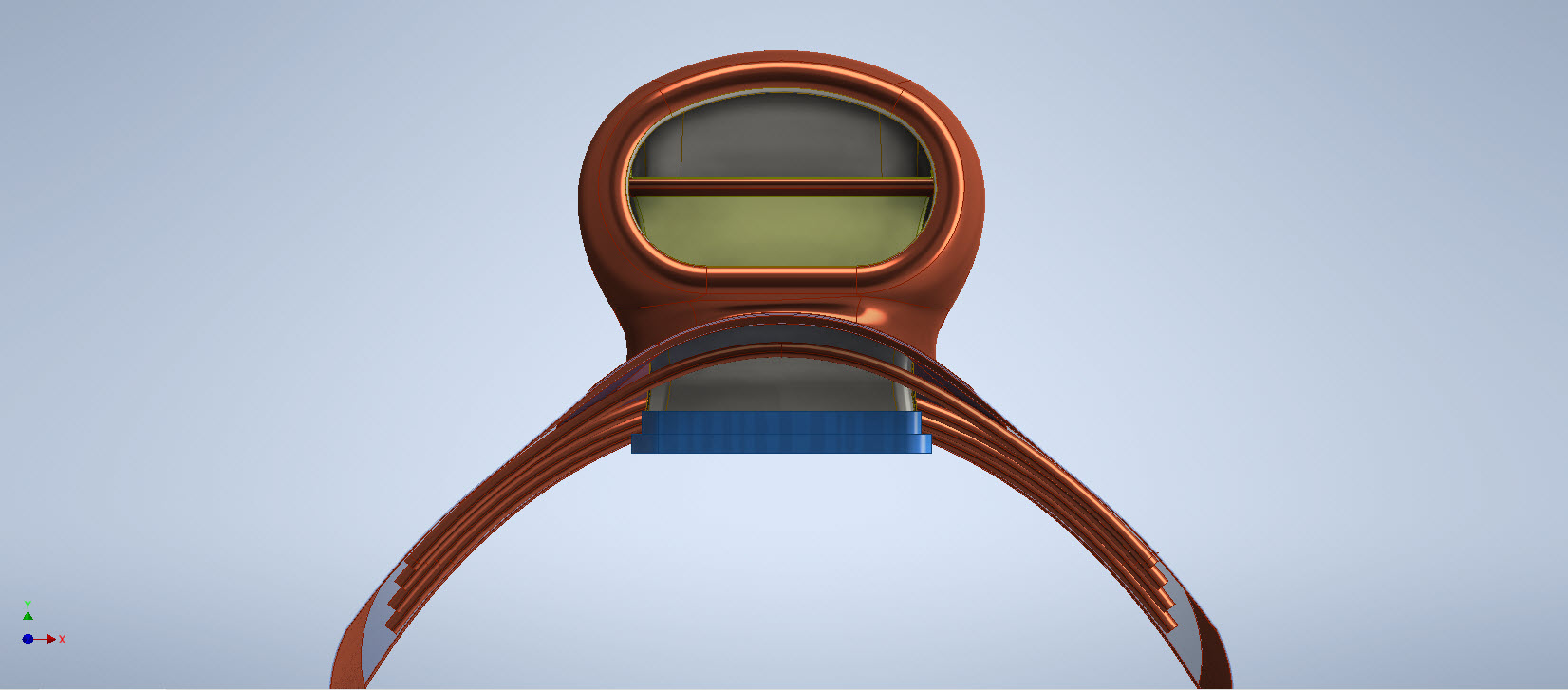
Hold on a moment; where did the ellipse in the middle of the arch come from? If we simply loft the two end profiles of the arch, as shown earlier, we can create an acceptable model, but it won’t be ideal. In the second image, where both surfaces are overlaid, you can see that this approach tends to create a diamond-like cross-section in the center. While this is not entirely incorrect, incorporating the ellipse in the center of the arch results in a much better finished surface, ensuring good continuity, as demonstrated.
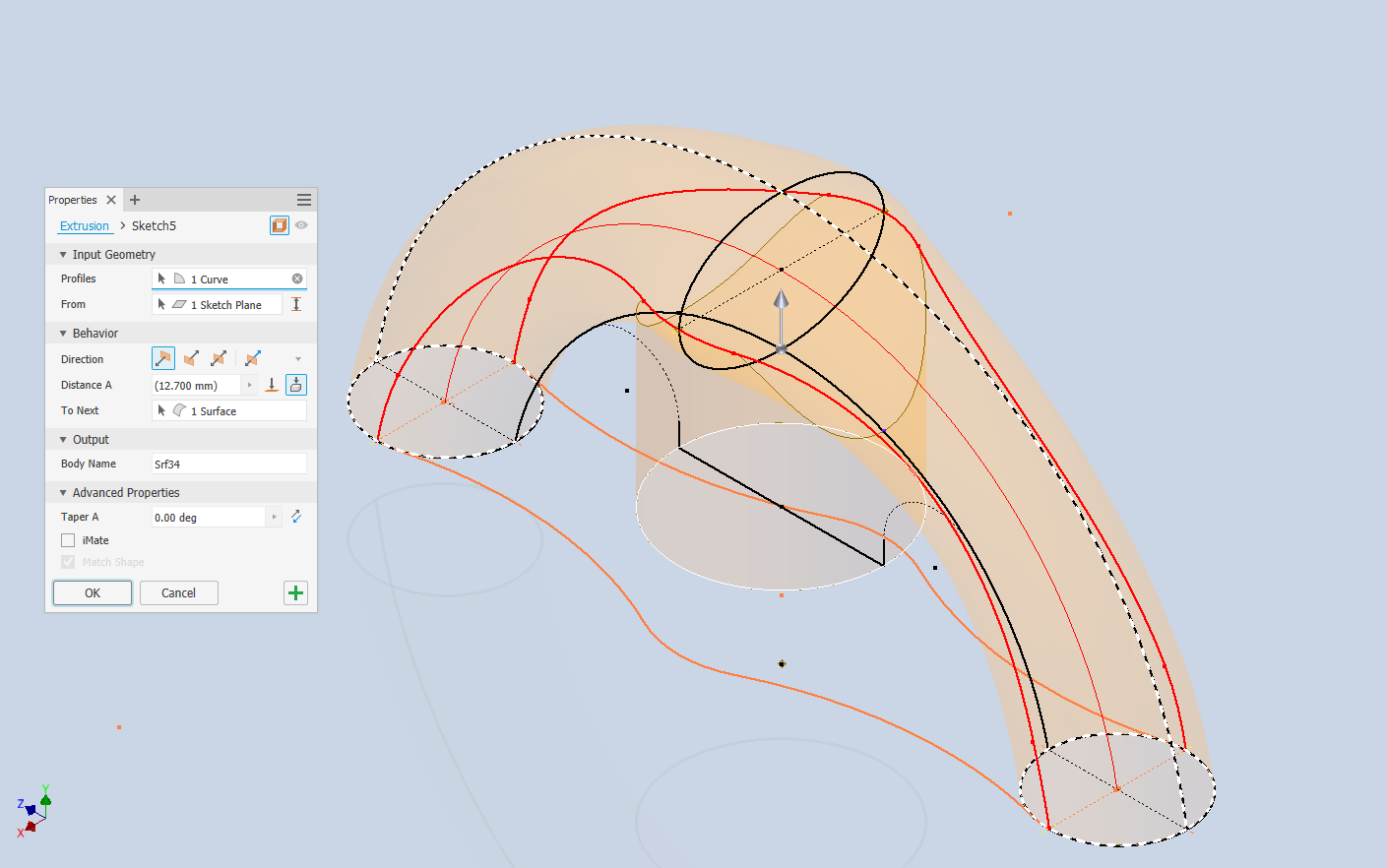
Once we have the arch lofted surface, we extrude the centre section circle to match the surface contours.
We then use this extrusion to trim the underside of the arch surface, apply patch surfaces to fill in the ends of the arch and this centre section. Then stitch everything together and we have the main solid model.
Apply a fillet as shown to the underside; note the fillet in this case is better selected as a tangent fillet and not a G2 curvature. It is often tempting to overuse the G2 fillet option as the perceived notion is that it creates a smoother finish, which by the way is correct, though in a case like this it tends to sharpen the fillet corners which is not good. Something to watch out for when applying fillets.
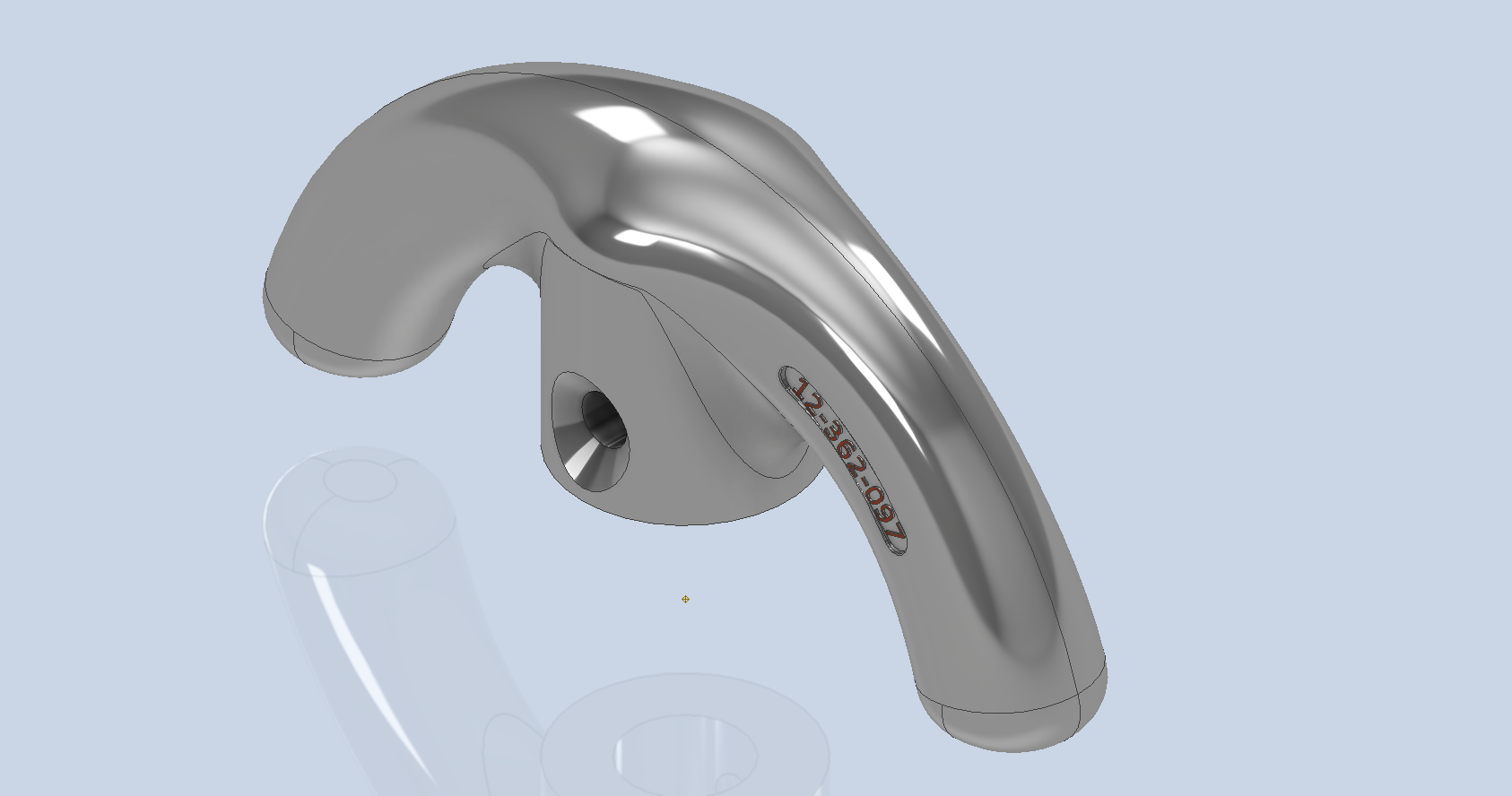
To finish up we add the holes as specified, fillet the ends of the arch (a good opportunity for a G2 fillet) and add the part identifier. The final part should look something like this:
In summary, when developing surface models, it’s beneficial to explore your options and start by creating sketches that support your plan of action. Consider using 3D intersections to define loft paths, and incorporate additional geometry as needed to maintain the circularity and continuity of the final surface.
This part is ready for manufacturing, which will probably be 3D printed for this static display restoration.
Typical Design Workflow:
Usually I would initially receive an inquiry via email from companies like Planes of Fame for a 3D CAD model of a specific part or assembly. Typically, the request includes a brief description of what is needed and not necessarily the actual part number. In this instance, it was for “the handle for operating the window glass.” I then searched through my archives to locate this item, reviewed the part’s blueprint, and checked which parts or assemblies it connects to ensure I have all the relevant information.
I will make every effort to start working on the CAD model as soon as possible, regardless of the time of day, to minimize any delays. For example, I received an inquiry about a part at 9:17 PM last night for the “P-39 Throttle Control Mount.” Following the established procedure, I was able to begin working on it relatively quickly on a Friday evening. The finished part (#12-631-027) was completed and submitted on Saturday at 11:17 AM. The final design included both the original 3D CAD model and a fully dimensioned 2D drawing, which is essential for verifying that all dimensions conform to the original blueprint.
This part will likely be 3D printed for the restoration of the static display, so the 2D drawing serves both as a dimensional check and a reference for manufacturing. If the inquiry had required a metal casting manufacturing process, the drawing would include more detailed information about part machining and the tolerances necessary for a full-metal manufactured item.
If you’re looking to bring your ideas to life with accurate 3D and 2D CAD models for replica parts, I would love to help! Don’t hesitate to get in touch hughtechnotes@gmail.com
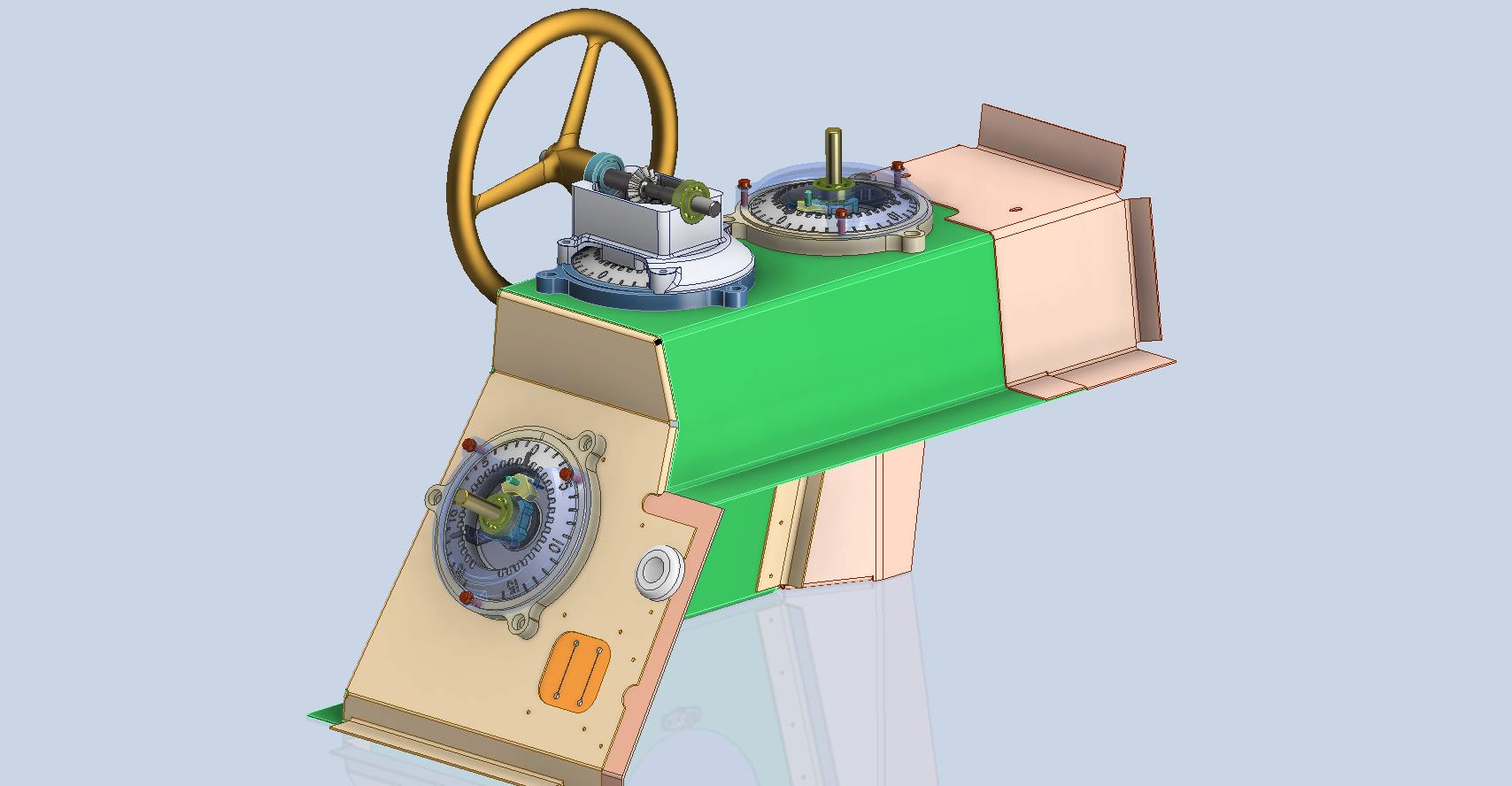
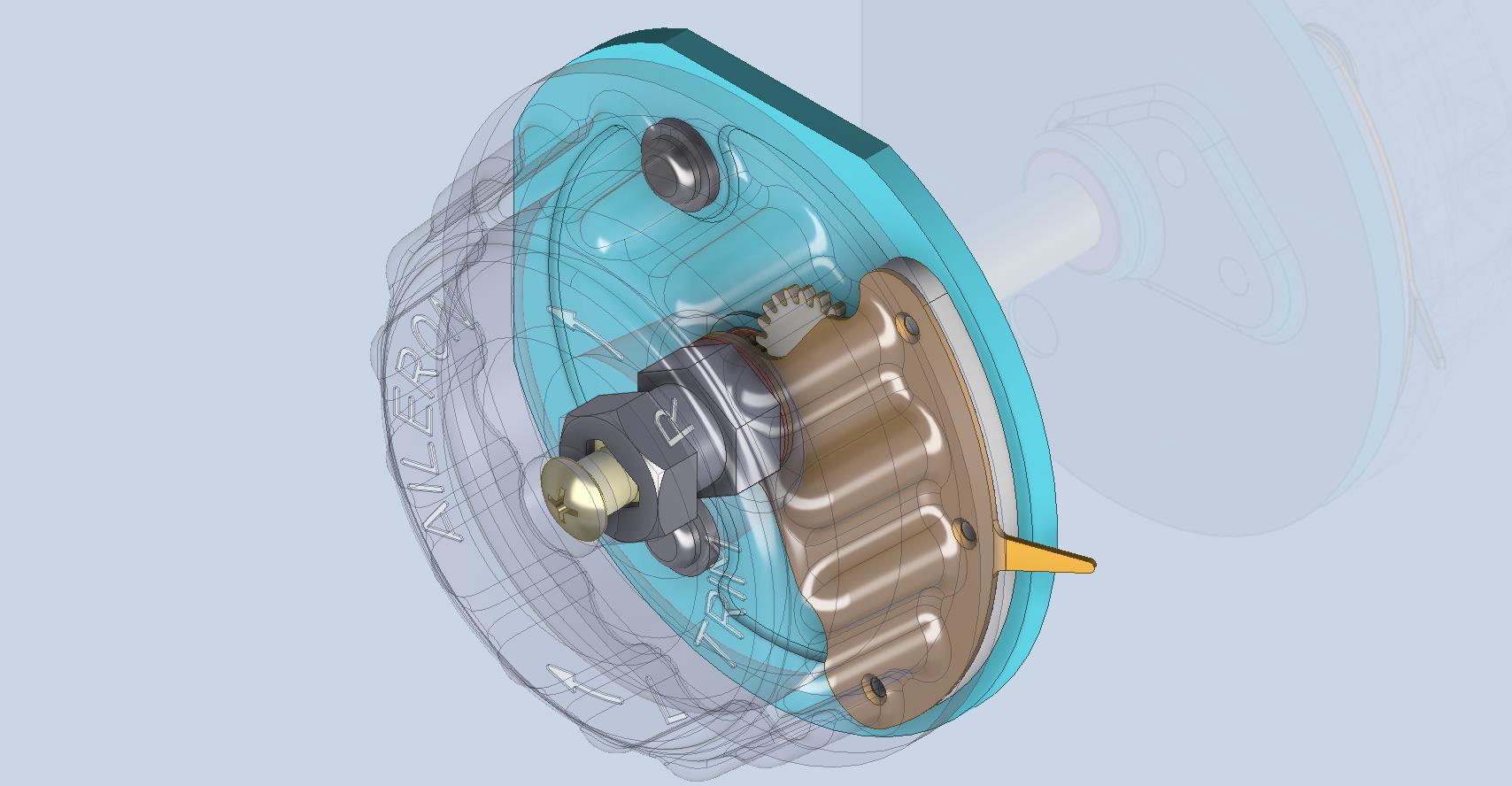
Working on the controls and instruments for the P-39 spawned a plethora of questions about how these controls actually worked. So I endeavored to incorporate the inner workings in the Trim Tab Control CAD models. This was specifically to get a better understanding of how they work. This was not a mandated requirement. The initial work scope was replicating the external components for a static display P-39 restoration.
Often enough in museums and private collections, we only see the external controls. For many, this is all they want to see. But what if we also see the internal gears, pulleys, shafts, and bearings to understand how they operate? This is exactly where I now want to go with my future projects.
The Trim Tab controls for the Elevator, Rudder and Aileron are already modelled for the P-39 including the internal components. These dials and controls are currently being manufactured for the restoration project. The decision has now been made to incorporate the working mechanisms as functional replicas. This is great and will actually have some form of function, however, the mystery of operation still eludes the operator. I want to take this a step further and produce desktop models with Clearview casings so that the internals are visible. The exact method is still under review. It will mainly comprise 3D printing techniques for the main components attached to perspex casings.
The dials for all 3 controls are similar with the Rudder and Aileron dials operated by a control knob (not shown) and the Elevator Tab controlled by a wheel as shown. At the base of each control dial there is a sprocket for a short Roller Chain which in turn is attached to operating cables. Out of curiosity I decided to have a look at other aircraft to see how alternative mechanisms were developed for the P-51 and the FM2.
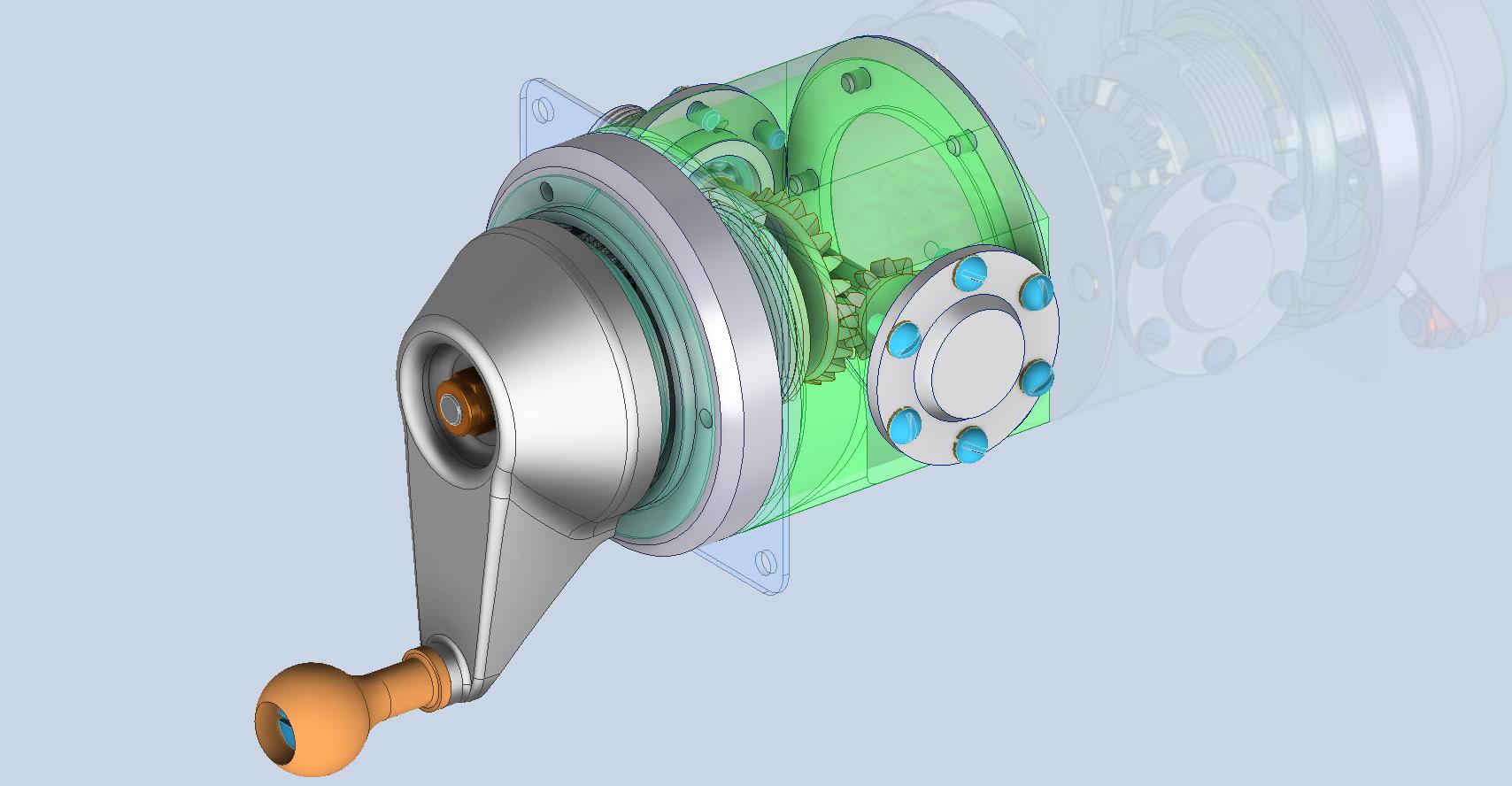
For the P-51 the Trim tab controls are comparable in their operation with the internal gearing arrangements but differ slightly in design.
The dials for the Aileron, Elevator and Rudder are all similar to the CAD model shown. The Elevator and Rudder have cable drums attached to a long shaft for direct cable operation whilst the Aileron has a chain sprocket similar to the P-39 Trim Tab controls.
The plan for the P-51 is to fully model all the components in the assembly shown, complete with cables and chains to simulate operation.
A small point of interest; the various aircraft designed by the same manufacturer often share common parts; for example the NAA drawings for the B-25 share the same Trim Tab control knobs as the P-51 and listed accordingly. For some reason, the P-51 drawings do not reciprocate.
If you can’t find drawings for a particular part, check collections for other aircraft by the same manufacturer. Occasionally, this can be worthwhile. Similarly, with Grumman, many parts were shared with the FM2 and the Grumman Goose.
The above model is the FM2 Elevator Trim tab control, the main body of which is typical for the Aileron and Rudder on Grumman drawing 13690. The Grumman Goose has similar controls shown on the Grumman Drawing 13693. Shared components across the various aircraft are listed on the Grumman FM2 drawings.
This Trim Tab control for the FM2 is probably the most complex I have studied so far…requiring very fine manufacturing tolerances. I am not entirely sure yet how this works as there is a complex array of tabbed washers that act as stops for the dial in both directions; it is unclear at this stage how they should be configured…I will get it worked out in due course.
A lot of work to do on these projects which will definitely keep me busy through 2025.
Developing the CAD standards for Rivets has been on my to-do list for far too long..so with the progression of the P-39 cockpit instruments it has become a priority. Typically on the Bell drawings and other aircraft manufacturers’ drawings we may only have the hole sizes noted, the rivet designation or information pertaining to the same but unreadable. Also occasionally even when we do have the hole sizes and the rivet designation often we don’t have the length required.
Something needed to be done to make this task a lot easier, particularly when you have instrument panels that incorporate many different types and sizes of rivets.
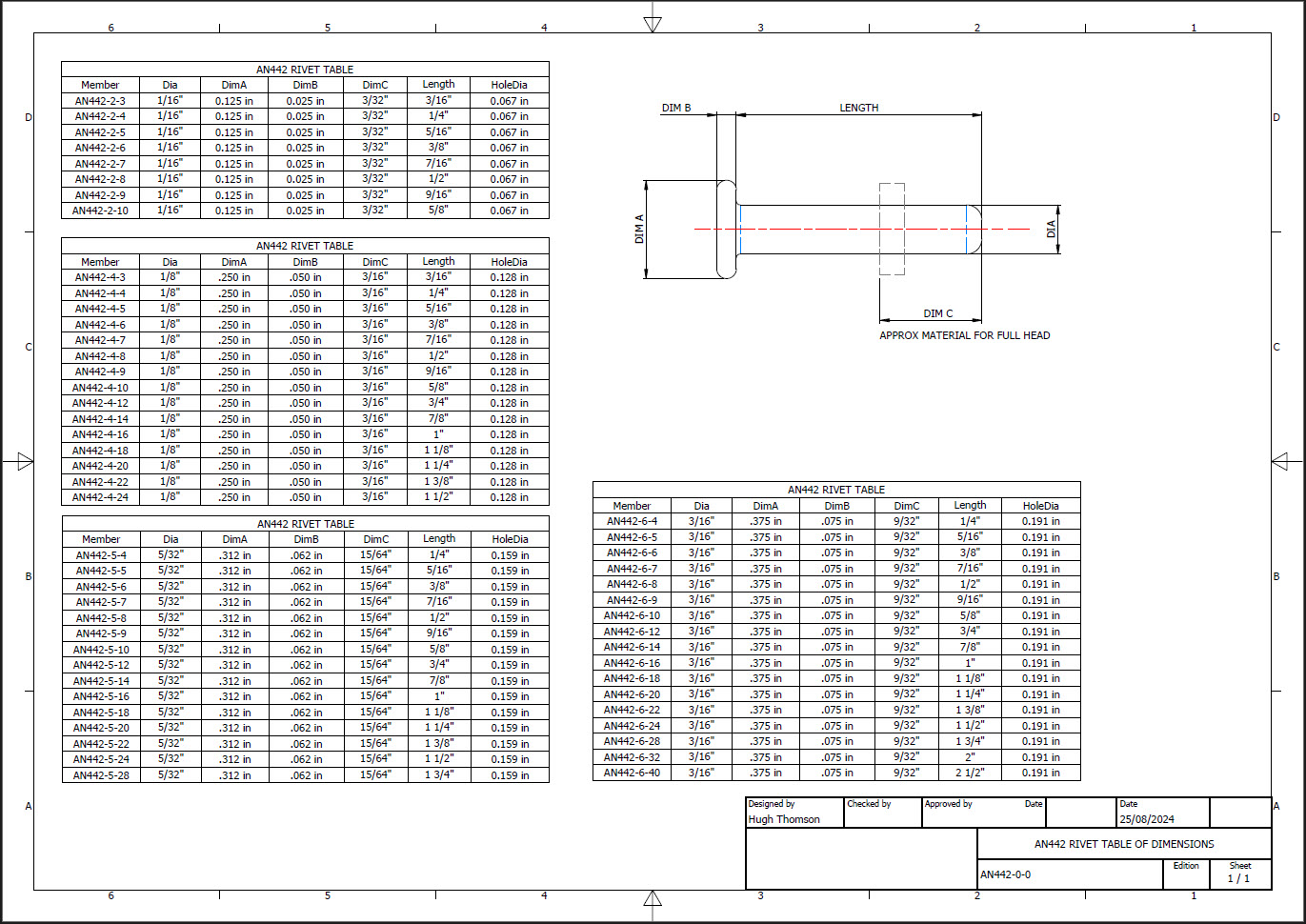
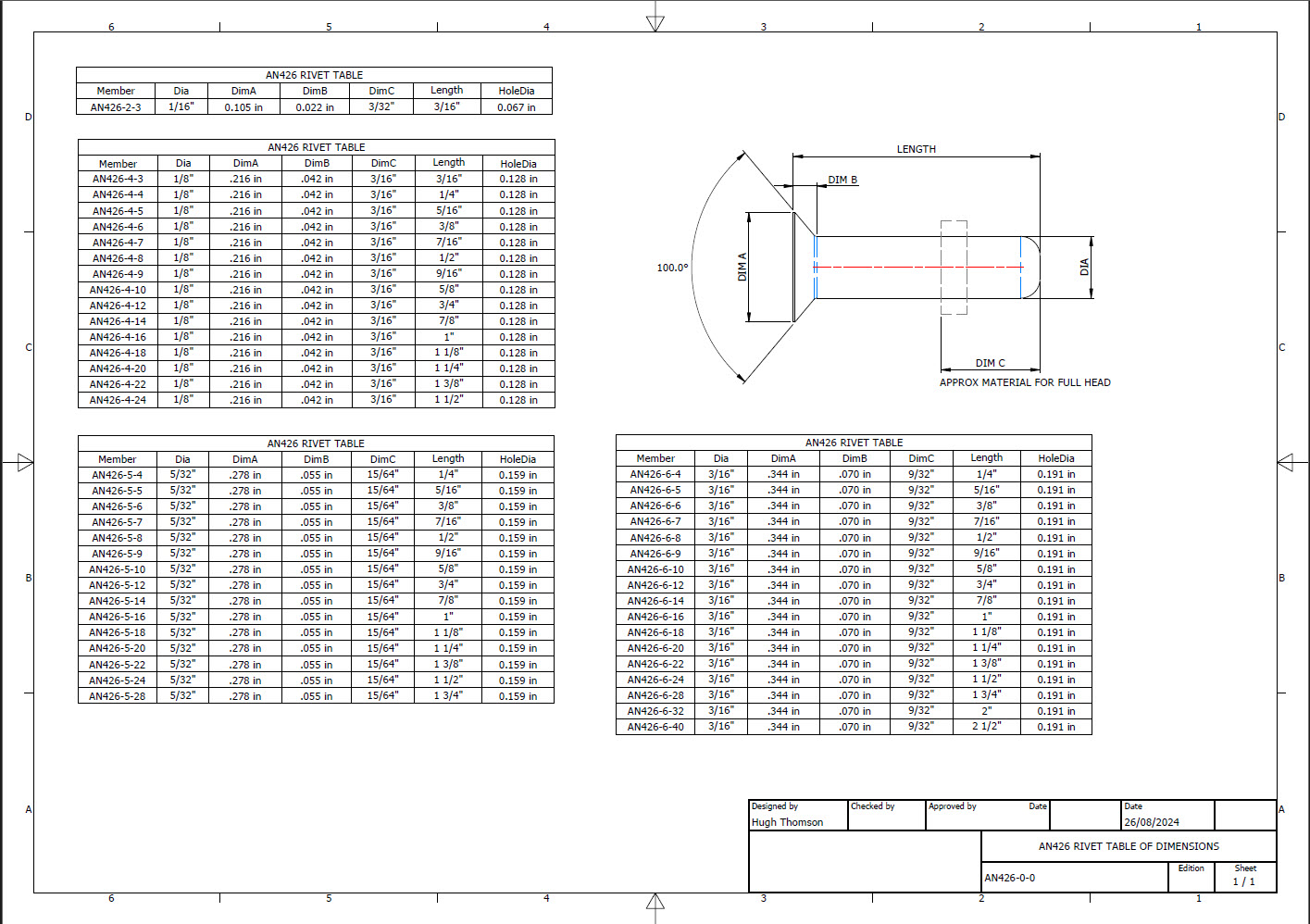
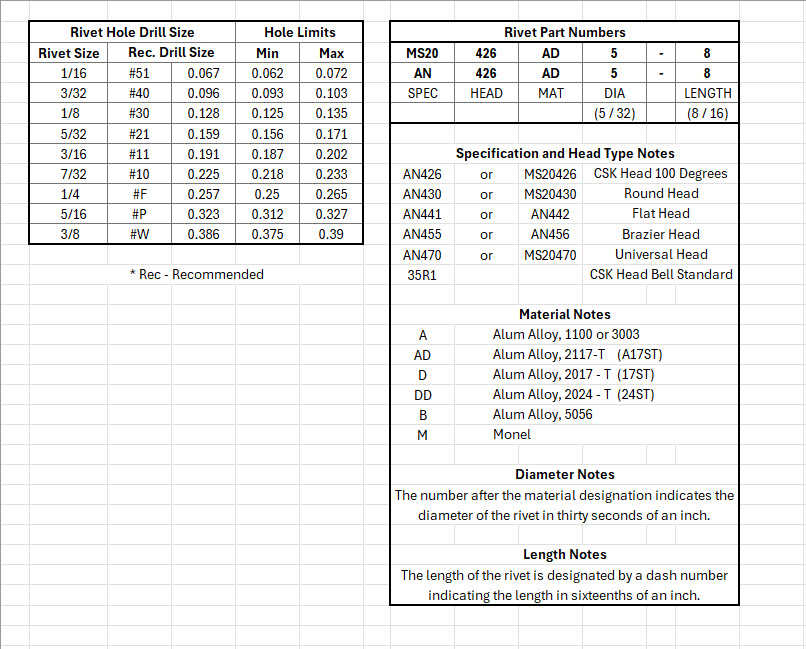
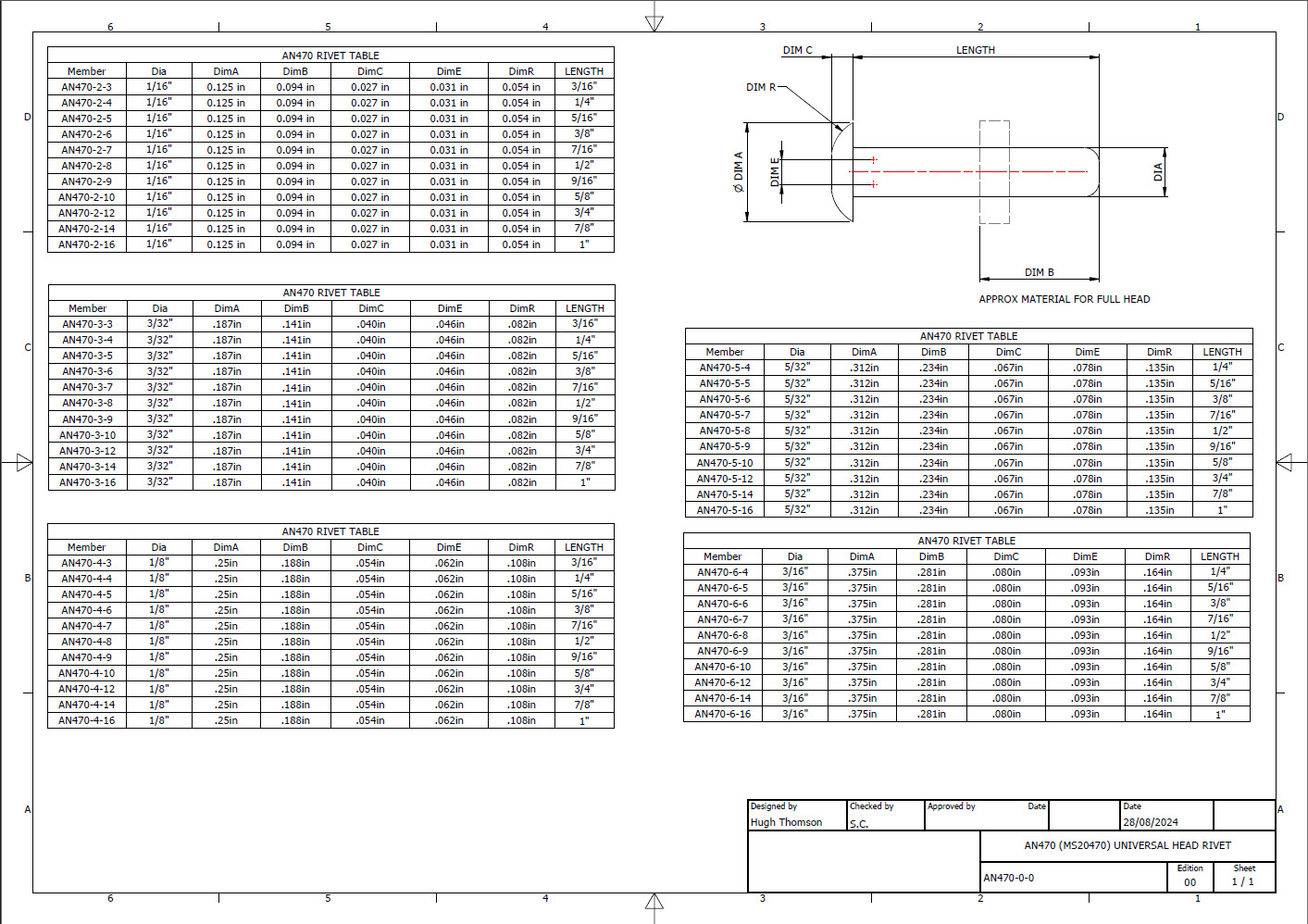
The first part of the process is to create several parts for the various types of rivets; which at the moment are listing the most common sizes I need right now. You will notice that the Rivet Name does not include the material type as doing so would require an extraordinarily large table of data. So the name is simplified to make this task easier to correlate but also because the priority at this time is dimensional correctness for rivet type, diameter, hole sizes and rivet length. At some stage, I will invest some time into deriving the various information sources to correctly name the rivets according to the AN and MS standards.
To complement the CAD iParts I also have a few spreadsheets listing key parameters and fabrication criteria.
The above tables are self-explanatory with the inclusion of a designation for a Bell Standard Rivet 35R1. I have actually found dimensional information for this type which I will include in the CAD library. This is where things get interesting because of the scarcity of historical components that may no longer be available, it may be necessary to find suitable alternatives.
You will notice that the Rivet Grip tables are in inches and mm…as I tend to work using metric mm templates (although the dimensions are input as inches) it makes it easier to measure the material thicknesses in mm and determine from that the rivet length. There is a technote somewhere on my blog that describes the process of inputting inch dimensions in metric mm templated models.
This will be an invaluable asset moving forward with the cockpit rebuild on the P-39. For example where there are issues with the legibility of key information on the Bell assembly drawings I can refer to other connecting part drawings that may only have hole diameters but will be sufficient to determine the correct rivet type and size.
This is very much a work in progress and will be updated as needed.
Update: 28th August 2024:
I have updated the Rivet CAD files which now include AN426, AN430, AN442, AN470 and of course the Bell standard 35R1.
All Rivet CAD data files (iParts) are now included in the CAD Standard library (see CAD resource tab for further details) along with original spreadsheets of Rivet Grip and general details.
The P-39 Restoration project was rather busy last month. The chaps at PoF have completed and test-fitted the Drive Shaft Cover fabrication and the Floor panels for the Rudder Quadrant…all is good. The Radio Console is now designed with the 3D CAD models and fully dimensioned 2D drawings; for all parts; issued for fabrication…I am looking forward to seeing the finished product.
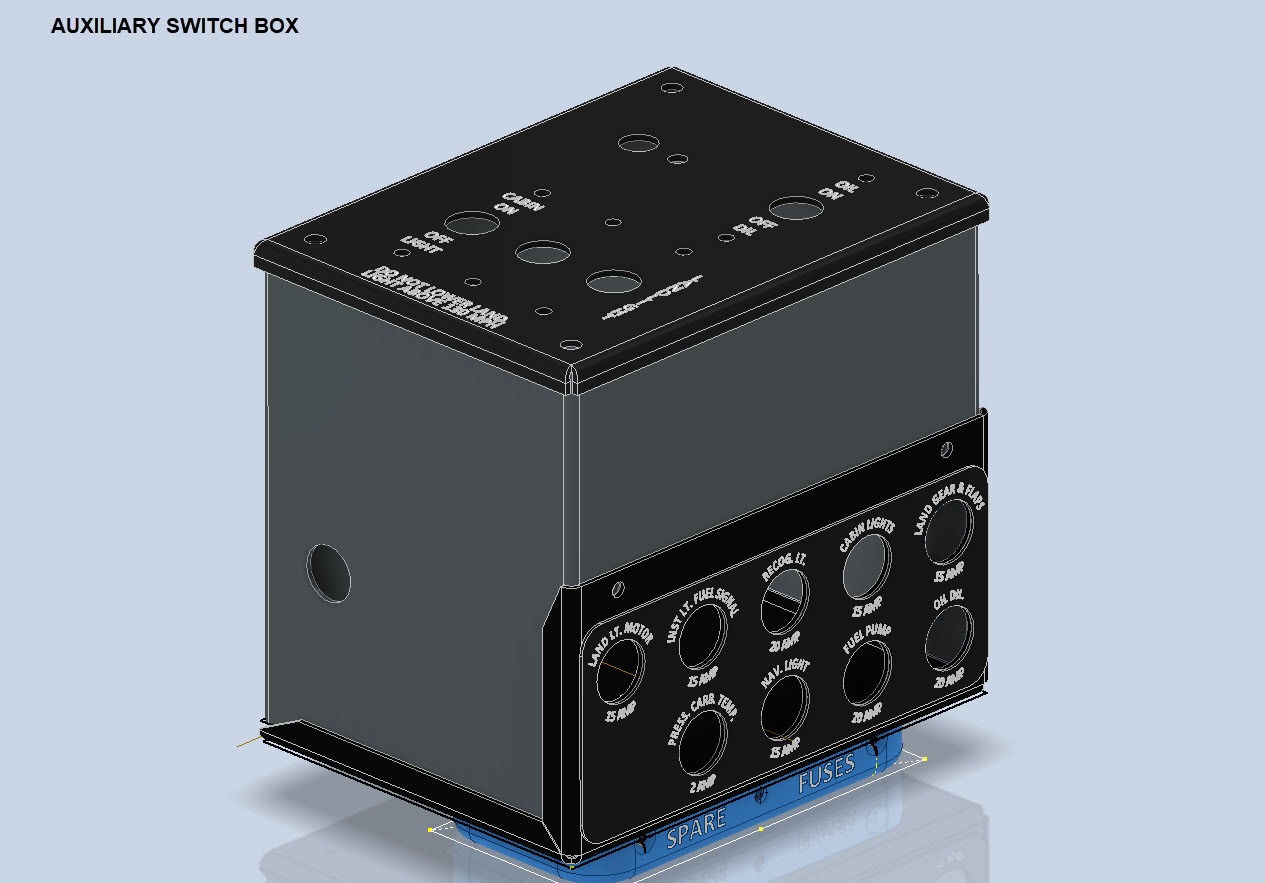
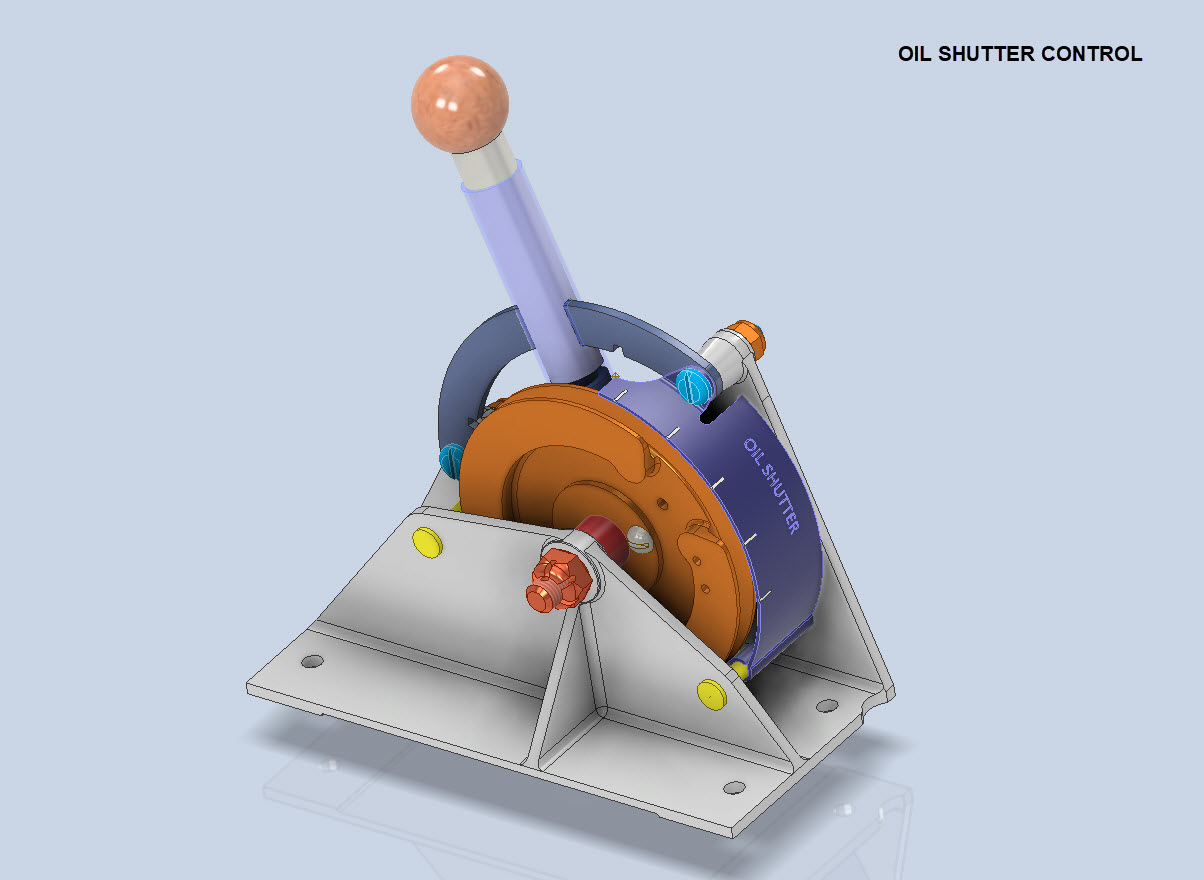
Several other components are still works in progress with the CAD development well-advanced. These are for the Auxiliary Switch Box and the Oil Shutter Control. I still have the detailed drawings to do for both of these assemblies, which hopefully I will get done in the next few weeks.
Today the importance of fully dimensioned and detailed 2D drawings is commonly overlooked. It is an essential part of the process to both check dimensional accuracy and also to ensure that the clearances and fabrication tolerances are correct. So I tend to do 2D dimensioned drawings for everything, even items we know in advance that will be 3D printed. All the assemblies include all the necessary bolts, nuts, screws, washers and other standard components in compliance with the requisite AN and MS standards.
As you know I already have a fairly comprehensive library of over 350 parts parametrically modelled in CAD, which although comprehensive will at some stage require the addition of more components as highlighted by this particular project.
The current library is available on the CAD resources page, which will save you a lot of time and effort on your own projects. Although these CAD files are aimed at Inventor users you can quickly download an evaluation copy of Inventor from the Autodesk website and convert them to any CAD format you need.
Please consider making a small donation, even the cost of a coffee will help support my work on this project and the research work on other aircraft.
As usual any comments or feedback please drop me a line at hughtechnotes@gmail.com
For instrumentation Panels, the location and size of text is very important to ensure clarity. This is usually well documented on the manufacturer’s blueprints so it is essential we get this right. In Inventor for example and I am sure it is equally similar in the many different CAD programs the key is the Text justification…let me show you.
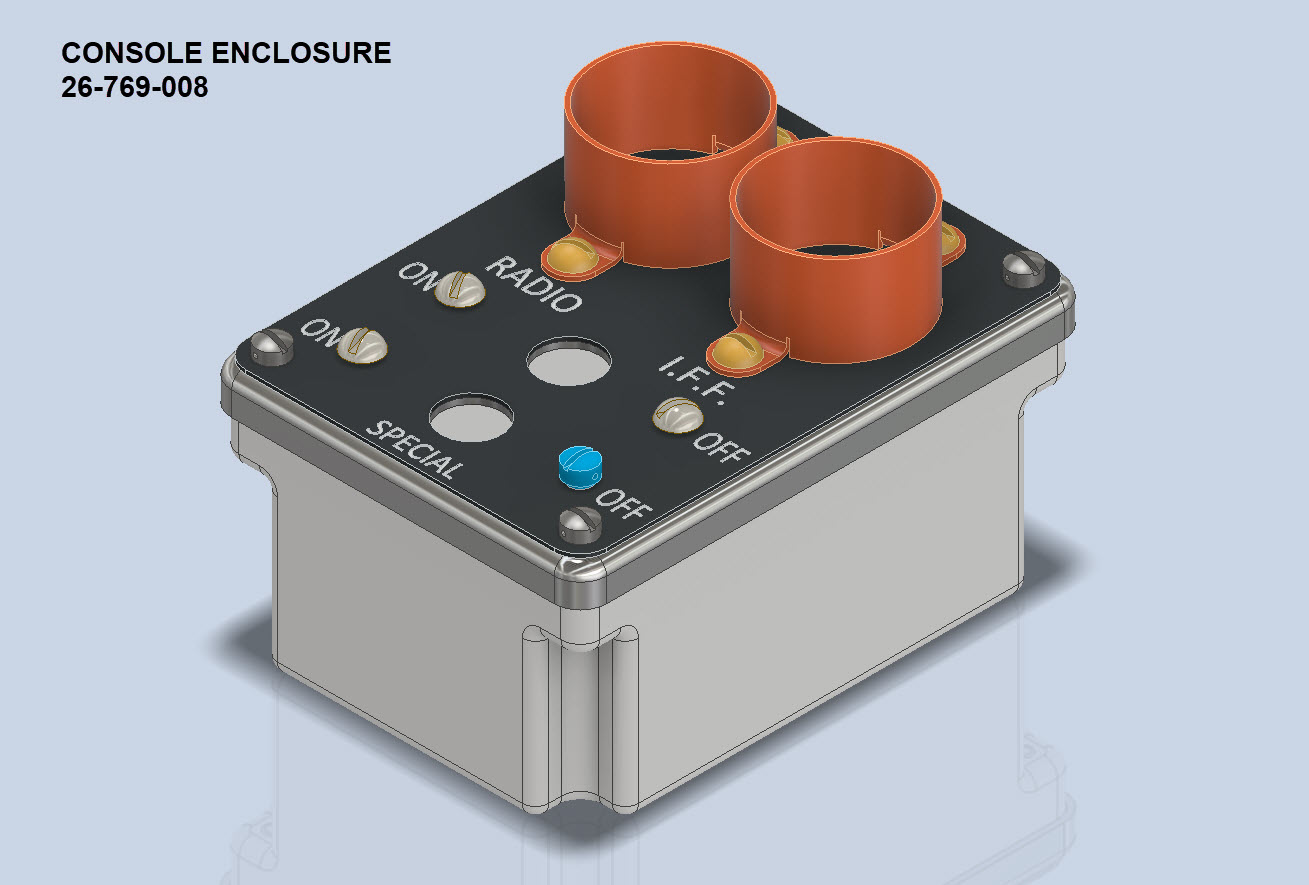
First of all a quick update on the P-39 Restoration progress. Much of the recent discussions revolved around fabrication and 3D printing. As mentioned in the previous article this restoration is a static display for which many of the parts will be 3D printed, although the key aluminium panels will still be fabricated as such. The very latest part to be issued for fabrication is this small Switch Box on the Radio Console.
A surprisingly complex box which will be 3D printed and the Nameplate will probably be CNC. The dimensions of the main box are not defined on the Bell drawings so I had to interpolate from the known information and other Bell references to determine the final dimensions. This took into account the clearance from the Drive Shaft connecting flange which is in very close proximity to this box. This also fits quite well into our discussion here on Label Text Placement.
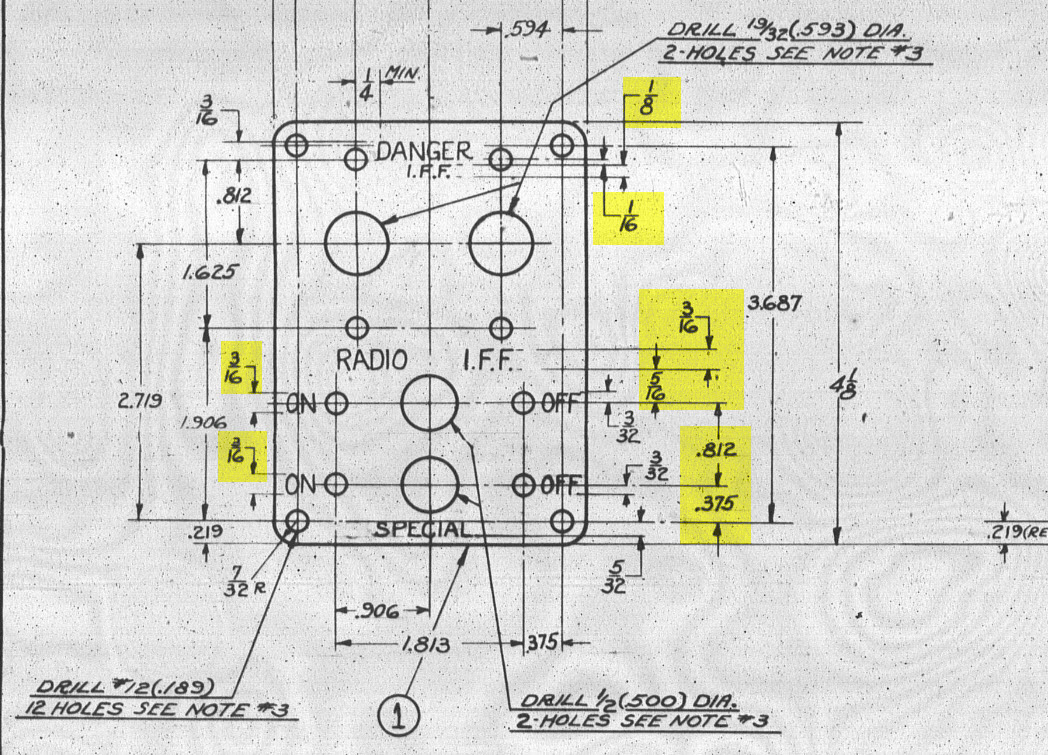
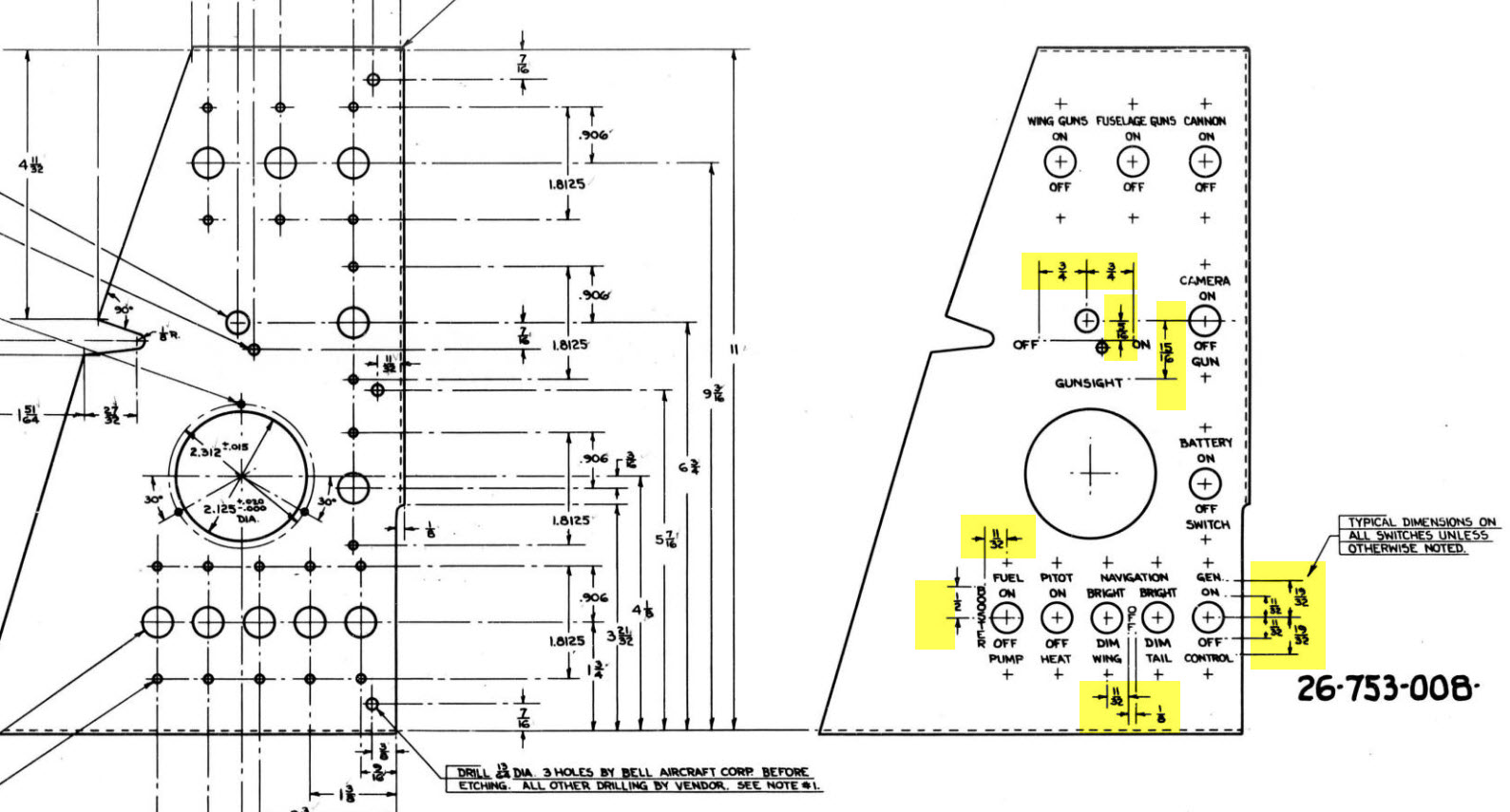
Typically on the Bell drawings, for example, the panel drawings include the height and location of the Label text similar to the following.
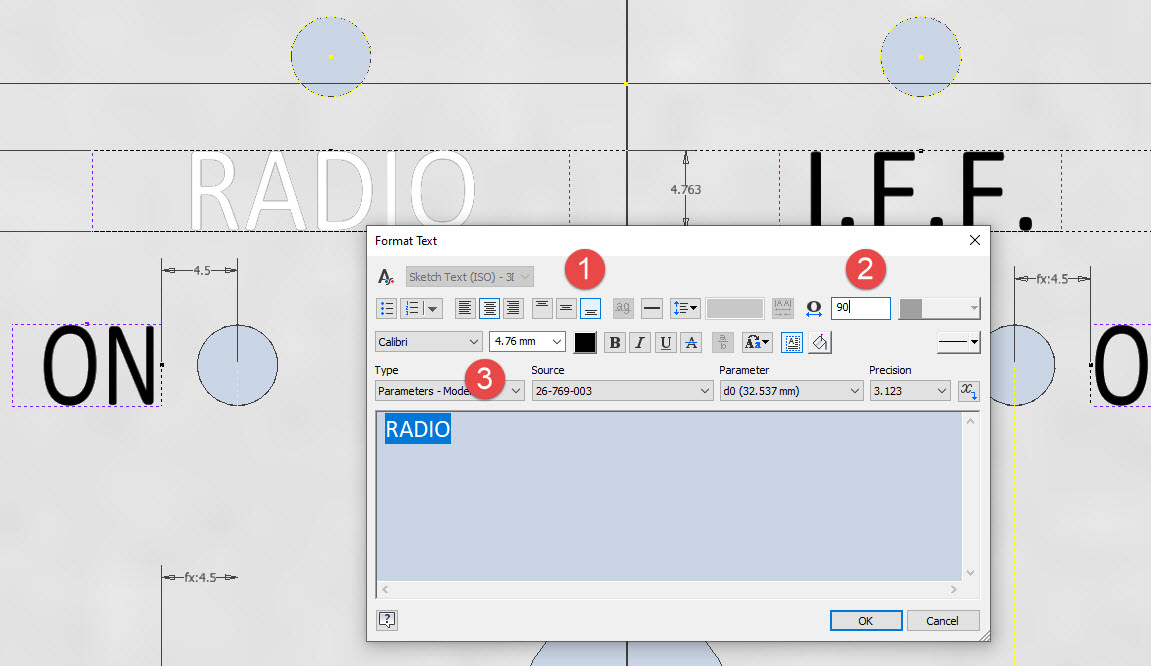
The way we do this in Inventor is by using the Text justification feature in the text editing box.
In the first image, we adjust the justification using the icons at “1”. If the dimension to the text label is to the bottom of the text we set the vertical justification to the bottom and if the placement horizontally is to the centre we centre the justification. When you exit the Text editing box a Text outline box is shown in dotted (this is optional so make sure you switch that on). The appropriate edge of the dotted line frame automatically aligns with the justification of the text entities. This dotted outline can be dimensioned and constrained as you would any graphic sketch entity. The second image shows some examples of how the dimensions of this outline relate to the justification.
It is not unusual for the overall width of the label text to also be specified in which case the “Stretch” value can be adjusted accordingly, entity “2”. At “3” we set the font and height, make sure you have the text highlighted in all cases or these adjustments will not be applied.
Interesting to note that the text outline can be useful if you require a frame around your text. The dotted lines can be changed to normal sketch lines and extruded or embossed as required.
There are a lot of features in the text editing dialogue which I may do as a technote further down the line but for now, to get the label text in exactly the right locations this is the way to do it.
An update on some recent work I have done for the P-38 Lightning and P-39 Airacobra. For the P38 Lightning, I now have the Boom Tailend interface with the Empennage and for the P-39 Airacobra, the new work includes the Auxiliary Fuel tank, Wing and underside panels at the Centre Section.
P-39 Airacobra Wing Layout and Aux Tank:
I was doing some research into the various closed penetrations on the underside panel as shown in the photograph on the right. So I modeled this panel to get a clearer idea of what was happening in this area as marked “A” in the underside view and front view images above. The 2 oblong holes are actually openings that normally would have a curved reinforcement which I understand would be used for the Auxiliary Fuel tank pipes and hoses. The Teardrops are for domed covers, which you can see more clearly in the first image view.
The Square cutout towards the rear of the panel is for the exhaust Flap and the slot to the front is for a removable panel that houses the Auxiliary Fuel tank mounting. The Aux fuel tank itself was well documented and was an interesting model to develop…I still have the fuel cap and vent pipe to add along with a few bracing struts to complete.
Following this exercise, I decided to further develop the wing layout. Although the CAD work for the wing was well-dimensioned with outlines for the Wing plan, Front Beam, Rear Beam, and Aux Rear Beam there was not much information on the actual rib profiles. We know that at STA 1 (22″) from the center of the ship the rib profile is a NACA 0015 and at the wing tip this is a NACA 23009 profile (204″ outboard). Other than that we have virtually no ordinate information for the ribs except for a partial profile at STA 7 +7.
The arrangement for the wing has been a subject of debate on several forums mainly regarding the construction of the Wing Tip. Usually, when there is a change in the rib profile the change occurs at the intersection of the wing tip and main wing however in this instance it is located at the extreme point of the wing tip. So the surface model is based on a loft between the 0015 profile at the root and the proxy 23009 profile at the extremities. This loft reveals an interesting caveat related to the evident wing twist and alignment of the Leading Edge.
Clarification on the location of the different NACA profiles was actually found in the NACA Report L-602 on the Flying Quality of the P-39 which defines the relative positions of the profiles. The caveat I was talking about relates to the wing twist…normally when we think of Wing twist or Washout we visualize the rib rotated about the 30% or 35% chord with the leading edge dropping and the trailing edge lifting slightly…but that is not what is happening here. The entire 23009 rib drops from a static position at the trailing edge towards the leading edge…the rotation is roughly 1.257 degrees. This results in a continuous leading edge downward alignment all along the length of the wing from the root to the tip.
As this is most unusual I was able to check the resulting surface model against known dimensional information for the beams and the partial profile at STA 7 +7 which matches. I still have to model the wing tip which has an interesting upward curvature.
P-38 Lightning Boom Tail End:
Another challenging aspect of the P-38 Lightning was determining the geometry for the Boom Tailend…essentially the intersection of the Boom and Empennage. We do have the lines of intersection for the Vertical Stabiliser, Horizontal Stabiliser, and the end of the boom but we don’t have any dimensional information for the curved profiles though we do have drawings that give us some idea of the profiles.
This was surprisingly difficult to get right and to be honest this final version is the result of 3 different attempts to achieve a viable solution. At first, I attempted to draw the Boom section, and stabilizers then fill the void with a surface patch to naturally define the curved fillets…with a few guidelines I managed to get a reasonable result but I incurred a few anomalies with the finished surface which I couldn’t correct. The second effort was more structured with a number of contours traced from the available drawings as a reference to gauge the curvature and then try again with surface patches but this time is broken down into quadrants, top 2 sections, and bottom sections…this was better and very close but again I had a few surface deviations at the leading edges.
Finally, I decided to have a look at using variable radius fillets…although I had already tried this unsuccessfully I changed my approach slightly which gave me good results. The fillets I used initially were tangential which caused a few problems where they met particularly on the top surface…what was happening was a sharp edge developing where the fillets intersected…so that was no good. It also mattered in which order the fillets were generated.
Eventually, I figured why not try G2 fillets and see if that worked…I am always wary of using G2 fillets due to some bad experiences using them before but I was running out of ideas and I was keen to find a workable solution. I started with variable G2 fillets at “1” and “2” with several control points to control the curvature and avoid folding the surface at the leading edges. After some fine-tuning, this worked out well for the first 3 locations. The remaining fillet for the Vertical Stabiliser did not go quite so well as it was impossible for the CAD software to give me a G2 variable fillet…so this one ended up being tangential. Perhaps with a bit more tweaking, it may have achieved a G2 fillet but I had spent many hours on this and I needed to make a decision.
There is a very very slight edging but it is almost unnoticeable on the final product. The final curvature of this model matches well with the guidelines extrapolated from the drawings and I am satisfied it is a very good representation of the Boom Tail End.
I hope you find this article useful and as usual any inquiries please get in touch at hughtechnotes@gmail.com
This rather small unassuming item is at first glance a straightforward little model that actually turned out to be a huge headache. I spent several days working on this model which will all be explained in this article. Hopefully, the solutions I found can help you.
The first hurdle was the Bell Drawing 12-614-001… several key dimensions were illegible and a complete end section was non-existent. The first task was to develop what I do know to help determine what I needed to know…that in itself took an inordinate amount of time but eventually managed to get that sorted. In addition to the sections shown on the drawing I needed to include a control sketch to control the dimensions of the eventual loft activity…this was essentially an ellipse with fixed height and variable half-width.
The side/outside lines of the Exhaust Stack are fixed profiles so it will be the inner profile that will change to make sure that the intersections of the 2 pipe exhausts were correctly located in the centre of the element.
You will notice the side profile sketch is separate from the main model sketches, this just makes it easier to see what I am doing as for the most part, it was mainly for reference.
At this stage, everything is quite straightforward as all I had to was loft the 2 pipes by selecting each of the profiles as shown and then trim the surfaces to give me a base model. A small tip: for this to work correctly and ensure the alignment with the external lines and allow for expansion internally it was necessary to loft using the Centreline option…the centerline holds the loft shape between sections normal to the centerline.
This is where everything got crazy. The main body part of this stack has no joint seam and is quite bulbous…so what I had to do was adapt this base model to form the bulbous surface complete with an internal curve.
As you can see in the image on the right the real item shows the bulbous main body part and the generous inside curve. By the way, some may have observed the real item looks shorter than the model…this is a puzzle…some of these exhaust items are indeed short and this is further noted on the Bell drawing as a dotted line! I suspect this may be linked to the engine used but as yet I do not know for sure.
I initially created the short version thinking that this was normal until I found out that most are actually longer versions. That was the start of many frustrations to come as that first batch of models was quickly scrapped and started again. That bulbous bit though is the main problem.
In order to achieve this I had to derive a solution that filled the void between the 2 tube lofts and at the same time provide an internal curve consistent with the real product. What I opted to do was simply trim and then remove the inner surfaces and then blend the remaining void with a surface patch.
My initial effort was to remove the centre section according to the natural divisions along the centre of each tube and the sketch plane. I tried variation after variation on this, adjusting tangency strength and G2 for each side, I even adjusted the dimensions on the control systems to make minor corrections. I eventually ended up with something reasonable and we got it 3d printed. The second image above is the latest model incarnation which I will explain below.
Two immediate issues are quite visible on these printed models…the initial curve between the 2 tubes is far too tight and almost looks as though it has folded. The second is the surface continuity…okay admittedly I was unsure about the short and long versions of this stack so the end extensions were a separate model part…though I should note that the surface should have been tangential and it’s clearly not.
Coming back to the cad model above…the second image shows what needed to be done. In this one you can see the cutout in the main body is an ellipse which gave much better results and a larger smoother curve between the tubes.
What was happening with effort 1 was that choosing the centre of the tubes at 2 and 3 (which by way was a logical choice) was actually restricting the area in which the inner curve could form, resulting in small deviations in surface accounting for the folded look. Essentially by selecting the centre lines I was actually creating self-imposed restrictions. It took me a while to figure that one out and many hours of work.
Further the mere fact that this patch includes sharp angular corners also did not help as the patch stretches to accommodate those corners again leading to imperfections. Finally, I decided to forego that first attempt and ended up using an ellipse profile that extended beyond the centrelines of the tubes. As there were no sharp edges continuity of the surface patch outline was good and ended with a smoother patch surface that was G2 compliant. There is a small additional patch at the end of the stack…there was a natural seam there which I needed to get rid of.
The final model is shown above and is a very much improved surface with good continuity and a generous internal curvature between the tubes. One final point is the mounting plate… which is not dimensioned on this Bell drawings because it is a contractor-supplied item. I searched through many drawings and found something similar…so I cannibalised the dimensions from that drawing to create the mounting plate. It turns out that this was a good effort as it actually aligns with the engine block.
Surface modelling is rarely this complex but occasionally you will come across something equally challenging. If something is not turning out the way you had hoped or expected just check to see if your choices are imposing restrictions on how the surface is created. When you are trimming or splitting surfaces try to minimise sharp edges and instead opt for curved circular solutions.
Update: 7th October 2022:
Just received word that the newly revised Exhaust Stack model has now been 3d printed…just another 11 sets to go. Apparently, the time for printing and ultrasonic cleaning will be about 4.6 days. They look good…check out the awesome curvature on these prints.
Following a recent inquiry about the P-39 Airacobra, I was asked if I had a model for the P-39 Carburettor Air Scoop. At the time I didn’t, though I did have some preliminary outlines that were done as part of the dimensional ordinate study. So I decided to get stuck in on this new project and see what can be accomplished…by the way did I mention this will be used on a real aircraft. The template moulds will be 3d printed and used to form the aluminium plates.
When you look at a photograph of the Carb Scoop it looks deceivingly uncomplicated however it turns out this part is surprisingly complex. The main body part itself is challenging with the curved profiles and filleted interfaces, the curvature of the fuselage; which by the way is not actually documented anywhere and the transitions from one frame to another to achieve smooth curvature. The internal duct comprises many varying profiles…the profiles tend to be rectangular with different corner radii throughout culminating in what can be described as a slot profile for the Air Scoop inlet.
I have been working on this for a few days now studying various modelling methods to achieve the most accurate and consistent results. So far I have the main scoop body and the fuselage skin modelled. The internal ductwork is set out on a sketch, though I will still have to define a number of intermittent profiles to ensure I get that right as well. Overall there are 12 individual parts for this assembly all detailed on one drawing…so some interpolation of design intent and cross-referencing with a few external drawings is essential.
At the Scoop inlet, there is a small lip that I have yet to model. The drawing has very little information on this so I decided to model the scoop without the Lip and then I will have to sculpt the curved form from extrapolated model information. That Lip at the end of the day will probably look inconsequential but the development work for such a small item cannot be understated. I shall update this article as work progresses.
An overview of the underlying geometry sketches for the CAD model. Point “1” is the fuselage skin…as mentioned the ordinates for this profile do not exist on available Bell drawings. So I work with what I know, namely the fuselage frames fore and aft and below. These were surface lofted and then the profile at “1” was patched to align with curvatures of known surfaces. using tangency and G2 on selected edges.
Point “2” is the scoop outline sketches, in which I made continuous elliptical profiles with an additional circular profile at the very tip below the fuselage plate surface.
The blue lines at “3” are the lofting guidelines, absolutely essential to getting this right. I initially skimped on this, instead, I attempted to just loft and use G2 or Tangency adjustments…it did not work well…so if you are doing this don’t skimp on these guidelines. Once the scoop body was lofted there was trimming to do with the flange plate (it was the offset from the fuselage surface) and then the 2 items were stitched. This provided an edge to which a variable fillet was applied. Cautionary note on the variable fillet…when initially applied don’t try and create adjustment points all at once…take your time, just create one pair at a time making micro adjustments and let the model regen and repeat.
The other key consideration is that the Bell drawing dimensions are generally only accurate to 1/32″ and 1/16″ (0.8mm and 1.6mm respectively). This will invariably impact the eventual quality of the end product when using CAD so it is important to understand where and how you need to compensate.
Update: Internal Duct:
I have now modelled the internal duct which has a partial concave curve on both sides to allow clearance to the main scoop housing. That was a real pain to model and to be honest, to achieve continuity with the duct curvature I simplified it slightly.
The sides of the duct are shown on the Bell drawings as being flat from the base level almost to the scoop inlet itself; merging to a point just past the horizontal breaker bar. I tried various methods of doing this but failed to achieve a good result…even using freeform curves…mathematically it is not to be! I settled for a smooth loft of the various sections to ensure that at the very least I could still achieve the partial concave surface and a smooth shell.
The front curved edge of the scoop inlet has a weld seam which is shown in the centre of the edge on the Bell drawings. I decided to move that joint further inward because an extended flange may reduce the installation clearance when installing the duct.
The curved plate you see will be cut back to finalise the flange for the scoop, which I shall leave until the main parts are all modelled. More updates to follow.
Duct Vane and Scoop Ring Stiffeners:
All inquiries as usual to HughTechnotes@gmail.com
Update 11th Sept 2022: Almost There:
Looking good and is deadly accurate. Trimmed the flange for the scoop main body and added the fuselage frame stiffeners. I still have a small panel door, forward lip and a few miscellaneous items to finish. One more day should do it.
The Main Body Sorted: Just the Lip to model and add to the finished model.
If you require a professional design and draughting service for your projects then please do not hesitate to drop me a line. Providing professional engineering, draughting (time served, old school) and modelling services in CAD since 1985. Fully conversant with Geometrical Tolerancing, Geometric Dimensioning and Tolerancing (GD&T), ISO Geometrical Product Specification (ISO GPS), BS 8888 and mechanical specification.
Email: hughtechnotes@gmail.com
Update 12th Dec 2022:
I have just received word that the P-39 Carb Scoop has just come off the 3d printer after 4 days. They printed this in 2 parts as you can see. Still a lot of finishing work to do before they have a chance to fit it onto the P-39.
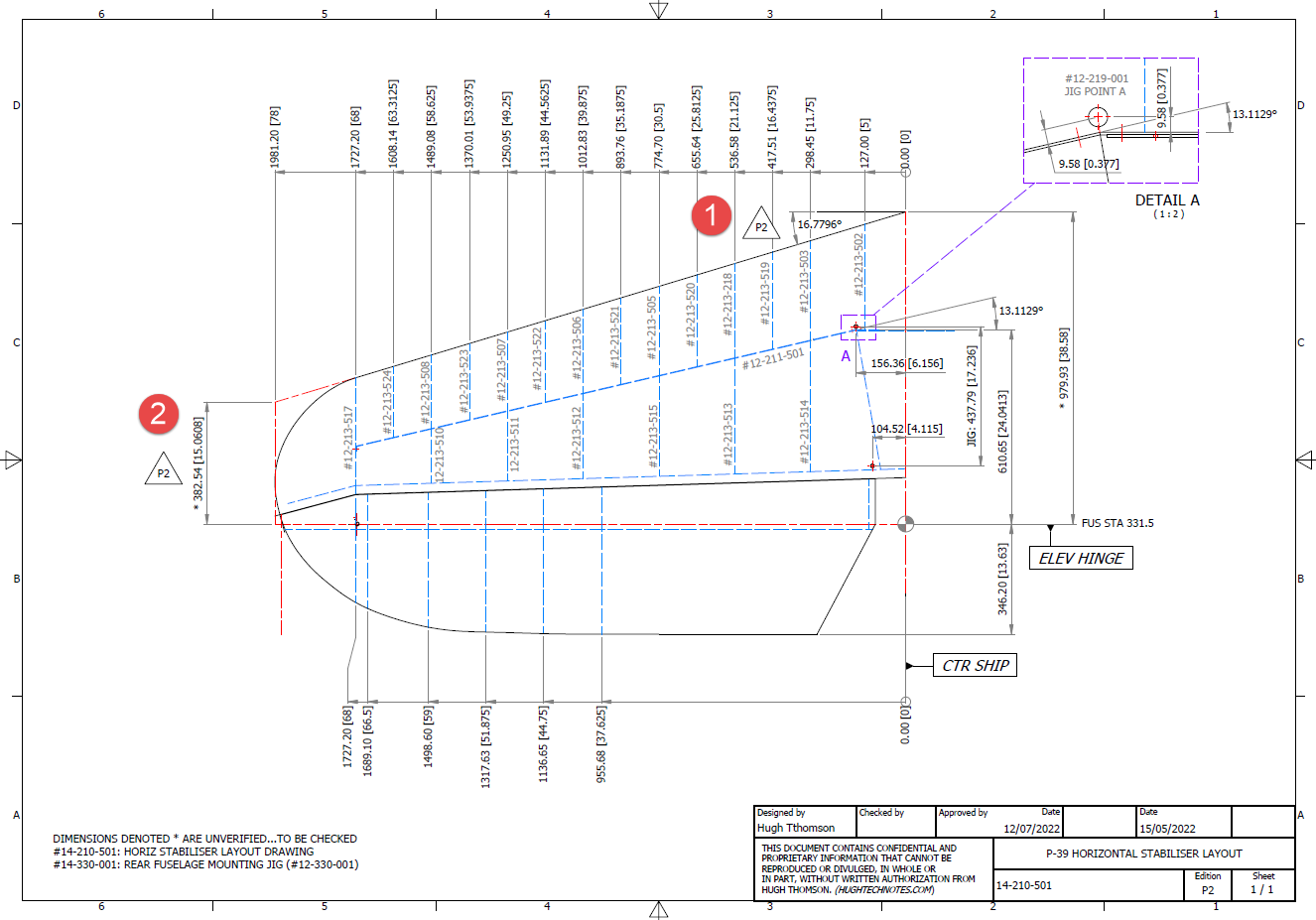
In a previous post, I covered the significant new model for P-39 Airacobra. This model is fully inclusive of all aspects of the aircraft. Within this post, I mentioned the extensive study involved in determining the layout for the Horizontal Stabiliser; the dimensions of which were unclear in the available blueprints
I was particularly keen to establish verification for the leading edge angle and though I had written to a number of organisations that have the P-39; surprisingly none of them took the time to either acknowledge or indeed reply…which of course was disappointing. From my experience, the industry is normally very supportive with regard to technical inquiries.
I revisited the documentation I do have and established that relevant information was included in the NACA Wartime Report L-602 which gives the chord length at Sta 49.25. It turns out; from my initial assessment; that the dimension at “2” was barely 2mm out and the Leading Edge angle is now 16.7796 degrees.
I mentioned in my last post that this latest study is available now which also includes the original model; which was more of a 3D modelling exercise than a dimensional study.
The P-39 Airacobra new CAD/Ordinate study is an impressive project.
All inquiries as usual to; hughtechnotes@gmail.com






















 Aviation CAD TechNotes