NAA P-51D Mustang: Wing Ordinate Rev

NAA P-51D & B/C Mustang: Wing Ordinate Major Update:

Thanks to Roland Hallam, I am now in receipt of new verifiable information that has prompted a return to the P51 project and a major update to the wing ordinate data sheets.

2017-05-21_15-46-57

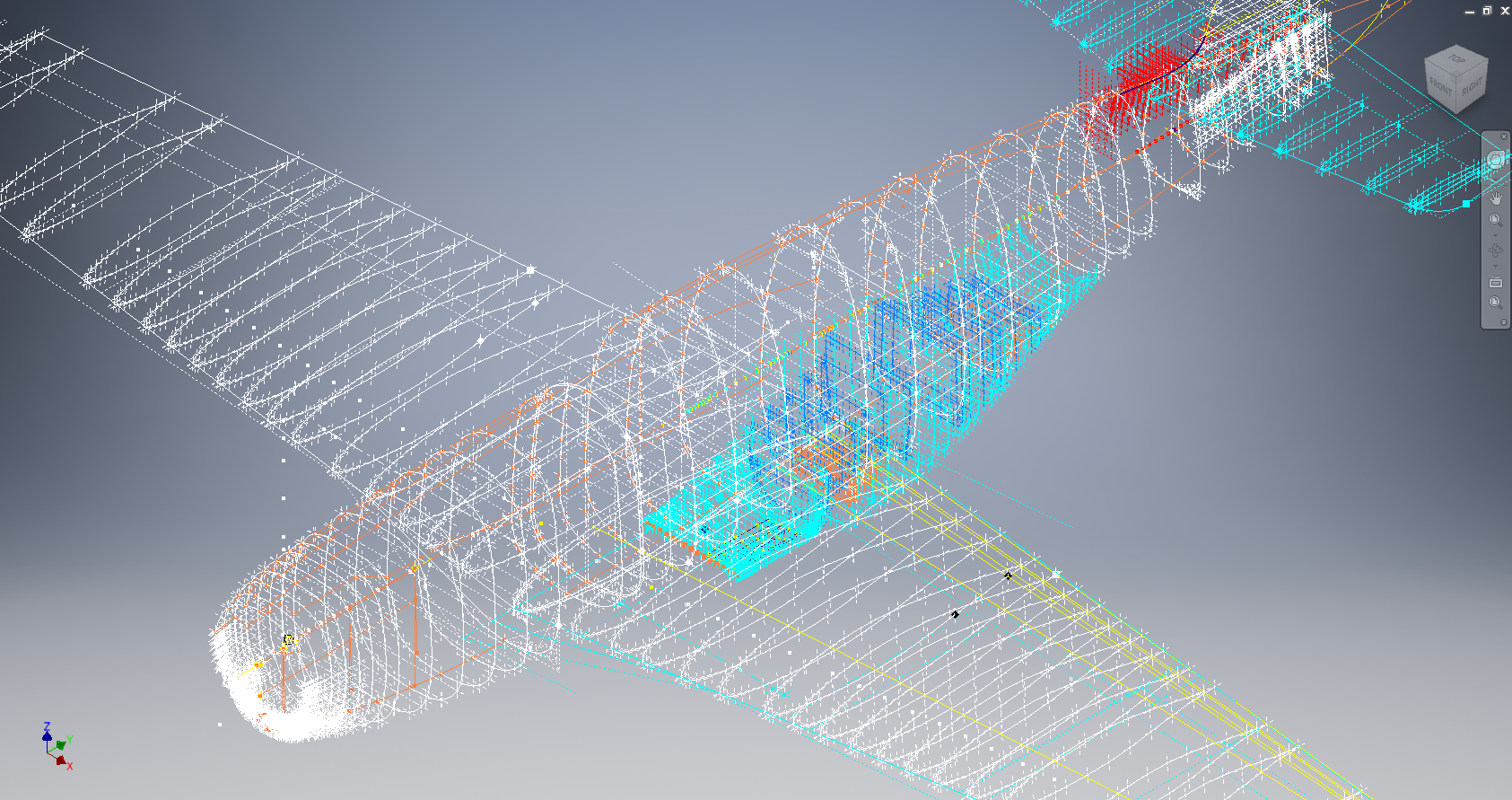
Many of the blanks have now been filled in and new additional information added. The above image is a snapshot of the work in progress. The groups highlighted in blue are checked verified dimensions, the red values are those that have changed and those areas remaining in white have prompted an interesting conclusion. Up until now, it was presumed that the wing profiles for the P51D and P51C were the same with the exception of the wing root, however, closer inspection would now suggest that a few rib locations are also slightly different which requires further investigation.

I am still working through the new information and dissecting what is relevant to the P-51D and the P-51B/C variants. This will probably take me a while to evaluate but I am confident that this will result in the most comprehensive dataset yet compiled for the P-51 wings.

I had not expected to return to the P51 project at this time but I’m sure you will agree this is an exciting development.

Mustang P-51 B/C Ordinates

Mustang P-51 B/C and P-51 D Ordinates:

P-51BC Layout

I have had a number of requests for the ordinate spreadsheets I developed for the Mustang P-51 B/C and D fuselage, cowl, cooler and air intakes, so I have decided to make them available to all; which could save you considerable time and effort.

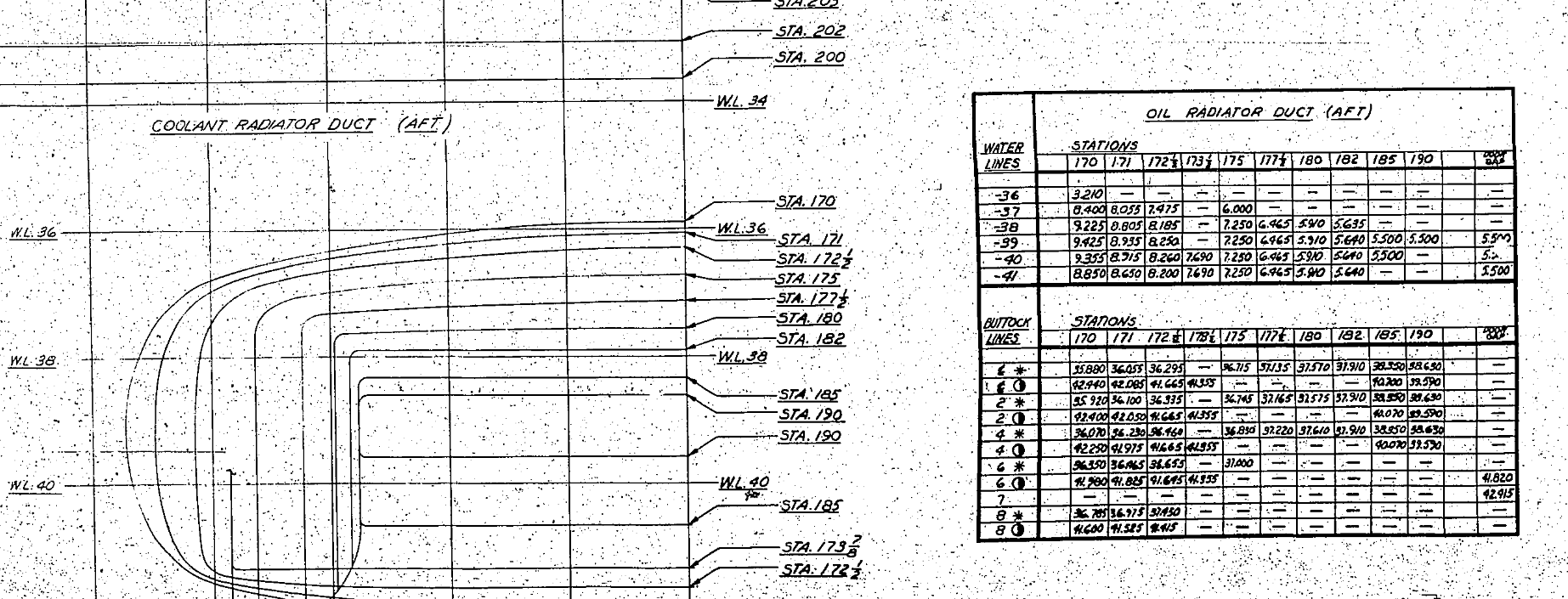
The ordinates are listed on 10 separate Excel workbooks with 18 spreadsheets for all known ordinates from manufacturers data. The ordinate listings are in both mm and inches with the X,Y,Z coordinates extrapolated from this data-set for ease of transferring to a suitable CAD system. The total points listed are literally thousands.

P-51 D Layout102-00005: Fuselage (BC main)
102-00006: Fuselage (forward to cowl)
102-00007: Removable Scoop (fuselage, Int and Ext)
102-00008: Coolant Radiator Duct (Aft Section)
102-00008: Coolant Radiator Duct (Fwd Section)
102-00008: Oil Radiator Duct (Aft)
102-00009: Carb Air Scoop (Cowl)
106-00006: Wing (P-51D)
73-00006: Wing (P-51BC)
 
+ Autocad DWG Fuselage Frame & Wing Profiles P-51 B/C and P-51D (ref only)
NAA Master Dimensions Report (wings, fuselage, landing gear).
Include scans of original source documents for reference.
 
The spreadsheets are not locked or protected so you can manipulate the core data to suit your own applications.
The P-51D fuselage profiles are reference only due to being mathematically generated based on original NAA methods and thus are not verified.

This represents a huge number of hours worked, meticulously listing each ordinate individually and then creating cad drawings to check the ordinates and derive the ordinates that are unclear on the manufacturers’ drawings.

2016-06-04_23-33-26

The ordinates for the P-51D wings comprises 2 sheets; the first listing the tabulated data as per the original manufacturer drawing and the second extrapolated to compile the X,Y,Z coordinates for input into CAD.

P-51D WING ORDINATE

P-51 Wing Profiles

Update 20 Aug 2019:

The spreadsheets now include the OLEO undercarriage and general tidy up of datasheets for consistency. Now probably the most comprehensive and complete dimensional study of the P-51 B/C and D. 2018-09-20_22-45-40

Horizontal Stabiliser and Fillet Ordinates layout:

Mustang P-51 BC

Sample data for P–51B/C and P-51D;

For further details see this more descriptive post or send me an email to HughTechnotes@gmail.com 

NAA P-51D Mustang: Carb Air Scoop

NAA P-51D Mustang: Carb Air Scoop

In an earlier post I discussed in some detail the progression of model development for the Carburetor Air Scoop (Lower Cowling) inlet and I mentioned that the final Air Scoop would be uploaded upon completion. Earlier Post : Air Scoop Prelim work:

It has actually been completed for awhile; I just forgot to upload it!

So here it is and if anyone has attempted to model a complex surface of this type you will understand how difficult this can be. Needless to say the Freeform T-Splines were invaluable in obtaining the correct surface.

The surface model is attached to over 300 ordinate points with numerous contour and fairing curves generated in preparation for the final surface modelling.

The data was first prepared in a spreadsheet; listing all ordinate points in mm and inch dimensions from which I extrapolated the 3D coordinates for each point; essentially creating a point cloud.

The ordinates were imported into Autocad, analysed and then the points grouped accordingly to define the contours and fairing lines.

This was then imported into Inventor and the surface painstakingly built up in each separate square grid attaching all the ordinate points. There was no easy way of doing this; I know I tried!

I am delighted to have finally completed this particular model having consumed many hours trying various methods to get it just right.

Update: Mustang P-51 Project & Operation Ark

Update: Mustang P-51 Project & Operation Ark

The Mustang P-51 project is on hold whilst we review the CAD systems we will use for Operation Ark. To date we have utilized both the Autodesk Inventor & the Dassault Solidworks for our projects and research. We have another contender for the project which is Solidedge, until recently this was not a viable option but the latest version ST8 exhibits many of the features we would need.

Operation Ark will be a long term project requiring many man hours of work to research and build literally thousands of models, so it makes no sense to have different CAD products for this project. There is also a cost consideration as the project will rely entirely on goodwill and donations to support our efforts and assist with  CAD software.

Collaboration technologies and access to rendering farms for final processing of the CAD data are also key considerations. We have received offers of support from a few fellow enthusiasts to help with the Cad model developments and rendering; the latter being from Bilby…thank you very much for your support. Some comments from fellow enthusiasts:

From Alan “I love your Operation Ark initiative, and would be more than willing to play a role in any capacity.”

From John; “ARK is an extremely important project and I congratulate you on your vision.”

From Beaufort: “…I am really impressed with what you do and I can see that massive amount of time that you put into it. I also love the design specifics of these aircraft…”

Operation Ark Project Status:

Lockheed_Vega_5

This project is attracting a lot of attention, with many positive responses as noted including suggestions of alternative aircraft for consideration. One of which is the Lockheed Vega , which is a unique aircraft and was; in many respects; ahead of its time.

This is actually a good example for Operation Ark as the only remaining examples are located in the USA with only one flight worthy example, though further research would suggest that number could well be 2. The location alone excludes a large number of enthusiasts from actually ever seeing one either as a static exhibit or in flight!

That is part of what Operation Ark is about, removing geographic constraints and bringing access to everyone; the complete aircraft with everything modeled right down to the nuts and bolts. An exact replica in 3D that can be interrogated online as assembled or as individual components. We are also contemplating extending this to include additive or 3d printing technologies to build a half size replica, making the parts available to interested parties.

WEB11667-2010pBut this is only one of the aircraft being considered and whilst a likely candidate for selection; specifically as we have access to the manufactures drawings; our preference would be for one that does not exist or has only 1 example in existence like the Ta152.

The project though is entirely dependent on the availability of the original manufacturers drawings and specifications, which is our current priority!

Even when we do have access to materials they first have to be evaluated, which incurs a cost for scanning of microfilm archives and then reviewed for completeness. This process is rather costly but ensures that we don’t commit to a particular aircraft that we can only partially build. Usually where we have incomplete datasets we will endeavor to source the missing data elsewhere before we actually exclude the aircraft from selection.

All the research and work published here to date has been done voluntarily in the hope that it will help other enthusiasts.

NAA P-51D Mustang: Fuselage: Conics

NAA P-51D Mustang: Fuselage: Conics

In the preceding article I had some fun with polynomials and how they could be useful for determining a smooth fit spline for the development of the Mustang fuselage. As a follow up to that article I wanted to share some research relating to conics.

The Mustang P-51 was the first aircraft to be completely defined by conics. The designer Edgar Schmued worked with Roy Liming to mathematically analyze the Mustangs shapes, tangents and curves. Conics were used by NAA as far back as 1932 though many of the techniques and equations we use today however were not actually in use until 1959.

The Bézier curves for example were based on the Bernstein polynomial which had been known since 1912 but its application for graphics was not understood till much later. Bézier curves were widely publicized in 1962 by the French engineer Pierre Bézier, who used them to design automobile bodies at Renault. The study of these curves was however first developed in 1959 by mathematician Paul de Casteljau using de Casteljau’s algorithm, a numerically stable method to evaluate Bézier curves at Citroën.

So I started to wonder how did Edgar Schmued and Roy Liming actually apply conic principles and what methods did they use for the Mustang design!

The documentation I have available for the Mustang Wind Tunnel models gives us a clue at the geometric construction for the fuselage frames. The designers used smooth conic sections with key parameters controlled by longitudinal shoulder and slope control curves. The longitudinal curves defined fullness and tangency values for the conics from forward to aft of the fuselage. The P-51 designers found that this technique allowed them to accurately control sectional areas to secure the required effects for lift, drag, stability, and overall performance.

2015-08-03_22-50-45

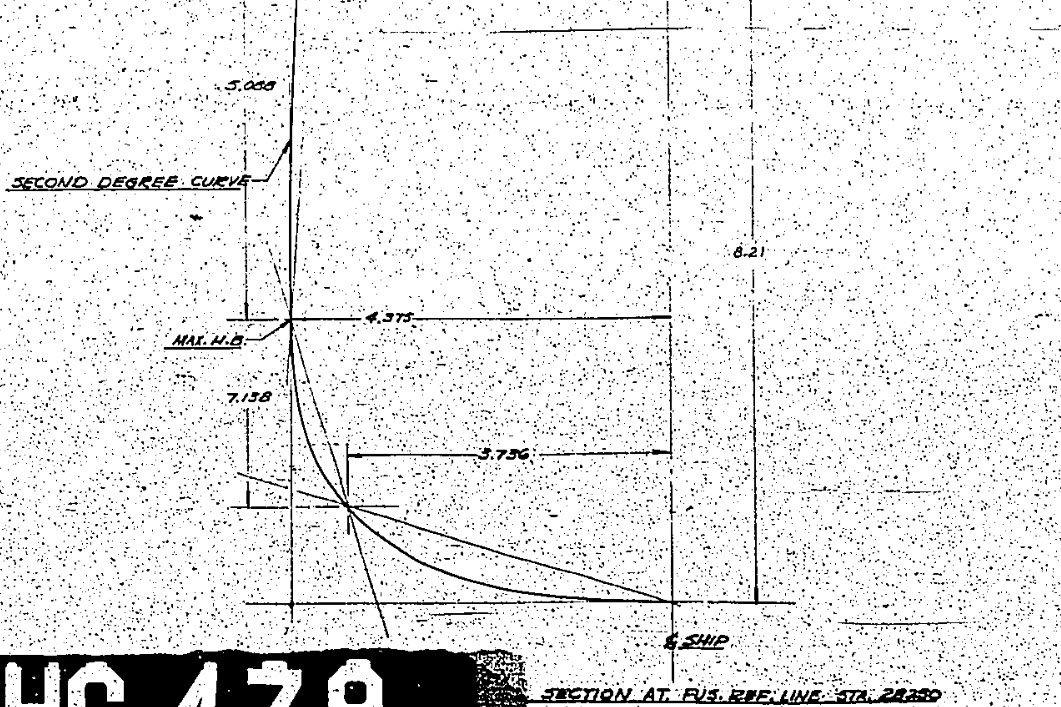
Here we see a scrap view from the wind tunnel models, showing clearly the development of the conic constrained by 2 tangent lines and a third Shoulder Point as a known point on the designed curve.

The intersections of lines extended from the Max Half breadth point and the Lower Ship Centre point illustrate a drafting technique for creating the finished curve for the lower section of a fuselage frame.

Hugh P-51 ConicsTaking this method further we can describe a curve using a series of extended lines to define any point on the curve as shown in my Cad drawing.

This is my interpretation of a technique for the drafting of a typical Mustang fuselage frame. I haven’t seen this technique applied to a full fuselage profile and whilst the design information I have suggests a similar approach by the Mustang designers I can’t verify that this was the actual technique used.

It is not possible within the scope of this article to go into the detail of this technique, but suffice to say that selecting only 3 points for the lower and upper sections contained within tangential lines provides the basis for accurately determining any other ordinate point on the particular curve. I have uploaded a short video on Youtube here: Drawing a Conic

This is actually a lot better than using the polynomial equations for frame geometry as they only give you a best fit approach based on the tabled ordinates; with limitations; whilst this construction technique will allow the flexibility of defining any point on the curve to an unprecedented degree of accuracy when created in CAD…it works!

So what else did these visionary guys do? I am really keen to further research the mathematical approach that Edgar Schmued and Roy Liming used in the other aspects of the aircraft design and uncover the methods that made the Mustang unique.

It is my hope that by sharing my research and developments that this will inspire others to also research the work of the designers from this era and hopefully in some small measure encourage support for our project “Operation Ark”.

2015-08-06_03-06-27Update: I must have spent a full day browsing through the archives to find more information that would assist with understanding the conics development and thankfully I came across this NAA lines drawing for the cowl on P-51C (NA-103).

This shows the development and tangent lines for everything including the shoulder lines and the fairing lines as well as the main profile contour lines.

Its very important to spend time verifying the information used for developing these designs to validate the research. Sometimes I could spend days just looking for small scraps of information just to verify one dimension, which happened quite a lot on the Ta-152 project!

Full profiles drawn in Autocad from comprehensive excel spreadsheet ordinate collections now available for download. See this article for details.

NAA P-51D Mustang: Fuselage Lines; Polynomials

NAA P-51D Mustang: Fuselage Lines; Polynomials.

This evening I spent some time looking back through some old notes I had on fuselage design, particularly Conic sections and Setting-out design theory.

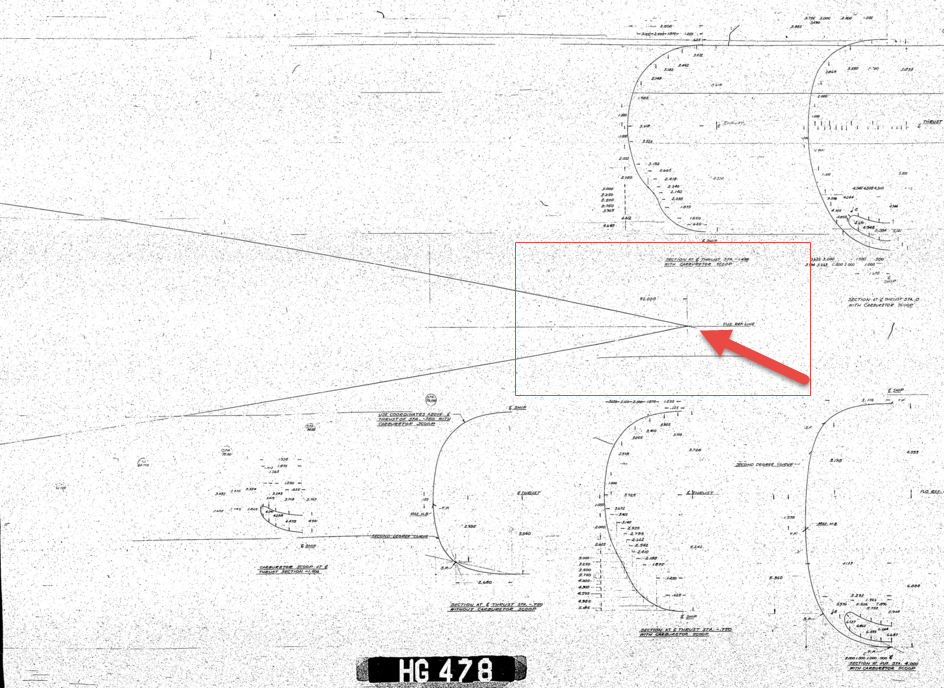
Checking through the archives for the Mustang P-51 we have a design set for the wind tunnel model with a line plan showing the Shoulder Points (SP) and the “point of convergence” where the upper line of the Mustang fuselage converges with the lower fuselage line and the Fuselage reference line.

2015-07-31_03-40-50The Wind Tunnel drawings are a quarter scale but are quite accurate.

Here we can see the “point of convergence” actually defined on the the wind tunnel drawing at the scaled sta 92. Technically station 92 does not exist as it is outwith the fabric of the WT aircraft, but for convenience I have defined it!

So with this in mind I decided to undertake an experiment to calculate the “point of convergence” with the fuselage ref line according to the manufactured ordinates.
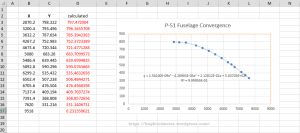
2015-07-31_12-43-55For this exercise I used the upper line of the fuselage, shown here as X,Y values starting from Station 113 and created a line chart.

I applied an third order polynomial equation to the line chart with a scientific value to 5 decimal places to increase the accuracy.

I recalculated the values of the Y ordinate to check that the formula produced an accurate result; shown in red. As you can see the resulting values are very close to the original Y values.

The last X value is the projected value I want to calculate to achieve a “close to zero” Y coordinate thus by definition being the calculated “point of convergence”. This value is 9518mm (374.725 inches) which compares quite well with the Wind Tunnel drawings showing this to be 92*4=368 inches.

Should I recreate this exercise but instead use a fifth or sixth order polynomial equation I am quite sure the resulting value for the point of convergence would be closer yet to the scaled up wind tunnel value.

Normally for this type of exercise I would work with tangent lines and the start points of the upper and lower fuselage lines from predefined Shoulder Points.

This was a bit of fun just to demonstrate how we can use the power of spreadsheets and mathematical equations to assist with developing our Cad designs.

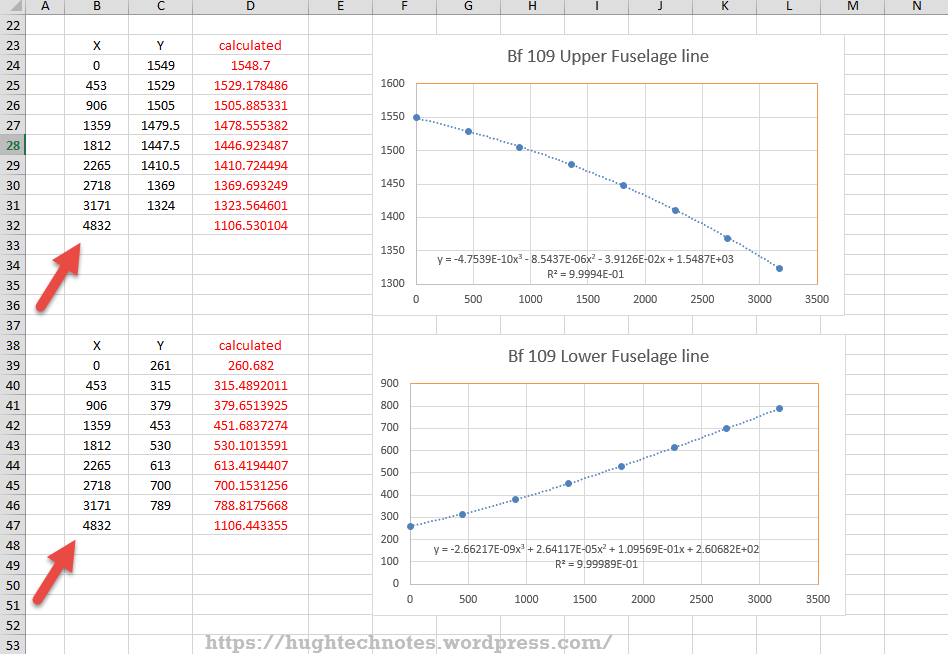
Bf 109Update: I decided to play about with this a bit more and had a look at the fuselage lines for the Bf109. I don’t have the design “point of convergence” for comparison but decided to do it anyway to find the convergence between the Lower and Upper fuselage lines.

These points are measured from a ground datum at 800mm below the fuselage reference line.

The stations/frames are from 2 – 8 inclusive. As you can see the calculated values verify the existing ordinate dimensions with the projected “point of convergence” calculated at 4832mm from station/frame 2.

These are the fuselage lines on the vertical plane which in theory should share the same convergence point for the fuselage lines on the horizontal plane (technically plan of max width)…an exercise for some other time!

What is even more interesting is that a line equation can be used to generate a spline in both the Inventor & Solidworks cad products… as a check to verify the cad work this is enormously useful!
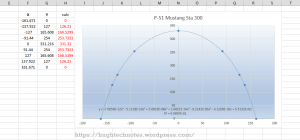
2015-08-01_00-02-16Another example of application would be for the frames or station profiles.

In this example I have applied a polynomial equation to a set of ordinates for the top section of station 300 for the P-51 Mustang.

This needs a full profile as an arc to achieve an accurate result, which I’ve applied as a sixth order polynomial…you cant get much more accurate than this with Excel!

Ideally we would wish to extend this arc to the max width ordinate, which would add another negative ordinate (below the base line) to the graph…for some unknown reason Excel finds it difficult to compute an acceptable polynomial with 2 sets of negative values, so I would have to transpose the ordinates accordingly.

The Mustang ordinates induce a minuscule negative curvature on the top rear fuselage frames when you create a CAD profile just using the ordinate values from the NAA drawings. Its not detrimental in anyway but it is rather annoying…so to obviate these issues I could utilize a polynomial solution to adjust the ordinates to get a positive curvature. The adjustment is micro millimeters, but hey that’s the way that CAD works.


Mustang P-51CAnother Update:
Out of curiosity I recalculated; to a higher degree of accuracy; the upper fuselage line for the P-51 and contrasted that with a similar calculation for the lower line of the fuselage.

The calculated point of convergence of both lines based on a 4th order polynomial to 5 decimal places is at 9375mm and slightly above the fuselage reference line at +18mm. Factoring in error based on the original ordinates being accurate to 1/16th inch and possible error as a consequence of a higher order polynomial I think this is a reasonable result. Its interesting to note the variation with the results we got before.

This is certainly closer to the expected values based on the wind tunnel data. The squiggly line by the way on the lower part of the fuselage is the plotted max half breadths; which is rather interesting!

Confirmation; have received confirmation that the intended point of convergence for the upper and lower fuselage lines is at Sta 368, which is at 9347.2mm…this is great!!

All CAD profiles included in the P-51 Mustang Ordinate Package now available. Refer promotion here.

NAA P-51D Mustang: Project Cad Technote; Smart Parts Vb

NAA P-51D Mustang: Project Cad Technote; Smart Parts Vb

I was looking at options for routing the cables in the tailwheel assembly. There is potential for a lot of ancillary routing for pipes and cables yet to be done in this assembly so I have deliberately shied away from the adaptive parts (which I am not keen on) and the typical pipe and cable routing functions.
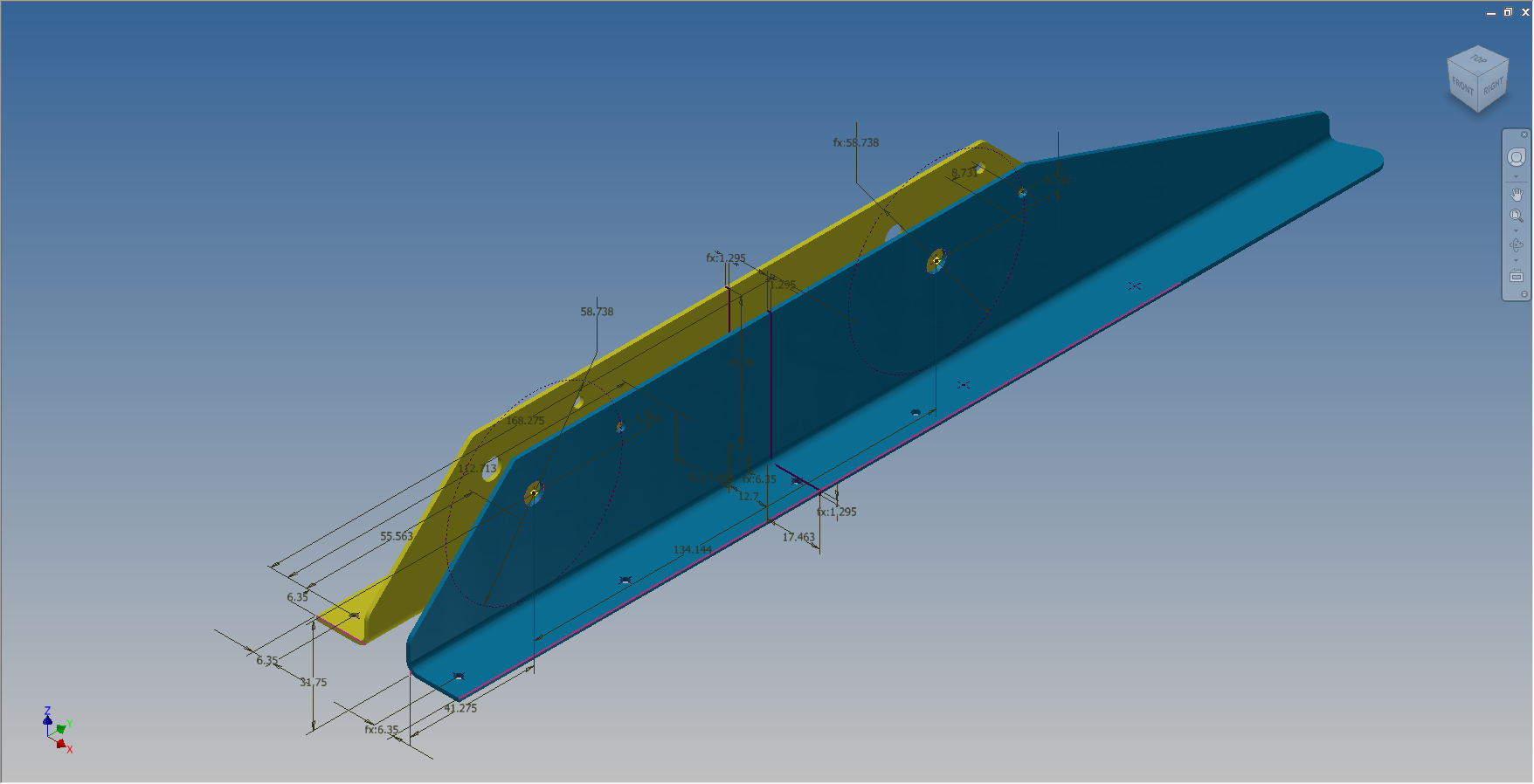
Also the cables are comprised of end terminals and many are sleeved for part of their length, which would mean having to route several times if I was to do this using the routing functions.

What I really wanted to do is have a sub assembly that contains the cable with all its bits in one sub assembly file but using the coordinates from the assembly to ensure correctness.

Extracting point coordinates from an Inventor assembly is not that straightforward requiring as in this case a vb solution, but first I had to define the key points.

2015-07-23_02-51-10      2015-07-23_02-44-30      2015-07-23_02-46-01

I use the term “smart parts” and what this entails is for the parts or sub assemblies to contain additional geometry that will assist with other modelling activities like cable routing.

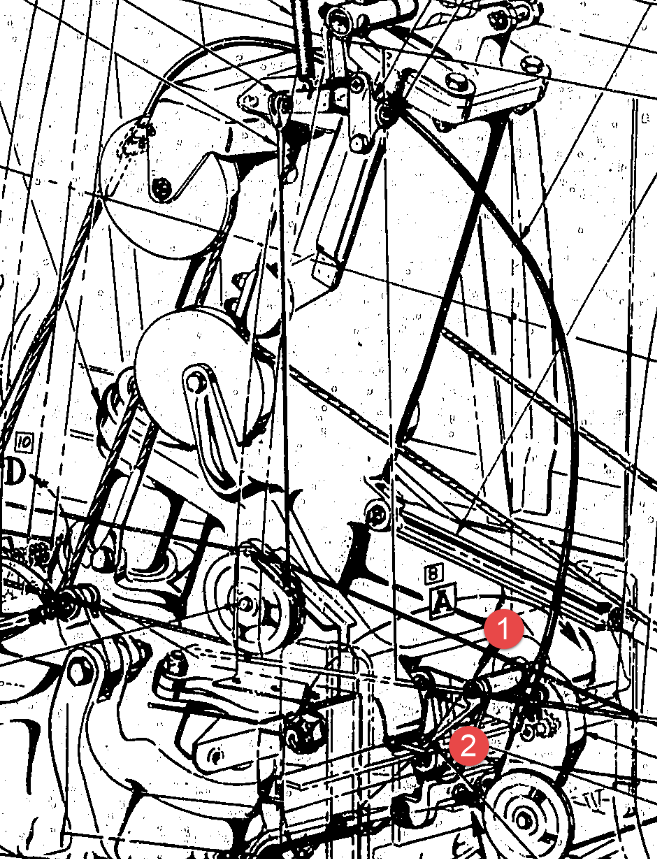
The image on the left shows the cables in this area with 2 key points 1&2 highlighted that are replicated in the 2 archive images. They define the straight section of the cable sleeve that is below and above the cable clips; the locations of which I have incorporated as points in the component sub assembly (last image). This sub assembly does not sit vertically in the assembly, the final position and orientation being determined by other factors which influences the final routing of the cable sleeve.

I have done something similar with the connection at the other end towards the left of the first image. At this stage I now have 4 points that determine the extent of the cable sleeve.

2015-07-23_03-13-17The next step was to go to the main assembly and extract the X,Y,Z coordinates of the four points from the fitted components.

I first select these and run a visual basic routine to extract the coordinates of each point and create a csv file which I import into excel which in turn is imported into a separate Cad part file.

It was then simply a case of running a spline through all four points and sweeping the sleeve profile.

The great thing about this is that the coordinates are relative to the origin of the main assembly so when I import the cable sleeve into the assembly I only have to constrain to the origin planes and it fits perfectly.

2015-07-23_03-23-16The cable itself will be done later in a similar manner which would be added to the sleeve part file as a multi part item or sub assembly using the sleeve centre line as part of the routing.

So no adaptivity, no complex pipe or cable routing just simple association through coordinate translations. The parameters of the sub assembly can be linked back to a spreadsheet so if the route changes I just re-extract the point coordinates and update the spreadsheet, which in turn will update the model.

To me this is a very tidy solution and maintains the integrity of the modelling hierarchy in accordance with the NAA register.

Using additional content in part files to facilitate other activities is very useful for examples like this and in fact any part that is associated with piping or cabling systems, particularly where you have cable clips or supports that need to be considered.

I should note that the extent of the cable sleeve is not exactly as shown in the first image due to the termination part not yet being modeled so I used something that was close at hand to demonstrate this principal.

If you would like a copy of the VB routine then please drop me an email and I will send it onto you.

NAA P-51D Mustang: Tail Wheel Assembly: Update.

NAA P-51D Mustang: Tail Wheel Assembly: Update.

I shall need to temporarily suspend further work on the assembly model as the remaining parts to achieve a full build are created in a later version of the Inventor cad program and therefore not compatible with the version I currently have access to.

So this is as far as I can go with the assembly, though one could argue that it may be worthwhile including the necessary bolts, washers, turnbuckles etc, but to be honest most of this is planned as the final components in the build. The main reason for this is to ensure that everything aligns properly and works according to the design intent before plugging in all those connecting bits!

p-51d mustang rear fuselage

I have some tidying up to do with the fuselage frames and to develop that library I was talking about for the aeronautical standard parts and components…so perhaps this may be the time to get this done.

I also plan to do some 2d detail drawings for some of this modelling to record some of the key information that I have had to research separately from the archive resource and create the Bill of Materials structure that complies with the existing NAA documents for the complete assembly.

2015-07-15_17-17-08

The 2d drawings will also serve as a dimensional check as these objects were built in mm whereas originally they were designed in inches.

Its very hard to identify small dimensional discrepancies when just reviewing the 3d model!

So for now I probably wont be posting too much on the modelling side of things but may include some new cad technotes on the techniques I have used in this project.

NAA P-51D Mustang: Tail Wheel Retracting Hydraulic Cylinder

NAA P-51D Mustang: Tail Wheel Retracting Hydraulic Cylinder.

Hydraulics is not something I have had very much exposure to in my varied engineering career, so it was rather interesting to build this Tail wheel retracting cylinder and learn some new stuff about the hydraulic designs of this era.

All the component parts are fully detailed in the NAA drawing archive enabling a complete cylinder to be built with the pipe fittings added from the Inventor Content library.

P-51D Mustang Tail Wheel retracting cylinder 2015-07-13_00-46-34

The Autodesk Inventor product has a very comprehensive standard parts library which includes a wide variety of pipe fittings and components. The elbows and reducers are from the Parker range which are sized correctly but slightly different in style to the aeronautical standard parts which would normally be used.

I did modify the hex head for the reducer to size correctly with the corresponding AN912 aeronautical part to ensure correct fitting with the cylinder interface.

When I have time available I intend to create a special library for all these standard components that will correspond exactly to the specified aeronautical standards.

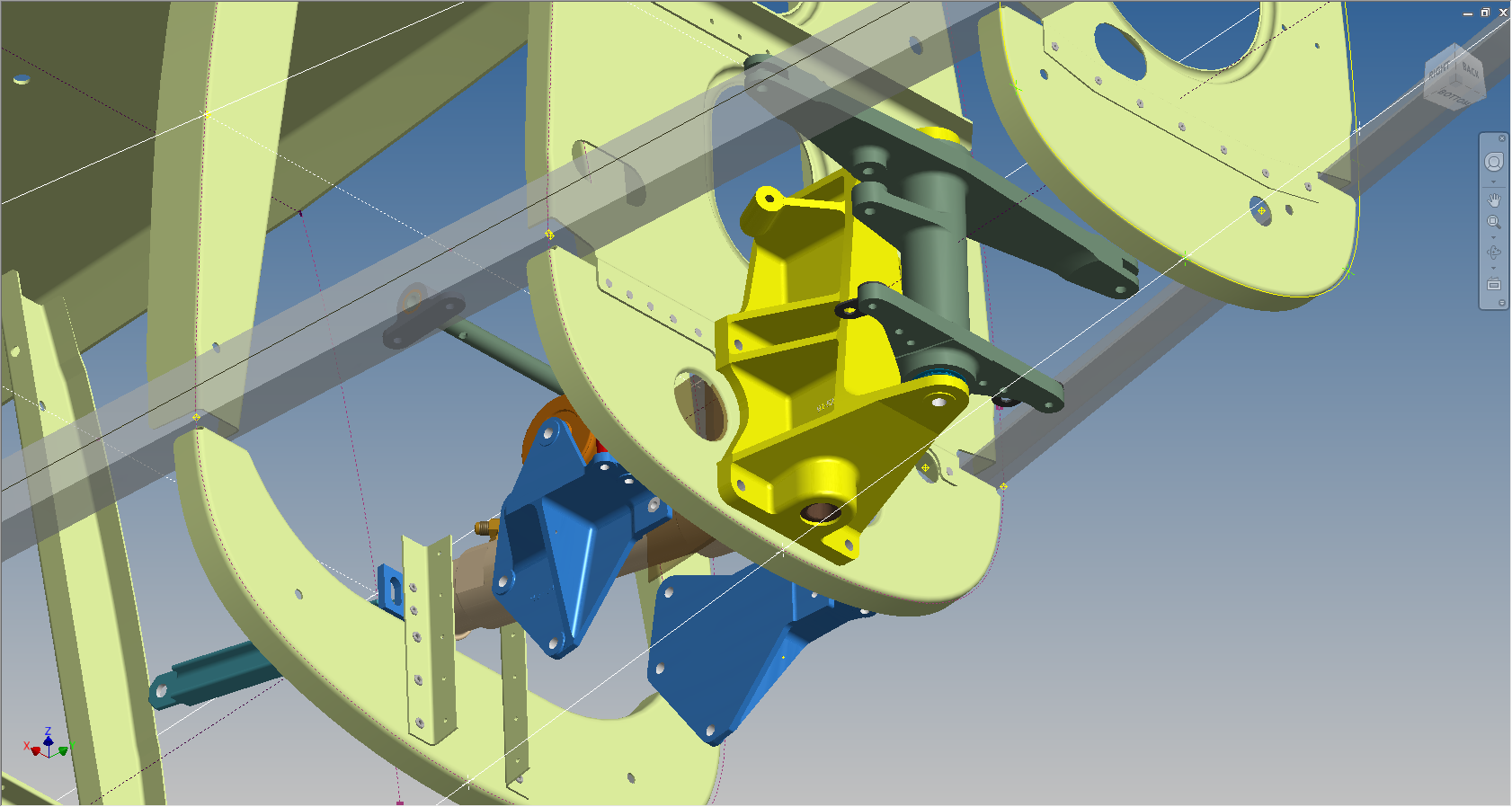
The blue support brackets on either side of the cylinder should actually be fitted to a sheet metal formed channel, which I don’t have the details for. There is a drawing for the P-51B/C models which will be similar to what I need but the lower station frames in this area are slightly different. I can’t be sure exactly how the channel should be fitted so I emailed a few companies that have been involved in the restoration of P-51D Mustangs to see if they can assist with either photographs of this area or even better some drawings!

2015-07-14_23-34-18 2015-07-14_23-03-35

NAA P-51D Mustang: Project Cad Technote Multi Body Parts

NAA P-51D Mustang: Project Cad Technote Multi Body Parts

The process of developing these drawings into accurate 3d models relies on maintaining the hierarchy according to the original NAA drawings, even if sometimes it gets a tad confusing when dealing with what constitutes a “sub-assembly” as I mentioned before.

The sub-assemblies I described as “Part Assemblies” as the assembly unusually comprises a fully detailed part inclusive of additional items like bearing, spacers etc.

I have reviewed my approach to how I deal with this and thought it may be prudent to write a quick note on this technique.

I am utilising the multi-part feature within Inventor for this, which allows you to model separate solid parts within a single part file and then create an assembly that comprises some or all of these solids.

2015-07-07_12-57-05

This is a scrap view from the NAA drawing showing an assembly that has 2 configurations based on varying paired angles with spacers and rivets as shown.

Each of these items has a suffix added to the part number i.e -1, -2, -3 etc.

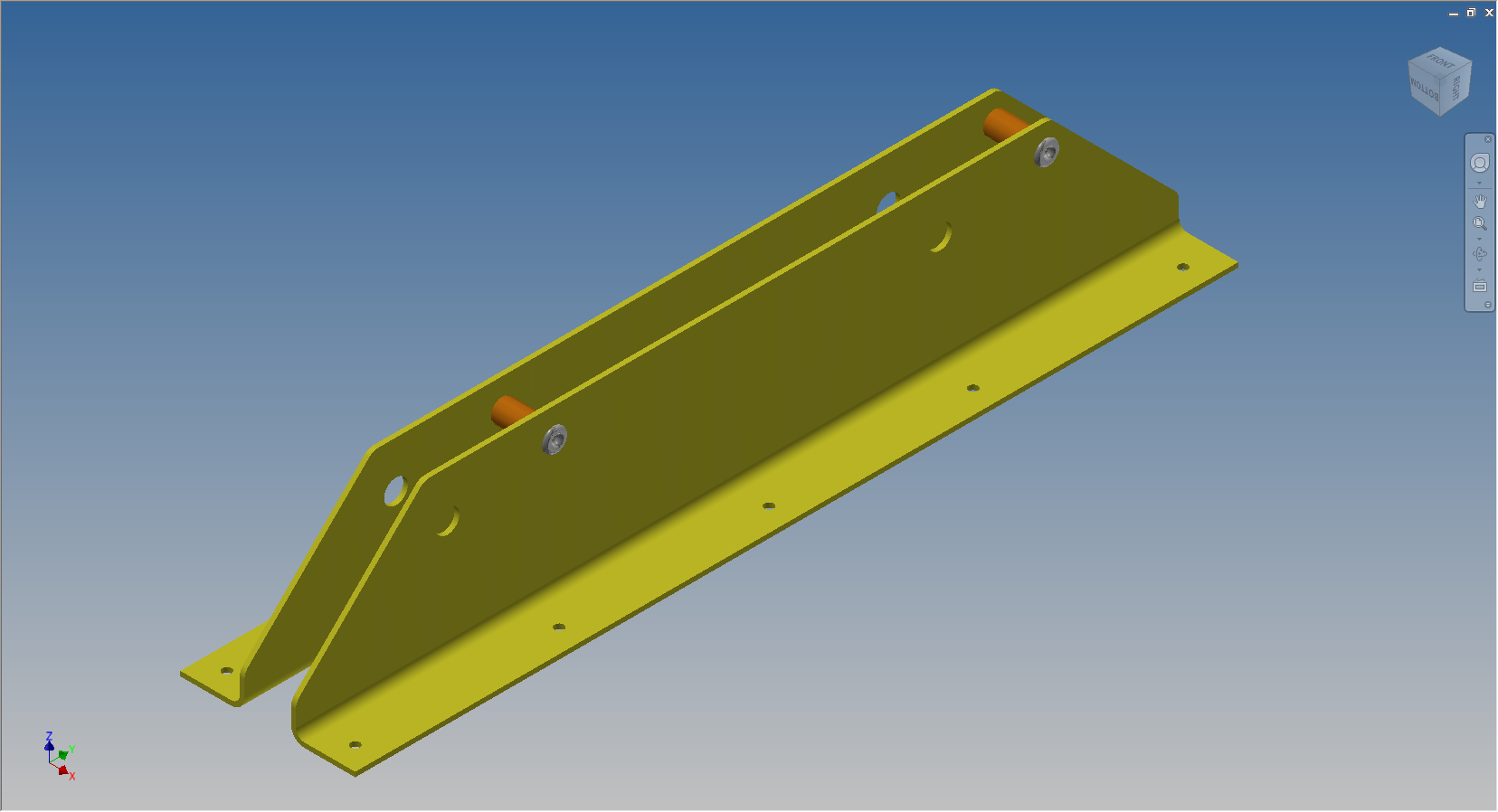
These images give you some idea of how I have modeled this, with the first image showing the configuration of items 2 & 3 and the second showing the configuration of item 2 & 4; all in one cad part file.

2015-07-07_12-41-28 2015-07-07_12-41-49

The beauty of working with multi body parts is that you only need one set of sketches that can be shared between all 3 parts.

2015-07-07_12-42-16

The sketches are dimensioned exactly as the original drawing…I mention this because I would not normally dimension from the edge of an angle section (cut edge); its not really good practice!

The image on the left shows the feature tree within Inventor; listing the 3 solids with appropriate suffixes.

The part file name (at the top) comprises the NAA drawing number with a suffix noting the archive reference.

All I have to do now is create an assembly for each of the configurations and add the relevant spacers and rivets. This is done very quickly using the “Create component” feature. The assembly number will comprise the NAA drawing number suffixed with either a -1 or a -5 respectively.

2015-07-07_13-50-22Only assemblies created from a multi-body part will be suffixed with a numerical character, otherwise they will simply be suffixed with SA.

Using this technique we maintain the integrity of the NAA numbering system with an hierarchy that suits the CAD strategy.

In a previous post I discussed “as-fitted” parts; like bushes; that might be press fitted and and reamed thus dimensionally different from the manufactured part, so these will still be modelled within the part file to “as-fitted” state and not brought in as a component of the sub assembly.