New Project: Standard Part Libraries

New Project: Standard Part Libraries

Many moons ago I started a project to develop libraries of Aeronautical standard parts according to the various National and International standards pertinent to aircraft design and maintenance noted in this article.

https://hughtechnotes.wordpress.com/2015/07/26/naa-p-51d-mustang-standard-part-models-specs/

Using the original standards from the wartime era and the updated, often replacement standards, I figured it would be a good idea to develop this project further. I am aware that there are many different CAD systems so it would be folly to just develop this for just one product.

The above products are currently available in the Resources Tab of this blog and though included with the Mustang P-51 Ordinate/CAD dataset are standard for many aircraft of this era and accordingly are available separately. This existing collection is already very comprehensive with over 300 parts modelled and listed, though these are in line for an overhaul and update.

Moving forward with this project I will develop the configuration spreadsheets exactly as per the original specification tables set out plus any additional dimensional data that will be required for modelling. This will be accompanied by a DWG file as a template to use when developing your own equivalent of an iPart. Essentially putting together a dataset that anyone can use regardless of what CAD system they are using.
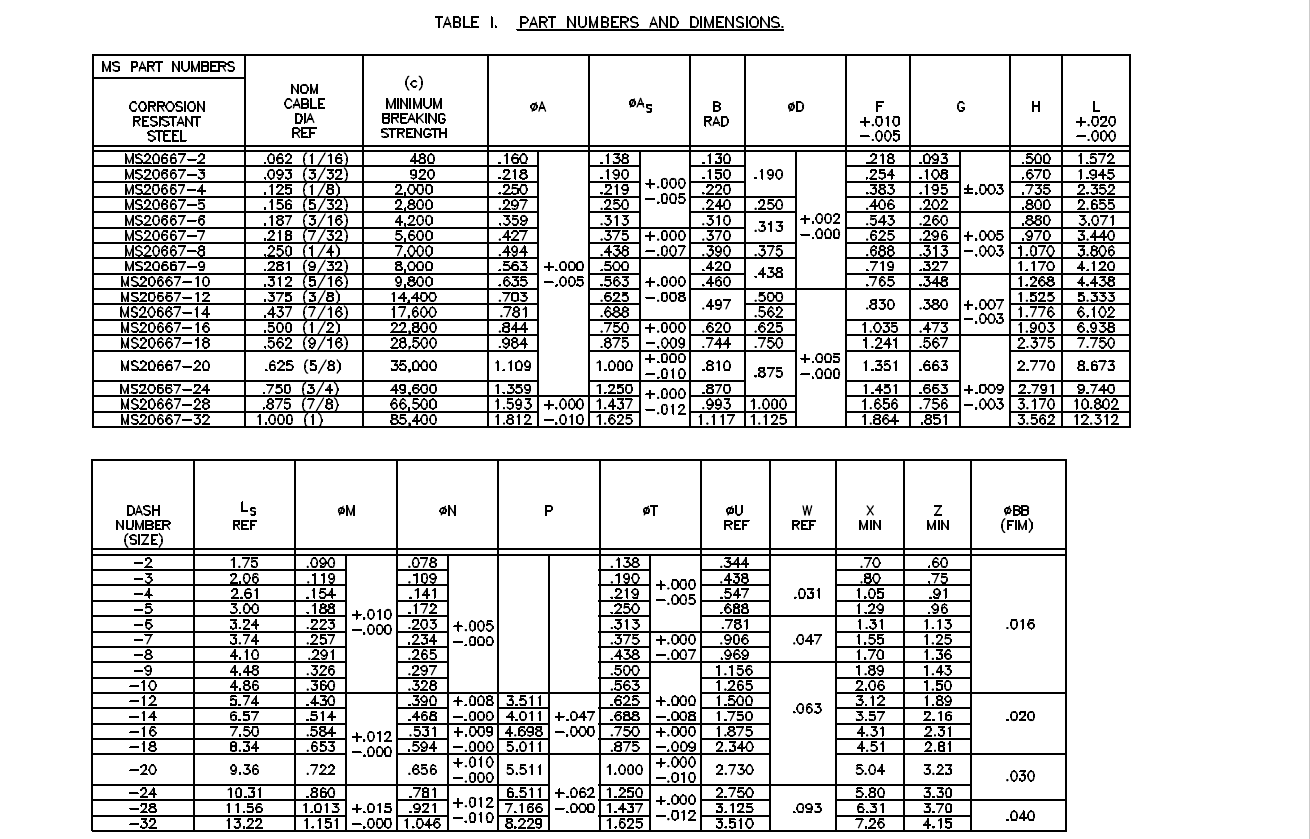
Additionally, standard metal work profiles will also be developed and produced in a similar manner.
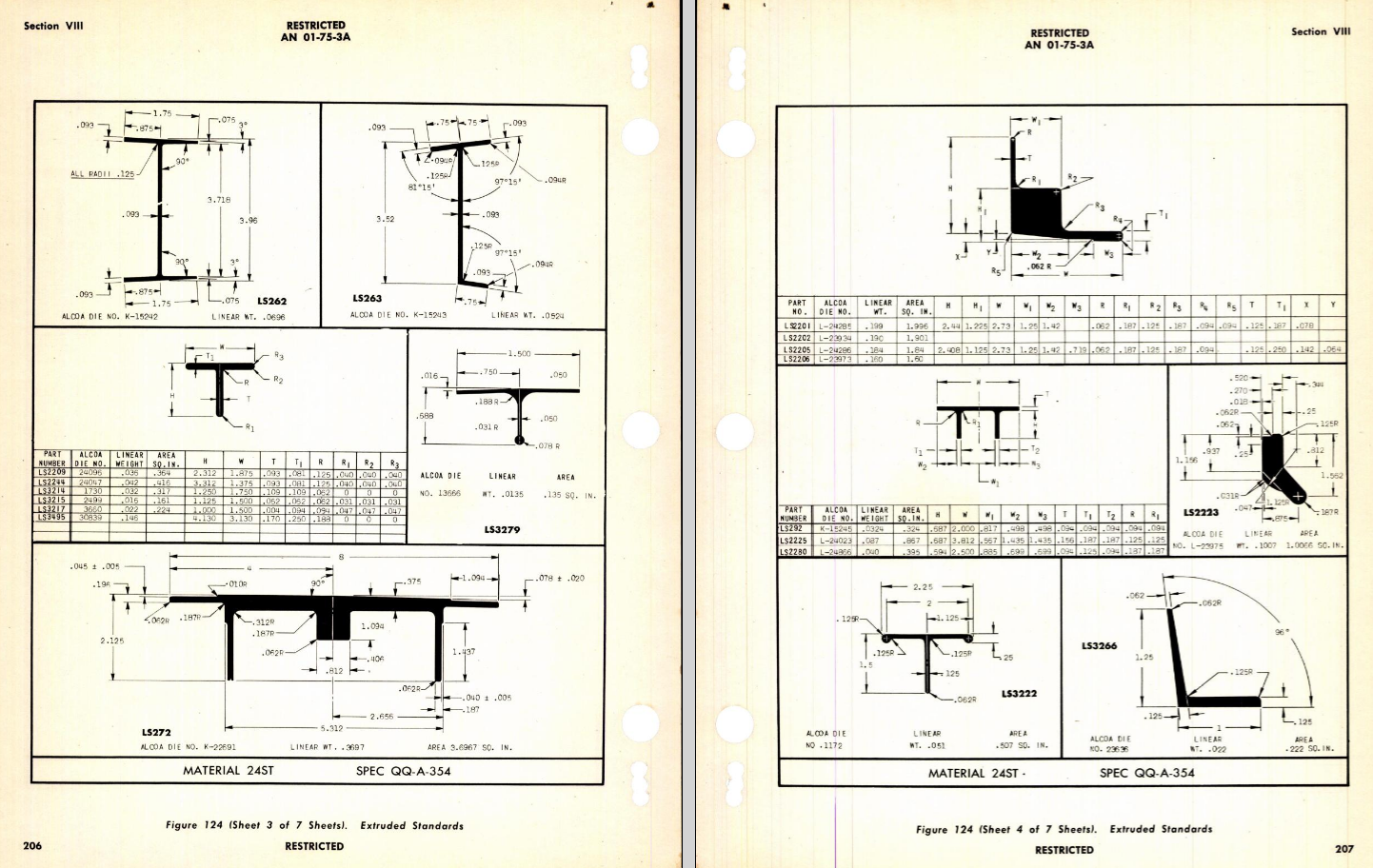
There is a catch: This will take a while to do and probably won’t be ready until October. Typically the study will comprise a basic dimensioned drawing exactly as per the reference Standard with accompanying spreadsheets. There will be separate spreadsheets for each part number in a collective Standard, though there may be only one drawing. For example AN21 THRU AN37.
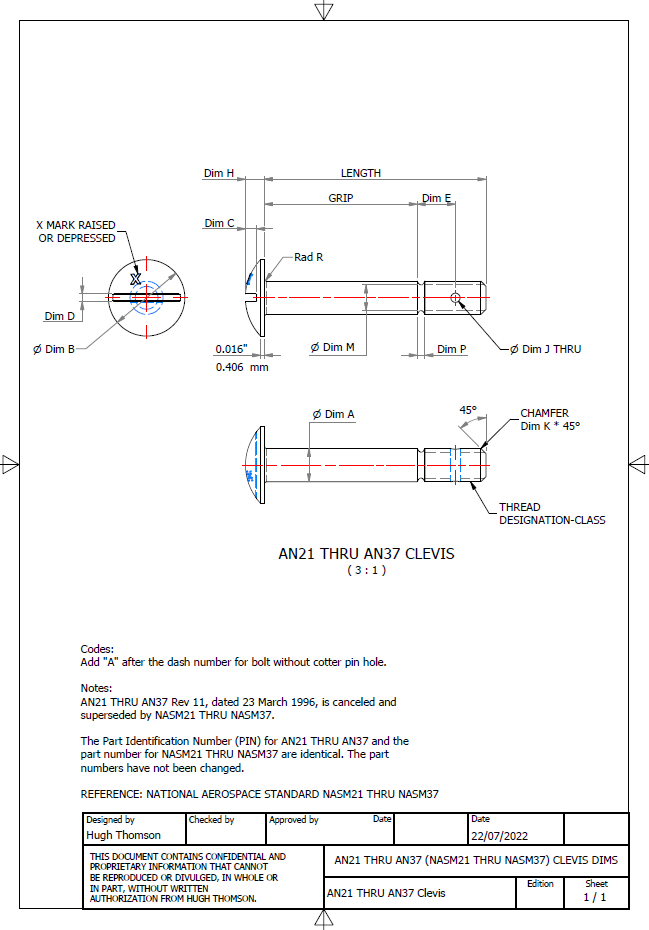
The way to use this dataset; regardless of the CAD system; is to first develop the part model naming the parameters as defined in the spec (you can use the DWG for your sketch template). In this example, the first 2 columns are generic to the specific CAD system with the first column being a unique value. From LENGTH to Dim P, in the table, these are the main geometry parameters. The Hole1 column has values “Suppress” or “Compute” which is an instruction to exclude or include the hole. The Thread parameters are defined as a Designation and Class which are standard integral parameters; those names may vary accordingly. Typically in Inventor, they can be found in the iParts Author as follows:
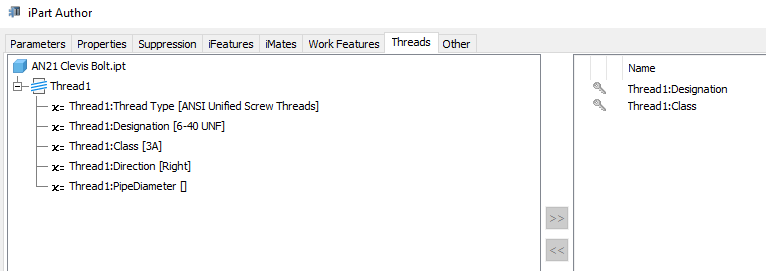
Once you have your Part modelled, open the iParts author and set up the first line of the table…you just need the first line at this stage Close the Author and open the table in Excel and copy the contents of the provided spreadsheet data tables above… ignore the header/titles. The iPart table will now be updated with all the above variations. It does not matter if your part template is Metric or Inches as the part dimensions are predefined as inches and will automatically recalculate depending on your template standards. You can of course already do this with the existing iParts but they are not inclusive of dimensioned drawings…so you have a bit more work to do referencing the actual standards for parameter names. That’s what this project work is designed to do…essentially finish with full documentation.

These spreadsheets and CAD profiles will enable anyone to very quickly develop a standard library in their own CAD system…an important resource and time-saving endeavour. I should note the actual AN and MS standards are available online for anyone that wants to access them. I have provided a link below to my previous article on this subject.

https://hughtechnotes.wordpress.com/2022/02/17/technote-manufacturers-standard-parts/

Update 27th July 2022:
Blimey, this is quite an awesome task…I envy those that build the standard libraries in the many CAD systems that contain thousands of parts…this will definitely take a long time.

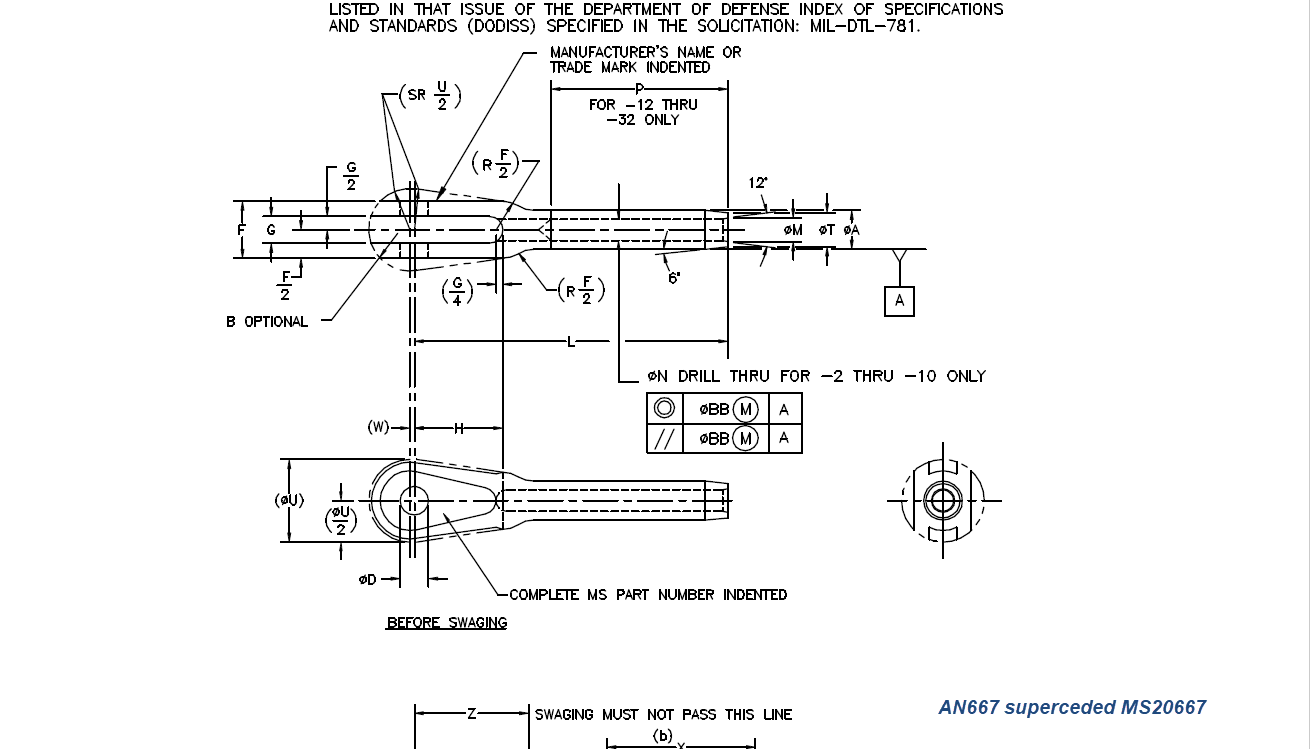
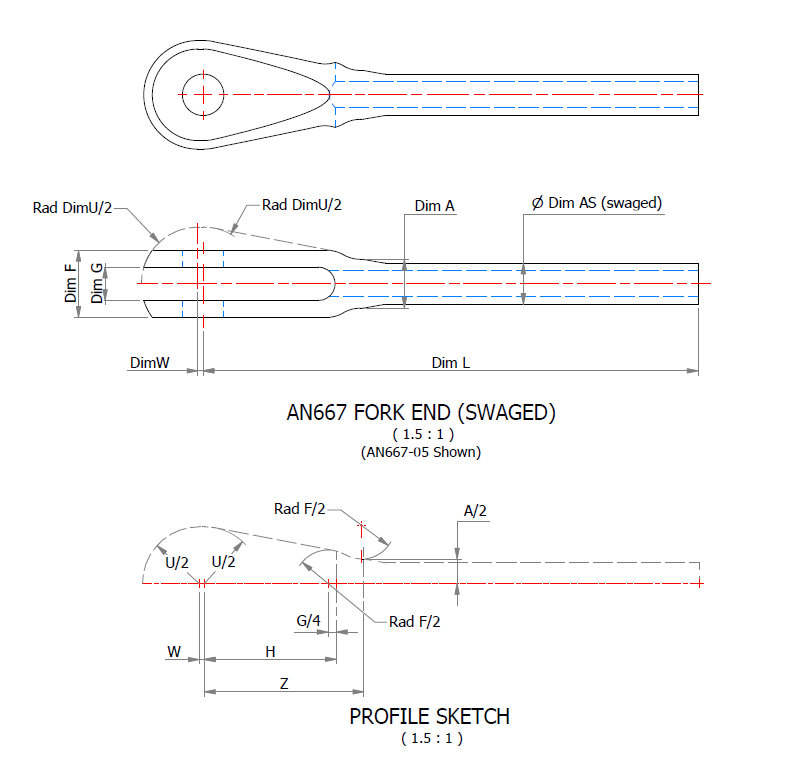
Many of the parts are relatively straightforward like Bolts, Castle Nuts, Clevis Pins etc that require nothing more than basic dimensioned drawings. Occasionally though many parts will require additional sketches to clarify the profiles, like this AN667 Terminal Fork End. Also in similar cases, the model will be dimensioned to As-Fitted/Swaged for use in assemblies. You can basically ignore the Scale as all the DWG versions of these drawings will be 1:1 according to the part number actually modelled.

This is a list of the Specifications I am currently working on. Many of these are updated versions of the existing standards available on the CAD Resources page. The updates include marginal improvements to the 3d models, additional data and verification of listed dimensions. The data sets also include dual part numbers where an item has been updated to a newer standard the new designation is noted alongside the old.

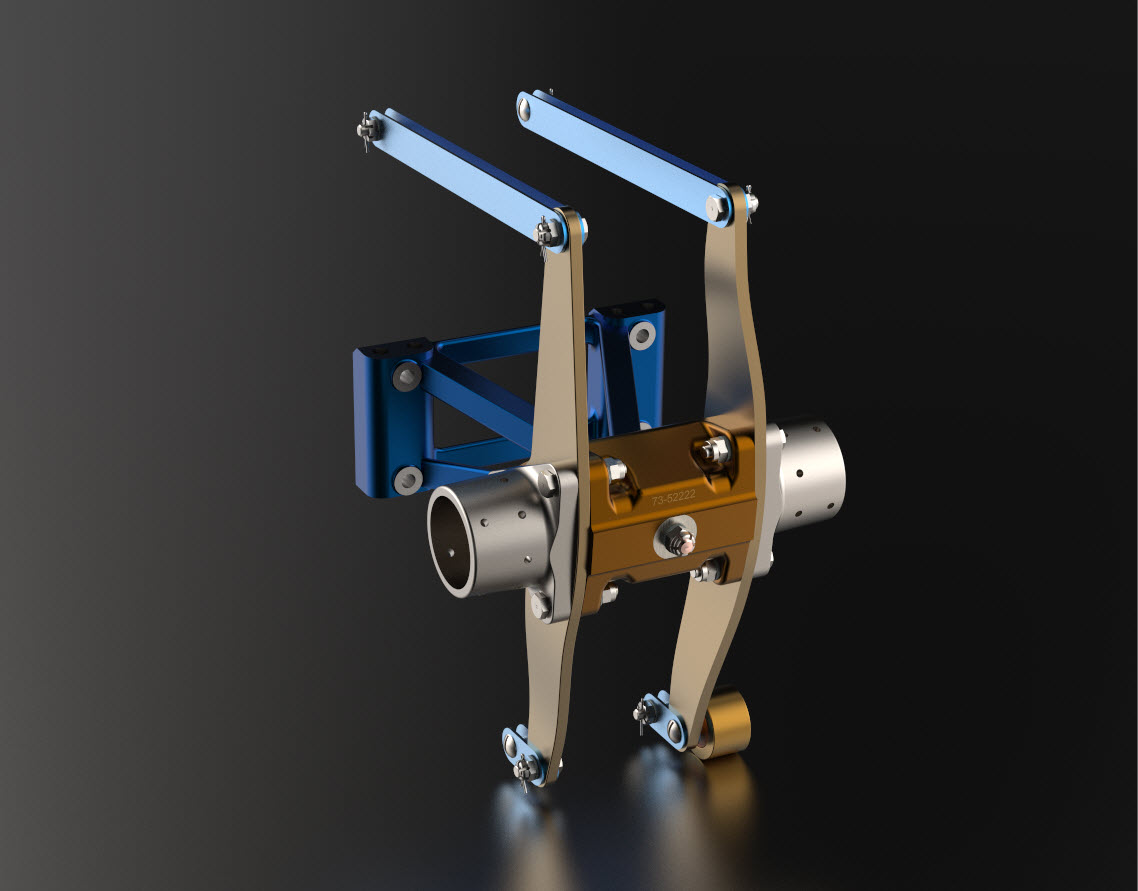
It is very important to get this stuff right, to ensure the part designations and representations are correctly defined in the assemblies. Have you ever tried to figure out assembly configurations from the NAA assembly drawings or picked your way through the Parts catalog just to identify a single connection for a clevis, nut and bolt, turnbuckle or whatever…it is time intensive. It was this desire to bring clarity to these assemblies that I created the P-51 Mustang cad models shown below, which incidentally was the catalyst that drove the development of these Part libraries.

Get in touch with any inquiries at the usual email. hughtechnotes@gmail.com
P-51D Mustang: 3D Instrument Panels

P-51D Mustang: 3D Instrument Panels: Updated 11 June 2022

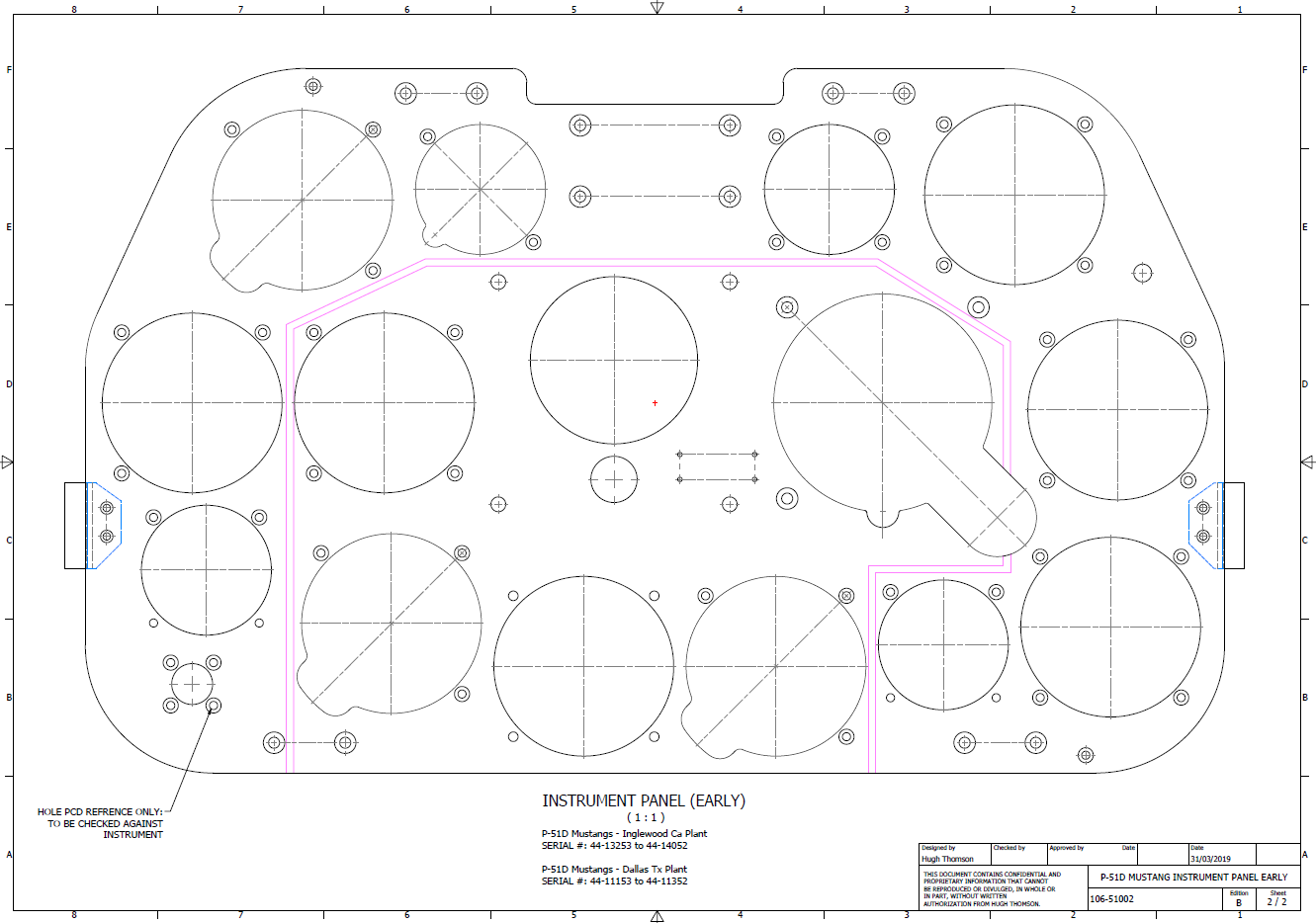
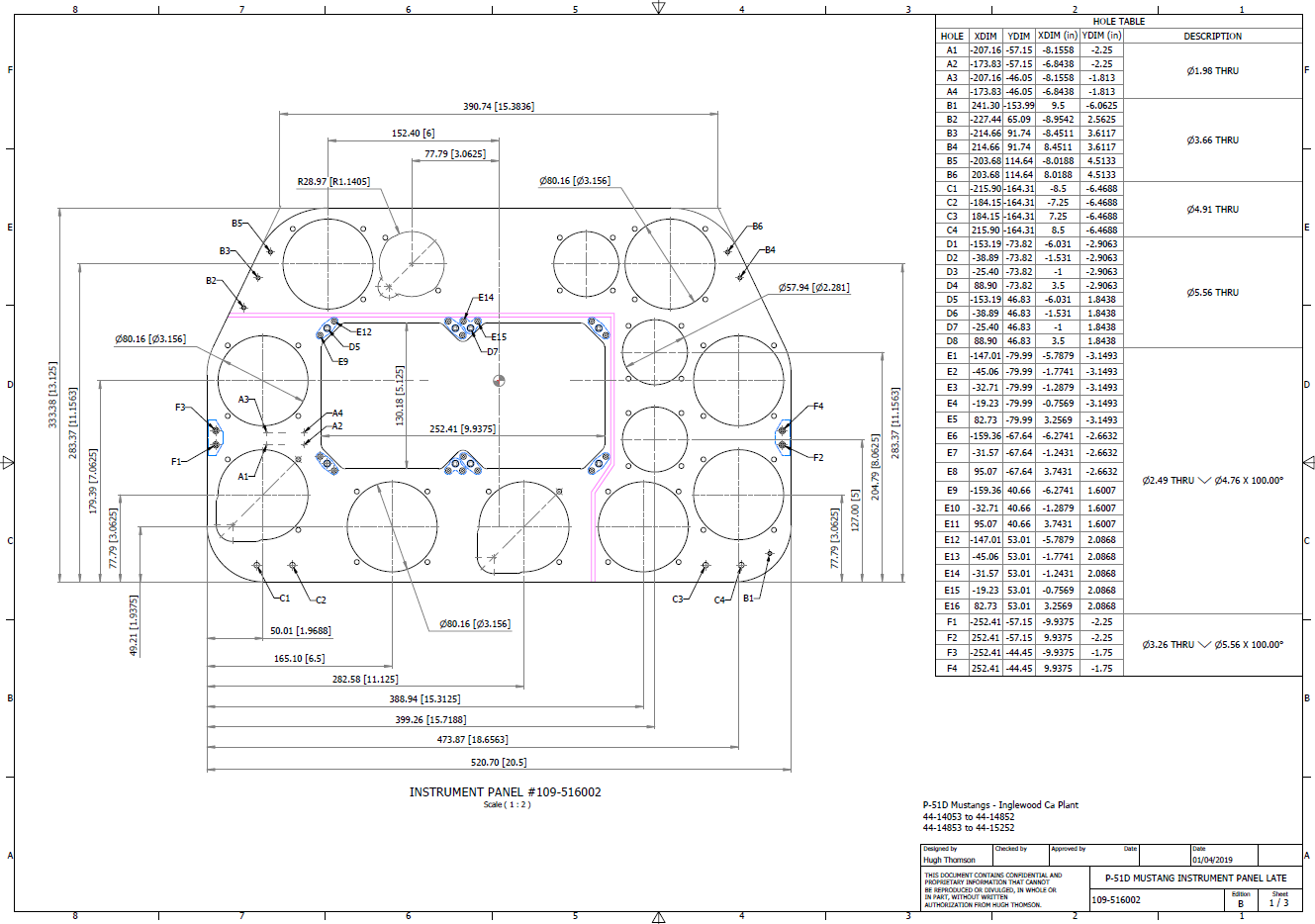
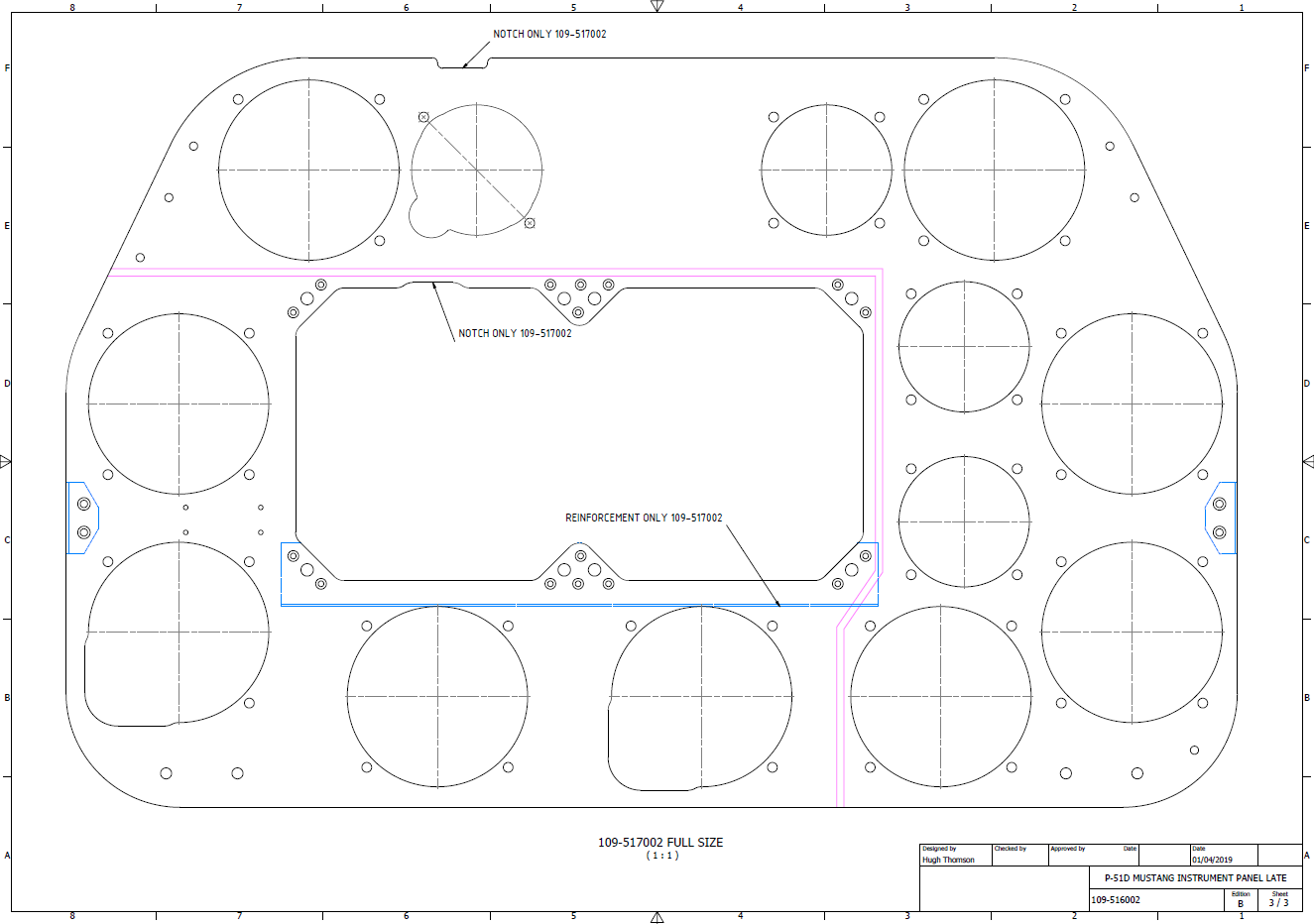
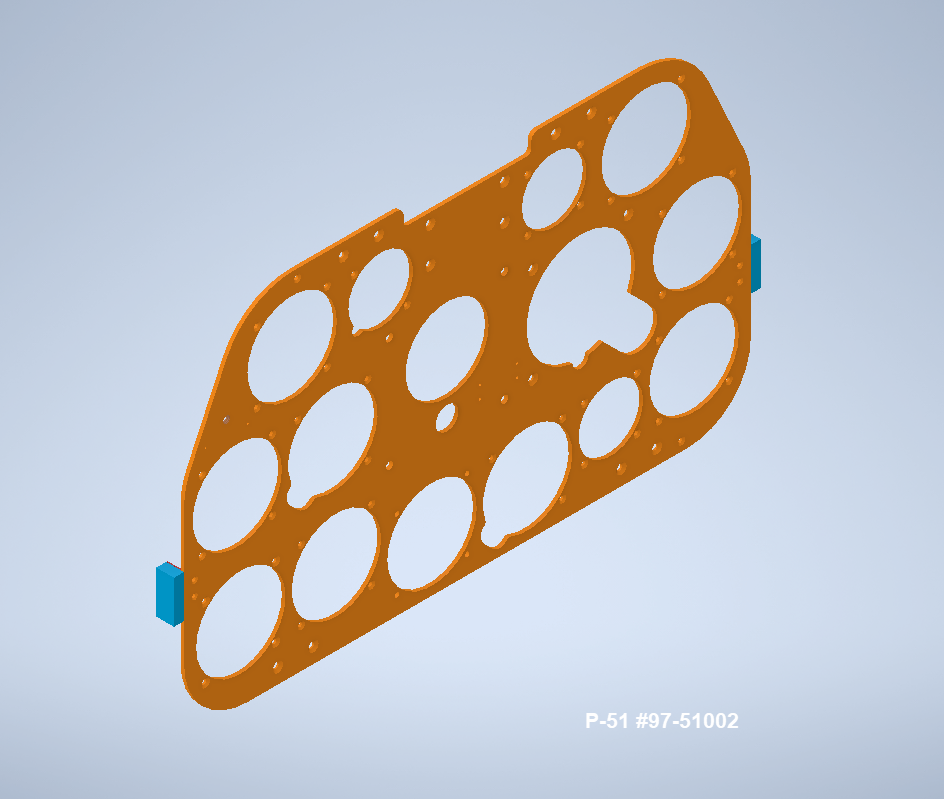
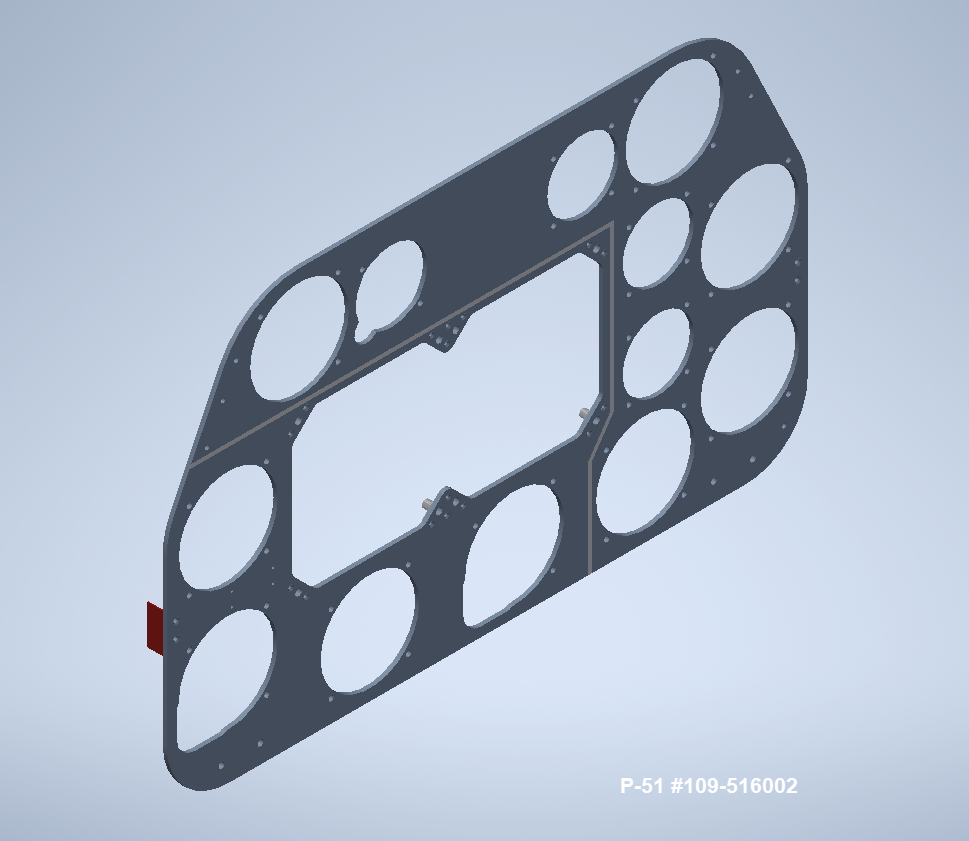
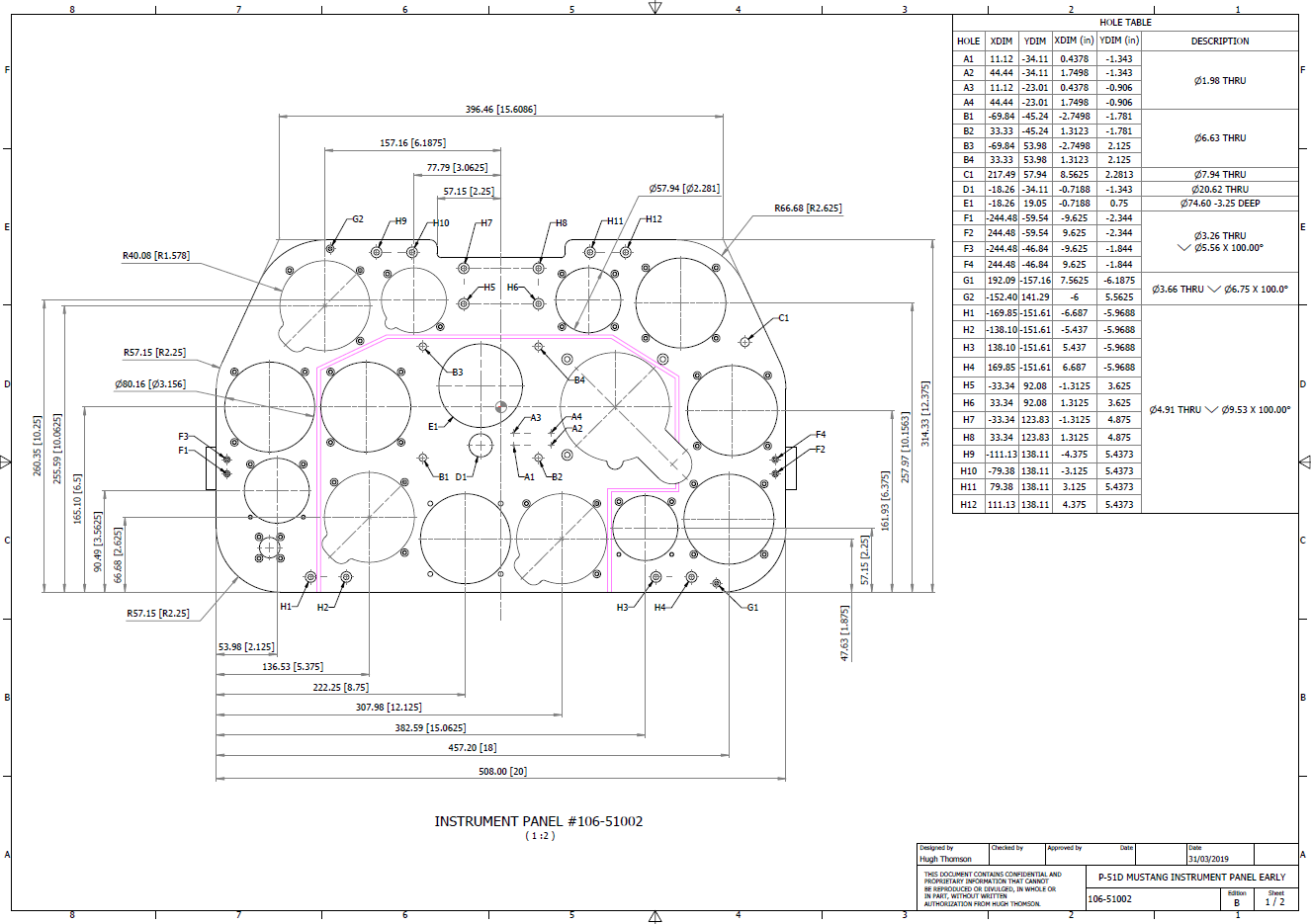
P-51 B and D Instrumentation Panels are now available online as a separate package. This package includes all below noted Instrumentation Panels 3D CAD models in STP, STL and 3D DWG formats with associated dimensioned 2D drawings and PDFs. Note the hole positions are listed in a tabulated form on the drawings which can be extracted for CNC work.

Also included is a copy of the original NAA instrumentation drawings for reference.

Update 20th June 2022: All Instrument panels now also include the Parasolid X_T format. The complete package is available for download, get in touch at hughtechnotes@gmail.com.

Early Version P51D: 106-51002

Later Versions: 109-516002, 109-517002

Update 15th Feb 2022

For P-51B Mustang: 97-51002

3D Model Views:

For further information drop me a line at hughtechnotes@gmail.com.

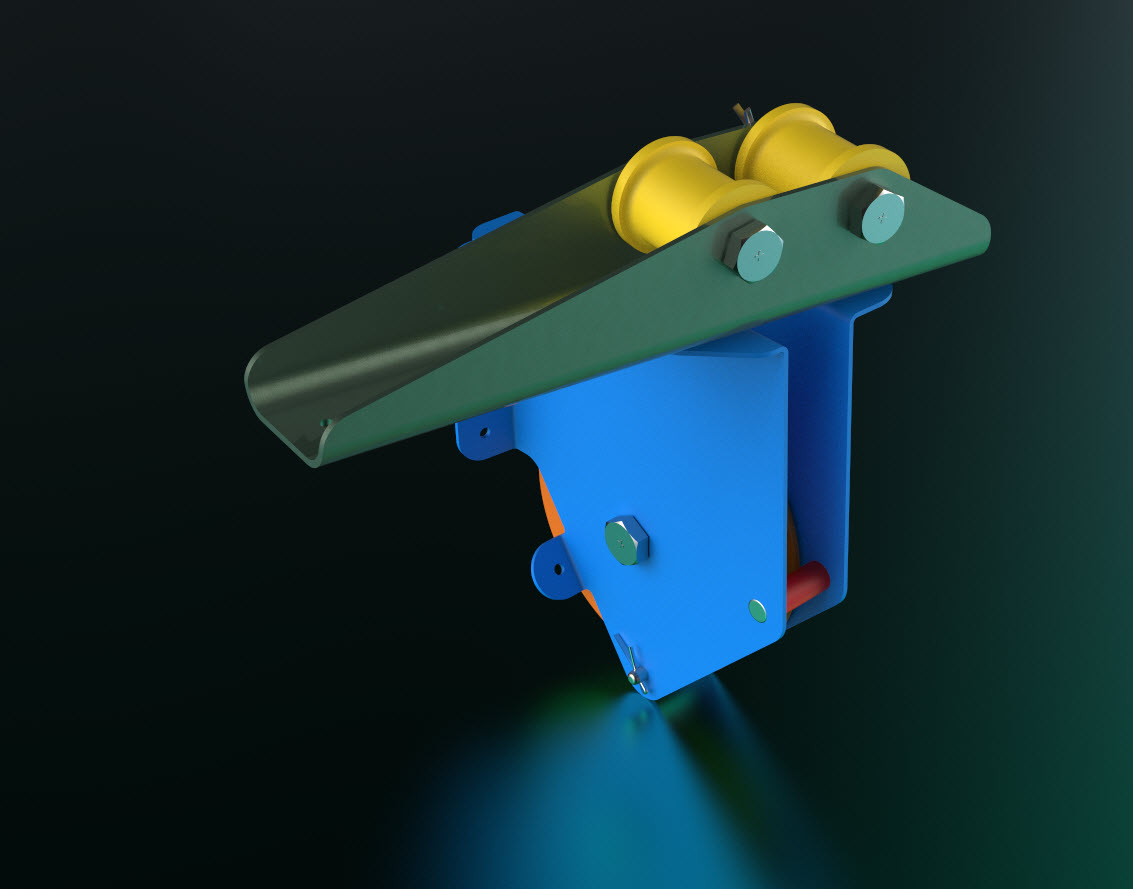
3D Printing: P-51 Tailwheel

3D Printing: P-51 Tailwheel:

I’m back after a few months dealing with a difficult period of my life. I would like to take this opportunity to thank those that stepped up to the challenge and supported me through this time.

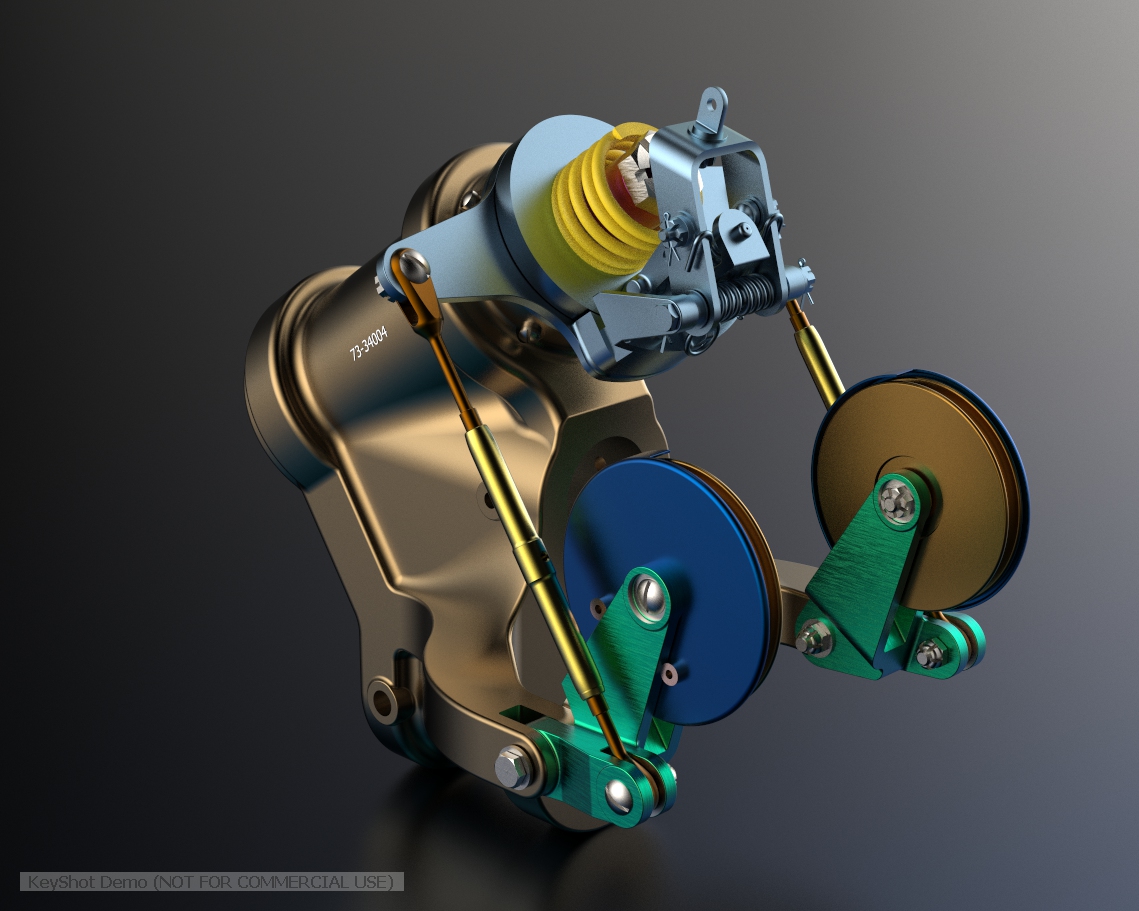
Many moons ago I developed a series of CAD models for the P-51 Mustang Tailwheel mechanism initially to study the mechanical operations and also to clarify an otherwise obscure area that is not clearly defined on the NAA drawings.

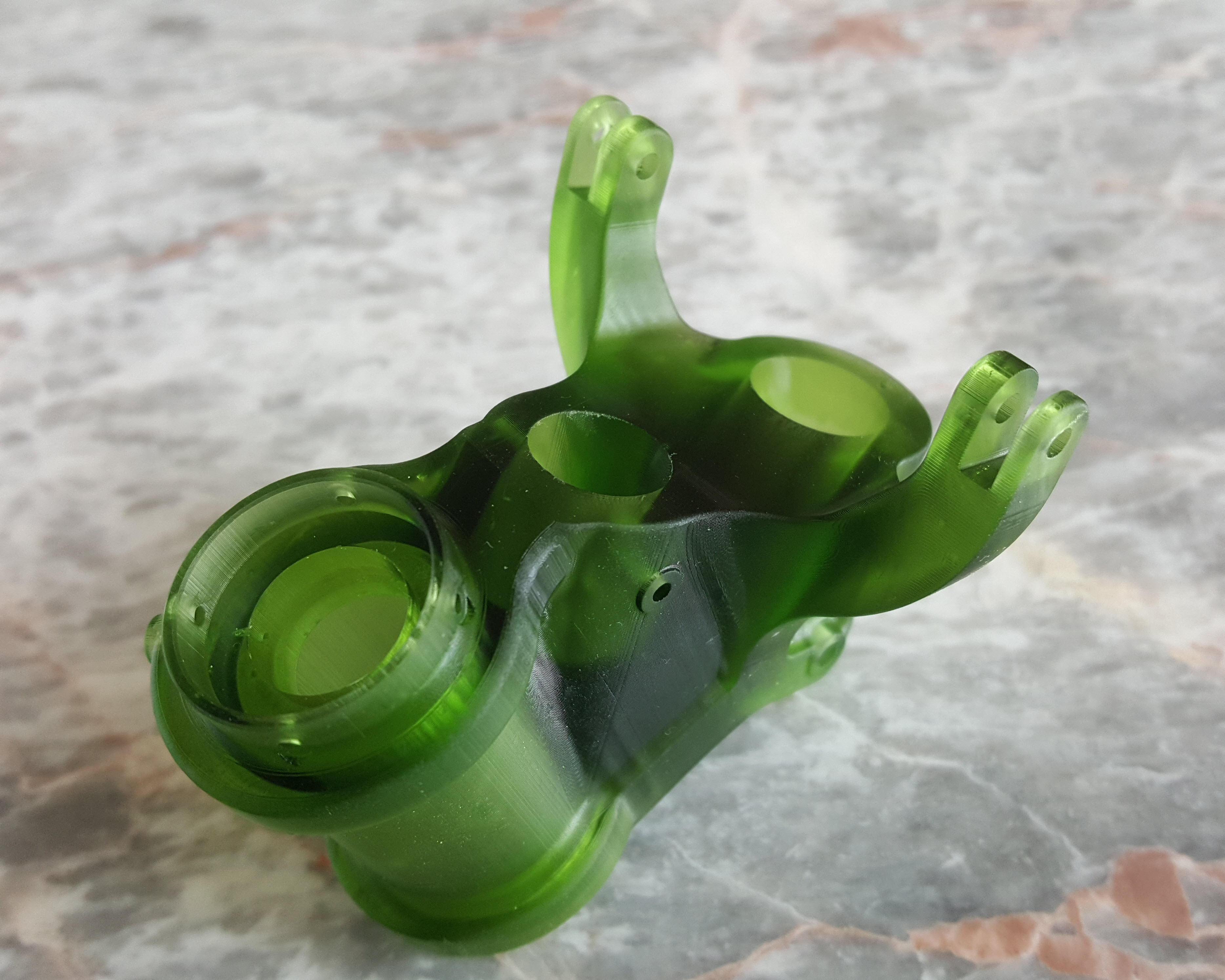
At the beginning of 2021 I had the good fortune to obtain an Elegoo Mars pro 3D printer which just sat in the cupboard until now. Getting my life back on track I unboxed this and setup for my first print which invariably had to be one the many CAD models from my research. The part selected is the Housing for the Tailwheel spindle. Part # 73-34004.

These parts are accurately modeled from the NAA drawings so I was unsure how well they would print at 1:4 scale particularly the thin wall elements.

The first image shows the preparation using the Lychee Slicer program with the layers set to 0.05mm. I added a generous amount of supports to maintain the print integrity using the Auto support feature with a few manually added for good measure. The Resin I used was the Elegoo Water Washable Green which has worked very well. I am rather pleased with this print as I had read many horror stories of problems that folks encountered with this type of immersive printing which made me a tad anxious before I eventually decided to take the plunge.

This printer is capable of printing with a layer height of only 0.02mm which is quite extraordinary but as it took 4 hours to print this model at 0.05mm I doubt if I will venture to printing at a finer pitch as the time would be excessive. I don’t plan to print all the Tailwheel components as my budget for resin is limited but I will print a few more to determine the limitations; if any; of resin 3d printing.

Talking about the future I should note that I am currently sourcing new material for the P-51 Mustang and hopefully to start a brand new project for the F7F Tigercat.

If you are interested in the Tailwheel models check out the bottom section of this post for details.

On a personal note it is good to be back working on these projects and please do not hesitate to comment or drop me a line with any queries. hughtechnotes@gmail.com.

P-51D Mustang: Conic Formula in Excel

P-51D Mustang: Conic Formula in Excel

A quick technote on entering a conic formula in MS Excel spreadsheets. Getting the correct syntax is critical to achieving correct results.

I am updating the ordinate datasheets for the P-51 B/C and D models to incorporate new information using the various conic formula according to the curve type. Typically with these equations, there are a number of constants to be established to input to the final quadratic formula.

excel formula 2

test equationThe original formula for one of the constants “P” is given as shown (1). If we enter the formula as prescribed in a hand calculator it will evaluate correctly but will not work correctly in Excel in this format. So we need to tell Excel to essentially divide everything in the top line by everything in the bottom by adding parenthesis as shown (2).

The bottom line shows the actual input in the excel formula bar (3).

We are continually working on updates to the Ordinate and Cad package so watch this space for new articles. There will also be in-depth tutorials on interrogating ordinate information to find max-width, tangents and matched second-degree curves as well as updates on detail drawings.

P-51D Mustang – Instrumentation Panel

P-51D Mustang – Instrumentation Panel

I have recently been working on updates to the Ordinate and Cad package (as noted in the previous posting) and also developing the Instrumentation panel assemblies for the P-51D Mustang.

What started out as a mere curiosity is actually turning out to be a fairly intensive project requiring a lot of research.

For the P-51D there are at least 4 variations on the main instrumentation panel for the early and late models. The U-shaped Support frame has 4 variations and just as many for the lower instruments panel set at 20 degrees to the main panel. It is important to get the correct combination of components for the various model numbers which is where a lot of my time is spent on the research.

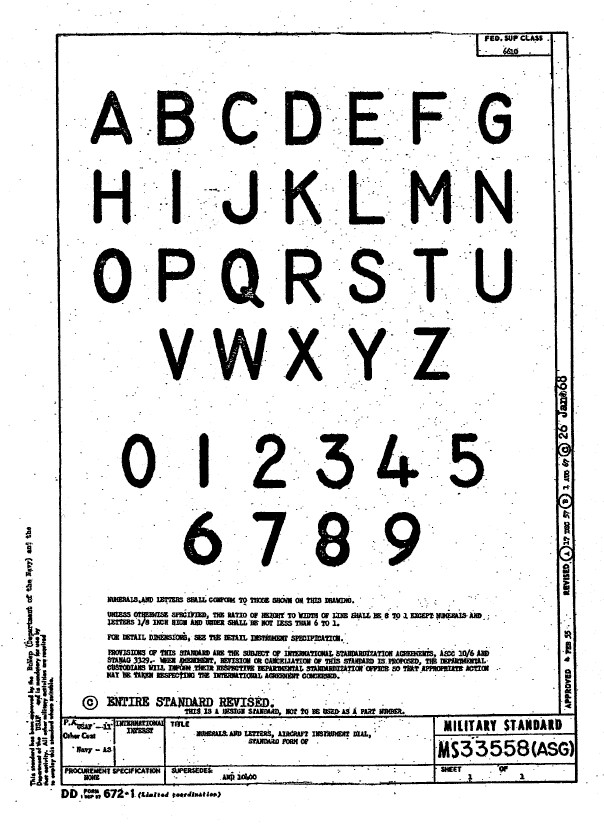
Part of that research is, of course, getting the label text just right which is where I encountered a lot of frustration. The generic text font used on the Mustang and many of the contemporary aircraft at that time was the MS-33558. There is a TTF font available online for download but the design is not very good with problems of self-intersecting edges and spacing definition.

Military-Standard-MS33558ASGUsing this font in CAD systems will result in problems with embossing or extruding.

Typically I had to find out why, so I downloaded a copy of Fontforge to analyze the characters and identify the problems. Most of the characters are fine but there are at least 7 that have intersecting line problems. However, due to the nature of the font construction process, it is very difficult to identify the problem areas and thereby to devise a solution.

I spent a few hours looking into this but font development is a relatively new procedure for me and I did not achieve any satisfactory results. This I think needs an expert touch. I appreciate the work that was done in developing this TTF but please whoever designed it just a bit more attention to detail would have saved me a lot of work.

In the interim, I decided to use the closest font I could find on my system which was a default SolidEdge font that is similar in style. I had SolidEdge as a trial program a while back and thankfully it left the fonts behind when I uninstalled it.

Another small point worth noting is the color of the label text. The images above show the early P-51D version arrangement and you will notice in the bottom left corner of the first image is a selection of text in red. It is “EMERGENCY” with an associated note. The drawing states that this is RED on a black background but many of the photos I have seen of this particular version show the text in white. So the question is did NAA change this at some stage or is it just down to restorers’ preference?

NAA P-51D Mustang: Front Fuselage

NAA P-51D Mustang: Front Fuselage

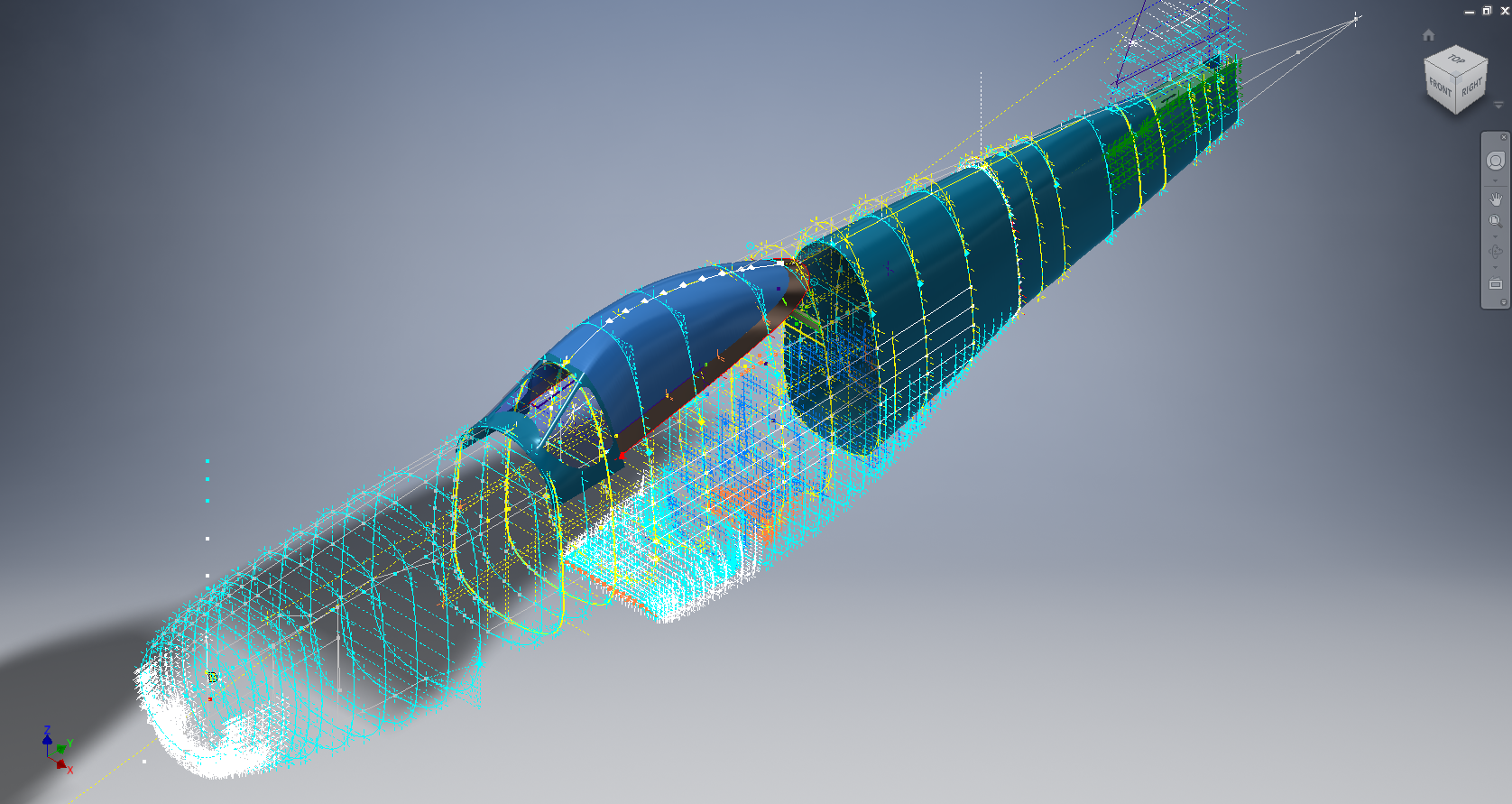
Following a recent inquiry, I have revisited the NAA P-51 Mustang project to develop the front fuselage and cockpit. This will be an extremely detailed and accurate model including fixings and rivet holes.

P-51D Early.png

The partial structure above is for the early P-51D version; note the instrument panel and support frame. There are also some minor differences with the other components, most notably the curved beam which has different end brackets for the early and late versions.

The 2 instrument panels depicting the P-51D versions, with the later version on the right. This will be a medium to long term project for which I will post regular updates.

Technote: Inventor Export Sketches

Technote: Export Sketches

The Inventor product has an option to export part Sketches to either an Autocad DWG or DXF format directly from the model environment. This is very useful if you are needing to share development information with someone else who is working with a different CAD product.

It is simply a case of highlighting the sketch as shown in the example below and selecting the “Export Sketch as…” option.

Inventor export sketch

A dialogue box pops up asking for the file format DWG or DXF and location for saving. I would recommend the DWG for the format as this replicates the Splines more accurately.


In this example the left image is for the Mustang P-51 rear fuselage, showing the outer profile for the P-51 B/C and the inner profile is for the P-51D. The image on the right is the fuselage tail-end.

I plan on extracting all the fuselage curves that include P-51D data to DWG format as a reference until such time as I can add the point data to the already comprehensive set of ordinates available here.

Mustang P-51 B/C Ordinates


NAA P-51D: Master Lines Plan

NAA P-51D Mustang: Master Lines Plan

The P-51D project is progressing well with further developments on the fuselage frame profiles. I now have a comprehensive Master Lines Plan incorporating additional information obtained from mathematical analysis, drawings, reference documentation and geometric developments. I have updated and remodeled the underside Oil Cooler Air intakes, canopy, windshield, rear fuselage and fuselage tail-end. As part of the remodel the groups of ordinates for each frame for the Oil Radiator Duct, Coolant radiator Duct and Removable Scoop are now contained on their own respective work-planes. This will make it much easier to micro manage the final mold lines.

Fuselage Master Lines Plan (P-51D overlaid on P-51 B/C):

2017-07-01_14-32-09

Test Lofts and developments:

2017-07-01_14-30-24

Front Views (note the Canopy Profile update from the previous article):


A month ago I was not sure how much could be achieved given the limited amount of information at hand but with due diligence and detailed research, it is quite amazing what can be accomplished.

With this template, it is now technically possible to accurately develop a CAD model for the entire fuselage structure and mechanical components for the P-51D, which would be great; but I often wonder what the value of such an undertaking would achieve, other than being a darn interesting thing to do and a test of CAD modeling skills.

Having achieved this significant milestone the time is right to conclude the work on the Mustang P-51D and P-51 B/C projects. I may continue with the P-39 project but as always I am keen to explore the options for the more obscure extinct aircraft as described in Operation Ark.

2017-07-01_00-15-20

If you are planning on developing your own Master Lines plan a good place to start would be with the 1000’s of ordinates points cataloged and recorded on the spreadsheets here: Mustang P-51B/C Ordinates which also includes the wing ordinates for the P-51D and vertical stabilizer.

NAA P-51D: Canopy

NAA P-51D Mustang: Canopy

With the return to the P-51D project, I have been working on developing the fuselage and the canopy ordinates specific to the P-51D. Supporting information in this regard is hard to come by and we don’t have the luxury of tabulated ordinate values and fully detailed mold lines as we had with the P-51 B/C.

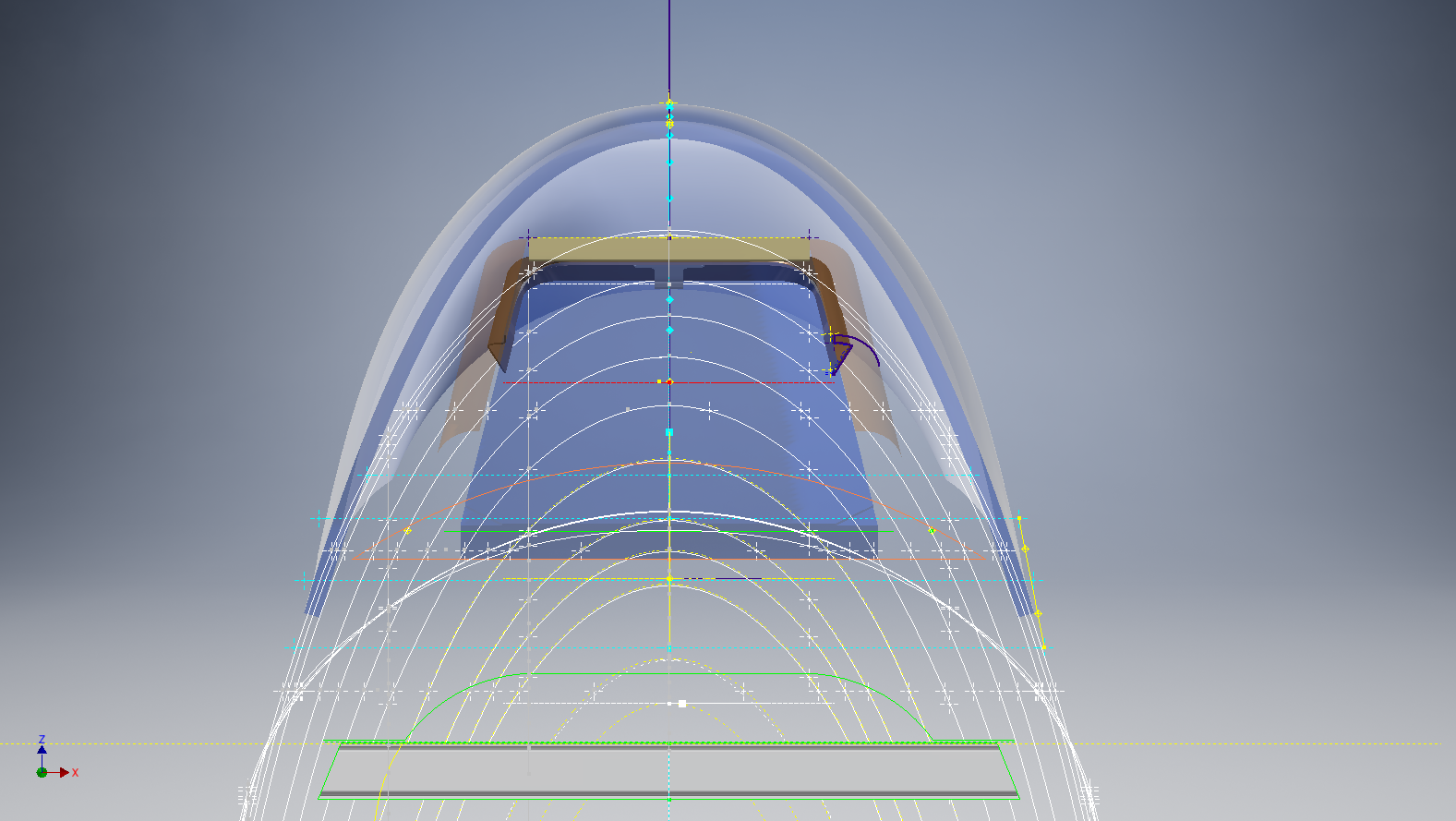
What we do have though is critical dimensions scattered amongst the 100s of drawings and documents that collectively help establish key datum points which in conjunction with conic geometric development appear to make this aspiration a feasible prospect. To give you some idea of progress this is a front view of the preliminary P-51D canopy model.

P-51D Canopy Front

I still have the windshield model to develop in order to finalise the canopy design but I am pleased with achieving this amount of progress derived from many hours of research and some straightforward geometric developments. Notice in particular the accurate tangency alignment with the known frame mold lines, it is perfectly aligned. I appreciate that there are a few variations on the profile of the canopies that were made for the P-51; some more bulbous than others, but we first need to establish a baseline which is what we will have.

As a consequence of this activity, I have also managed to develop the rear fuselage profile ordinates for the P-51D. I am rather excited by this new development in conjunction with the completed wing ordinates and the more recent vertical stabiliser it may actually be possible to have a full ordinate set uniquely for the P-51D.

Update: Below is the finished baseline canopy model profile.

2017-06-08_13-55-28

…and this is what it looks like to develop the canopy and windshield with limited known data…

P-51d Canopy Dev01

Update: August 2018 “P-51D Bubble Canopy”

The real thing…this is a model derived from a ridiculously accurate laser scan point cloud of a P-51D Bubble Canopy.

NAA P-51D Mustang: Using Ordinate Data

NAA P-51 Mustang: Using Ordinate Data Spreadsheets

A question arose during a telecon today about using the Ordinate Spreadsheets for Cad and Modelling.

2018-11-30_08-40-04

Typically for the fuselage and cowlings, the spreadsheets are set out as above. The top section replicates the layout of the original manufacturer’s drawings specifically to allow traceability for verification purposes. The section below, bordered in blue is the concatenated values from the top table in a format such that the values represent the actual X,Y,Z coordinates for each point.

2017-05-23_21-47-42For use in Cad systems like Autocad, it is recommended to collate these in a TXT file by simply copying and pasting.
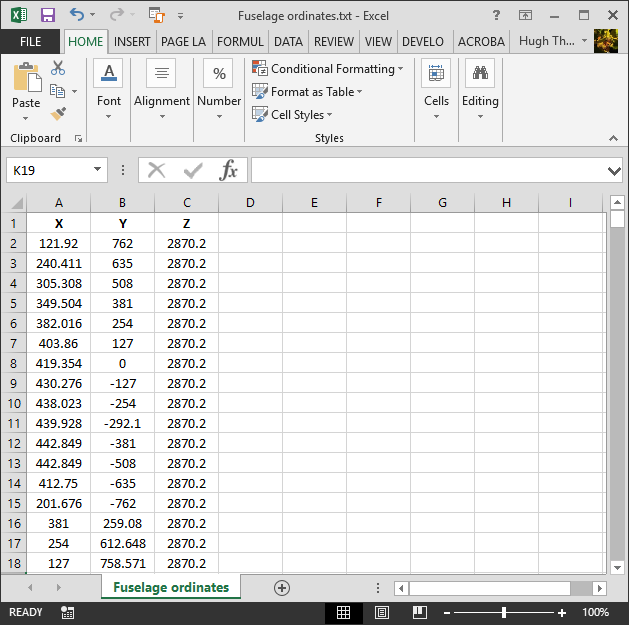
Once collated open Autocad, select the Multiple Point feature and cut and paste the entire contents of the TXT file onto the command line which in turn will import the values as points.

For other CAD systems like Inventor the preferred format is an excel spreadsheet with 3 column headers X, Y and Z.

All we have to do is to open this same TXT file from Excel as a comma delimited file, check the options presented in the opening dialogue to ensure correct formatting and save the file as an XLS. Remember to label the first row as X,Y and Z.

2017-05-23_22-06-55

When you start a sketch in Inventor there is a feature on the toolbar to import Excel data. When you import the data there are a few self-explanatory options.

2017-05-23_22-12-58

There are of course many ways of doing this and it will vary according to what CAD system you use. Importing all X, Y, Z points in a 3D sketch, for example, will align the ordinates with the current UCS, which in some cases may not be desirable. The Z value is the Frame or Station location relative to the aircraft datum, which essentially translates to being the work plane location. The X, Y values are typically the sketch coordinates normal to the work plane.

If you are working on a 2d sketch and importing the set of points as X, Y, Z values; Inventor will only import the respective X,Y values and ignore the Z value, in fact, it will notify you that it is doing this.

Update: July 2018

The ordinate spreadsheets now have an additional page that compiles the ordinates for each frame with the X,Y,Z components listed separately. This makes it easier to manage the ordinates depending on what CAD system you are importing to.

2018-07-31_23-24-09

If you require any further information then please drop me a line.