NAA P-51D: Canopy

NAA P-51D Mustang: Canopy

With the return to the P-51D project, I have been working on developing the fuselage and the canopy ordinates specific to the P-51D. Supporting information in this regard is hard to come by and we don’t have the luxury of tabulated ordinate values and fully detailed mold lines as we had with the P-51 B/C.

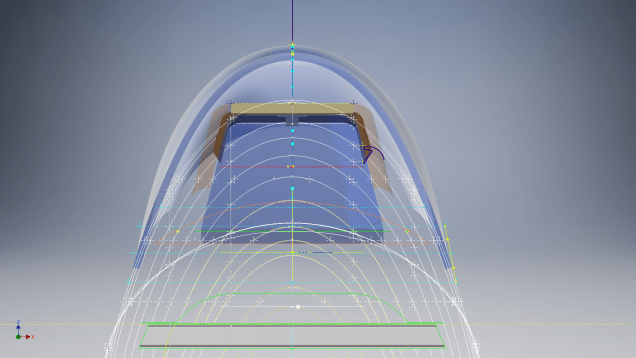
What we do have though is critical dimensions scattered amongst the 100s of drawings and documents that collectively help establish key datum points which in conjunction with conic geometric development appear to make this aspiration a feasible prospect. To give you some idea of progress this is a front view of the preliminary P-51D canopy model.

P-51D Canopy Front

I still have the windshield model to develop in order to finalise the canopy design but I am pleased with achieving this amount of progress derived from many hours of research and some straightforward geometric developments. Notice in particular the accurate tangency alignment with the known frame mold lines, it is perfectly aligned. I appreciate that there are a few variations on the profile of the canopies that were made for the P-51; some more bulbous than others, but we first need to establish a baseline which is what we will have.

As a consequence of this activity, I have also managed to develop the rear fuselage profile ordinates for the P-51D. I am rather excited by this new development in conjunction with the completed wing ordinates and the more recent vertical stabiliser it may actually be possible to have a full ordinate set uniquely for the P-51D.

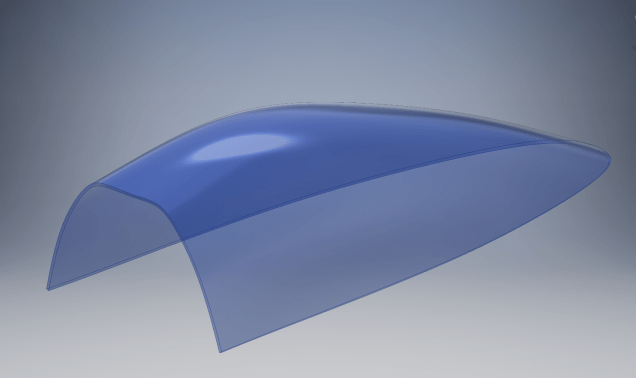
Update: Below is the finished baseline canopy model profile.

2017-06-08_13-55-28

…and this is what it looks like to develop the canopy and windshield with limited known data…

P-51d Canopy Dev01

Update: August 2018 “P-51D Bubble Canopy”

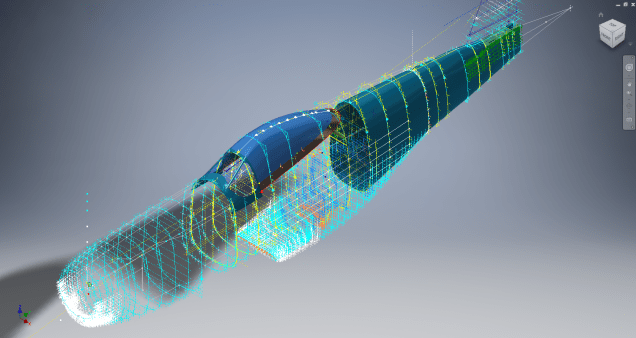
The real thing…this is a model derived from a ridiculously accurate laser scan point cloud of a P-51D Bubble Canopy.

NAA P-51D Mustang: Using Ordinate Data

NAA P-51 Mustang: Using Ordinate Data Spreadsheets

A question arose during a telecon today about using the Ordinate Spreadsheets for Cad and Modelling.

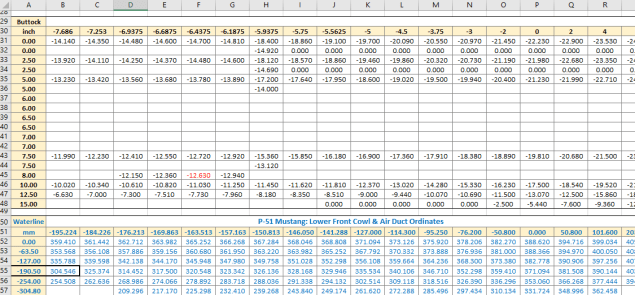
2018-11-30_08-40-04

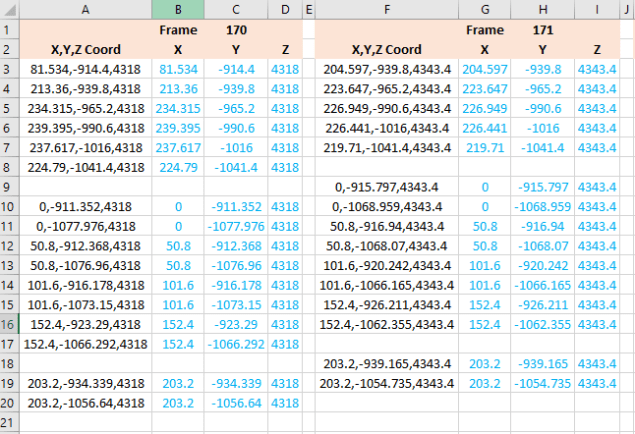
Typically for the fuselage and cowlings, the spreadsheets are set out as above. The top section replicates the layout of the original manufacturer’s drawings specifically to allow traceability for verification purposes. The section below, bordered in blue is the concatenated values from the top table in a format such that the values represent the actual X,Y,Z coordinates for each point.

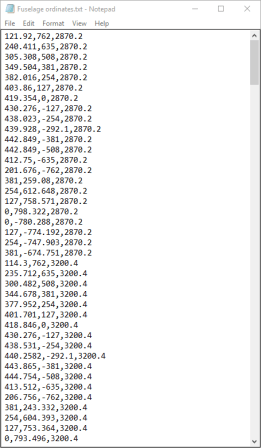
2017-05-23_21-47-42For use in Cad systems like Autocad, it is recommended to collate these in a TXT file by simply copying and pasting.

Once collated open Autocad, select the Multiple Point feature and cut and paste the entire contents of the TXT file onto the command line which in turn will import the values as points.

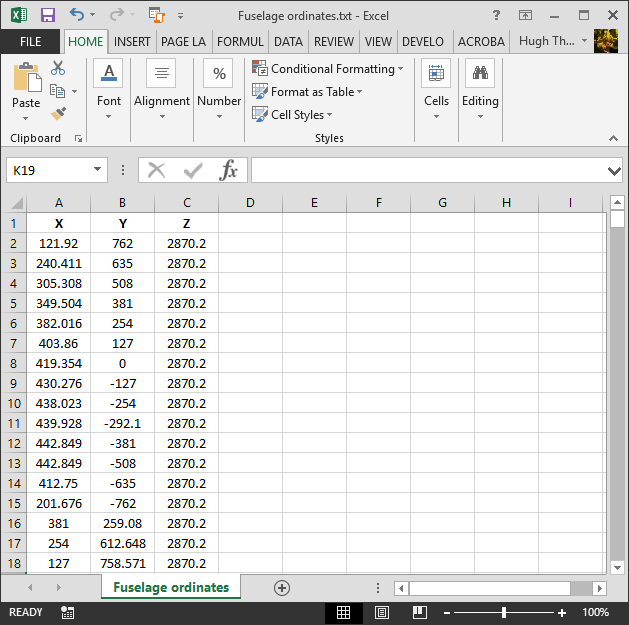
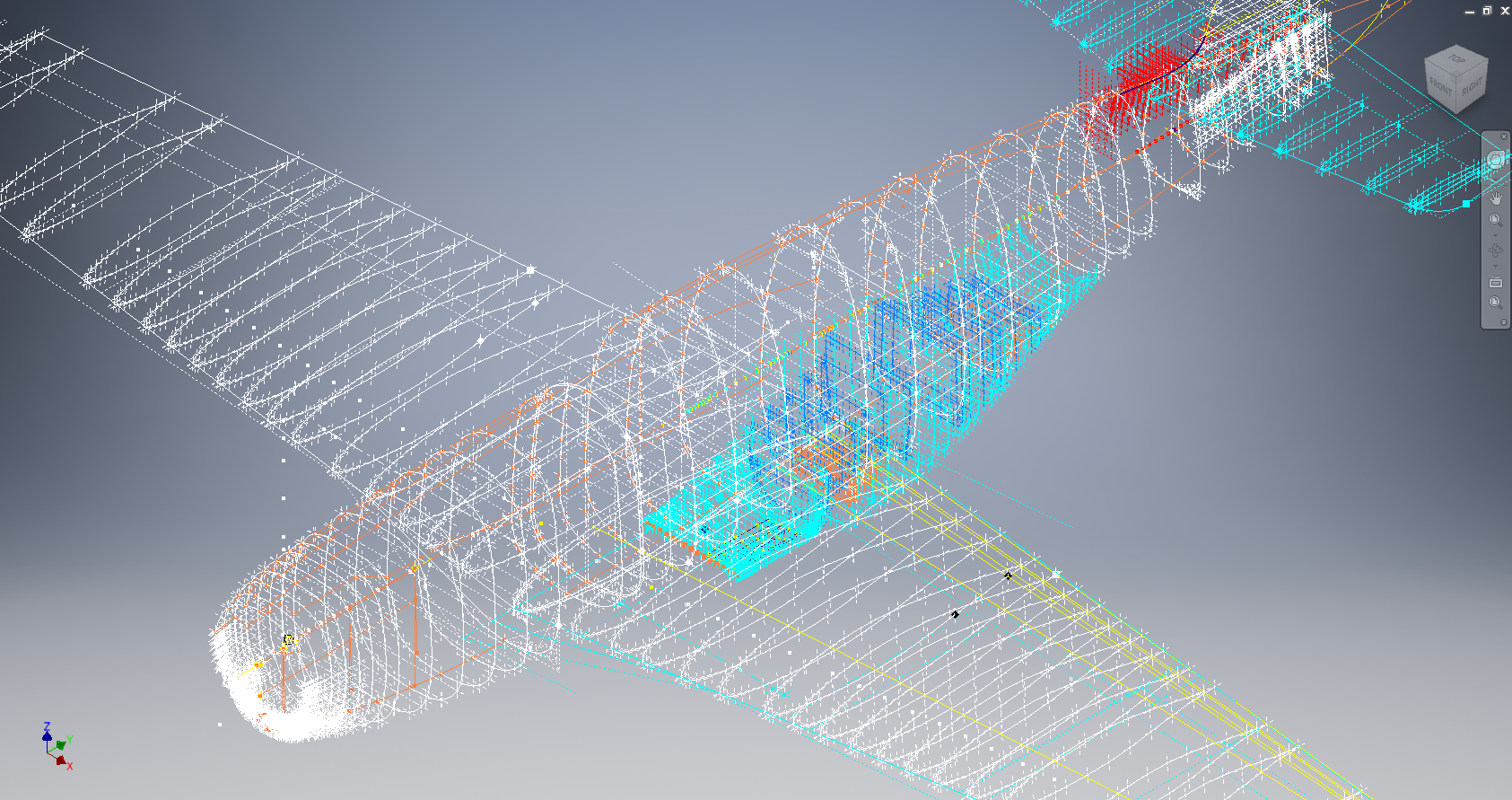
For other CAD systems like Inventor the preferred format is an excel spreadsheet with 3 column headers X, Y and Z.

All we have to do is to open this same TXT file from Excel as a comma delimited file, check the options presented in the opening dialogue to ensure correct formatting and save the file as an XLS. Remember to label the first row as X,Y and Z.

2017-05-23_22-06-55

When you start a sketch in Inventor there is a feature on the toolbar to import Excel data. When you import the data there are a few self-explanatory options.

2017-05-23_22-12-58

There are of course many ways of doing this and it will vary according to what CAD system you use. Importing all X, Y, Z points in a 3D sketch, for example, will align the ordinates with the current UCS, which in some cases may not be desirable. The Z value is the Frame or Station location relative to the aircraft datum, which essentially translates to being the work plane location. The X, Y values are typically the sketch coordinates normal to the work plane.

If you are working on a 2d sketch and importing the set of points as X, Y, Z values; Inventor will only import the respective X,Y values and ignore the Z value, in fact, it will notify you that it is doing this.

Update: July 2018

The ordinate spreadsheets now have an additional page that compiles the ordinates for each frame with the X,Y,Z components listed separately. This makes it easier to manage the ordinates depending on what CAD system you are importing to.

2018-07-31_23-24-09

If you require any further information then please drop me a line.

NAA P-51D Mustang: Wing Ordinate Rev

NAA P-51D & B/C Mustang: Wing Ordinate Major Update:

Thanks to Roland Hallam, I am now in receipt of new verifiable information that has prompted a return to the P51 project and a major update to the wing ordinate data sheets.

2017-05-21_15-46-57

Many of the blanks have now been filled in and new additional information added. The above image is a snapshot of the work in progress. The groups highlighted in blue are checked verified dimensions, the red values are those that have changed and those areas remaining in white have prompted an interesting conclusion. Up until now, it was presumed that the wing profiles for the P51D and P51C were the same with the exception of the wing root, however, closer inspection would now suggest that a few rib locations are also slightly different which requires further investigation.

I am still working through the new information and dissecting what is relevant to the P-51D and the P-51B/C variants. This will probably take me a while to evaluate but I am confident that this will result in the most comprehensive dataset yet compiled for the P-51 wings.

I had not expected to return to the P51 project at this time but I’m sure you will agree this is an exciting development.

Bell P-39: Wing Trailing Edge

Technote: Bell P-39 Wing Trailing Edge Calculation.

The root wing profile for the P-39 is based on the NACA 0015 (4-digit series).

p-39 wing TE

The Bell P-39 archive contains ordinate data for the fuselage, tail, stabilisers, cowls and so on but sadly the main ordinate plan for the wings is missing. However, we do have some ordinate data including a mid wing profile section and of course the front, rear and aux beams. We also know the root wing profile is based on the NACA 0015 which collectively provides enough core information to develop the wing structure.

The “baseline” NACA 0015 has a non-zero trailing edge thickness relative to the chord length. Just working from the generic geometry formula we end up with a large trailing edge thickness which is greater than that specified by Bell.

The baseline NACA 0015 airfoil is described by the function:2016-08-23_04-27-34

In order to achieve a degree of control over the resulting trailing edge thickness we only need to adjust the fourth coefficient in the polynomial slightly.

xyz

The above amendment will give a zero thickness at the trailing edge. The actual value we were looking for was 0.03in radius which was achieved through trial and error with the fourth coefficient value set to 0.1024.

  • x = coordinates along the length of the airfoil, from 0 to c (which stands for chord, or length)
  • y = coordinates above and below the line extending along the length of the airfoil, generally defined as either yt for thickness coordinates or yc for camber coordinates

The final profile was checked against known ordinates from the fuselage data.

The information here was sourced from a white paper written by WeiHei, Francisco Gomez, Daniel Rodriguez and Vasilis Theoflis.


Bell P-39 Airacobra: Fuselage

Bell P-39 Airacobra: Fuselage

This is an update on the P-39 project. I have actually been drifting between this and the P-51 Mustang as a number of inquiries have come in regarding the ordinates and various questions on the Oil Cooler model and landing gear mechanisms; which has been an interesting diversion.

Getting back on topic, I thought it may be prudent to write a quick update on what I am doing with the P-39 Airacobra and where I hope the journey will take me.

I have of course continued working on the ordinate data spreadsheet which is derived from the part drawings themselves. This serves as a check whilst I am developing the structure. The 3D models are being developed in context, i.e the individual part models are located to the 3D spatial ordinates relative to a single datum so when I plug these into the assembly they will import to the correct 3D location thus negating the requirement for constraints.

2016-08-12_22-48-54

This is the first time I have worked this way as I usually just model the part and then constrain to the corresponding items in the assembly, but this is usually dependent on the quality of the assembly scans to clearly identify and ensure correct alignment of the parts. As we all probably know these scanned files are the most likely to have problems with legibility. In many respects having the part files modelled relative to ordinates in 3D space ensures that the parts line up correctly and I don’t have to worry too much about the quality of the assembly scans.

P-39 Airacobra Fuselage

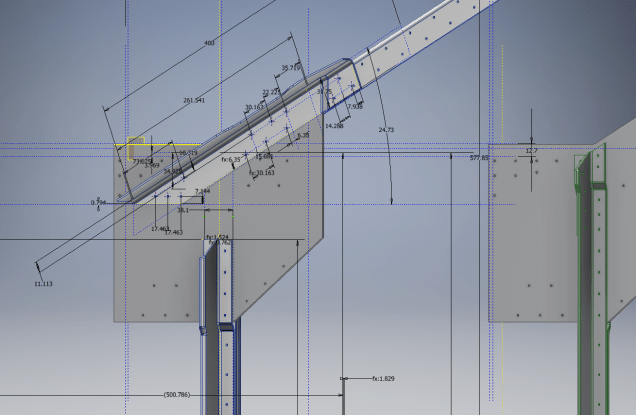
The P-39 main assembly drawings are actually not too bad as the image above shows. This is a scrap view of the fuselage Longitudinal, comprising many small parts all riveted together to form the assembly. The area in red is where I am working at the moment; which is a major node; just aft of the engine bay; where the many struts and braces overlap on both sides of the stiffener plate. The following image gives you some idea of the detail to which this is being developed.

P-39 Airacobra Fuselage1

The pilot holes for the rivets are unique to each individual part and just like the real process of construction these holes will be match drilled to all the other corresponding parts in assembly.

Modelling the complex parts and locating all those holes takes a lot of time but I believe the end result will be worthwhile. With this degree of accuracy you could just about build one of these aircraft from scratch!.

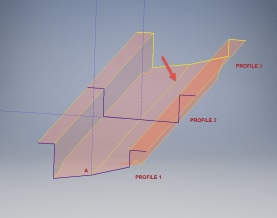
Quick Technote: P-39-01This is the lower level fuselage cross member that has a built in twist to align with the connecting frames at both ends. The model consists of 3 profiles with the 2 outer ones containing a small angular deviation in the centre at point A. Normally I would loft the profiles to create the finished surface but this projects the deviation throughout the length giving us 2 surfaces; which does not look good.

I therefore deleted the resulting 2 base surfaces and simply replaced them with a boundary surface. I’m sure you will agree the result is a much smoother gradation of curvature; that matches expectations.


Mustang P-51 B/C Ordinates

Mustang P-51 B/C and P-51 D Ordinates:

P-51BC Layout

I have had a number of requests for the ordinate spreadsheets I developed for the Mustang P-51 B/C and D fuselage, cowl, cooler and air intakes, so I have decided to make them available to all; which could save you considerable time and effort.

The ordinates are listed on 10 separate Excel workbooks with 18 spreadsheets for all known ordinates from manufacturers data. The ordinate listings are in both mm and inches with the X,Y,Z coordinates extrapolated from this data-set for ease of transferring to a suitable CAD system. The total points listed are literally thousands.

P-51 D Layout102-00005: Fuselage (BC main)
102-00006: Fuselage (forward to cowl)
102-00007: Removable Scoop (fuselage, Int and Ext)
102-00008: Coolant Radiator Duct (Aft Section)
102-00008: Coolant Radiator Duct (Fwd Section)
102-00008: Oil Radiator Duct (Aft)
102-00009: Carb Air Scoop (Cowl)
106-00006: Wing (P-51D)
73-00006: Wing (P-51BC)
 
+ Autocad DWG Fuselage Frame & Wing Profiles P-51 B/C and P-51D (ref only)
NAA Master Dimensions Report (wings, fuselage, landing gear).
Include scans of original source documents for reference.
 
The spreadsheets are not locked or protected so you can manipulate the core data to suit your own applications.
The P-51D fuselage profiles are reference only due to being mathematically generated based on original NAA methods and thus are not verified.

This represents a huge number of hours worked, meticulously listing each ordinate individually and then creating cad drawings to check the ordinates and derive the ordinates that are unclear on the manufacturers’ drawings.

2016-06-04_23-33-26

The ordinates for the P-51D wings comprises 2 sheets; the first listing the tabulated data as per the original manufacturer drawing and the second extrapolated to compile the X,Y,Z coordinates for input into CAD.

P-51D WING ORDINATE

P-51 Wing Profiles

Update 20 Aug 2019:

The spreadsheets now include the OLEO undercarriage and general tidy up of datasheets for consistency. Now probably the most comprehensive and complete dimensional study of the P-51 B/C and D. 2018-09-20_22-45-40

Horizontal Stabiliser and Fillet Ordinates layout:

Mustang P-51 BC

Sample data for P–51B/C and P-51D;

For further details see this more descriptive post or send me an email to HughTechnotes@gmail.com 

NAA P-51D Mustang: Fuselage Lines; Polynomials

NAA P-51D Mustang: Fuselage Lines; Polynomials.

This evening I spent some time looking back through some old notes I had on fuselage design, particularly Conic sections and Setting-out design theory.

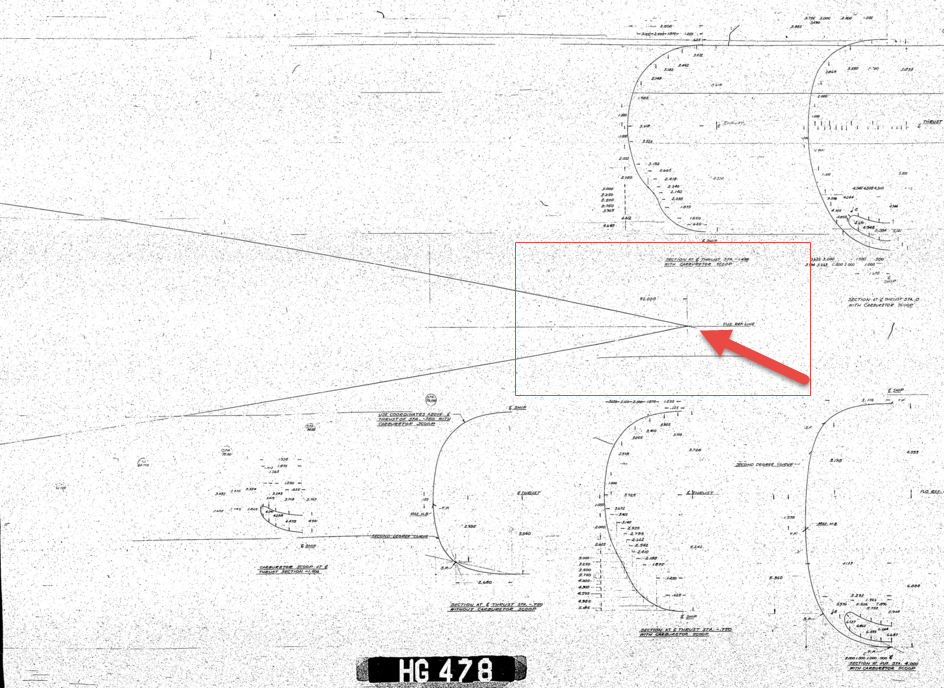
Checking through the archives for the Mustang P-51 we have a design set for the wind tunnel model with a line plan showing the Shoulder Points (SP) and the “point of convergence” where the upper line of the Mustang fuselage converges with the lower fuselage line and the Fuselage reference line.

2015-07-31_03-40-50The Wind Tunnel drawings are a quarter scale but are quite accurate.

Here we can see the “point of convergence” actually defined on the the wind tunnel drawing at the scaled sta 92. Technically station 92 does not exist as it is outwith the fabric of the WT aircraft, but for convenience I have defined it!

So with this in mind I decided to undertake an experiment to calculate the “point of convergence” with the fuselage ref line according to the manufactured ordinates.
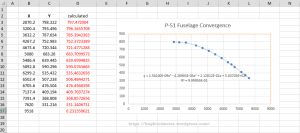
2015-07-31_12-43-55For this exercise I used the upper line of the fuselage, shown here as X,Y values starting from Station 113 and created a line chart.

I applied an third order polynomial equation to the line chart with a scientific value to 5 decimal places to increase the accuracy.

I recalculated the values of the Y ordinate to check that the formula produced an accurate result; shown in red. As you can see the resulting values are very close to the original Y values.

The last X value is the projected value I want to calculate to achieve a “close to zero” Y coordinate thus by definition being the calculated “point of convergence”. This value is 9518mm (374.725 inches) which compares quite well with the Wind Tunnel drawings showing this to be 92*4=368 inches.

Should I recreate this exercise but instead use a fifth or sixth order polynomial equation I am quite sure the resulting value for the point of convergence would be closer yet to the scaled up wind tunnel value.

Normally for this type of exercise I would work with tangent lines and the start points of the upper and lower fuselage lines from predefined Shoulder Points.

This was a bit of fun just to demonstrate how we can use the power of spreadsheets and mathematical equations to assist with developing our Cad designs.

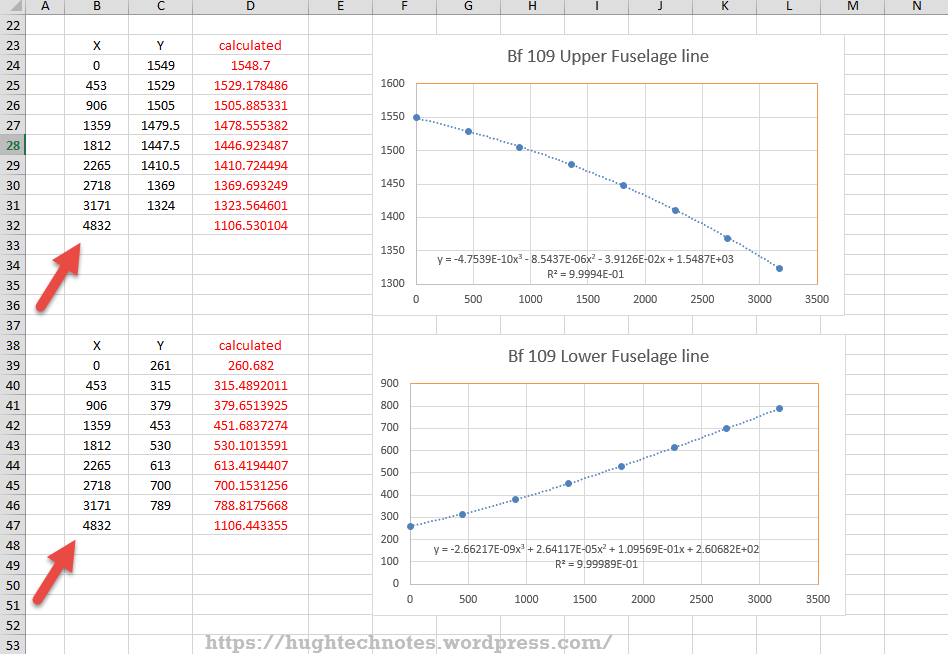
Bf 109Update: I decided to play about with this a bit more and had a look at the fuselage lines for the Bf109. I don’t have the design “point of convergence” for comparison but decided to do it anyway to find the convergence between the Lower and Upper fuselage lines.

These points are measured from a ground datum at 800mm below the fuselage reference line.

The stations/frames are from 2 – 8 inclusive. As you can see the calculated values verify the existing ordinate dimensions with the projected “point of convergence” calculated at 4832mm from station/frame 2.

These are the fuselage lines on the vertical plane which in theory should share the same convergence point for the fuselage lines on the horizontal plane (technically plan of max width)…an exercise for some other time!

What is even more interesting is that a line equation can be used to generate a spline in both the Inventor & Solidworks cad products… as a check to verify the cad work this is enormously useful!
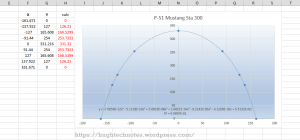
2015-08-01_00-02-16Another example of application would be for the frames or station profiles.

In this example I have applied a polynomial equation to a set of ordinates for the top section of station 300 for the P-51 Mustang.

This needs a full profile as an arc to achieve an accurate result, which I’ve applied as a sixth order polynomial…you cant get much more accurate than this with Excel!

Ideally we would wish to extend this arc to the max width ordinate, which would add another negative ordinate (below the base line) to the graph…for some unknown reason Excel finds it difficult to compute an acceptable polynomial with 2 sets of negative values, so I would have to transpose the ordinates accordingly.

The Mustang ordinates induce a minuscule negative curvature on the top rear fuselage frames when you create a CAD profile just using the ordinate values from the NAA drawings. Its not detrimental in anyway but it is rather annoying…so to obviate these issues I could utilize a polynomial solution to adjust the ordinates to get a positive curvature. The adjustment is micro millimeters, but hey that’s the way that CAD works.


Mustang P-51CAnother Update:
Out of curiosity I recalculated; to a higher degree of accuracy; the upper fuselage line for the P-51 and contrasted that with a similar calculation for the lower line of the fuselage.

The calculated point of convergence of both lines based on a 4th order polynomial to 5 decimal places is at 9375mm and slightly above the fuselage reference line at +18mm. Factoring in error based on the original ordinates being accurate to 1/16th inch and possible error as a consequence of a higher order polynomial I think this is a reasonable result. Its interesting to note the variation with the results we got before.

This is certainly closer to the expected values based on the wind tunnel data. The squiggly line by the way on the lower part of the fuselage is the plotted max half breadths; which is rather interesting!

Confirmation; have received confirmation that the intended point of convergence for the upper and lower fuselage lines is at Sta 368, which is at 9347.2mm…this is great!!

All CAD profiles included in the P-51 Mustang Ordinate Package now available. Refer promotion here.

North American P-51 Mustang: Wings

NAA P-51D Mustang: Wing Geometry

Started work today on the wing geometry and ordinates.

This is the last ordinate data-set drawing I have in my P-51 archive and probably the most challenging, thus perhaps the reason why I left it until last!

2015-06-06_22-51-32The quality of the scanned drawing is not that great with much of the data missing or obscured and requiring a fair amount of interpolation to derive the correct values.

The interpolated data is derived through the use of various techniques within Excel, including polynomial curve formulas to determine the values I need from the known data.

So far this has worked out rather well enabling me to make a start on a geometry plan for the wing which will verify the relative dimensions of the Leading Edge, Front Spar and the 25% Chord line.

This drawing is still “work in progress”, which is shown for reference.

The wing ordinates are cross-referenced against 3 different sources to ensure correctness.

Update June 2018:

I have revisited this spreadsheet to include generated excel profiles to check the ordinates and also to derive the XYZ coordinates for input into CAD, centered about the front spar position. The missing and unknown values are now sorted thanks to a new resource…the spreadsheet is complete and verified. See Mustang Ordinates for full details.

P-51D WING ORDINATE

P-51 Wing Profiles

North American P-51 Mustang Project: Ordinates

NAA P-51 B/C/D Mustang

This is one of those projects that gets started and then for some reason gets put on the back-burner until now. One of the key reasons was due to the challenge of obtaining a good surface representation for the lower cowling for the P-51 B/C where I was having problems with the duct intake profile.

As usual I started with listing the ordinates in a spreadsheet and converting these to millimeters and extracting the X,Y.Z coordinates for further work in CAD.

I prefer to work in millimeters as I know that at so2015-05-30_19-31-32me stage the end profile may need micro adjustment which is so much easier to do using millimeter units.

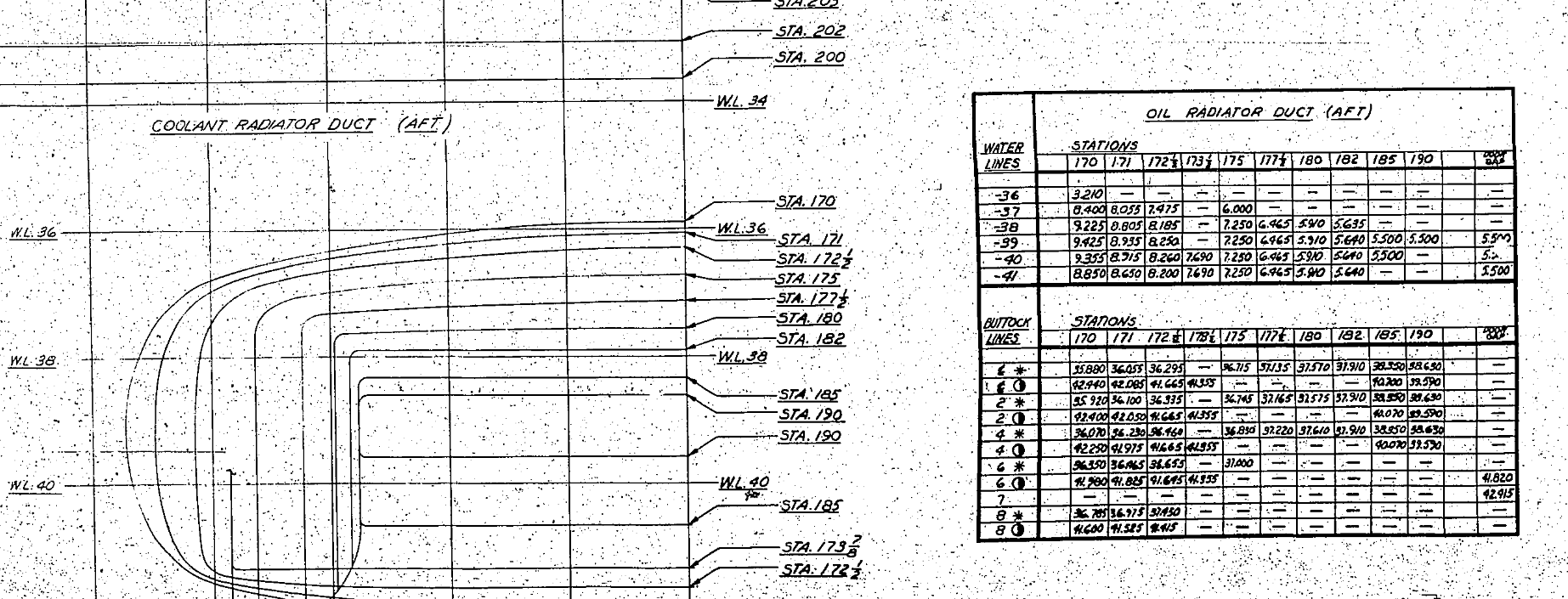
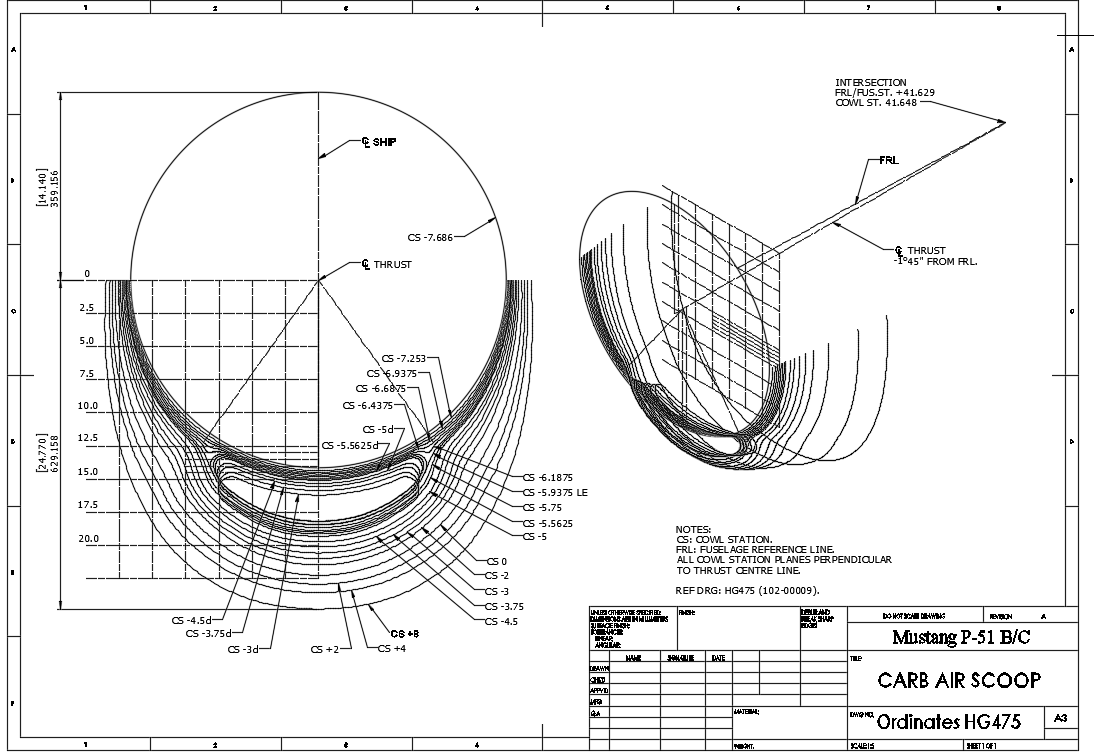
This is a scrap view from the NAA drawing showing the ordinates table and the contours.

Thankfully for this part most of the ordinates were quite legible with only a few requiring interpolation; which would be done as a consequence of developing the data in CAD.

As it turns out there were a few orphaned ordinates that for some unknown reason did not align with the CAD developed surfaces; so these were simply ignored instead of trying to invent a purpose for them being there!

2015-05-30_20-39-59The drawing (right) shows the end result of transferring the spreadsheet data into a CAD product. This drawing is simply a record of the translation process and surmises the ordinates in relation to the Thrust line and Fuselage Reference line.

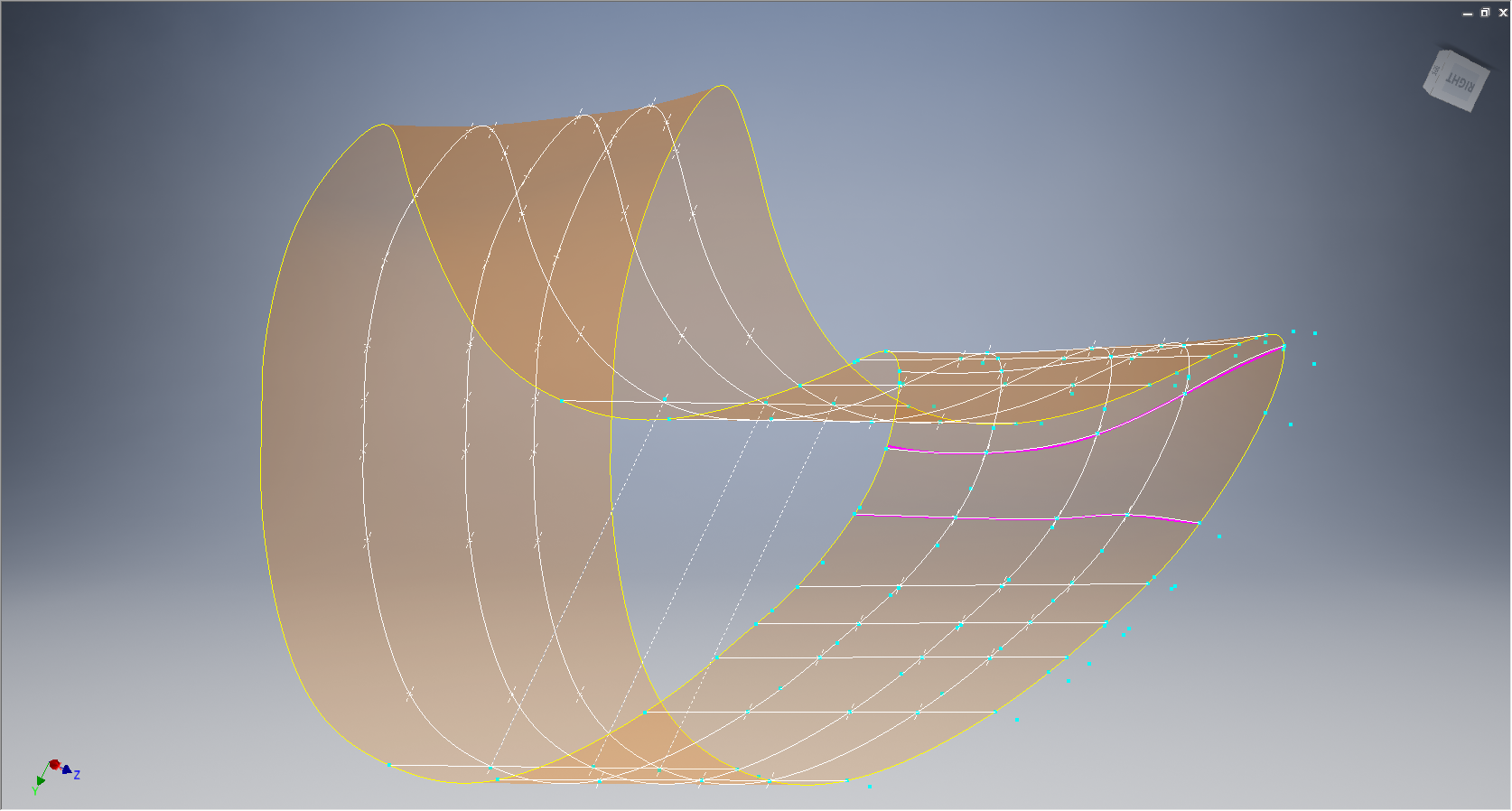
The main body of the cowling did not present any real problems but the intake duct portion did.

This area is less than 3 inches deep and is actually quite a complex surface; so any small deviation from exactness results in some crazy surface deformations. The original data tables are actually extremely good requiring only one small adjustment to get the result I was after…the trick was identifying which ordinates to use for the end profile and which ones we needed to check we have it done right.

After many (about a dozen) test developments of surface development and interrogation of the original data tables to ensure correct translations I eventually determined the correct ordinates and profiles to use to get this right.

2015-05-30_19-30-34

The resulting surface is based on the selected original ordinates with only one requiring micro adjust. In most cases the adjustment is simply an error in interpreting the sometimes indistinct values in the original data where a 6 could be an 8 or a 3 could be 5.

The 2 magenta coloured contours are generated profiles from a surface section cut overlayed on the ordinate controlled contours from the NAA tables which provides a check to ensure the surface conforms to the original design.

This surface will be converted to a T-Spline surface to facilitate final development.

It may be that this particular part does not warrant this level of exactness nor indeed the time expended in getting to this point. However it is a testament to the many fine designers of this era to be able to reproduce their work that was done to an extraordinary degree of accuracy.

Update Jan 2021: A comprehensive Ordinate/CAD package incorporating all known ordinate data points is now available for download. See this post for details.