Technote: Sheetmetal; Avoid Bend Stress Points

Technote: Sheetmetal; Avoid Bend Stress Points:

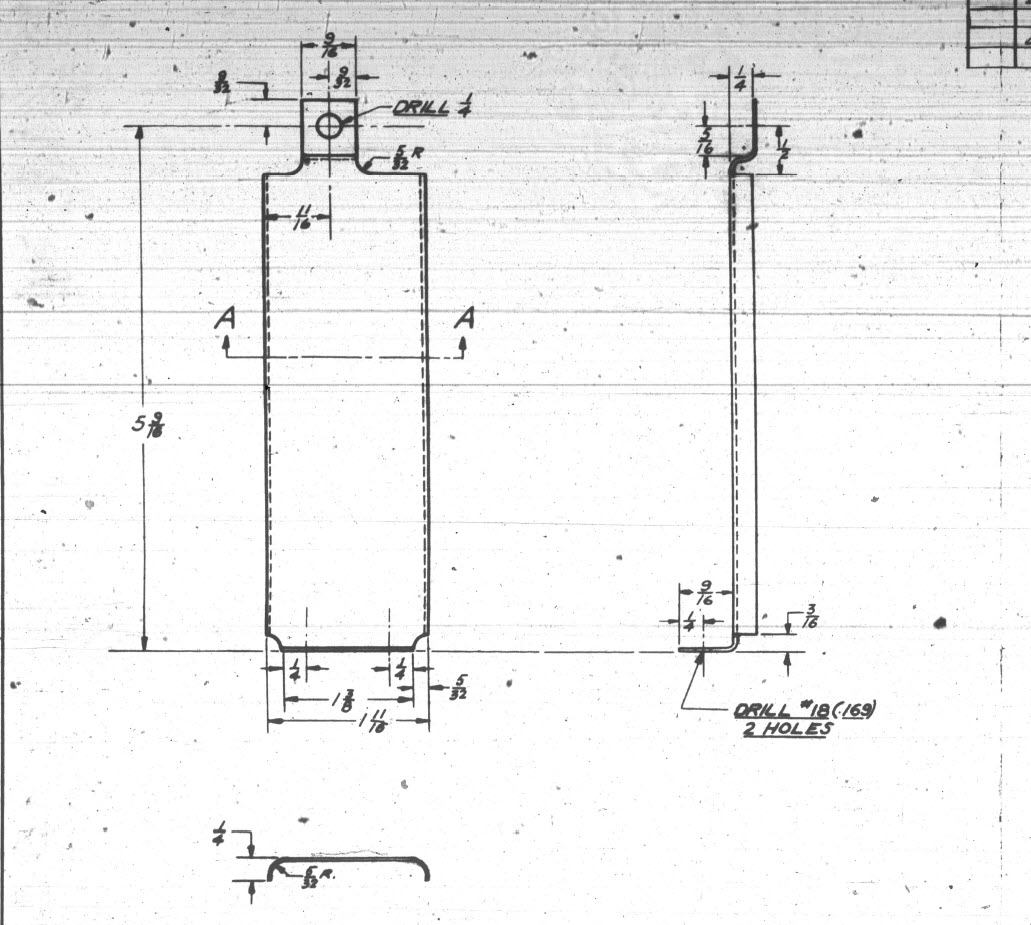
This is a sheet metal part for the P-39 Airacobra (#12-509-052) sent to me by a fellow enthusiast for comment. Before I get immersed in discussion on this subject I would just say that this part is a cable cover that is unlikely to be under any substantial stress and thus would probably be fine as modelled.

The part comprises 2 tabs, one on the top and one on the bottom. It is the fillet radius that I will focus on. The first bend is offset from the edge of the plate. The drawing specifies a 5/32″ (4mm) radius for the fillets at the intersection of the top tab and the main body which overlaps the sheet metal bend. The originator has taken this literally and attempted to create a finished fillet of 5/32″.

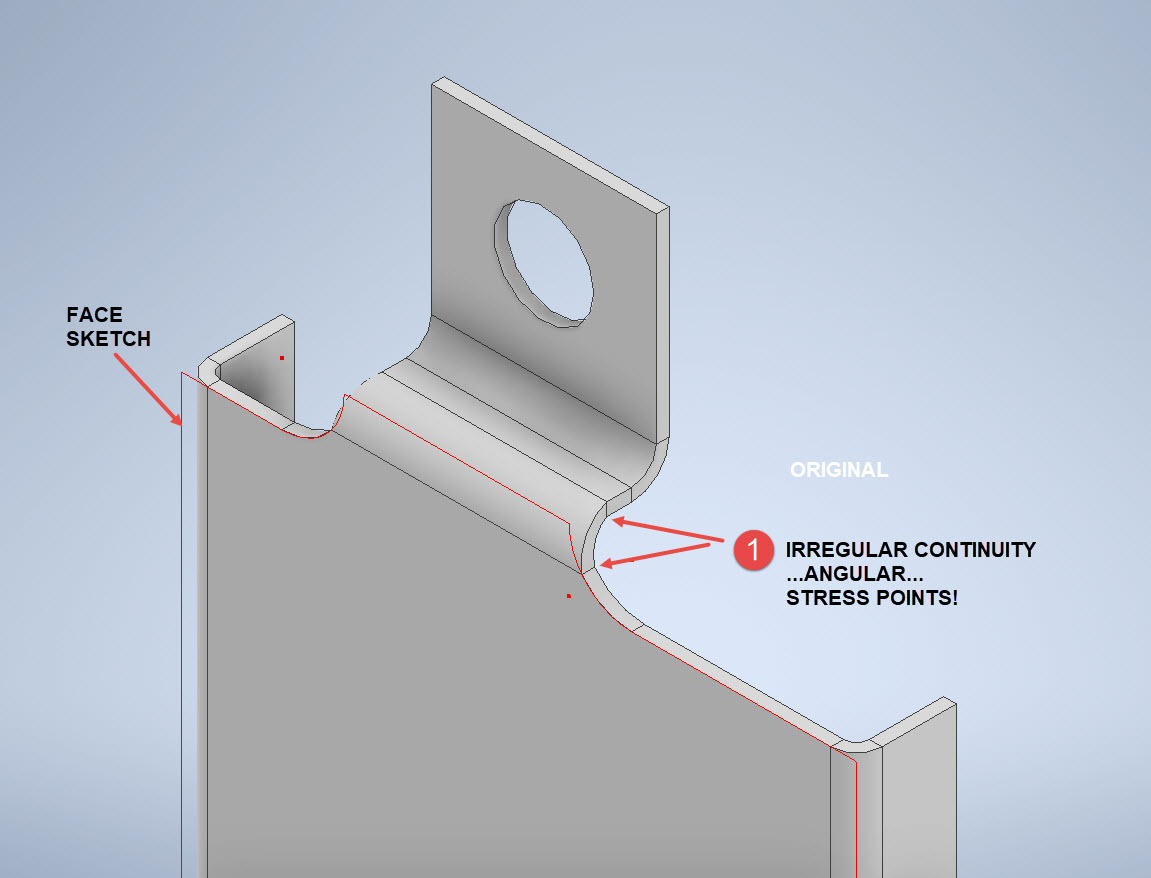
I suspect that the drawing is actually referring to a 5/32″ radius as it would be for the developed flat pattern because doing so otherwise; due to the bend being offset as illustrated on the cad model; this introduces stress points.

The images show the irregular continuity which creates angular edges that essentially become focussed stress points. It is often best to try to achieve smooth continuity both for bending purposes and of course when in use. What they did was sketch a face profile; which included the specified radius (#1)and then proceeded to adopt the standard commands to build the flanges. Technically it is not wrong but as the manufacturer’s drawing does not contain a developed flat pattern it is often misinterpreted…the radius should perhaps be applied to the pattern before bending.

Similarly, at the bottom tab, we also have irregular continuity as shown at #2.

I rebuilt this model to address these issues and you can see how a small change in modelling technique can obviate some of these issues.

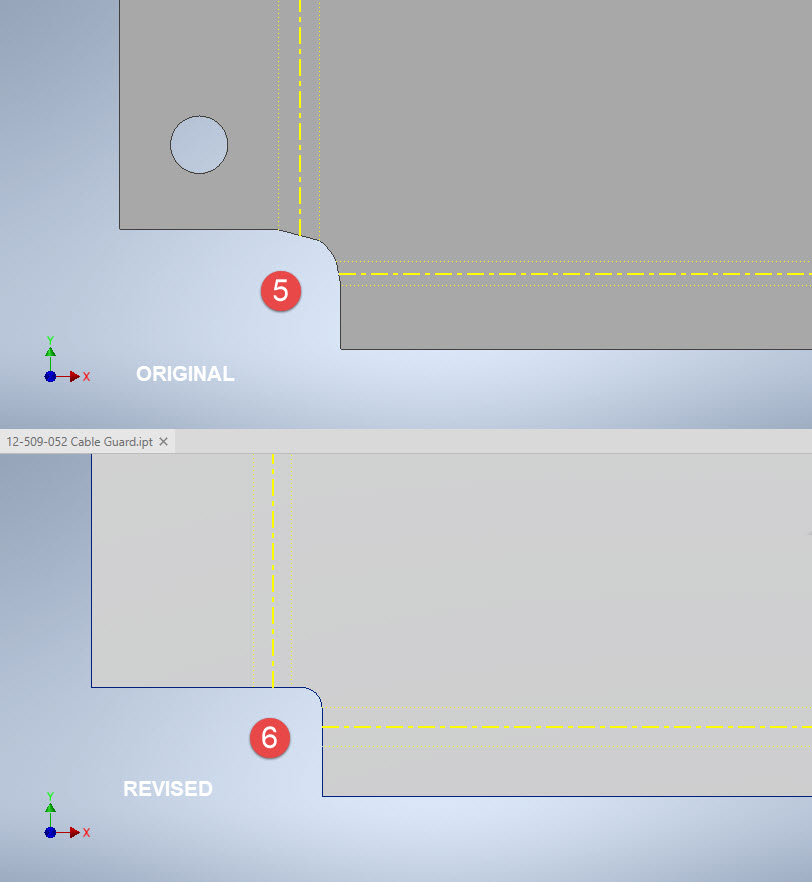
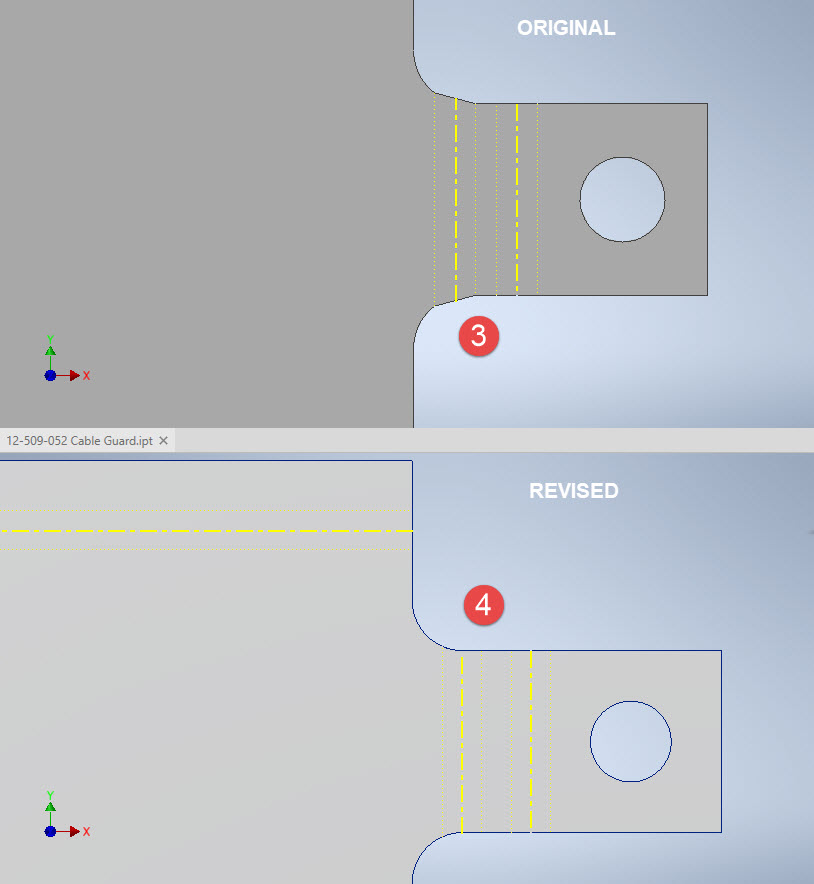
The images show the developed pattern with the original cad model on the top and the new version on the bottom. At #3 the outline of the tab would be difficult to cut with the small taper before the fillet, whereas the lower profile at #4 is easier to cut with no stress points. Similarly for the base tab at #5 and #6. I should note that the bottom tab radius is not specified so I opted for the default minimum which fits nicely before the bend lines.

There are several ways to do this with the easiest being accomplished by using the Unfold command on a square flange and then applying the fillet before refolding. The option I have used here is first to draw an extended flange as part of the initial face sketch, create the first part of the model as a Face then apply the 5/32″ fillet before bending along a predetermined bend line sketch.

The sketched tab outline is a lot bigger than is required which of course can be trimmed once the tab is complete. You can see the extents of the tab on the initial sketch…you only need to add a plane at that point to trim. The resulting fillet is a smooth continuity with no obvious stress points.

Understandably the designers wished to increase the amount of material at the bend to maximise strength so it is advised to try to achieve those goals. As I said before, for a cover like this it is probably not too critical if we only applied a small fillet but for framing and structural elements, it may be critical.

One quick note on the 2 vertical flanges…the drawing specified an internal radius of 5/32″ which to be honest is unworkable as the resulting bend would overlap the bottom tab…in this case, I opted for the minimum specified.

At the end of the day, it is down to the interpretation of the designer intent. For the majority of sheet-metal drawings, they often do not include developed flat patterns but may contain information that is actually applicable to the flat pattern and not necessarily the finished folded profile.

Technote: Learning Resource for 3D CAD!

Technote: Learning Resource for 3D CAD!

Today I had an interesting conversation with a University lecturer on utilising historical blueprints as a resource for learning 3D CAD. I have been involved in similar discussions in the past and I do think they are an ideal source for those that are beginning this journey. I once helped a college to develop a curriculum for their students learning CAD on the principle that they would be more engaged in the learning process if they were developing a real-world object that they could actually relate to.

It does make a lot of sense and I would encourage new users to seriously consider the many benefits of using blueprint resources for learning. A typical aircraft design covers complex mechanical items, hydraulics, electrical, sheet metal, moulds, integration with external resources such as Excel spreadsheets as well as familiarising the end-user with tolerance application. Never mind the added benefit of how to prepare quality, fully dimensioned 2D drawings. All disciplines in one package!

I work with a lot of different CAD systems, not just Inventor, though the main reason for using Inventor is because it is accessible as a trial product more so than many others and that this industry is not one normally associated with Inventor…so it is a nice challenge. Occasionally, particularly with other CAD systems, I tend to evaluate them using the blueprints as source material to cover the many aspects of their functionality.

The blueprint archives are not expensive when you think that you could get 10000 blueprints for a small amount of money. The downside of having so many blueprints is finding what you need to help with your learning task. The P-51 Mustang blueprints come complete with a fully detailed drawing list which helps enormously. The P-39 blueprints are roughly sorted into categories which helps in this respect. The Fw190 and Bf109 sets are also very good but as they are in German this sometimes can be counterproductive if it is not your first language.

I am currently putting together a free random collection of a dozen or so blueprints from the various Aviation archives that will give you an introduction to real-world applications and a head start on your project. Just drop me a line at hughtechnotes@gmail.com.

The initial randomly selected files are available online here. https://www.mediafire.com/folder/iyedg37u0ckku/Blueprint+samples

P-51 Mustang: Rear Fuselage Drawing Rev C

P-51 Mustang: Rear Fuselage Drawing Rev C:

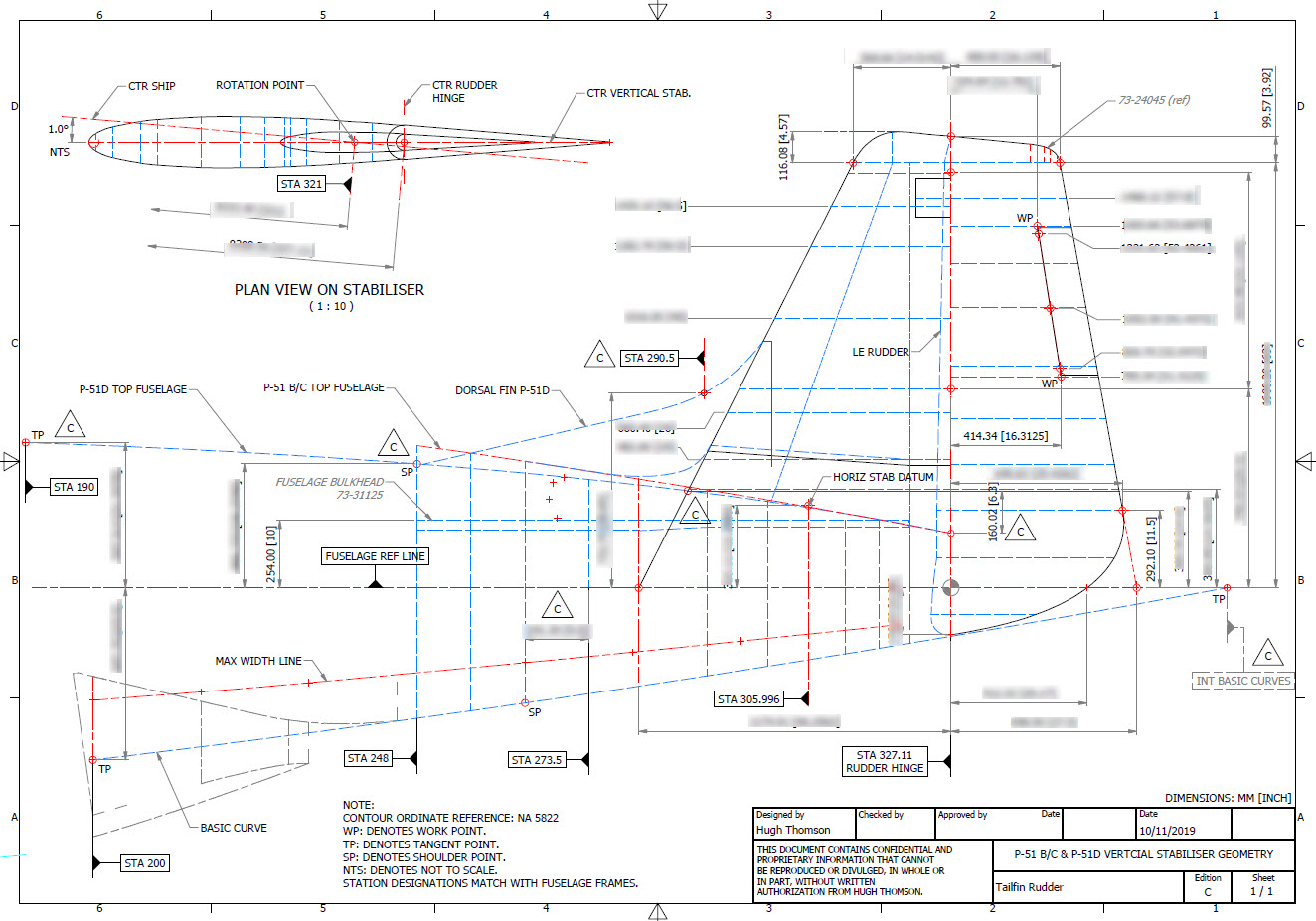
The updated revision C version for the rear fuselage and tailfin is now available in the P-51 Mustang CAD/Ordinate package as both a DWG and DXF format.

Incorporates additional curve data, dimensions and general revision.

As usual, all inquiries to hughtechnotes@gmail.com.

3D Printing: P-51 Tailwheel

3D Printing: P-51 Tailwheel:

I’m back after a few months dealing with a difficult period of my life. I would like to take this opportunity to thank those that stepped up to the challenge and supported me through this time.

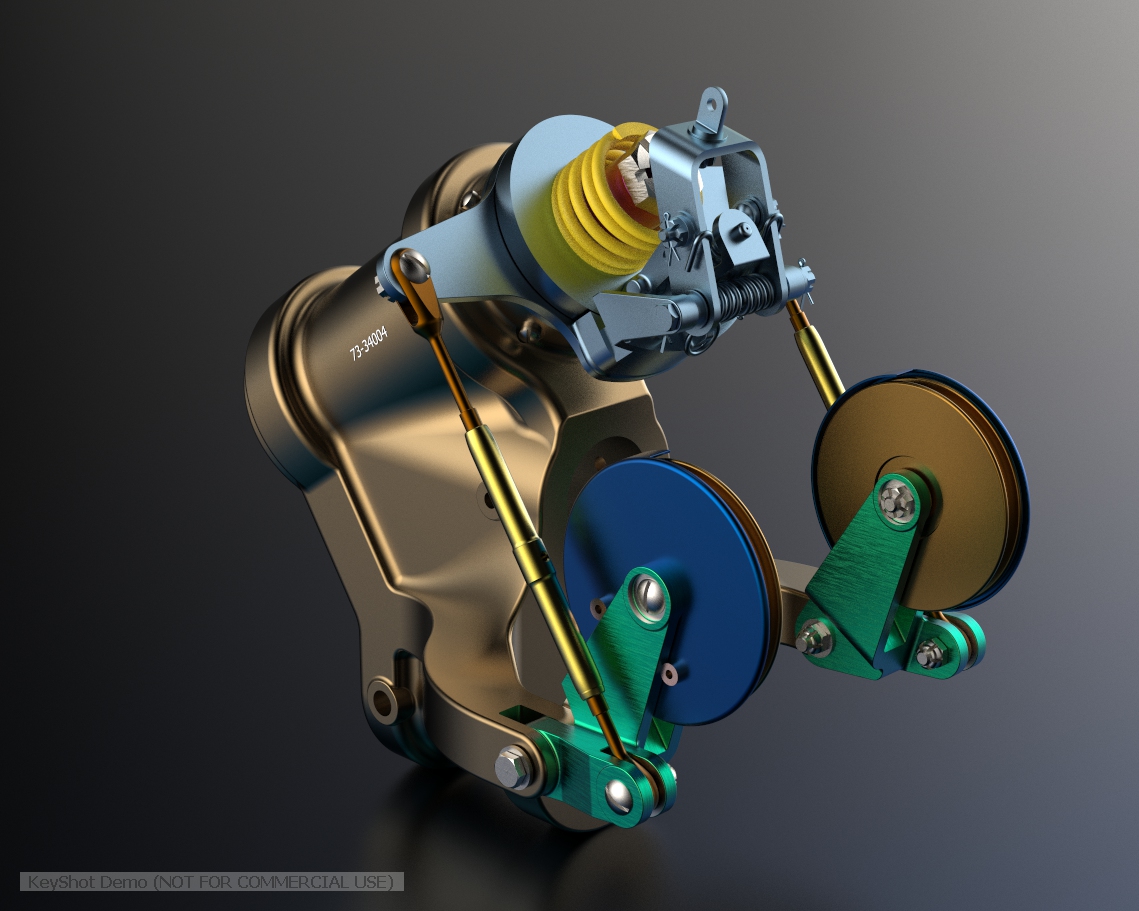
Many moons ago I developed a series of CAD models for the P-51 Mustang Tailwheel mechanism initially to study the mechanical operations and also to clarify an otherwise obscure area that is not clearly defined on the NAA drawings.

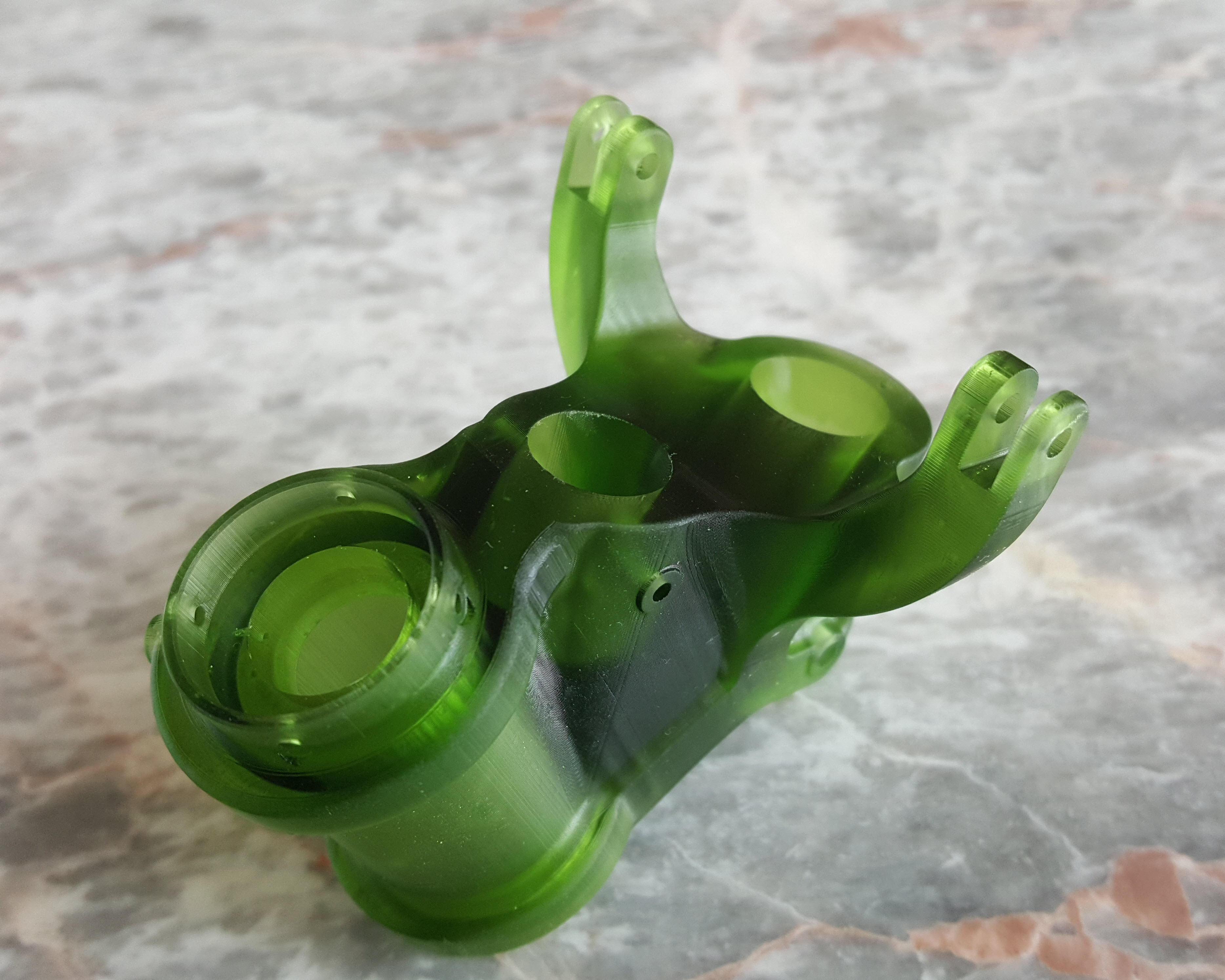
At the beginning of 2021 I had the good fortune to obtain an Elegoo Mars pro 3D printer which just sat in the cupboard until now. Getting my life back on track I unboxed this and setup for my first print which invariably had to be one the many CAD models from my research. The part selected is the Housing for the Tailwheel spindle. Part # 73-34004.

These parts are accurately modeled from the NAA drawings so I was unsure how well they would print at 1:4 scale particularly the thin wall elements.

The first image shows the preparation using the Lychee Slicer program with the layers set to 0.05mm. I added a generous amount of supports to maintain the print integrity using the Auto support feature with a few manually added for good measure. The Resin I used was the Elegoo Water Washable Green which has worked very well. I am rather pleased with this print as I had read many horror stories of problems that folks encountered with this type of immersive printing which made me a tad anxious before I eventually decided to take the plunge.

This printer is capable of printing with a layer height of only 0.02mm which is quite extraordinary but as it took 4 hours to print this model at 0.05mm I doubt if I will venture to printing at a finer pitch as the time would be excessive. I don’t plan to print all the Tailwheel components as my budget for resin is limited but I will print a few more to determine the limitations; if any; of resin 3d printing.

Talking about the future I should note that I am currently sourcing new material for the P-51 Mustang and hopefully to start a brand new project for the F7F Tigercat.

If you are interested in the Tailwheel models check out the bottom section of this post for details.

On a personal note it is good to be back working on these projects and please do not hesitate to comment or drop me a line with any queries. hughtechnotes@gmail.com.

Technote: Autodesk Inventor 2022 Part Model States

Technote: Autodesk Inventor 2022 Part Model States

In a previous Technote I briefly introduced the work method for Derived parts that provide the capability of managing model states i.e. from Forged part to machining; as separate part files. This was included in a discussion on the P-51 Mustang Tail Wheel down position modeling.

Inventor 2022; just released; now has a feature called Part Model states which will enable you to manage manufacturing operations, dimensional variations and simplified representations all on one part file.

Check out the introductory video on The Autodesk website for more details on this feature as well as more information on the latest release of Autodesk® Inventor®. This is packed with user-requested updates and enhancements to help manage your design process, speed up your connected engineering workflows and reduce repetitive tasks.

Whilst Autodesk Inventor is not normally associated with the Aviation industry it has a very advanced 3D toolset that adapts well to this industry as I have demonstrated in the many Technotes throughout this blog. So do checkout my previous articles on using Inventor in this environment and drop me a line or comment below. More information on Inventor 2022 and specific tutorials on utilizing the host of features within Inventor will follow.

Recycling Project: Repurpose Construction Site Waste

Recycling Project: Repurpose Construction Site Waste.

I haven’t posted for a while due to research for a number of environmental and recycling projects. The projects involve researching design options to see how we can repurpose/recycle Construction Waste materials like timber, insulation, paper etc.

This post is just to let everyone know that I am still here and working away in the background and also as an introduction to my new project. Aviation projects of course are still work in progress.

Anyway getting back on subject: The Recycling or Upcycling project is based on maximising usage of material that would otherwise not be considered for alternative purpoes. As the typical timber waste from sites vary considerably it is critical for the new designs to be able to utilise the smallest offcuts that would not otherwise be a consideration.

I can’t go into too much detail right now but the essential elements will comprise unique lattice structural forms as well as composite design features to maximise strength and practicality. Historically, recycling construction waste is actually fairly common however it is mostly restricted to creating furniture and small garden utilities. The principal idea of repurposing for garden buildings or offices is not so common due to the technical challenges of effective use of small sized materials…until now.

I plan to crowdfund the construction of a number of these designs shortly. If anyone is interested in supporting these projects please drop me a line.

The Work in Progress aviation projects include datasets for the L23 and L33 gliders…watch this space.

Contact me at hughtechnotes@gmail.com

NASA, MSI, AN, USAF SPECS

NASA, MSI, AN, USAF SPECS

I have recently noticed that certain online sites are making available Industry Standard specifications for sale. You dont need to pay for this stuff as it is freely available online, where you can get virtually any spec you may need for historical and for new aviation projects here:

http://everyspec.com/MS-Specs/MS2/MS21000-MS21999/

or try: https://quicksearch.dla.mil/qsSearch.aspx

Aircraft manuals. Again dont be paying crazy money for these. Those same companies are charging upwards of $10 for a copy of a manual. Instead drop me a line I may already have it.

I also have the full compliment of HAWM workshop manuals; which are the original scans. Perhaps consider supporting the research that is done here. There are 27 manuals in this collection, covering everything you need to know about aviation workshop practice.

As usual all enquires to hughtechnotes@gmail.com

P-39 Airacobra Recovered from the Black Sea

P-39 Airacobra Recovered from the Black Sea

“SIMFEROPOL, September 25. / TASS /. An expedition of the Russian Geographical Society (RGO), together with the Russian Ministry of Defense, lifted a Bell P-39 Airacobra fighter from the bottom of the Black Sea from the regiment that took part in the air cover of the Yalta conference of leaders of the anti-Hitler coalition in 1945, a specialist from the Expeditionary Center of the Ministry of Defense Anatoly told TASS on Friday Kalemberg.”

As many of you know I am a huge fan of the P-39 Airacobra. So I was particularly interested to read these reports of the recovery of this P-39 from the Black Sea. These are the links to the articles I have read so far from various news publications.

Links to the articles:

https://tass.ru/obschestvo/9550353

https://www.dailymail.co.uk/news/article-8772705/Second-World-War-era-Bell-P-39-Airacobra-crashed-1943-raised-depths-Black-Sea.html

If anyone has any further information to share on this project please drop me a line and I will feature updates in future articles; perhaps even progress on the restoration.

Popular Technotes!

Popular Technotes…

I have run this blog for almost a decade now in order to pass on and share my research and technical know-how related to the amazing designs of historical aircraft.

The blog is a journal to document my experiences on this journey with articles on the various aircraft designs interspersed with a bunch of Technotes. There’s a lot of stuff so I thought it may be prudent to compile a list of the more popular technotes to date:

Technotes Selection:

  1. Technote: Inventor Sketch Datum: The importance of selecting the correct datum points when offseting work planes.
  2. Technote: Inventor face Draft: This uses a part from the P39 that required facedrafts, similar to forging and catsing requirements.
  3. Technote: Positioning Holes in Complex Surfaces: Complex surface hole positioning.
  4. Hoppers: Surface Modelling for Mass Containment: Slightly off-topic but nevertheless relevant; describes the best way to model hoppers for mechanical handling projects.
  5. Technote Sopwith Pup: Spar Clip Technote: An article discussing some of the design vagaries for the Sopwith Camel as well as in-depth use of sheet metal development.
  6. Technote Bell P-39: Modelling Curved Cockpit Glass: Inventive use of Inventor design features to develop complex cockpit glass.
  7. Technote: Bell P-39 Creating Wing Fillets: 3D Sketches and workplanes used to develop the complex flanges for the P39 wing fillets.
  8. Technote: Sheet Metal Bending in CAD: General technical details for sheet metal bends.
  9. CAD Library: A large selection of CAD resources.
  10. Other Blog: Pioneering modular workflow and design solutions for use of 3D CAD in Substation design for the Power Industry that defied “expert” optinion. Prior to my work on this subject there was no viable solution for this industry. This was a long time ago but much of the subject matter is still pertinent to the industry today.

Theres a bundle of other interesting stuff and discussions on CAD, design as well as a number of articles on Excel.

I came across a site that provided a link to this blog describing it as a “guy that does CAD from aviation blueprints”. Actually they could not be more wrong. Sure there is a stack of CAD related stuff but the serious work is researching and compiling accurate dimensional data. Did you know for example that the top of the rear fuselage for the P-51D Mustang has only 4 verifiable ordinate points…prior to my documenting this no one actually knew this. The ordinates came from blueprints, reports, manuals and letter correspondence..the latter consumed a lot of time. I am probably only one of a handful of people who has actually studied every single drawing in the P-51 Mustang archive. This is serious research not just CAD!

Grumman JRF Goose: New Project

Grumman JRF Goose: New Project

Just started a new project to determine the structure ordinates for the JRF Goose. Typically for the Grumman drawings, this will require resources from a combination of tabled ordinate data and extrapolated dimensions from the individual part drawings.

With the NAA drawings for the B25 Mitchell I was spoiled as these guys tend to love ordinate tables and it is much easier to develop the data spreadsheets whereas the Grumman guys tend to fragment the information over several drawings. The wing ribs, for example, are actually in 3 separate drawings; the nose, intermediate and tail-end.

JRF_5-at-anchor

Why Ordinate datasets are important;

I spend a lot of time developing these datasets as a record of my research that can be utilised for various purposes including development of CAD 2D and 3D models. As an engineer, I know from experience that when the skeletal framework of an aircraft is correct then everything else will fall into place. I often see modellers dive headfirst into creating 3d part models and end up encountering problems with alignment and fits.

It is therefore prudent to first check the geometry prior to committing to 3d modelling…it will save you a lot of time, frustration and work in the long run.

The datasets already completed for the P-51 Mustang and the B25 Mitchell have been used by restoration companies, researchers, modellers and RC enthusiasts. The criteria for each group vary so it makes sense to provide the correct geometry in formats that can be translated to any engineering systems in a manner that can be used according to their specific needs.
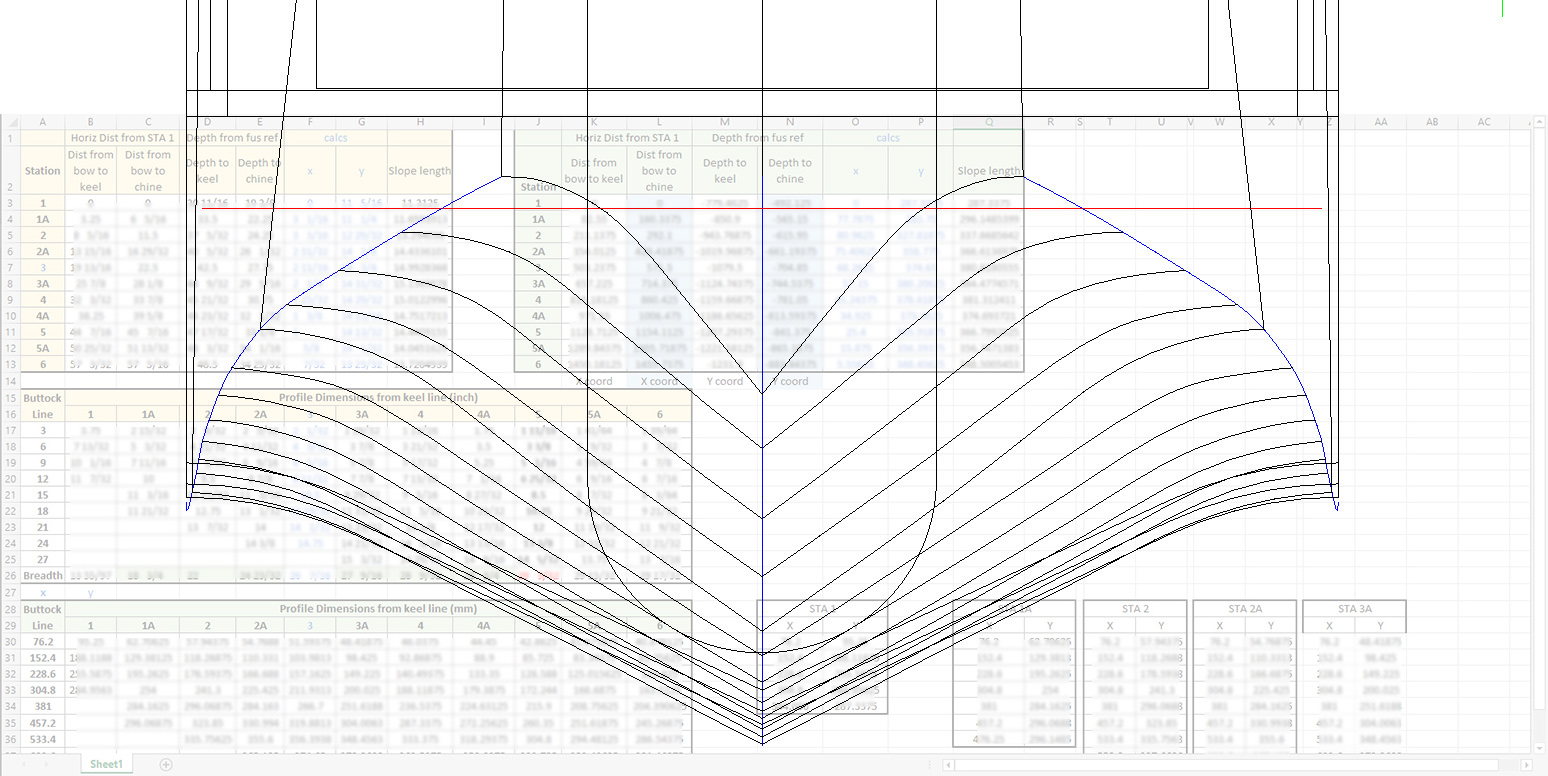
goosehullxc

The Goose Dataset:

The above cross floor drawing is an example where the ordinates are first compiled in a spreadsheet in both inch and millimetre formats. The core data is then extrapolated to determine the workable X, Y, Z coordinates. This is an interesting aspect of the aircraft design as the cross-floor profiles share similarities with the sister aircraft, the J2F Duck. Where I have cross-references between similar aircraft this information will also be included on the spreadsheet as a record of data resources.

goose wing2c

The wings; as mentioned; are compiled from 3 different sections for the nose, intermediate and tail-end which require 3 sets of tables for each rib and then consolidated.

The ribs once integrated into the CAD assembly are then checked at each ordinate point to verify alignment with the neighbouring profiles to ensure accurate alignment. Occasionally the originating data is unclear so it is absolutely essential to continually check neighbouring associations to achieve accuracy.

X2C

The wing tip float: as well as the float profiles; depicted in the image above; I will also be studying the support structure and relationship with the wing.

This ordinate set will comprise the dimensional data as spreadsheets and as 2d DWG cad profiles for every frame and rib. For the main fuselage, the drawings will contain the key dimensional information in lieu of the usual spreadsheets due to the complexity of the frames. All other areas; wings, cross floor, nacelle and empennage will have both spreadsheet data and drawings.
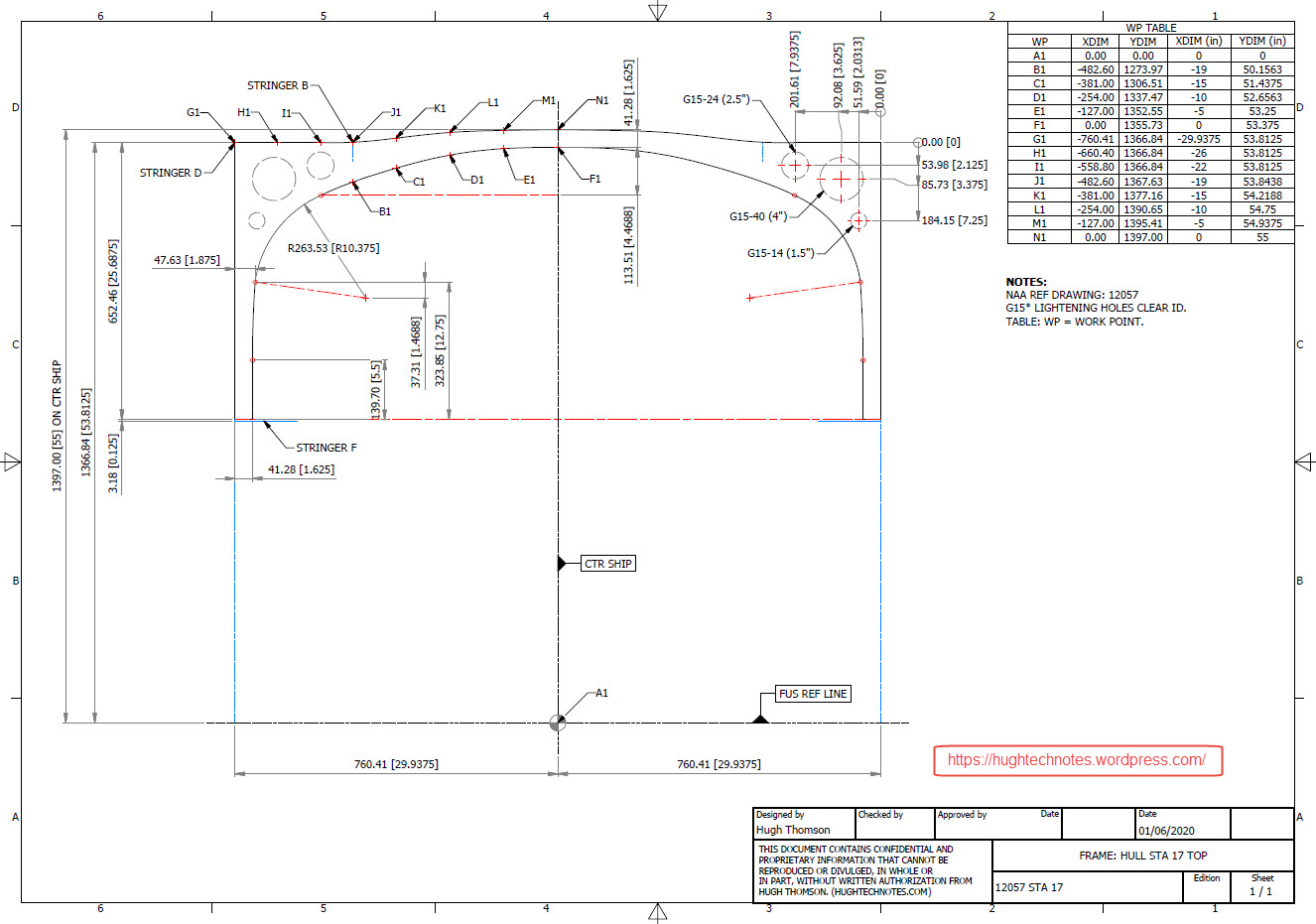
GOOSE STA 17

These datasets are designed to help you get a heads up on your own aviation projects and as a resource for research. I do this work and research so you don’t have to…so please consider supporting my efforts. Thank you.

Update 3rd June 2020:

Have been quite busy figuring out the vagaries of working with the Grumman drawings. They are generally quite good but to be honest the inclusion of a few more ref dimensions would not go amiss! The development of the tail fin and rudder required referencing 3 separate drawings in order to ascertain the correct relationships between the fuselage, tail fin and rudder.
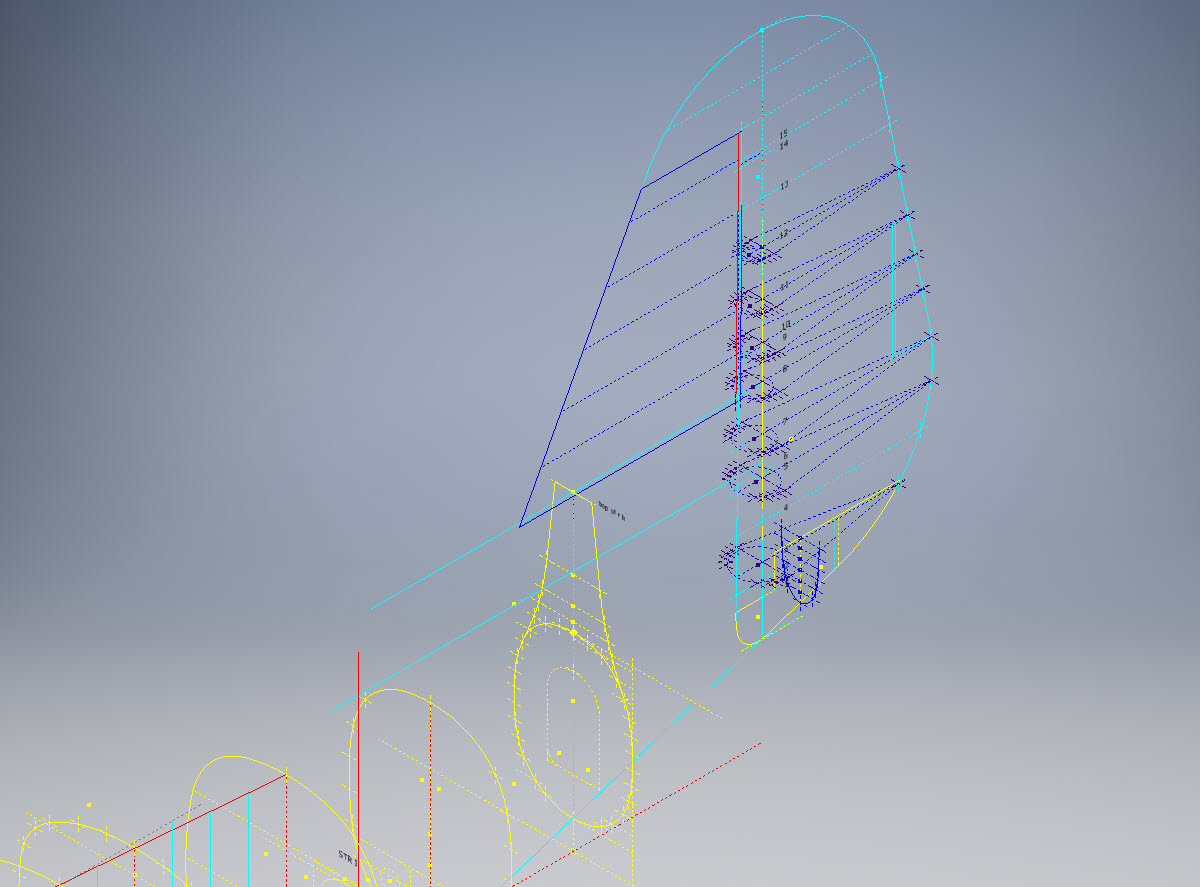
Goose Tail

I also noticed a number of incorrect dimensions during the development of the fuselage and tail. When this happens it is imperative to cross-reference various associated drawings and sometimes even the Structural manual to determine correctness. This is actually where a lot of time is consumed in sorting these issues.

For the wing the ordinates are being checked as the profiles are developed. Part of this process involves developing key structural components as 3d models to ensure that the profile ordinates align correctly. In the following image it shows that the ordinates points align as expected with the red points (intermediate wing section) on the aft of the front beam web and the yellow wing nose points fall on the forward face.

goose wing 1

I am not planning to fully model this aircraft only where necessary to investigate alignments.

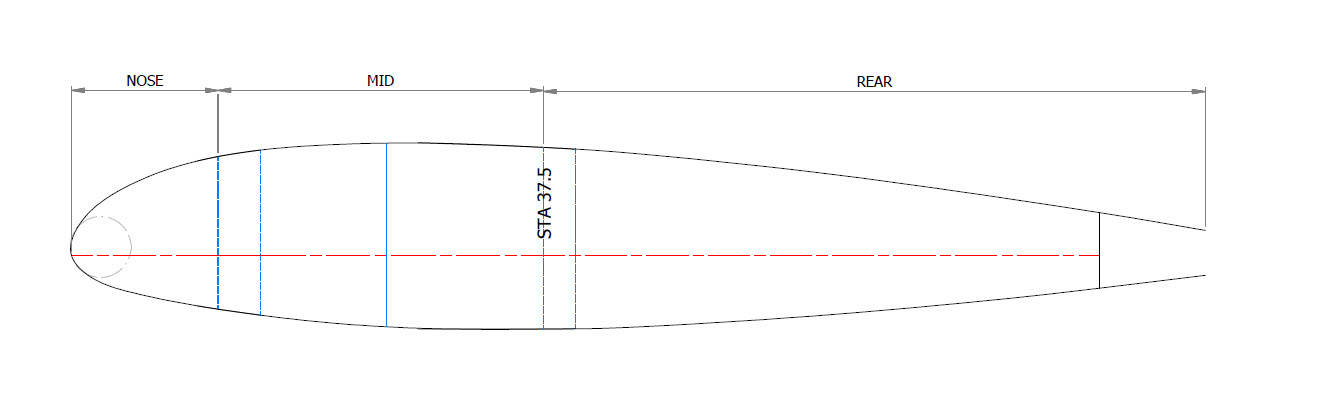
TechTip: It can be frustrating working with Grumman drawings…take nothing for granted. The wing ribs as mentioned comprise 3 drawings, the Nose, Box Section and Intermediate. For the sake of complicity I shall refer to them as Nose, Mid and Rear.
W3

One would assume a certain degree of consistency particularly when the detail drawings relate to Station locations. For example: you would expect the STA 37.5 would be a location that would be consistent for the mid and rear sections…but it is not. For the Rear section it refers to the back face of the rear beam and for the Mid section it refers to the front face of the rear beam. So when aligning the various actions it is imperative that the connecting line is either of the chord stations on either side of STA 37.5 (ie STA 40) and not STA 37.5. It is easier for the Nose and Mid Sections as they both have ref dimensions to the common STA 25, however the rear section does not reference chord STA 25.

Seriously a few additional reference dimensions consistently applied would make working with these drawings a lot easier.

I carried out a dimensional study on the spreadsheet data to check the relationships between chord STA, 30, 37.5 and 40. It revealed a number of inconsistencies in the STA dimensions but we did have consistency with the offsets at STA 30 and 37.5 (highlight red).

G8

I would expect that the dimensions from STA 30 and 40 would be consistent with no variation as noted on the Mid and the Rear rib profiles…however that is not always the case. Out of all the ribs only 4 were what I would envisage as being correct. This requires further in-depth analysis to determine the best solution.

This will be a lot of work but a clear example why it is important to record the data in spreadsheets so an analysis like this can be done.

Update 14th June 2020:

Fuselage Frames, Tail Fin and Rudder now complete. Horizontal Stabiliser, Stringers, Flaps and Ailerons, Nacelle and revised wings still to do.
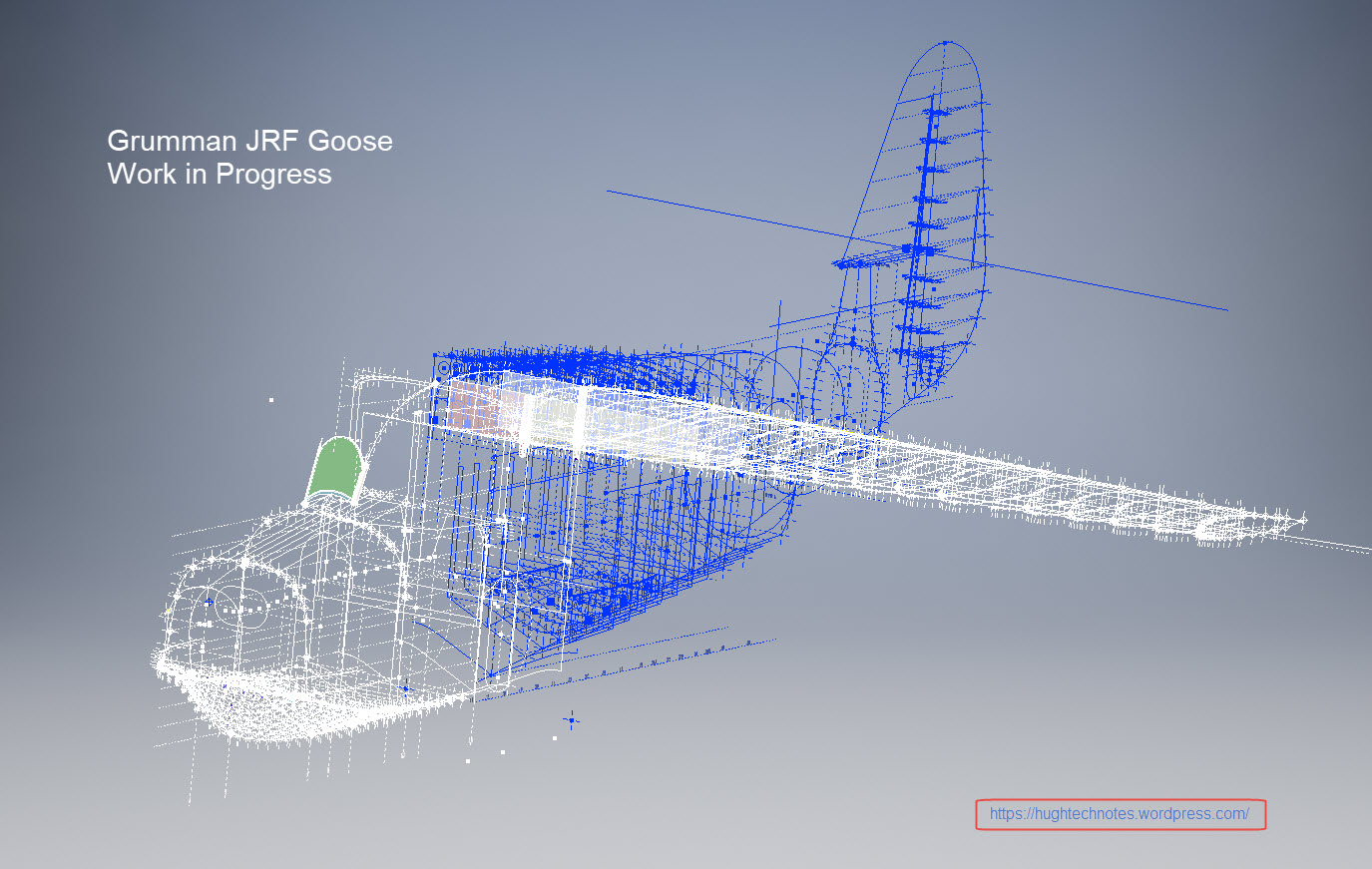
wip

This will be the full package, spreadsheets and drawings. The latter will be all the frames and ribs at 1:1 in Autocad DWG format as well as the full 3d model.

goose keelI seriously think this will make a great foundation for an RC model at whatever scale you desire.

Update 2oth June 2020:

With reference to the Techtip above I have revised the wing layout to correct identified anomalies with the Grumman wing rib drawings.

GrGoose1

I first established 5 ribs that are deemed to be correct, setup a work plane at Chord STA 40 and checked the relationship with the established ribs. For reference I initiated 4 axis selected from 4 known points on the ribs. I then placed the Rib at STA 271 to act as a check. The ordinate points on the profile for this rib is within 0.04mm of the projected axis and the dimensional offset from the work plane is only 0.025mm.

Having now established correct alignments I will introduce each of the remaining ribs, then check dimensions for each one with the work plane and each of the 4 axis. The end result will be a dimensionally accurate wing.